



Android Fingerprint
Authentication
Gabriel Bernardo Pereira
gabeira@gmail.com
Me
Senior Android Developer
● Team Leader
● Tech Leader
● iOS Developer
● QA
● Business Analyst
● Java2 ME
linkedin.com/in/gabeira
What to expect
● Problem / Solutions
● Alternative implementations
● Native Google Support
● UI Guidelines
● Requirements / Implementation
● Cryptography
● Best Practices
● Google Sample and live Code (if we have time)
Reference:
androidauthority.com/how-to-add-fingerprint-authentication-to-your-android-app-747304
https://www.wired.com/story/android-unlock-pattern-or-pin/
Biometrics
https://www.howtogeek.com/226689/how-to-improve-fingerprint-recognition-with-touch-id/
developer.samsung.com/galaxy/pass
slideshare.net/SamsungBusinessUSA/
how-to-use-samsung-pass-to-replace-your-passwords
developer.android.com/about/versions/marshmallow/android-6.0.html
UI Guidelines
material.io/guidelines/
patterns/fingerprint.html
Requirements
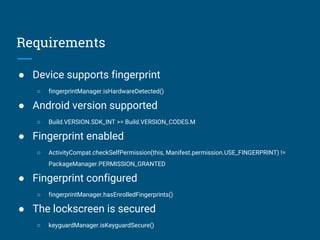
● Device supports fingerprint
○ fingerprintManager.isHardwareDetected()
● Android version supported
○ Build.VERSION.SDK_INT >= Build.VERSION_CODES.M
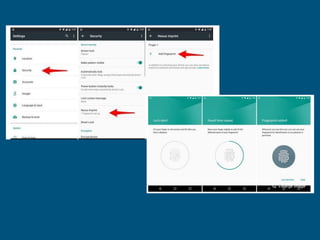
● Fingerprint enabled
○ ActivityCompat.checkSelfPermission(this, Manifest.permission.USE_FINGERPRINT) !=
PackageManager.PERMISSION_GRANTED
● Fingerprint configured
○ fingerprintManager.hasEnrolledFingerprints()
● The lockscreen is secured
○ keyguardManager.isKeyguardSecure()
How to implement
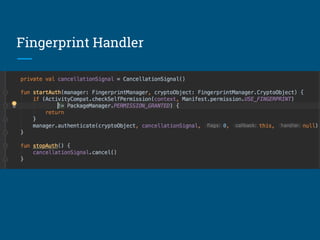
Fingerprint Handler
Fingerprint Handler
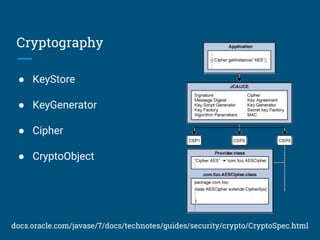
Cryptography
● KeyStore
● KeyGenerator
● Cipher
● CryptoObject
docs.oracle.com/javase/7/docs/technotes/guides/security/crypto/CryptoSpec.html
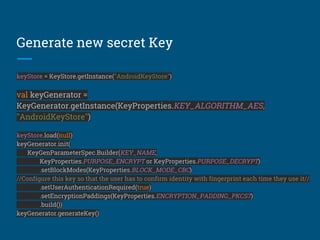
Generate new secret Key
keyStore = KeyStore.getInstance("AndroidKeyStore")
val keyGenerator =
KeyGenerator.getInstance(KeyProperties.KEY_ALGORITHM_AES,
"AndroidKeyStore")
keyStore.load(null)
keyGenerator.init(
KeyGenParameterSpec.Builder(KEY_NAME,
KeyProperties.PURPOSE_ENCRYPT or KeyProperties.PURPOSE_DECRYPT)
.setBlockModes(KeyProperties.BLOCK_MODE_CBC)
//Configure this key so that the user has to confirm identity with fingerprint each time they use it//
.setUserAuthenticationRequired(true)
.setEncryptionPaddings(KeyProperties.ENCRYPTION_PADDING_PKCS7)
.build())
keyGenerator.generateKey()
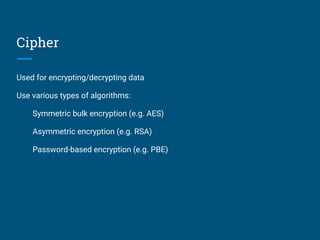
Cipher
Used for encrypting/decrypting data
Use various types of algorithms:
Symmetric bulk encryption (e.g. AES)
Asymmetric encryption (e.g. RSA)
Password-based encryption (e.g. PBE)
How to init Cipher
cipher = Cipher.getInstance(
KeyProperties.KEY_ALGORITHM_AES + "/"
+ KeyProperties.BLOCK_MODE_CBC + "/"
+ KeyProperties.ENCRYPTION_PADDING_PKCS7)
keyStore.load(null)
val key = keyStore.getKey(KEY_NAME, null) as SecretKey
cipher.init(Cipher.ENCRYPT_MODE, key)
Create CryptoObject with cipher
val cryptoObject = FingerprintManager.CryptoObject(cipher)
val helper = FingerprintHandler(this)
helper.startAuth( fingerprintManager , cryptoObject )
Best practices
● Consider backwards compatibility;
● Provide alternate methods of authentication;
● Clearly indicate when your app is “listening” for user input;
● If the device cannot support finger authentication, then
explain why;
● Provide the user with plenty of feedback.
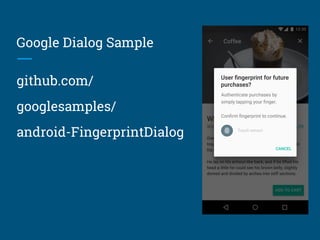
Google Dialog Sample
github.com/
googlesamples/
android-FingerprintDialog
Let's Code (baby steps)
github.com/
gabeira/
FingerprintKotlin
Available on Slideshare

Android Fingerprint Authentication