Amazon's User Experience


        Presentation
Global Assessment

● Home page contains all
  information necessary
  and is credible
● Easy to navigate
● User opinion highly
  valuable given the volume
  they have obtained
● International sales,
  international payment
  options great
● Purchasing process
  simple and easy
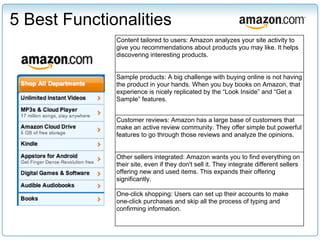
5 Best Functionalities
              Content tailored to users: Amazon analyzes your site activity to
              give you recommendations about products you may like. It helps
              discovering interesting products.


              Sample products: A big challenge with buying online is not having
              the product in your hands. When you buy books on Amazon, that
              experience is nicely replicated by the “Look Inside” and “Get a
              Sample” features.


              Customer reviews: Amazon has a large base of customers that
              make an active review community. They offer simple but powerful
              features to go through those reviews and analyze the opinions.


              Other sellers integrated: Amazon wants you to find everything on
              their site, even if they don't sell it. They integrate different sellers
              offering new and used items. This expands their offering
              significantly.

              One-click shopping: Users can set up their accounts to make
              one-click purchases and skip all the process of typing and
              confirming information.
3 Pain Points
Too many items on one page: When strictly speaking
about user experience, a regular Amazon page is
extremely cluttered. It can contain more than 250 links
and buttons.


Difficult to find uncommon items: Amazon has millions
of products, but unless you know the exact name, you
will only see the most popular and bestselling items.
What's the value in such a large offering if you can't
find it?


Lack of clarity of who is the seller, what are the terms:
When purchasing from 3rd party sellers, it is not
always clear who you are buying from, or if they offer
the same service.
Improvements
             Pain Point                          Improvements


          Too many items      Allow users to choose which information to show on
          on one page         product pages. Make items as bestselling list,
                              recently viewed items, and “customers who
                              bought...”, optional. Offer a more visually pleasing
                              product-list view, like expandable lists (i.e. show top
                              3 best sellers, and a link to “Show more”).

          Difficult to find   Improve advanced search options, currently too
          uncommon items      limited.
                              Implement Netflix's recommendation system, where
                              users can rate books they've read, and mark the
                              ones that are interesting/not interesting to them.


          Lack of clarity of Add a page in the purchase process when buying
          who is seller, what from 3rd parties where it shows exactly what's
          are terms           different vs. buying from Amazon directly.
New Feature
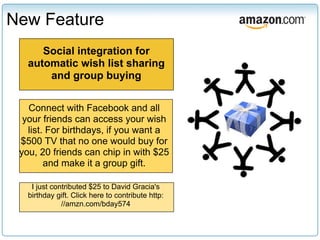
      Social integration for
   automatic wish list sharing
       and group buying


   Connect with Facebook and all
  your friends can access your wish
   list. For birthdays, if you want a
 $500 TV that no one would buy for
 you, 20 friends can chip in with $25
        and make it a group gift.

    I just contributed $25 to David Gracia's
   birthday gift. Click here to contribute http:
              //amzn.com/bday574
New Feature - Research
                                    Types of questions to be answered:
 1. Understand if users need                      ■ What are the occasions people
    such a tool, and how would                      would collaborate on a gift for?
                                                  ■ Do people really want to
    they use it                                     collaborate on gift buying? is
      ○ Qualitative research:                       there a real demand?
                                                  ■ If so, How many people need to
        interviews, focus                           collaborate on the gift?
        groups                                    ■ Are our current payment
                                                    methods sufficient?
 2. Analyze                                       ■ How can the organizer send out
    technical feasibility to make                   the gift sharing invitation?
                                                  ■ What tools do gift organizers
    sure it's possible and                          need to manage the group?
    practical                                     ■ What if someone doesn’t pay on
                                                    time for the gift to reach the
                                                    recipient by the date in
                                                    question? e.g., can the
                                                    organizer pay the balance?
                                                  ■ What kind of reminders do we
                                                    need to send to participants?
                                                  ■ How can we maximize on the
                                                    opportunity?
New Feature - Design & Test

DESIGN                        TEST

1. Integrate with the Gift    1. Launch a pilot on
   Organizer.                    Amazon's US site, asking
2. Use qualitative research      for extensive feedback
   to improve user               for all users that try it.
   experience. Users must     2. Promote via social media
   find it easy to use.          marketing and encourage
3. Make adjustments and          sharing.
   finalize for testing.      3. Use Google's Website
                                 Optimizer for A/B testing
                                 until strong feedback is
                                 gathered.
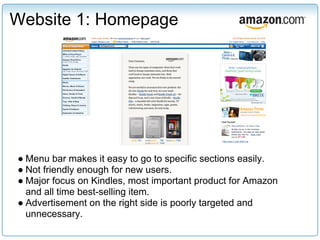
Website 1: Homepage


● Menu bar makes it easy to go to specific sections easily.
● Not friendly enough for new users.
● Major focus on Kindles, most important product for Amazon
  and all time best-selling item.
● Advertisement on the right side is poorly targeted and
  unnecessary.
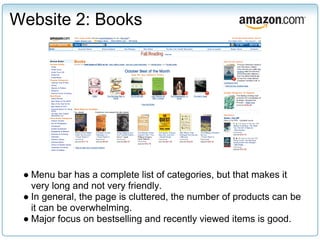
Website 2: Books


 ● Menu bar has a complete list of categories, but that makes it
   very long and not very friendly.
 ● In general, the page is cluttered, the number of products can be
   it can be overwhelming.
 ● Major focus on bestselling and recently viewed items is good.
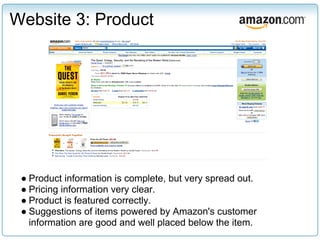
Website 3: Product


 ● Product information is complete, but very spread out.
 ● Pricing information very clear.
 ● Product is featured correctly.
 ● Suggestions of items powered by Amazon's customer
   information are good and well placed below the item.
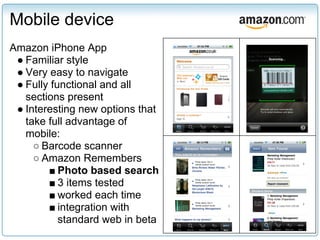
Mobile device
Amazon iPhone App
 ● Familiar style
 ● Very easy to navigate
 ● Fully functional and all
   sections present
 ● Interesting new options that
   take full advantage of
   mobile:
     ○ Barcode scanner
     ○ Amazon Remembers
        ■ Photo based search
        ■ 3 items tested
        ■ worked each time
        ■ integration with
           standard web in beta

Amazon's User Experience

  • 1.
  • 2.
    Global Assessment ● Homepage contains all information necessary and is credible ● Easy to navigate ● User opinion highly valuable given the volume they have obtained ● International sales, international payment options great ● Purchasing process simple and easy
  • 3.
    5 Best Functionalities Content tailored to users: Amazon analyzes your site activity to give you recommendations about products you may like. It helps discovering interesting products. Sample products: A big challenge with buying online is not having the product in your hands. When you buy books on Amazon, that experience is nicely replicated by the “Look Inside” and “Get a Sample” features. Customer reviews: Amazon has a large base of customers that make an active review community. They offer simple but powerful features to go through those reviews and analyze the opinions. Other sellers integrated: Amazon wants you to find everything on their site, even if they don't sell it. They integrate different sellers offering new and used items. This expands their offering significantly. One-click shopping: Users can set up their accounts to make one-click purchases and skip all the process of typing and confirming information.
  • 4.
    3 Pain Points Toomany items on one page: When strictly speaking about user experience, a regular Amazon page is extremely cluttered. It can contain more than 250 links and buttons. Difficult to find uncommon items: Amazon has millions of products, but unless you know the exact name, you will only see the most popular and bestselling items. What's the value in such a large offering if you can't find it? Lack of clarity of who is the seller, what are the terms: When purchasing from 3rd party sellers, it is not always clear who you are buying from, or if they offer the same service.
  • 5.
    Improvements Pain Point Improvements Too many items Allow users to choose which information to show on on one page product pages. Make items as bestselling list, recently viewed items, and “customers who bought...”, optional. Offer a more visually pleasing product-list view, like expandable lists (i.e. show top 3 best sellers, and a link to “Show more”). Difficult to find Improve advanced search options, currently too uncommon items limited. Implement Netflix's recommendation system, where users can rate books they've read, and mark the ones that are interesting/not interesting to them. Lack of clarity of Add a page in the purchase process when buying who is seller, what from 3rd parties where it shows exactly what's are terms different vs. buying from Amazon directly.
  • 6.
    New Feature Social integration for automatic wish list sharing and group buying Connect with Facebook and all your friends can access your wish list. For birthdays, if you want a $500 TV that no one would buy for you, 20 friends can chip in with $25 and make it a group gift. I just contributed $25 to David Gracia's birthday gift. Click here to contribute http: //amzn.com/bday574
  • 7.
    New Feature -Research Types of questions to be answered: 1. Understand if users need ■ What are the occasions people such a tool, and how would would collaborate on a gift for? ■ Do people really want to they use it collaborate on gift buying? is ○ Qualitative research: there a real demand? ■ If so, How many people need to interviews, focus collaborate on the gift? groups ■ Are our current payment methods sufficient? 2. Analyze ■ How can the organizer send out technical feasibility to make the gift sharing invitation? ■ What tools do gift organizers sure it's possible and need to manage the group? practical ■ What if someone doesn’t pay on time for the gift to reach the recipient by the date in question? e.g., can the organizer pay the balance? ■ What kind of reminders do we need to send to participants? ■ How can we maximize on the opportunity?
  • 8.
    New Feature -Design & Test DESIGN TEST 1. Integrate with the Gift 1. Launch a pilot on Organizer. Amazon's US site, asking 2. Use qualitative research for extensive feedback to improve user for all users that try it. experience. Users must 2. Promote via social media find it easy to use. marketing and encourage 3. Make adjustments and sharing. finalize for testing. 3. Use Google's Website Optimizer for A/B testing until strong feedback is gathered.
  • 9.
    Website 1: Homepage ●Menu bar makes it easy to go to specific sections easily. ● Not friendly enough for new users. ● Major focus on Kindles, most important product for Amazon and all time best-selling item. ● Advertisement on the right side is poorly targeted and unnecessary.
  • 10.
    Website 2: Books ● Menu bar has a complete list of categories, but that makes it very long and not very friendly. ● In general, the page is cluttered, the number of products can be it can be overwhelming. ● Major focus on bestselling and recently viewed items is good.
  • 11.
    Website 3: Product ● Product information is complete, but very spread out. ● Pricing information very clear. ● Product is featured correctly. ● Suggestions of items powered by Amazon's customer information are good and well placed below the item.
  • 12.
    Mobile device Amazon iPhoneApp ● Familiar style ● Very easy to navigate ● Fully functional and all sections present ● Interesting new options that take full advantage of mobile: ○ Barcode scanner ○ Amazon Remembers ■ Photo based search ■ 3 items tested ■ worked each time ■ integration with standard web in beta