Mobile Healthcare App
Usability Study
Performed as part of Bentley University’s HF 750 (Testing and
Assessment Programs) coursework.
CONTENTS
Our Process
Expert Review
Usability Study
Recommendations & Action Items
1
2
3
4
Usability Study: CONTENTS
Usability Study: PROCESS
What We Did
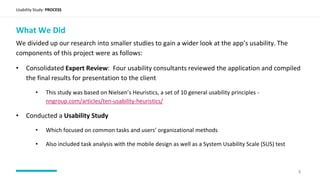
We divided up our research into smaller studies to gain a wider look at the app’s usability. The
components of this project were as follows:
• Consolidated Expert Review: Four usability consultants reviewed the application and compiled
the final results for presentation to the client
• This study was based on Nielsen’s Heuristics, a set of 10 general usability principles -
nngroup.com/articles/ten-usability-heuristics/
• Conducted a Usability Study
• Which focused on common tasks and users’ organizational methods
• Also included task analysis with the mobile design as well as a System Usability Scale (SUS) test
3
Expert Review
Usability Study: EXPERT REVIEW
Major Heuristic Themes
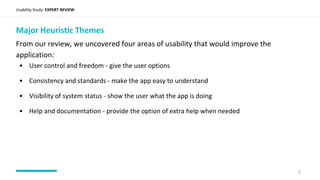
From our review, we uncovered four areas of usability that would improve the
application:
5
• User control and freedom - give the user options
• Consistency and standards - make the app easy to understand
• Visibility of system status - show the user what the app is doing
• Help and documentation - provide the option of extra help when needed
Usability Study
Usability Study: USABILITY STUDY
Methodology
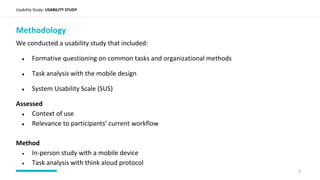
We conducted a usability study that included:
● Formative questioning on common tasks and organizational methods
● Task analysis with the mobile design
● System Usability Scale (SUS)
Assessed
● Context of use
● Relevance to participants’ current workflow
Method
● In-person study with a mobile device
● Task analysis with think aloud protocol
7
Usability Study: USABILITY STUDY
Participant Recruitment and Screening
Recruitment
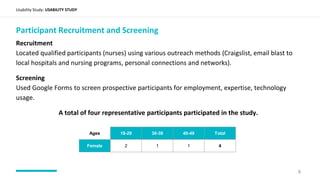
Located qualified participants (nurses) using various outreach methods (Craigslist, email blast to
local hospitals and nursing programs, personal connections and networks).
Screening
Used Google Forms to screen prospective participants for employment, expertise, technology
usage.
A total of four representative participants participated in the study.
8
Ages 18-29 30-39 40-49 Total
Female 2 1 1 4
Background and current practices
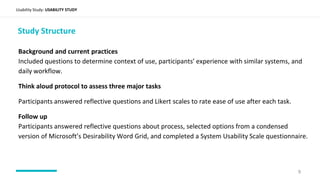
Included questions to determine context of use, participants’ experience with similar systems, and
daily workflow.
Think aloud protocol to assess three major tasks
Participants answered reflective questions and Likert scales to rate ease of use after each task.
Follow up
Participants answered reflective questions about process, selected options from a condensed
version of Microsoft’s Desirability Word Grid, and completed a System Usability Scale questionnaire.
Usability Study: USABILITY STUDY
Study Structure
9
Usability Study Findings
Path
Usability Study: USABILITY STUDY FINDINGS
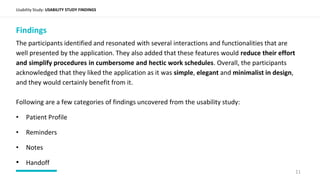
Findings
The participants identified and resonated with several interactions and functionalities that are
well presented by the application. They also added that these features would reduce their effort
and simplify procedures in cumbersome and hectic work schedules. Overall, the participants
acknowledged that they liked the application as it was simple, elegant and minimalist in design,
and they would certainly benefit from it.
Following are a few categories of findings uncovered from the usability study:
• Patient Profile
• Reminders
• Notes
• Handoff
11
Usability Study: USABILITY STUDY FINDINGS
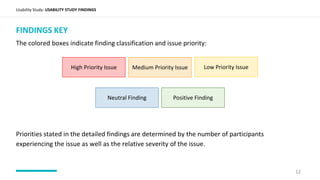
FINDINGS KEY
The colored boxes indicate finding classification and issue priority:
Priorities stated in the detailed findings are determined by the number of participants
experiencing the issue as well as the relative severity of the issue.
Low Priority IssueMedium Priority IssueHigh Priority Issue
Positive FindingNeutral Finding
12
Usability Study Follow Up
Path
Usability Study: MICROSOFT DESIRABILITY WORD GRID
14
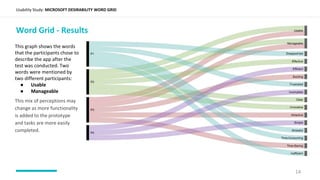
Word Grid - Results
This graph shows the words
that the participants chose to
describe the app after the
test was conducted. Two
words were mentioned by
two different participants:
● Usable
● Manageable
This mix of perceptions may
change as more functionality
is added to the prototype
and tasks are more easily
completed.
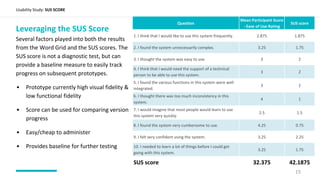
Leveraging the SUS Score
Several factors played into both the results
from the Word Grid and the SUS scores. The
SUS score is not a diagnostic test, but can
provide a baseline measure to easily track
progress on subsequent prototypes.
• Prototype currently high visual fidelity &
low functional fidelity
• Score can be used for comparing version
progress
• Easy/cheap to administer
• Provides baseline for further testing
Usability Study: SUS SCORE
Question
Mean Participant Score
- Ease of Use Rating
SUS score
1. I think that I would like to use this system frequently. 2.875 1.875
2. I found the system unnecessarily complex. 3.25 1.75
3. I thought the system was easy to use. 3 2
4. I think that I would need the support of a technical
person to be able to use this system.
3 2
5. I found the various functions in this system were well
integrated.
3 2
6. I thought there was too much inconsistency in this
system.
4 1
7. I would imagine that most people would learn to use
this system very quickly.
2.5 1.5
8. I found the system very cumbersome to use. 4.25 0.75
9. I felt very confident using the system. 3.25 2.25
10. I needed to learn a lot of things before I could get
going with this system.
3.25 1.75
SUS score 32.375 42.1875
15

Mobile Healthcare App

  • 1.
    Mobile Healthcare App UsabilityStudy Performed as part of Bentley University’s HF 750 (Testing and Assessment Programs) coursework.
  • 2.
    CONTENTS Our Process Expert Review UsabilityStudy Recommendations & Action Items 1 2 3 4 Usability Study: CONTENTS
  • 3.
    Usability Study: PROCESS WhatWe Did We divided up our research into smaller studies to gain a wider look at the app’s usability. The components of this project were as follows: • Consolidated Expert Review: Four usability consultants reviewed the application and compiled the final results for presentation to the client • This study was based on Nielsen’s Heuristics, a set of 10 general usability principles - nngroup.com/articles/ten-usability-heuristics/ • Conducted a Usability Study • Which focused on common tasks and users’ organizational methods • Also included task analysis with the mobile design as well as a System Usability Scale (SUS) test 3
  • 4.
  • 5.
    Usability Study: EXPERTREVIEW Major Heuristic Themes From our review, we uncovered four areas of usability that would improve the application: 5 • User control and freedom - give the user options • Consistency and standards - make the app easy to understand • Visibility of system status - show the user what the app is doing • Help and documentation - provide the option of extra help when needed
  • 6.
  • 7.
    Usability Study: USABILITYSTUDY Methodology We conducted a usability study that included: ● Formative questioning on common tasks and organizational methods ● Task analysis with the mobile design ● System Usability Scale (SUS) Assessed ● Context of use ● Relevance to participants’ current workflow Method ● In-person study with a mobile device ● Task analysis with think aloud protocol 7
  • 8.
    Usability Study: USABILITYSTUDY Participant Recruitment and Screening Recruitment Located qualified participants (nurses) using various outreach methods (Craigslist, email blast to local hospitals and nursing programs, personal connections and networks). Screening Used Google Forms to screen prospective participants for employment, expertise, technology usage. A total of four representative participants participated in the study. 8 Ages 18-29 30-39 40-49 Total Female 2 1 1 4
  • 9.
    Background and currentpractices Included questions to determine context of use, participants’ experience with similar systems, and daily workflow. Think aloud protocol to assess three major tasks Participants answered reflective questions and Likert scales to rate ease of use after each task. Follow up Participants answered reflective questions about process, selected options from a condensed version of Microsoft’s Desirability Word Grid, and completed a System Usability Scale questionnaire. Usability Study: USABILITY STUDY Study Structure 9
  • 10.
  • 11.
    Usability Study: USABILITYSTUDY FINDINGS Findings The participants identified and resonated with several interactions and functionalities that are well presented by the application. They also added that these features would reduce their effort and simplify procedures in cumbersome and hectic work schedules. Overall, the participants acknowledged that they liked the application as it was simple, elegant and minimalist in design, and they would certainly benefit from it. Following are a few categories of findings uncovered from the usability study: • Patient Profile • Reminders • Notes • Handoff 11
  • 12.
    Usability Study: USABILITYSTUDY FINDINGS FINDINGS KEY The colored boxes indicate finding classification and issue priority: Priorities stated in the detailed findings are determined by the number of participants experiencing the issue as well as the relative severity of the issue. Low Priority IssueMedium Priority IssueHigh Priority Issue Positive FindingNeutral Finding 12
  • 13.
  • 14.
    Usability Study: MICROSOFTDESIRABILITY WORD GRID 14 Word Grid - Results This graph shows the words that the participants chose to describe the app after the test was conducted. Two words were mentioned by two different participants: ● Usable ● Manageable This mix of perceptions may change as more functionality is added to the prototype and tasks are more easily completed.
  • 15.
    Leveraging the SUSScore Several factors played into both the results from the Word Grid and the SUS scores. The SUS score is not a diagnostic test, but can provide a baseline measure to easily track progress on subsequent prototypes. • Prototype currently high visual fidelity & low functional fidelity • Score can be used for comparing version progress • Easy/cheap to administer • Provides baseline for further testing Usability Study: SUS SCORE Question Mean Participant Score - Ease of Use Rating SUS score 1. I think that I would like to use this system frequently. 2.875 1.875 2. I found the system unnecessarily complex. 3.25 1.75 3. I thought the system was easy to use. 3 2 4. I think that I would need the support of a technical person to be able to use this system. 3 2 5. I found the various functions in this system were well integrated. 3 2 6. I thought there was too much inconsistency in this system. 4 1 7. I would imagine that most people would learn to use this system very quickly. 2.5 1.5 8. I found the system very cumbersome to use. 4.25 0.75 9. I felt very confident using the system. 3.25 2.25 10. I needed to learn a lot of things before I could get going with this system. 3.25 1.75 SUS score 32.375 42.1875 15