Amazon Web
Service
Mahek Kantesaria
17MCS1006
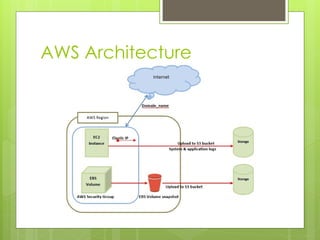
AWS Architecture
Amazon Elastic Compute
Cloud (Amazon EC2)
 provides scalable computing capacity in
the Amazon Web Services (AWS) cloud
 eliminates your need to invest in hardware
up front
 Able to launch as many or as few virtual
servers as you need, configure security
and networking, and manage storage
 enables you to scale up or down to
handle changes in requirements
 Features of Amazon EC2
 Virtual computing environments, known as
instances
 Preconfigured templates for your instances,
known as Amazon Machine Images (AMIs)
 Secure login information for your instances
using key pairs
 Persistent storage volumes for your data
using Amazon Elastic Block Store (Amazon
EBS)
S3 Bucket
 Amazon S3 (Simple Storage Service) is a scalable,
high-speed, low-cost web-based service designed
for online backup and archiving of data and
application programs
 It allows to upload, store, and download any type
of files up to 5 GB in size
 The subscriber has control over the accessibility of
data, i.e. privately/publicly accessible.
 Amazon Simple Storage Service is storage for the
Internet.
 It is designed to make web-scale computing
easier for developers.
Amazon EBS Volumes
 durable, block-level storage device that you
can attach to a single EC2 instance
 Used as primary storage for data that requires
frequent updates, such as the system drive for
an instance or storage for a database
application
 For current-generation volumes attached to
current-generation instance types, you can
dynamically increase size, modify provisioned
IOPS capacity, and change volume type on
live production volumes
 provides the following volume types: General
Purpose SSD (gp2), Provisioned IOPS SSD (io1),
Throughput Optimized HDD (st1), Cold HDD
(sc1), and Magnetic (standard, a previous-
generation type)
Amazon EBS Snapshots
 back up the data on your Amazon EBS
volumes to Amazon S3 by taking point-in-time
snapshots
 Snapshots are incremental backups, which
means that only the blocks on the device that
have changed after your most recent
snapshot are saved
 minimizes the time required, create the
snapshot and saves on storage costs by not
duplicating data
 When you delete a snapshot, only the data
unique to that snapshot is removed
 Each snapshot contains all of the information
needed to restore your data.
 On creation, new volume begins as an
exact replica of the original volume that
was used to create the snapshot
 replicated volume loads data lazily in the
background
 If you access data that hasn't been
loaded yet, the volume immediately
downloads the requested data from
Amazon S3
THANK YOU!

Amazon Web services architecture and components

  • 1.
  • 2.
  • 3.
    Amazon Elastic Compute Cloud(Amazon EC2)  provides scalable computing capacity in the Amazon Web Services (AWS) cloud  eliminates your need to invest in hardware up front  Able to launch as many or as few virtual servers as you need, configure security and networking, and manage storage  enables you to scale up or down to handle changes in requirements
  • 4.
     Features ofAmazon EC2  Virtual computing environments, known as instances  Preconfigured templates for your instances, known as Amazon Machine Images (AMIs)  Secure login information for your instances using key pairs  Persistent storage volumes for your data using Amazon Elastic Block Store (Amazon EBS)
  • 5.
    S3 Bucket  AmazonS3 (Simple Storage Service) is a scalable, high-speed, low-cost web-based service designed for online backup and archiving of data and application programs  It allows to upload, store, and download any type of files up to 5 GB in size  The subscriber has control over the accessibility of data, i.e. privately/publicly accessible.  Amazon Simple Storage Service is storage for the Internet.  It is designed to make web-scale computing easier for developers.
  • 6.
    Amazon EBS Volumes durable, block-level storage device that you can attach to a single EC2 instance  Used as primary storage for data that requires frequent updates, such as the system drive for an instance or storage for a database application  For current-generation volumes attached to current-generation instance types, you can dynamically increase size, modify provisioned IOPS capacity, and change volume type on live production volumes  provides the following volume types: General Purpose SSD (gp2), Provisioned IOPS SSD (io1), Throughput Optimized HDD (st1), Cold HDD (sc1), and Magnetic (standard, a previous- generation type)
  • 7.
    Amazon EBS Snapshots back up the data on your Amazon EBS volumes to Amazon S3 by taking point-in-time snapshots  Snapshots are incremental backups, which means that only the blocks on the device that have changed after your most recent snapshot are saved  minimizes the time required, create the snapshot and saves on storage costs by not duplicating data  When you delete a snapshot, only the data unique to that snapshot is removed  Each snapshot contains all of the information needed to restore your data.
  • 8.
     On creation,new volume begins as an exact replica of the original volume that was used to create the snapshot  replicated volume loads data lazily in the background  If you access data that hasn't been loaded yet, the volume immediately downloads the requested data from Amazon S3
  • 9.