ALTER
FACE A Test Heuristic for UI
Web Applications
by Júlio de Lima
iam@juliodelima.com.br
Heuristics are processes that occur naturally in the
human mind. They help to solve problems and make
decisions in conditions of uncertainty, replacing the
complex way of doing something, with a simpler one
and still bringing satisfactory results.
Gabriel Santos
Heurísticas de teste de software: o que são e seus benefícios
by Júlio de Lima
iam@juliodelima.com.br
Introduction
Modern web applications are
built using components made
by hand and this causes a
series of failures to arise.
With this in mind, Júlio de Lima
introduces the ALTER FACE heuristic
proposes tests that reveal flaws related
to the way in which Web applications are
built based on their components. In the
next slides, we will see in detail what
constitutes this brand new heuristic.
by Júlio de Lima
iam@juliodelima.com.br
Let's Start!
Are you ready?
by Júlio de Lima
iam@juliodelima.com.br
1
2
3
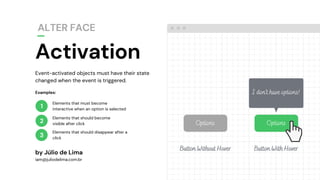
Elements that must become
interactive when an option is selected
Elements that should become
visible after click
Elements that should disappear after a
click
by Júlio de Lima
iam@juliodelima.com.br
Examples:
OptionsOptions
I don't have options!
Button Without Hover Button With Hover
Event-activated objects must have their state
changed when the event is triggered.
Activation
ALTER FACE
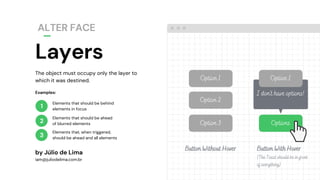
The object must occupy only the layer to
which it was destined.
Layers
ALTER FACE
by Júlio de Lima
iam@juliodelima.com.br
1
2
3
Elements that should be behind
elements in focus
Elements that should be ahead
of blurred elements
Elements that, when triggered,
should be ahead and all elements
Examples:
Option 3
Option 2 Option 2
Option 1Option 1
Options
I don't have options!
Button Without Hover Button With Hover
(The Toast should be in front
of everything)
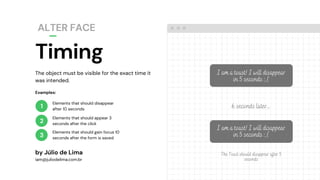
The object must be visible for the exact time it
was intended.
Timing
ALTER FACE
by Júlio de Lima
iam@juliodelima.com.br
1
2
3
Elements that should disappear
after 10 seconds
Elements that should appear 3
seconds after the click
Elements that should gain focus 10
seconds after the form is saved
Examples:
I am a toast! I will disappear
in 5 seconds :,(
6 seconds later...
I am a toast! I will disappear
in 5 seconds :,(
The Toast should disappear after 5
seconds
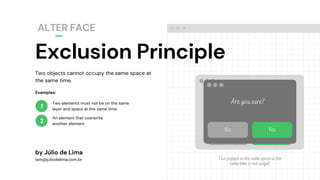
No Yes
Exclusion Principle
ALTER FACE
1
2
Two objects cannot occupy the same space at
the same time.
by Júlio de Lima
iam@juliodelima.com.br
Two elements must not be on the same
layer and space at the same time
An element that overwrite
another element
Examples:
Are you sure?
No Yes
Two popups in the same space at the
same time is not useful!
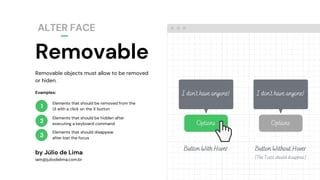
Removable objects must allow to be removed
or hiden.
Removable
ALTER FACE
by Júlio de Lima
iam@juliodelima.com.br
1
2
Elements that should be removed from the
UI with a click on the X button
Elements that should be hidden after
executing a keyboard command
Examples:
3
Elements that should disappear
after lost the focus
Options
I don't have anyone!
Button With Hover
Options
I don't have anyone!
Button Without Hover
(The Toast should disappear)
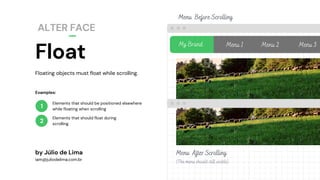
Float
ALTER FACE
1
2
Floating objects must float while scrolling.
by Júlio de Lima
iam@juliodelima.com.br
Elements that should be positioned elsewhere
while floating when scrolling
Elements that should float during
scrolling
My Brand Menu 1 Menu 2 Menu 3
Menu After Scrolling
(The menu should still visible)
Menu Before Scrolling
Examples:
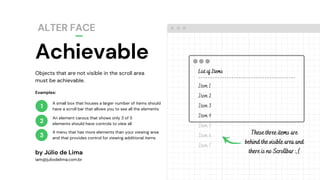
Achievable
ALTER FACE
1
2
3
List of Items
-----------------------------------------
Item 1
Item 2
Item 3
Item 4
Item 5
Item 6
Item 7
Objects that are not visible in the scroll area
must be achievable.
by Júlio de Lima
iam@juliodelima.com.br
A small box that houses a larger number of items should
have a scroll bar that allows you to see all the elements
An element carous that shows only 3 of 5
elements should have controls to view all
A menu that has more elements than your viewing area
and that provides control for viewing additional items
Examples:
These three items are
behind the visible area and
there is no Scrollbar :,(
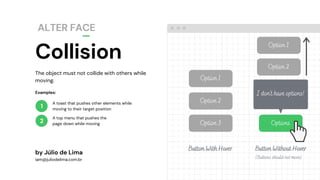
Collision
ALTER FACE
1
2
Option 2
The object must not collide with others while
moving.
by Júlio de Lima
iam@juliodelima.com.br
A toast that pushes other elements while
moving to their target position
A top menu that pushes the
page down while moving
Examples:
Option 3
Option 2
Option 2
Option 1
Option 1
Options
I don't have options!
Button With Hover Button Without Hover
(Buttons should not move)
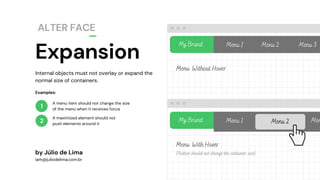
Expansion
ALTER FACE
1
2
My Brand Menu 1 Menu 2 Menu 3
Internal objects must not overlay or expand the
normal size of containers.
by Júlio de Lima
iam@juliodelima.com.br
A menu item should not change the size
of the menu when it receives focus
A maximized element should not
push elements around it
Examples:
Menu Without Hover
Menu With Hover
(Button should not change the container size)
My Brand Menu 1 Menu 2 Men
Have you been using the
ALTER FACE Test Heuristic?
Tell us how it was!
by Júlio de Lima
iam@juliodelima.com.br
bit.ly/ALTERFACE
Happy testing!
Contact me for
questions or feedbacks
by Júlio de Lima
iam@juliodelima.com.br

ALTER FACE Test Heuristic

  • 1.
    ALTER FACE A TestHeuristic for UI Web Applications by Júlio de Lima iam@juliodelima.com.br
  • 2.
    Heuristics are processesthat occur naturally in the human mind. They help to solve problems and make decisions in conditions of uncertainty, replacing the complex way of doing something, with a simpler one and still bringing satisfactory results. Gabriel Santos Heurísticas de teste de software: o que são e seus benefícios by Júlio de Lima iam@juliodelima.com.br
  • 3.
    Introduction Modern web applicationsare built using components made by hand and this causes a series of failures to arise. With this in mind, Júlio de Lima introduces the ALTER FACE heuristic proposes tests that reveal flaws related to the way in which Web applications are built based on their components. In the next slides, we will see in detail what constitutes this brand new heuristic. by Júlio de Lima iam@juliodelima.com.br
  • 4.
    Let's Start! Are youready? by Júlio de Lima iam@juliodelima.com.br
  • 5.
    1 2 3 Elements that mustbecome interactive when an option is selected Elements that should become visible after click Elements that should disappear after a click by Júlio de Lima iam@juliodelima.com.br Examples: OptionsOptions I don't have options! Button Without Hover Button With Hover Event-activated objects must have their state changed when the event is triggered. Activation ALTER FACE
  • 6.
    The object mustoccupy only the layer to which it was destined. Layers ALTER FACE by Júlio de Lima iam@juliodelima.com.br 1 2 3 Elements that should be behind elements in focus Elements that should be ahead of blurred elements Elements that, when triggered, should be ahead and all elements Examples: Option 3 Option 2 Option 2 Option 1Option 1 Options I don't have options! Button Without Hover Button With Hover (The Toast should be in front of everything)
  • 7.
    The object mustbe visible for the exact time it was intended. Timing ALTER FACE by Júlio de Lima iam@juliodelima.com.br 1 2 3 Elements that should disappear after 10 seconds Elements that should appear 3 seconds after the click Elements that should gain focus 10 seconds after the form is saved Examples: I am a toast! I will disappear in 5 seconds :,( 6 seconds later... I am a toast! I will disappear in 5 seconds :,( The Toast should disappear after 5 seconds
  • 8.
    No Yes Exclusion Principle ALTERFACE 1 2 Two objects cannot occupy the same space at the same time. by Júlio de Lima iam@juliodelima.com.br Two elements must not be on the same layer and space at the same time An element that overwrite another element Examples: Are you sure? No Yes Two popups in the same space at the same time is not useful!
  • 9.
    Removable objects mustallow to be removed or hiden. Removable ALTER FACE by Júlio de Lima iam@juliodelima.com.br 1 2 Elements that should be removed from the UI with a click on the X button Elements that should be hidden after executing a keyboard command Examples: 3 Elements that should disappear after lost the focus Options I don't have anyone! Button With Hover Options I don't have anyone! Button Without Hover (The Toast should disappear)
  • 10.
    Float ALTER FACE 1 2 Floating objectsmust float while scrolling. by Júlio de Lima iam@juliodelima.com.br Elements that should be positioned elsewhere while floating when scrolling Elements that should float during scrolling My Brand Menu 1 Menu 2 Menu 3 Menu After Scrolling (The menu should still visible) Menu Before Scrolling Examples:
  • 11.
    Achievable ALTER FACE 1 2 3 List ofItems ----------------------------------------- Item 1 Item 2 Item 3 Item 4 Item 5 Item 6 Item 7 Objects that are not visible in the scroll area must be achievable. by Júlio de Lima iam@juliodelima.com.br A small box that houses a larger number of items should have a scroll bar that allows you to see all the elements An element carous that shows only 3 of 5 elements should have controls to view all A menu that has more elements than your viewing area and that provides control for viewing additional items Examples: These three items are behind the visible area and there is no Scrollbar :,(
  • 12.
    Collision ALTER FACE 1 2 Option 2 Theobject must not collide with others while moving. by Júlio de Lima iam@juliodelima.com.br A toast that pushes other elements while moving to their target position A top menu that pushes the page down while moving Examples: Option 3 Option 2 Option 2 Option 1 Option 1 Options I don't have options! Button With Hover Button Without Hover (Buttons should not move)
  • 13.
    Expansion ALTER FACE 1 2 My BrandMenu 1 Menu 2 Menu 3 Internal objects must not overlay or expand the normal size of containers. by Júlio de Lima iam@juliodelima.com.br A menu item should not change the size of the menu when it receives focus A maximized element should not push elements around it Examples: Menu Without Hover Menu With Hover (Button should not change the container size) My Brand Menu 1 Menu 2 Men
  • 14.
    Have you beenusing the ALTER FACE Test Heuristic? Tell us how it was! by Júlio de Lima iam@juliodelima.com.br bit.ly/ALTERFACE
  • 15.
    Happy testing! Contact mefor questions or feedbacks by Júlio de Lima iam@juliodelima.com.br