#AlfrescoDayParis
Alfresco Support Admin Tools
Antonio Soler
Premier Advance Support Engineer EMEA
Agenda:
● Overview
● Dependencies
● Features
● Use Cases
OVERVIEW
Presentation
● Alfresco is not an easily maintained application. It requires external tools to
diagnose, monitor and analyse problems or fine tune configuration specific to
the user case. For example, jstack, jVisualVM , Yourkit, etc.
04/FEB/2016
OVERVIEW
In mid-size companies the system administration tasks are run by a one-man band
OVERVIEW
In larger enterprises problem investigation or configuration of a system feature (e.g.
LDAP sync) involves several people from different teams: Alfresco admin, sysAdmin,
DBAdmin, Developer, network admin, DevOps, project Manager … this can comprise 4
or 5 people ...
Troubleshooting a problem
•One-man band:
• Knows a little about everything
• Alfresco is not his sole
responsibility
• Not a specialist or has access to
specialist tools.
• Alfresco support may need to train
the admin how to use a specialist
tool
DevOps Team:
• Not all available when required
• Alfresco is not the only
responsibility
• A simple task such as putting a
class in DEBUG may require an
internal change process
• Internal security policies may inhibit
diagnostic steps, such as accessing
the DB or LDAP-AD
Dependencies
Traditionally control of a JVM is made through the JMX (Java Management Extension)
which gives access to the Management Beans (MBeans) and the monitoring parameters
of the JVM.
Note: JMX is only available in the Enterprise Edition of Alfresco
Starting with version Alfresco 4.2.0 the JMX objects are exposed through the JavaScript
API.
Dependencies
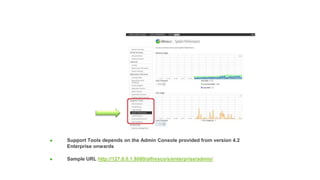
● Support Tools depends on the Admin Console provided from version 4.2
Enterprise onwards
● Sample URL http://127.0.0.1:8080/alfresco/s/enterprise/admin/
Dependencies
● Live graphs use the CANVAS browser object which is unavailable on some old
browsers:
Internet
Explorer
Firefox
Safari
(Desktop)
Chrome
Opera
(Desktop)
Safari
(Mobile)
Opera
(Mobile)
Android
Browser
6.0 2.0 - 6.0 3.1 - 3.2 4.0 - 13.0 9.0 - 11.0 3.2 10.0 2.0
7.0 7.0 4.0 14.0 11.1 4.0 11.0 2.1
8.0 8.0 5.0 15.0 11.5 4.2 - 4.3 11.1 2.3,3.0
9.0 9.0 5.1 16.0 11.6 5.0 11.5 4.0
● This is the library used: http://smoothiecharts.org/
Features
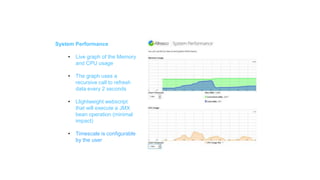
System Performance
• Live graph of the Memory
and CPU usage
• The graph uses a
recursive call to refresh
data every 2 seconds
• Llightweight webscript
that will execute a JMX
bean operation (minimal
impact)
• Timescale is configurable
by the user
Features
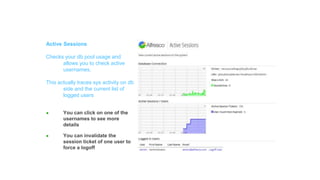
Active Sessions
Checks your db pool usage and
allows you to check active
usernames.
This actually traces sys activity on db
side and the current list of
logged users
● You can click on one of the
usernames to see more
details
● You can invalidate the
session ticket of one user to
force a logoff
Features
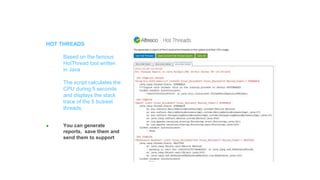
HOT THREADS
Based on the famous
HotThread tool written
in Java
The script calculates the
CPU during 5 seconds
and displays the stack
trace of the 5 busiest
threads.
● You can generate
reports, save them and
send them to support
Features
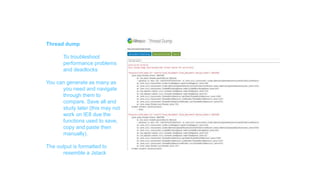
Thread dump
To troubleshoot
performance problems
and deadlocks
You can generate as many as
you need and navigate
through them to
compare. Save all and
study later (this may not
work on IE8 due the
functions used to save,
copy and paste then
manually).
The output is formatted to
resemble a Jstack
Features
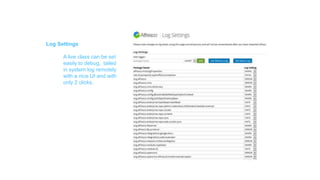
Log Settings
A live class can be set
easily to debug, tailed
in system log remotely
with a nice UI and with
only 2 clicks.
Features
THREAD SAMPLER
allows you to see what
each thread on the
system is doing, every 5
seconds
threads are coloured
depending on their
status
clicking on one of them
displays the stacktrace.
Threadumps can be
saved in json format to
send to a support ticket
or loaded later using
the same page to
analyze them.
Features
Apart from that there are 4 little tools that could be helpful on some cases
- JMX Settings on the DB
To find which beans have values overridden from the DB and revert them to the values
on the properties files, use with care
- Test Transformation
Transformation settings and test transformation
- Thread Profiler
Provides a live summary of each thread’s memory and CPU usage
- Scheduled Jobs
Lists and interprets the CRON jobs defined internally in Alfresco. Also shows the last
execution time.
Contents:
● Acknowledgments
Special thanks to:
Mike Farman for his support on this project and parts of the code.
Marco Mancuso for his help on the development and adapting it to Maven
standards.
Rich McKnight for his code to access the persisted Mbeans on the DB.
Jamie Allison for his code review, polish and improvements.
Will Abson for his useful advice.
The Smoothie Charts creators: http:smoothiecharts.org/ the library from which
was quite useful and fun to use

1.Source code on Github:
Copy from support-tools-1.x from
github.com – Alfresco Support Tools to
/alfresco/amps
2.Use ./bin/apply_amps or ./bin/alfresco-
mmt.jar to install into alfresco.jar
3.Remove .tomat/tmp ./tomcat/work,
.webapps/alfresco
4.Restart alfresco
Thanks for watching...
Merci !
Gerald Cussen – gerald.cussen@alfresco.com
Suivez-nous sur
#AlfrescoDayParis

Alfresco Support tools

  • 1.
  • 2.
    Alfresco Support AdminTools Antonio Soler Premier Advance Support Engineer EMEA
  • 3.
  • 4.
    OVERVIEW Presentation ● Alfresco isnot an easily maintained application. It requires external tools to diagnose, monitor and analyse problems or fine tune configuration specific to the user case. For example, jstack, jVisualVM , Yourkit, etc. 04/FEB/2016
  • 5.
    OVERVIEW In mid-size companiesthe system administration tasks are run by a one-man band
  • 6.
    OVERVIEW In larger enterprisesproblem investigation or configuration of a system feature (e.g. LDAP sync) involves several people from different teams: Alfresco admin, sysAdmin, DBAdmin, Developer, network admin, DevOps, project Manager … this can comprise 4 or 5 people ...
  • 7.
    Troubleshooting a problem •One-manband: • Knows a little about everything • Alfresco is not his sole responsibility • Not a specialist or has access to specialist tools. • Alfresco support may need to train the admin how to use a specialist tool DevOps Team: • Not all available when required • Alfresco is not the only responsibility • A simple task such as putting a class in DEBUG may require an internal change process • Internal security policies may inhibit diagnostic steps, such as accessing the DB or LDAP-AD
  • 8.
    Dependencies Traditionally control ofa JVM is made through the JMX (Java Management Extension) which gives access to the Management Beans (MBeans) and the monitoring parameters of the JVM. Note: JMX is only available in the Enterprise Edition of Alfresco Starting with version Alfresco 4.2.0 the JMX objects are exposed through the JavaScript API.
  • 9.
    Dependencies ● Support Toolsdepends on the Admin Console provided from version 4.2 Enterprise onwards ● Sample URL http://127.0.0.1:8080/alfresco/s/enterprise/admin/
  • 10.
    Dependencies ● Live graphsuse the CANVAS browser object which is unavailable on some old browsers: Internet Explorer Firefox Safari (Desktop) Chrome Opera (Desktop) Safari (Mobile) Opera (Mobile) Android Browser 6.0 2.0 - 6.0 3.1 - 3.2 4.0 - 13.0 9.0 - 11.0 3.2 10.0 2.0 7.0 7.0 4.0 14.0 11.1 4.0 11.0 2.1 8.0 8.0 5.0 15.0 11.5 4.2 - 4.3 11.1 2.3,3.0 9.0 9.0 5.1 16.0 11.6 5.0 11.5 4.0 ● This is the library used: http://smoothiecharts.org/
  • 11.
    Features System Performance • Livegraph of the Memory and CPU usage • The graph uses a recursive call to refresh data every 2 seconds • Llightweight webscript that will execute a JMX bean operation (minimal impact) • Timescale is configurable by the user
  • 12.
    Features Active Sessions Checks yourdb pool usage and allows you to check active usernames. This actually traces sys activity on db side and the current list of logged users ● You can click on one of the usernames to see more details ● You can invalidate the session ticket of one user to force a logoff
  • 13.
    Features HOT THREADS Based onthe famous HotThread tool written in Java The script calculates the CPU during 5 seconds and displays the stack trace of the 5 busiest threads. ● You can generate reports, save them and send them to support
  • 14.
    Features Thread dump To troubleshoot performanceproblems and deadlocks You can generate as many as you need and navigate through them to compare. Save all and study later (this may not work on IE8 due the functions used to save, copy and paste then manually). The output is formatted to resemble a Jstack
  • 15.
    Features Log Settings A liveclass can be set easily to debug, tailed in system log remotely with a nice UI and with only 2 clicks.
  • 16.
    Features THREAD SAMPLER allows youto see what each thread on the system is doing, every 5 seconds threads are coloured depending on their status clicking on one of them displays the stacktrace. Threadumps can be saved in json format to send to a support ticket or loaded later using the same page to analyze them.
  • 17.
    Features Apart from thatthere are 4 little tools that could be helpful on some cases - JMX Settings on the DB To find which beans have values overridden from the DB and revert them to the values on the properties files, use with care - Test Transformation Transformation settings and test transformation - Thread Profiler Provides a live summary of each thread’s memory and CPU usage - Scheduled Jobs Lists and interprets the CRON jobs defined internally in Alfresco. Also shows the last execution time.
  • 18.
    Contents: ● Acknowledgments Special thanksto: Mike Farman for his support on this project and parts of the code. Marco Mancuso for his help on the development and adapting it to Maven standards. Rich McKnight for his code to access the persisted Mbeans on the DB. Jamie Allison for his code review, polish and improvements. Will Abson for his useful advice. The Smoothie Charts creators: http:smoothiecharts.org/ the library from which was quite useful and fun to use
  • 19.
     1.Source code onGithub: Copy from support-tools-1.x from github.com – Alfresco Support Tools to /alfresco/amps 2.Use ./bin/apply_amps or ./bin/alfresco- mmt.jar to install into alfresco.jar 3.Remove .tomat/tmp ./tomcat/work, .webapps/alfresco 4.Restart alfresco Thanks for watching...
  • 20.
    Merci ! Gerald Cussen– gerald.cussen@alfresco.com Suivez-nous sur #AlfrescoDayParis