
Adopting the AnswerModules Suite for OpenText Content Server
About AnswerModules 
AnswerModules is a Swiss ICT company. 
Our mission is to engineer, develop and 
market innovative value-added solutions 
for the ECM world. 
http://www.answermodules.com
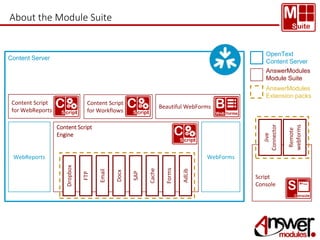
About the Module Suite 
Beautiful WebForms 
WebForms 
Script 
Console 
Content Server 
Content Script 
for WebReports 
WebReports 
Content Script 
Engine 
Forms 
AdLib 
SAP 
Cache 
Email 
Docx 
Dropbox 
FTP 
OpenText 
Content Server 
AnswerModules 
Module Suite 
AnswerModules 
Extension packs 
Content Script 
for Workflows 
Jive 
Connector 
Remote 
webforms
Module Suite 
AnswerModules Suite adoption 
path and advantages: 
a discussion based on examples 
from real world projects.
Overview 
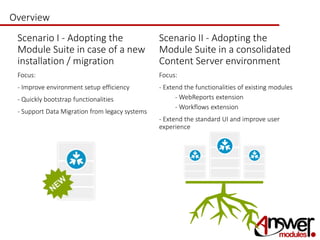
• Scenario I - Adopting the 
Module Suite in case of a new 
installation / migration 
• Focus: 
• - Improve environment setup efficiency 
• - Quickly bootstrap functionalities 
• - Support Data Migration from legacy systems 
• Scenario II - Adopting the 
Module Suite in a consolidated 
Content Server environment 
• Focus: 
• - Extend the functionalities of existing modules 
• - WebReports extension 
• - Workflows extension- Quicklytrap 
• - Extend the standard UI and improve user 
experience
Improve Content Server adoption 
The importance of the 
first project 
Hitting the ground running with a major project on 
a new platform is not a trivial task. 
In a typical adoption scenario, the Module 
Suite can help in many different ways, such 
as: 
- Providing tools to enable early 
prototyping of final solutions 
- Simplifying data migration from legacy 
systems 
- Helping to recover from incorrect design 
decisions
Performing Workspace setup with Content Script 
Content Script can be used to setup a workspace environment, giving you the 
opportunity to codify your design choices in a clear, compact set of repeatable 
scripts. 
A typical setup script creates the main folder structure, applicative users groups, 
assigns permissions, creates categories, associates categories to spaces and 
prefills attributes values, creates form templates, forms and SQL form tables, 
classifications, facets and facet trees, columns, associates columns and facets to 
spaces etc.. 
The main benefits of this approach are: 
- Scripts can be modified and re-executed 
as many times as needed 
- Creating objects with Content Script is 
way faster than using standard Content 
Server UI 
- Setting up a new environments simply 
requires to move and re-execute a script
Does Content Script support my custom object type ? 
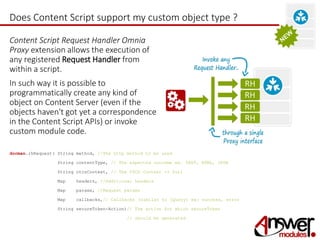
Content Script Request Handler Omnia 
Proxy extension allows the execution of 
any registered Request Handler from 
within a script. 
In such way it is possible to 
programmatically create any kind of 
object on Content Server (even if the 
objects haven't got yet a correspondence 
in the Content Script APIs) or invoke 
custom module code. 
docman.rhRequest( String method, //The http method to be used 
String contentType, // The expected outcome ex. TEXT, HTML, JSON 
String otcsContext, // The OTCS Context -> $url 
Map headers, //Additional headers 
Map params, //Request params 
Map callbacks,// Callbacks (similar to jQuery) ex: success, error 
String secureToken-Action)// The action for which secureToken 
// should be generated
Proxying Request Handler Calls 
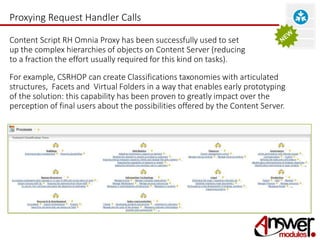
Content Script RH Omnia Proxy has been successfully used to set 
up the complex hierarchies of objects on Content Server (reducing 
to a fraction the effort usually required for this kind on tasks). 
For example, CSRHOP can create Classifications taxonomies with articulated 
structures, Facets and Virtual Folders in a way that enables early prototyping 
of the solution: this capability has been proven to greatly impact over the 
perception of final users about the possibilities offered by the Content Server.
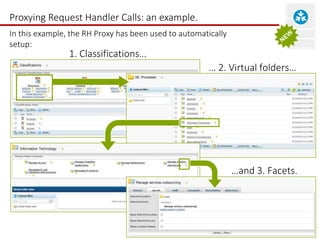
Proxying Request Handler Calls: an example. 
In this example, the RH Proxy has been used to automatically 
setup: 
… 2. Virtual folders… 
…and 3. Facets. 
1. Classifications…
Using Content Script APIs for environment setup 
There are other sorts of objects you could be interested in creating 
programmatically with Content Script: Categories and Forms Templates 
are among these. 
The definition and creation of these milestones objects, even though made very 
simple by the well designed OTCS GUI, can become quite an expensive activity for 
which the costs tend to grow with the complexity of the structures and with the 
iterations you need to go through. 
The difference between creating Categories and Form Templates with Content 
Script or using the standard UI is somehow similar to the difference between writing 
a text page using a Word processor or a typing machine: with the former, whenever 
you make a mistake or decide to introduce major changes, you can place the cursor 
in the right place and apply the fix; with the latter, you will probably have to rewrite 
the whole page. 
To introduce even the most complex change in your definition, all you will have to 
do is simply change the script and run it once again.
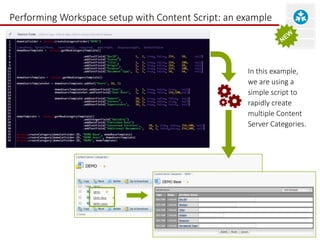
Performing Workspace setup with Content Script: an example 
In this example, 
we are using a 
simple script to 
rapidly create 
multiple Content 
Server Categories.
Support Data Migration from legacy systems 
With new taxonomies, folder structures, and a new permission model in 
place, the next step of a typical adoption project is to migrate contents 
and documents from one ore more legacy repositories into the new 
solution. 
Content Script and its companion Script Console can dramatically reduce the effort 
required to complete these tasks. 
Content Script comes with a set of builtin tools for parsing and manipulating XML, 
CSV and Excel documents, for connecting to different DBMS Providers, for working 
with zip files, FTPs, Cloud services etc.. 
The Script Console (a stand alone runtime environment for Content Script) can be 
used to speed up the migration process or to setup and schedule regular ingestion 
scripts.
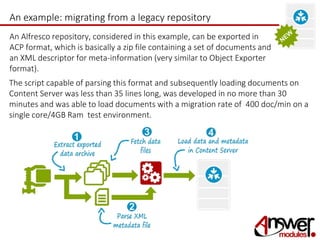
An example: migrating from a legacy repository 
An Alfresco repository, considered in this example, can be exported in 
ACP format, which is basically a zip file containing a set of documents and 
an XML descriptor for meta-information (very similar to Object Exporter 
format). 
The script capable of parsing this format and subsequently loading documents on 
Content Server was less than 35 lines long, was developed in no more than 30 
minutes and was able to load documents with a migration rate of 400 doc/min on a 
single core/4GB Ram test environment.
Rapidly bootstrap functionalities 
Being able to rapidly prototype an environment while defining a new 
EIM strategy can help you to speed up the design and analysis phase. 
Migrating content from legacy systems will provide you raw data to 
work on; nevertheless, you are not going to make substantial progress 
until you will be able to organize the contribution of the knowledge 
experts that are in charge of contents and processes. 
Wouldn't it be great to have the chance to 
get knowledge experts involved from the 
very first stages of the project, 
bootstrapping the applications they need 
and collecting the information they can 
provide as soon as possible, in a way that 
can be later reused, and directly on Content 
Server ?
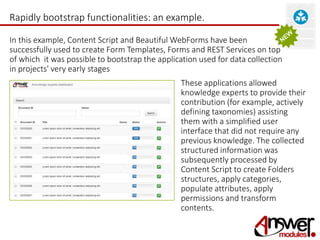
Rapidly bootstrap functionalities: an example. 
In this example, Content Script and Beautiful WebForms have been 
successfully used to create Form Templates, Forms and REST Services on top 
of which it was possible to bootstrap the application used for data collection 
in projects' very early stages 
These applications allowed 
knowledge experts to provide their 
contribution (for example, actively 
defining taxonomies) assisting 
them with a simplified user 
interface that did not require any 
previous knowledge. The collected 
structured information was 
subsequently processed by 
Content Script to create Folders 
structures, apply categories, 
populate attributes, apply 
permissions and transform 
contents.
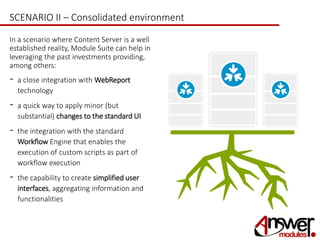
SCENARIO II – Consolidated environment 
In a scenario where Content Server is a well 
established reality, Module Suite can help in 
leveraging the past investments providing, 
among others: 
- a close integration with WebReport 
technology 
- a quick way to apply minor (but 
substantial) changes to the standard UI 
- the integration with the standard 
Workflow Engine that enables the 
execution of custom scripts as part of 
workflow execution 
- the capability to create simplified user 
interfaces, aggregating information and 
functionalities
Content Script Extension for WebReports 
WebReports can not only merely coexist with the Content Script engine, 
but can also take great advantage of it. 
At the present moment, there are three main integration hooks between Content Script 
objects and WebReports objects. 
The first hook allows for WebReports execution from Content Scripts. 
Through a dedicated API, Content Script objects can programmatically retrieve WebReports 
objects, provide configuration parameters and run them. 
The second hook adds Content Script as new kind of datasource for WebReports. 
It enormously simplifies the integration of WebReports with any flavour of external or 
remote data source. For example, webservices and REST services. 
The third hook allows for a tighter interweaving between the two technologies. Thanks to a 
custom subTag, one or more Content Scripts can be executed while rendering the 
WebReports view.
Content Script Extension for Workflows 
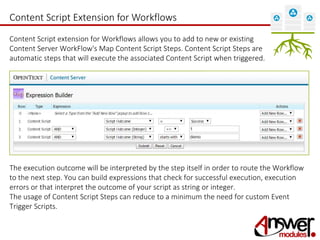
Content Script extension for Workflows allows you to add to new or existing 
Content Server WorkFlow's Map Content Script Steps. Content Script Steps are 
automatic steps that will execute the associated Content Script when triggered. 
The execution outcome will be interpreted by the step itself in order to route the Workflow 
to the next step. You can build expressions that check for successful execution, execution 
errors or that interpret the outcome of your script as string or integer. 
The usage of Content Script Steps can reduce to a minimum the need for custom Event 
Trigger Scripts.
Content Script Extension for Workflows 
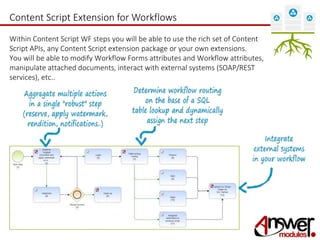
Within Content Script WF steps you will be able to use the rich set of Content 
Script APIs, any Content Script extension package or your own extensions. 
You will be able to modify Workflow Forms attributes and Workflow attributes, 
manipulate attached documents, interact with external systems (SOAP/REST 
services), etc..
Improving the end User eXperience 
Module Suite adopts a Convention over configuration approach in most of 
it's components: the functionalities that enable minor UI enhancements are 
not an exception. 
By simply creating a Content Script in a predefined container of the Content 
Script Volume, you will be able to: 
- Customize the standard function menu, either for a single object or for an 
entire category of objects (subtype) 
- Add new multi-file Content Script backed buttons on the multi-action bar, 
either for a single space or for an entire category of spaces 
Additionally, it will be extremely simple to create customized User Interfaces 
for specific complex actions, capable of blending seamlessly in the standard 
Content Server UI
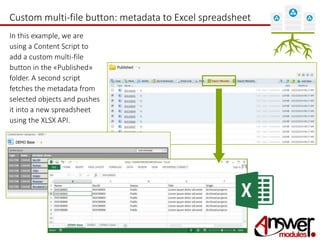
Custom multi-file button: metadata to Excel spreadsheet 
In this example, we are 
using a Content Script to 
add a custom multi-file 
button in the «Published» 
folder. A second script 
fetches the metadata from 
selected objects and pushes 
it into a new spreadsheet 
using the XLSX API.
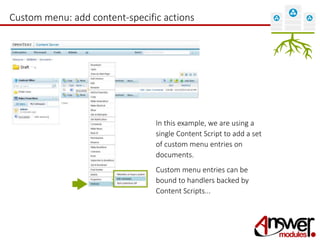
Custom menu: add content-specific actions 
In this example, we are using a 
single Content Script to add a set 
of custom menu entries on 
documents. 
Custom menu entries can be 
bound to handlers backed by 
Content Scripts...
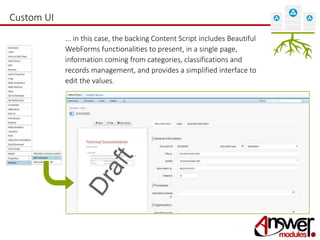
Custom UI 
... in this case, the backing Content Script includes Beautiful 
WebForms functionalities to present, in a single page, 
information coming from categories, classifications and 
records management, and provides a simplified interface to 
edit the values.

Adopting AnswerModules ModuleSuite

  • 1.
    Adopting the AnswerModulesSuite for OpenText Content Server
  • 2.
    About AnswerModules AnswerModulesis a Swiss ICT company. Our mission is to engineer, develop and market innovative value-added solutions for the ECM world. http://www.answermodules.com
  • 3.
    About the ModuleSuite Beautiful WebForms WebForms Script Console Content Server Content Script for WebReports WebReports Content Script Engine Forms AdLib SAP Cache Email Docx Dropbox FTP OpenText Content Server AnswerModules Module Suite AnswerModules Extension packs Content Script for Workflows Jive Connector Remote webforms
  • 4.
    Module Suite AnswerModulesSuite adoption path and advantages: a discussion based on examples from real world projects.
  • 5.
    Overview • ScenarioI - Adopting the Module Suite in case of a new installation / migration • Focus: • - Improve environment setup efficiency • - Quickly bootstrap functionalities • - Support Data Migration from legacy systems • Scenario II - Adopting the Module Suite in a consolidated Content Server environment • Focus: • - Extend the functionalities of existing modules • - WebReports extension • - Workflows extension- Quicklytrap • - Extend the standard UI and improve user experience
  • 6.
    Improve Content Serveradoption The importance of the first project Hitting the ground running with a major project on a new platform is not a trivial task. In a typical adoption scenario, the Module Suite can help in many different ways, such as: - Providing tools to enable early prototyping of final solutions - Simplifying data migration from legacy systems - Helping to recover from incorrect design decisions
  • 7.
    Performing Workspace setupwith Content Script Content Script can be used to setup a workspace environment, giving you the opportunity to codify your design choices in a clear, compact set of repeatable scripts. A typical setup script creates the main folder structure, applicative users groups, assigns permissions, creates categories, associates categories to spaces and prefills attributes values, creates form templates, forms and SQL form tables, classifications, facets and facet trees, columns, associates columns and facets to spaces etc.. The main benefits of this approach are: - Scripts can be modified and re-executed as many times as needed - Creating objects with Content Script is way faster than using standard Content Server UI - Setting up a new environments simply requires to move and re-execute a script
  • 8.
    Does Content Scriptsupport my custom object type ? Content Script Request Handler Omnia Proxy extension allows the execution of any registered Request Handler from within a script. In such way it is possible to programmatically create any kind of object on Content Server (even if the objects haven't got yet a correspondence in the Content Script APIs) or invoke custom module code. docman.rhRequest( String method, //The http method to be used String contentType, // The expected outcome ex. TEXT, HTML, JSON String otcsContext, // The OTCS Context -> $url Map headers, //Additional headers Map params, //Request params Map callbacks,// Callbacks (similar to jQuery) ex: success, error String secureToken-Action)// The action for which secureToken // should be generated
  • 9.
    Proxying Request HandlerCalls Content Script RH Omnia Proxy has been successfully used to set up the complex hierarchies of objects on Content Server (reducing to a fraction the effort usually required for this kind on tasks). For example, CSRHOP can create Classifications taxonomies with articulated structures, Facets and Virtual Folders in a way that enables early prototyping of the solution: this capability has been proven to greatly impact over the perception of final users about the possibilities offered by the Content Server.
  • 10.
    Proxying Request HandlerCalls: an example. In this example, the RH Proxy has been used to automatically setup: … 2. Virtual folders… …and 3. Facets. 1. Classifications…
  • 11.
    Using Content ScriptAPIs for environment setup There are other sorts of objects you could be interested in creating programmatically with Content Script: Categories and Forms Templates are among these. The definition and creation of these milestones objects, even though made very simple by the well designed OTCS GUI, can become quite an expensive activity for which the costs tend to grow with the complexity of the structures and with the iterations you need to go through. The difference between creating Categories and Form Templates with Content Script or using the standard UI is somehow similar to the difference between writing a text page using a Word processor or a typing machine: with the former, whenever you make a mistake or decide to introduce major changes, you can place the cursor in the right place and apply the fix; with the latter, you will probably have to rewrite the whole page. To introduce even the most complex change in your definition, all you will have to do is simply change the script and run it once again.
  • 12.
    Performing Workspace setupwith Content Script: an example In this example, we are using a simple script to rapidly create multiple Content Server Categories.
  • 13.
    Support Data Migrationfrom legacy systems With new taxonomies, folder structures, and a new permission model in place, the next step of a typical adoption project is to migrate contents and documents from one ore more legacy repositories into the new solution. Content Script and its companion Script Console can dramatically reduce the effort required to complete these tasks. Content Script comes with a set of builtin tools for parsing and manipulating XML, CSV and Excel documents, for connecting to different DBMS Providers, for working with zip files, FTPs, Cloud services etc.. The Script Console (a stand alone runtime environment for Content Script) can be used to speed up the migration process or to setup and schedule regular ingestion scripts.
  • 14.
    An example: migratingfrom a legacy repository An Alfresco repository, considered in this example, can be exported in ACP format, which is basically a zip file containing a set of documents and an XML descriptor for meta-information (very similar to Object Exporter format). The script capable of parsing this format and subsequently loading documents on Content Server was less than 35 lines long, was developed in no more than 30 minutes and was able to load documents with a migration rate of 400 doc/min on a single core/4GB Ram test environment.
  • 15.
    Rapidly bootstrap functionalities Being able to rapidly prototype an environment while defining a new EIM strategy can help you to speed up the design and analysis phase. Migrating content from legacy systems will provide you raw data to work on; nevertheless, you are not going to make substantial progress until you will be able to organize the contribution of the knowledge experts that are in charge of contents and processes. Wouldn't it be great to have the chance to get knowledge experts involved from the very first stages of the project, bootstrapping the applications they need and collecting the information they can provide as soon as possible, in a way that can be later reused, and directly on Content Server ?
  • 16.
    Rapidly bootstrap functionalities:an example. In this example, Content Script and Beautiful WebForms have been successfully used to create Form Templates, Forms and REST Services on top of which it was possible to bootstrap the application used for data collection in projects' very early stages These applications allowed knowledge experts to provide their contribution (for example, actively defining taxonomies) assisting them with a simplified user interface that did not require any previous knowledge. The collected structured information was subsequently processed by Content Script to create Folders structures, apply categories, populate attributes, apply permissions and transform contents.
  • 17.
    SCENARIO II –Consolidated environment In a scenario where Content Server is a well established reality, Module Suite can help in leveraging the past investments providing, among others: - a close integration with WebReport technology - a quick way to apply minor (but substantial) changes to the standard UI - the integration with the standard Workflow Engine that enables the execution of custom scripts as part of workflow execution - the capability to create simplified user interfaces, aggregating information and functionalities
  • 18.
    Content Script Extensionfor WebReports WebReports can not only merely coexist with the Content Script engine, but can also take great advantage of it. At the present moment, there are three main integration hooks between Content Script objects and WebReports objects. The first hook allows for WebReports execution from Content Scripts. Through a dedicated API, Content Script objects can programmatically retrieve WebReports objects, provide configuration parameters and run them. The second hook adds Content Script as new kind of datasource for WebReports. It enormously simplifies the integration of WebReports with any flavour of external or remote data source. For example, webservices and REST services. The third hook allows for a tighter interweaving between the two technologies. Thanks to a custom subTag, one or more Content Scripts can be executed while rendering the WebReports view.
  • 19.
    Content Script Extensionfor Workflows Content Script extension for Workflows allows you to add to new or existing Content Server WorkFlow's Map Content Script Steps. Content Script Steps are automatic steps that will execute the associated Content Script when triggered. The execution outcome will be interpreted by the step itself in order to route the Workflow to the next step. You can build expressions that check for successful execution, execution errors or that interpret the outcome of your script as string or integer. The usage of Content Script Steps can reduce to a minimum the need for custom Event Trigger Scripts.
  • 20.
    Content Script Extensionfor Workflows Within Content Script WF steps you will be able to use the rich set of Content Script APIs, any Content Script extension package or your own extensions. You will be able to modify Workflow Forms attributes and Workflow attributes, manipulate attached documents, interact with external systems (SOAP/REST services), etc..
  • 21.
    Improving the endUser eXperience Module Suite adopts a Convention over configuration approach in most of it's components: the functionalities that enable minor UI enhancements are not an exception. By simply creating a Content Script in a predefined container of the Content Script Volume, you will be able to: - Customize the standard function menu, either for a single object or for an entire category of objects (subtype) - Add new multi-file Content Script backed buttons on the multi-action bar, either for a single space or for an entire category of spaces Additionally, it will be extremely simple to create customized User Interfaces for specific complex actions, capable of blending seamlessly in the standard Content Server UI
  • 22.
    Custom multi-file button:metadata to Excel spreadsheet In this example, we are using a Content Script to add a custom multi-file button in the «Published» folder. A second script fetches the metadata from selected objects and pushes it into a new spreadsheet using the XLSX API.
  • 23.
    Custom menu: addcontent-specific actions In this example, we are using a single Content Script to add a set of custom menu entries on documents. Custom menu entries can be bound to handlers backed by Content Scripts...
  • 24.
    Custom UI ...in this case, the backing Content Script includes Beautiful WebForms functionalities to present, in a single page, information coming from categories, classifications and records management, and provides a simplified interface to edit the values.