Zohar Elkayam
CTO, Brillix
Zohar@Brillix.co.il
www.realdbamagic.com
Twitter: @realmgic
Adding Real Time Reporting to Your
Database: Oracle DB In-Memory
Who am I?
• Zohar Elkayam, CTO at Brillix
• Oracle ACE Associate
• DBA, team leader, Oracle University instructor and a senior
consultant for over 17 years
• Editor of ilDBA – Israel Database Community website
• Blogger – www.realdbamagic.com
http://brillix.co.il2
Agenda
• The Customer: Clarizen’s challenges and possible solutions
• Introduction to Database In Memory: Oracle In Memory Option
• How to use DBIM in a nutshell
• What we tested (results)
• Conclusions
http://brillix.co.il3
About the Customer:
Clarizen
http://brillix.co.il4
About Clarizen
• Startup company founded in 2006
• 200 employees with offices in San Mateo, CA, Tel Aviv, and London
• The product is a web based (SaaS) collaborative work
and innovative project management software suite
• A leader in Gartner’s Magic Quadrant for Cloud-based IT PPM
Services
• Over 2,500 customers around the globe and growing
5
http://brillix.co.il
Clarizen’s Challenges
• Enterprise level customers demand on-line reporting
• Service is provided from multiple data centers all around the world
• Strong requirement for robust solution, which can be duplicated
easily
• Amounts of data is ever growing
• Complex design, using all the current Oracle technologies
• Short timeframe to deliver
http://brillix.co.il6
Possible Solutions
• Using current database configuration and setup (do almost
nothing)
• Build a data warehouse environment with new ETL/ELT
processes
• Adding a In Memory Database or Column Store to the
configuration
http://brillix.co.il7
What are In Memory Databases
and Column Stores?
http://brillix.co.il8
What is a In Memory Database?
In memory databases are management systems that keeps the
data in a non-persistent storage (RAM) for faster access
Examples:
• MemcacheDB
• Oracle TimesTen
http://brillix.co.il9
What is a Column Store Database?
• Column Store databases are management systems that uses
data managed in a columnar structure format for better
analysis of single column data (i.e. aggregation). Data is saved
and handled as columns instead of rows.
Examples:
• HP Vertica
• Pivotal (EMC) GreenPlum
• Hadoop HBase
http://brillix.co.il10
How Records are Organized?
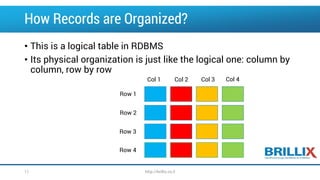
• This is a logical table in RDBMS
• Its physical organization is just like the logical one: column by
column, row by row
Row 1
Row 2
Row 3
Row 4
Col 1 Col 2 Col 3 Col 4
http://brillix.co.il11
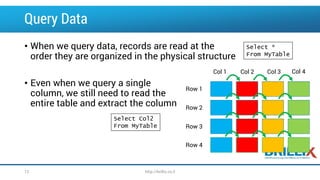
Query Data
• When we query data, records are read at the
order they are organized in the physical structure
• Even when we query a single
column, we still need to read the
entire table and extract the column
Row 1
Row 2
Row 3
Row 4
Col 1 Col 2 Col 3 Col 4
Select Col2
From MyTable
Select *
From MyTable
http://brillix.co.il12
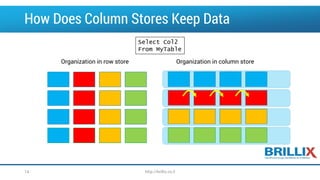
How Does Column Stores Keep Data
Organization in row store Organization in column store
http://brillix.co.il14
Select Col2
From MyTable
Column Store Limitations
• Most Column stores avoid or limit online transactions
• Most Column stores avoid data changes (updates) and
implement it as insert/delete
• Good for large amounts of data, not so much for small amounts
• SQL might be somewhat different from ANSI SQL
http://brillix.co.il15
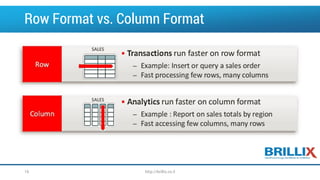
Row Format vs. Column Format
http://brillix.co.il16
Clarizen PoC
Clarizen decided to test a few solutions:
• The baseline with the original query time (do nothing solution)
• A traditional columnar data store: HP Vertica
• Oracle Solution: Oracle 12c with In Memory Option
http://brillix.co.il17
Oracle In Memory Option
http://brillix.co.il18
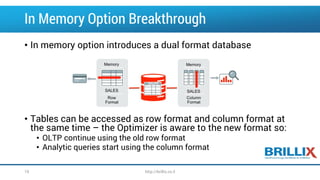
In Memory Option Breakthrough
• In memory option introduces a dual format database
• Tables can be accessed as row format and column format at
the same time – the Optimizer is aware to the new format so:
• OLTP continue using the old row format
• Analytic queries start using the column format
http://brillix.co.il19
Oracle In Memory Option
• Column data is pure in memory format: it’s non-persistent and
require no logging, archiving or backup
• Data changes are simultaneously changed in both formats so
data is consistent and current
• No changes to the application is required – just turn on and
start using
http://brillix.co.il20
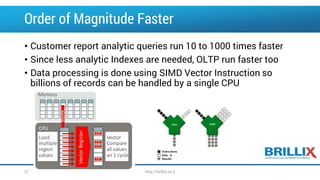
Order of Magnitude Faster
• Customer report analytic queries run 10 to 1000 times faster
• Since less analytic Indexes are needed, OLTP run faster too
• Data processing is done using SIMD Vector Instruction so
billions of records can be handled by a single CPU
http://brillix.co.il21
In Memory Option – Good To Know
• Oracle 12.1.0.2 feature – additional license is required
• It is Not In Memory Database – it’s an accelerator to the
current database
• It is Not Column Store Database – it allows keeping some of
our data in column store which is non-persistent
• It has nothing to do with Times-Ten or Oracle Coherence
http://brillix.co.il22
More Good to Know (cont.)
• In Memory Option requires more memory than the data you plan to
load to the memory: no LRU mechanism
• Compression ratio for columns is better so more data can be stored
in memory
• In memory option does not work on the standby node of Data
Guard: Oracle roadmap does contains this feature in the future.
• Optimization of DBIM execution plan will change in the near future
http://brillix.co.il23
How To Use DBIM?
http://brillix.co.il24
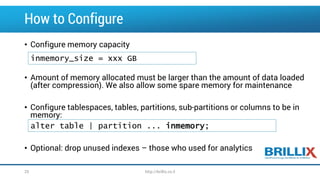
How to Configure
• Configure memory capacity
• Amount of memory allocated must be larger than the amount of data loaded
(after compression). We also allow some spare memory for maintenance
• Configure tablespaces, tables, partitions, sub-partitions or columns to be in
memory:
• Optional: drop unused indexes – those who used for analytics
inmemory_size = xxx GB
alter table | partition ... inmemory;
http://brillix.co.il25
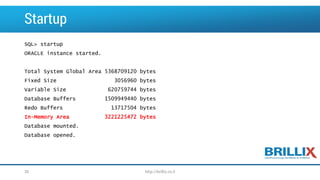
Startup
SQL> startup
ORACLE instance started.
Total System Global Area 5368709120 bytes
Fixed Size 3056960 bytes
Variable Size 620759744 bytes
Database Buffers 1509949440 bytes
Redo Buffers 13717504 bytes
In-Memory Area 3221225472 bytes
Database mounted.
Database opened.
http://brillix.co.il26
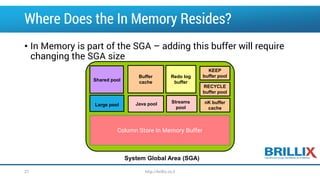
Where Does the In Memory Resides?
• In Memory is part of the SGA – adding this buffer will require
changing the SGA size
Shared pool
Buffer
cache
Redo log
buffer
Streams
pool
Large pool Java pool
System Global Area (SGA)
KEEP
buffer pool
RECYCLE
buffer pool
nK buffer
cache
Column Store In Memory Buffer
http://brillix.co.il27
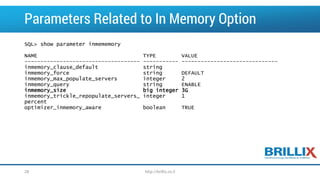
Parameters Related to In Memory Option
SQL> show parameter inmememory
NAME TYPE VALUE
------------------------------------ ----------- ------------------------------
inmemory_clause_default string
inmemory_force string DEFAULT
inmemory_max_populate_servers integer 2
inmemory_query string ENABLE
inmemory_size big integer 3G
inmemory_trickle_repopulate_servers_ integer 1
percent
optimizer_inmemory_aware boolean TRUE
http://brillix.co.il28
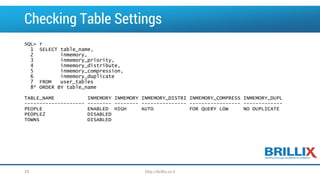
Checking Table Settings
SQL> r
1 SELECT table_name,
2 inmemory,
3 inmemory_priority,
4 inmemory_distribute,
5 inmemory_compression,
6 inmemory_duplicate
7 FROM user_tables
8* ORDER BY table_name
TABLE_NAME INMEMORY INMEMORY INMEMORY_DISTRI INMEMORY_COMPRESS INMEMORY_DUPL
-------------------- -------- -------- --------------- ----------------- -------------
PEOPLE ENABLED HIGH AUTO FOR QUERY LOW NO DUPLICATE
PEOPLE2 DISABLED
TOWNS DISABLED
http://brillix.co.il29
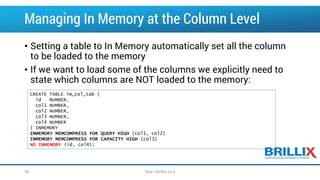
Managing In Memory at the Column Level
• Setting a table to In Memory automatically set all the column
to be loaded to the memory
• If we want to load some of the columns we explicitly need to
state which columns are NOT loaded to the memory:
CREATE TABLE im_col_tab (
id NUMBER,
col1 NUMBER,
col2 NUMBER,
col3 NUMBER,
col4 NUMBER
) INMEMORY
INMEMORY MEMCOMPRESS FOR QUERY HIGH (col1, col2)
INMEMORY MEMCOMPRESS FOR CAPACITY HIGH (col3)
NO INMEMORY (id, col4);
http://brillix.co.il30
Table Types That are Not Supported
• There are tables and column types which are not supported:
• IOT
• Clustered tables
• Objects owned by SYS, SYSTEM or stored in the SYSTEM and
SYSAUX tablespaces
• LONG type columns
• Out of line LOB
http://brillix.co.il31
How Data is Populated in the Memory
• By default, data is being populated in the in memory cache
while first reading the table
• Objects could be configured to be loaded as the instance starts
and prioritized according to the application needs
• There are 5 level of prioritization: None, Low, Medium, High and
Critical. None means no pre-loading, critical means before all
others.
http://brillix.co.il32
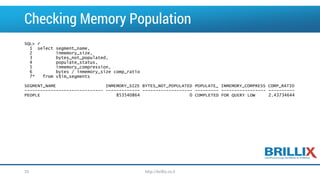
Checking Memory Population
SQL> r
1 select segment_name,
2 inmemory_size,
3 bytes_not_populated,
4 populate_status,
5 inmemory_compression,
6 bytes / inmemory_size comp_ratio
7* from v$im_segments
SEGMENT_NAME INMEMORY_SIZE BYTES_NOT_POPULATED POPULATE_ INMEMORY_COMPRESS COMP_RATIO
------------------------------ ------------- ------------------- --------- ----------------- ----------
PEOPLE 853540864 0 COMPLETED FOR QUERY LOW 2.43734644
http://brillix.co.il33
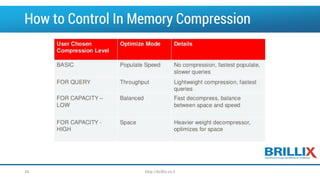
How to Control In Memory Compression
http://brillix.co.il34
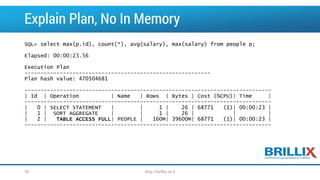
Explain Plan, No In Memory
SQL> select max(p.id), count(*), avg(salary), max(salary) from people p;
Elapsed: 00:00:23.56
Execution Plan
----------------------------------------------------------
Plan hash value: 470504681
-----------------------------------------------------------------------------
| Id | Operation | Name | Rows | Bytes | Cost (%CPU)| Time |
-----------------------------------------------------------------------------
| 0 | SELECT STATEMENT | | 1 | 26 | 68771 (1)| 00:00:23 |
| 1 | SORT AGGREGATE | | 1 | 26 | | |
| 2 | TABLE ACCESS FULL| PEOPLE | 160M| 39600M| 68771 (1)| 00:00:23 |
-----------------------------------------------------------------------------
http://brillix.co.il35
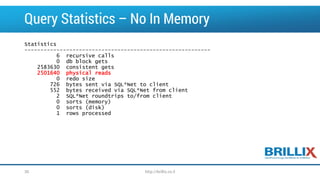
Query Statistics – No In Memory
Statistics
----------------------------------------------------------
6 recursive calls
0 db block gets
2583630 consistent gets
2501640 physical reads
0 redo size
726 bytes sent via SQL*Net to client
552 bytes received via SQL*Net from client
2 SQL*Net roundtrips to/from client
0 sorts (memory)
0 sorts (disk)
1 rows processed
http://brillix.co.il36
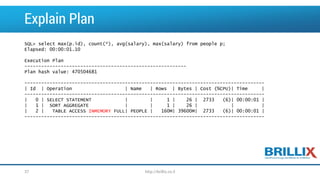
Explain Plan
SQL> select max(p.id), count(*), avg(salary), max(salary) from people p;
Elapsed: 00:00:01.10
Execution Plan
----------------------------------------------------------
Plan hash value: 470504681
--------------------------------------------------------------------------------------
| Id | Operation | Name | Rows | Bytes | Cost (%CPU)| Time |
--------------------------------------------------------------------------------------
| 0 | SELECT STATEMENT | | 1 | 26 | 2733 (6)| 00:00:01 |
| 1 | SORT AGGREGATE | | 1 | 26 | | |
| 2 | TABLE ACCESS INMEMORY FULL| PEOPLE | 160M| 39600M| 2733 (6)| 00:00:01 |
--------------------------------------------------------------------------------------
http://brillix.co.il37
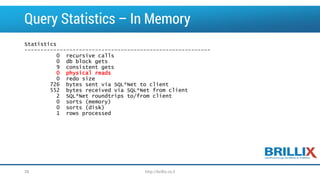
Query Statistics – In Memory
Statistics
----------------------------------------------------------
0 recursive calls
0 db block gets
9 consistent gets
0 physical reads
0 redo size
726 bytes sent via SQL*Net to client
552 bytes received via SQL*Net from client
2 SQL*Net roundtrips to/from client
0 sorts (memory)
0 sorts (disk)
1 rows processed
http://brillix.co.il38
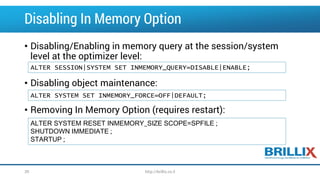
Disabling In Memory Option
• Disabling/Enabling in memory query at the session/system
level at the optimizer level:
• Disabling object maintenance:
• Removing In Memory Option (requires restart):
ALTER SESSION|SYSTEM SET INMEMORY_QUERY=DISABLE|ENABLE;
ALTER SYSTEM SET INMEMORY_FORCE=OFF|DEFAULT;
ALTER SYSTEM RESET INMEMORY_SIZE SCOPE=SPFILE ;
SHUTDOWN IMMEDIATE ;
STARTUP ;
http://brillix.co.il39
PoC Results
http://brillix.co.il40
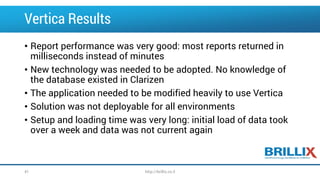
Vertica Results
• Report performance was very good: most reports returned in
milliseconds instead of minutes
• New technology was needed to be adopted. No knowledge of
the database existed in Clarizen
• The application needed to be modified heavily to use Vertica
• Solution was not deployable for all environments
• Setup and loading time was very long: initial load of data took
over a week and data was not current again
http://brillix.co.il41
Oracle In Memory PoC Results
• Performance were slower than Vertica: seconds vs.
milliseconds but it was insignificant for the end user
• There was no need to change the application code
• No new tools or special deployments
• Data is always current and up to date
• Requires upgrading to Oracle 12c
• Very new technology (tested on the first MONTH after GA)
http://brillix.co.il42
Customer’s Decision
• The Oracle 12c In Memory Option was the preferred solution
• A two database setup was planned (11g and 12c) with Golden Gate
synchronization
• The solution was deployed in QA environment and tested for
production but delayed due to Golden Gate synchronization issues
• Since the application is yet to be ready for Oracle 12c, we wait for
the developers approval in order to utilize in production
http://brillix.co.il43
What Did We Not Talk About?
• Working with DBIM with RAC, Engineered systems and in
multitenant environments
• In depth In memory storage indexes and In memory joins,
execution plans
• Read consistency, IMCU staleness, and trickle repopulate
• Choosing the right tables and columns for IMDB
http://brillix.co.il44
Conclusion
• The DBIM is a very interesting feature which can make analytic
and reporting run much faster
• Working with in memory option requires understanding of the
database model and relevant queries – memory is not infinite
• No significant bugs found yet but it’s very early to tell
http://brillix.co.il45
Q&A
http://brillix.co.il46
Thank You
Zohar Elkayam
twitter: @realmgic
Zohar@Brillix.co.il
www.realdbamagic.com
http://brillix.co.il47

Adding real time reporting to your database oracle db in memory

  • 1.
    Zohar Elkayam CTO, Brillix Zohar@Brillix.co.il www.realdbamagic.com Twitter:@realmgic Adding Real Time Reporting to Your Database: Oracle DB In-Memory
  • 2.
    Who am I? •Zohar Elkayam, CTO at Brillix • Oracle ACE Associate • DBA, team leader, Oracle University instructor and a senior consultant for over 17 years • Editor of ilDBA – Israel Database Community website • Blogger – www.realdbamagic.com http://brillix.co.il2
  • 3.
    Agenda • The Customer:Clarizen’s challenges and possible solutions • Introduction to Database In Memory: Oracle In Memory Option • How to use DBIM in a nutshell • What we tested (results) • Conclusions http://brillix.co.il3
  • 4.
  • 5.
    About Clarizen • Startupcompany founded in 2006 • 200 employees with offices in San Mateo, CA, Tel Aviv, and London • The product is a web based (SaaS) collaborative work and innovative project management software suite • A leader in Gartner’s Magic Quadrant for Cloud-based IT PPM Services • Over 2,500 customers around the globe and growing 5 http://brillix.co.il
  • 6.
    Clarizen’s Challenges • Enterpriselevel customers demand on-line reporting • Service is provided from multiple data centers all around the world • Strong requirement for robust solution, which can be duplicated easily • Amounts of data is ever growing • Complex design, using all the current Oracle technologies • Short timeframe to deliver http://brillix.co.il6
  • 7.
    Possible Solutions • Usingcurrent database configuration and setup (do almost nothing) • Build a data warehouse environment with new ETL/ELT processes • Adding a In Memory Database or Column Store to the configuration http://brillix.co.il7
  • 8.
    What are InMemory Databases and Column Stores? http://brillix.co.il8
  • 9.
    What is aIn Memory Database? In memory databases are management systems that keeps the data in a non-persistent storage (RAM) for faster access Examples: • MemcacheDB • Oracle TimesTen http://brillix.co.il9
  • 10.
    What is aColumn Store Database? • Column Store databases are management systems that uses data managed in a columnar structure format for better analysis of single column data (i.e. aggregation). Data is saved and handled as columns instead of rows. Examples: • HP Vertica • Pivotal (EMC) GreenPlum • Hadoop HBase http://brillix.co.il10
  • 11.
    How Records areOrganized? • This is a logical table in RDBMS • Its physical organization is just like the logical one: column by column, row by row Row 1 Row 2 Row 3 Row 4 Col 1 Col 2 Col 3 Col 4 http://brillix.co.il11
  • 12.
    Query Data • Whenwe query data, records are read at the order they are organized in the physical structure • Even when we query a single column, we still need to read the entire table and extract the column Row 1 Row 2 Row 3 Row 4 Col 1 Col 2 Col 3 Col 4 Select Col2 From MyTable Select * From MyTable http://brillix.co.il12
  • 13.
    How Does ColumnStores Keep Data Organization in row store Organization in column store http://brillix.co.il14 Select Col2 From MyTable
  • 14.
    Column Store Limitations •Most Column stores avoid or limit online transactions • Most Column stores avoid data changes (updates) and implement it as insert/delete • Good for large amounts of data, not so much for small amounts • SQL might be somewhat different from ANSI SQL http://brillix.co.il15
  • 15.
    Row Format vs.Column Format http://brillix.co.il16
  • 16.
    Clarizen PoC Clarizen decidedto test a few solutions: • The baseline with the original query time (do nothing solution) • A traditional columnar data store: HP Vertica • Oracle Solution: Oracle 12c with In Memory Option http://brillix.co.il17
  • 17.
    Oracle In MemoryOption http://brillix.co.il18
  • 18.
    In Memory OptionBreakthrough • In memory option introduces a dual format database • Tables can be accessed as row format and column format at the same time – the Optimizer is aware to the new format so: • OLTP continue using the old row format • Analytic queries start using the column format http://brillix.co.il19
  • 19.
    Oracle In MemoryOption • Column data is pure in memory format: it’s non-persistent and require no logging, archiving or backup • Data changes are simultaneously changed in both formats so data is consistent and current • No changes to the application is required – just turn on and start using http://brillix.co.il20
  • 20.
    Order of MagnitudeFaster • Customer report analytic queries run 10 to 1000 times faster • Since less analytic Indexes are needed, OLTP run faster too • Data processing is done using SIMD Vector Instruction so billions of records can be handled by a single CPU http://brillix.co.il21
  • 21.
    In Memory Option– Good To Know • Oracle 12.1.0.2 feature – additional license is required • It is Not In Memory Database – it’s an accelerator to the current database • It is Not Column Store Database – it allows keeping some of our data in column store which is non-persistent • It has nothing to do with Times-Ten or Oracle Coherence http://brillix.co.il22
  • 22.
    More Good toKnow (cont.) • In Memory Option requires more memory than the data you plan to load to the memory: no LRU mechanism • Compression ratio for columns is better so more data can be stored in memory • In memory option does not work on the standby node of Data Guard: Oracle roadmap does contains this feature in the future. • Optimization of DBIM execution plan will change in the near future http://brillix.co.il23
  • 23.
    How To UseDBIM? http://brillix.co.il24
  • 24.
    How to Configure •Configure memory capacity • Amount of memory allocated must be larger than the amount of data loaded (after compression). We also allow some spare memory for maintenance • Configure tablespaces, tables, partitions, sub-partitions or columns to be in memory: • Optional: drop unused indexes – those who used for analytics inmemory_size = xxx GB alter table | partition ... inmemory; http://brillix.co.il25
  • 25.
    Startup SQL> startup ORACLE instancestarted. Total System Global Area 5368709120 bytes Fixed Size 3056960 bytes Variable Size 620759744 bytes Database Buffers 1509949440 bytes Redo Buffers 13717504 bytes In-Memory Area 3221225472 bytes Database mounted. Database opened. http://brillix.co.il26
  • 26.
    Where Does theIn Memory Resides? • In Memory is part of the SGA – adding this buffer will require changing the SGA size Shared pool Buffer cache Redo log buffer Streams pool Large pool Java pool System Global Area (SGA) KEEP buffer pool RECYCLE buffer pool nK buffer cache Column Store In Memory Buffer http://brillix.co.il27
  • 27.
    Parameters Related toIn Memory Option SQL> show parameter inmememory NAME TYPE VALUE ------------------------------------ ----------- ------------------------------ inmemory_clause_default string inmemory_force string DEFAULT inmemory_max_populate_servers integer 2 inmemory_query string ENABLE inmemory_size big integer 3G inmemory_trickle_repopulate_servers_ integer 1 percent optimizer_inmemory_aware boolean TRUE http://brillix.co.il28
  • 28.
    Checking Table Settings SQL>r 1 SELECT table_name, 2 inmemory, 3 inmemory_priority, 4 inmemory_distribute, 5 inmemory_compression, 6 inmemory_duplicate 7 FROM user_tables 8* ORDER BY table_name TABLE_NAME INMEMORY INMEMORY INMEMORY_DISTRI INMEMORY_COMPRESS INMEMORY_DUPL -------------------- -------- -------- --------------- ----------------- ------------- PEOPLE ENABLED HIGH AUTO FOR QUERY LOW NO DUPLICATE PEOPLE2 DISABLED TOWNS DISABLED http://brillix.co.il29
  • 29.
    Managing In Memoryat the Column Level • Setting a table to In Memory automatically set all the column to be loaded to the memory • If we want to load some of the columns we explicitly need to state which columns are NOT loaded to the memory: CREATE TABLE im_col_tab ( id NUMBER, col1 NUMBER, col2 NUMBER, col3 NUMBER, col4 NUMBER ) INMEMORY INMEMORY MEMCOMPRESS FOR QUERY HIGH (col1, col2) INMEMORY MEMCOMPRESS FOR CAPACITY HIGH (col3) NO INMEMORY (id, col4); http://brillix.co.il30
  • 30.
    Table Types Thatare Not Supported • There are tables and column types which are not supported: • IOT • Clustered tables • Objects owned by SYS, SYSTEM or stored in the SYSTEM and SYSAUX tablespaces • LONG type columns • Out of line LOB http://brillix.co.il31
  • 31.
    How Data isPopulated in the Memory • By default, data is being populated in the in memory cache while first reading the table • Objects could be configured to be loaded as the instance starts and prioritized according to the application needs • There are 5 level of prioritization: None, Low, Medium, High and Critical. None means no pre-loading, critical means before all others. http://brillix.co.il32
  • 32.
    Checking Memory Population SQL>r 1 select segment_name, 2 inmemory_size, 3 bytes_not_populated, 4 populate_status, 5 inmemory_compression, 6 bytes / inmemory_size comp_ratio 7* from v$im_segments SEGMENT_NAME INMEMORY_SIZE BYTES_NOT_POPULATED POPULATE_ INMEMORY_COMPRESS COMP_RATIO ------------------------------ ------------- ------------------- --------- ----------------- ---------- PEOPLE 853540864 0 COMPLETED FOR QUERY LOW 2.43734644 http://brillix.co.il33
  • 33.
    How to ControlIn Memory Compression http://brillix.co.il34
  • 34.
    Explain Plan, NoIn Memory SQL> select max(p.id), count(*), avg(salary), max(salary) from people p; Elapsed: 00:00:23.56 Execution Plan ---------------------------------------------------------- Plan hash value: 470504681 ----------------------------------------------------------------------------- | Id | Operation | Name | Rows | Bytes | Cost (%CPU)| Time | ----------------------------------------------------------------------------- | 0 | SELECT STATEMENT | | 1 | 26 | 68771 (1)| 00:00:23 | | 1 | SORT AGGREGATE | | 1 | 26 | | | | 2 | TABLE ACCESS FULL| PEOPLE | 160M| 39600M| 68771 (1)| 00:00:23 | ----------------------------------------------------------------------------- http://brillix.co.il35
  • 35.
    Query Statistics –No In Memory Statistics ---------------------------------------------------------- 6 recursive calls 0 db block gets 2583630 consistent gets 2501640 physical reads 0 redo size 726 bytes sent via SQL*Net to client 552 bytes received via SQL*Net from client 2 SQL*Net roundtrips to/from client 0 sorts (memory) 0 sorts (disk) 1 rows processed http://brillix.co.il36
  • 36.
    Explain Plan SQL> selectmax(p.id), count(*), avg(salary), max(salary) from people p; Elapsed: 00:00:01.10 Execution Plan ---------------------------------------------------------- Plan hash value: 470504681 -------------------------------------------------------------------------------------- | Id | Operation | Name | Rows | Bytes | Cost (%CPU)| Time | -------------------------------------------------------------------------------------- | 0 | SELECT STATEMENT | | 1 | 26 | 2733 (6)| 00:00:01 | | 1 | SORT AGGREGATE | | 1 | 26 | | | | 2 | TABLE ACCESS INMEMORY FULL| PEOPLE | 160M| 39600M| 2733 (6)| 00:00:01 | -------------------------------------------------------------------------------------- http://brillix.co.il37
  • 37.
    Query Statistics –In Memory Statistics ---------------------------------------------------------- 0 recursive calls 0 db block gets 9 consistent gets 0 physical reads 0 redo size 726 bytes sent via SQL*Net to client 552 bytes received via SQL*Net from client 2 SQL*Net roundtrips to/from client 0 sorts (memory) 0 sorts (disk) 1 rows processed http://brillix.co.il38
  • 38.
    Disabling In MemoryOption • Disabling/Enabling in memory query at the session/system level at the optimizer level: • Disabling object maintenance: • Removing In Memory Option (requires restart): ALTER SESSION|SYSTEM SET INMEMORY_QUERY=DISABLE|ENABLE; ALTER SYSTEM SET INMEMORY_FORCE=OFF|DEFAULT; ALTER SYSTEM RESET INMEMORY_SIZE SCOPE=SPFILE ; SHUTDOWN IMMEDIATE ; STARTUP ; http://brillix.co.il39
  • 39.
  • 40.
    Vertica Results • Reportperformance was very good: most reports returned in milliseconds instead of minutes • New technology was needed to be adopted. No knowledge of the database existed in Clarizen • The application needed to be modified heavily to use Vertica • Solution was not deployable for all environments • Setup and loading time was very long: initial load of data took over a week and data was not current again http://brillix.co.il41
  • 41.
    Oracle In MemoryPoC Results • Performance were slower than Vertica: seconds vs. milliseconds but it was insignificant for the end user • There was no need to change the application code • No new tools or special deployments • Data is always current and up to date • Requires upgrading to Oracle 12c • Very new technology (tested on the first MONTH after GA) http://brillix.co.il42
  • 42.
    Customer’s Decision • TheOracle 12c In Memory Option was the preferred solution • A two database setup was planned (11g and 12c) with Golden Gate synchronization • The solution was deployed in QA environment and tested for production but delayed due to Golden Gate synchronization issues • Since the application is yet to be ready for Oracle 12c, we wait for the developers approval in order to utilize in production http://brillix.co.il43
  • 43.
    What Did WeNot Talk About? • Working with DBIM with RAC, Engineered systems and in multitenant environments • In depth In memory storage indexes and In memory joins, execution plans • Read consistency, IMCU staleness, and trickle repopulate • Choosing the right tables and columns for IMDB http://brillix.co.il44
  • 44.
    Conclusion • The DBIMis a very interesting feature which can make analytic and reporting run much faster • Working with in memory option requires understanding of the database model and relevant queries – memory is not infinite • No significant bugs found yet but it’s very early to tell http://brillix.co.il45
  • 45.
  • 46.
    Thank You Zohar Elkayam twitter:@realmgic Zohar@Brillix.co.il www.realdbamagic.com http://brillix.co.il47