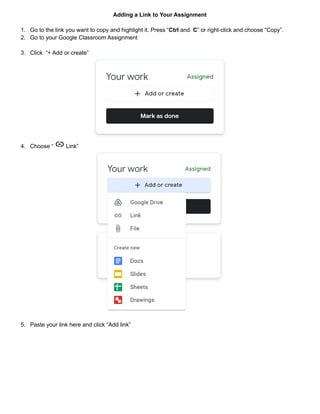
To add a link to a Google Classroom assignment, copy the desired link, go to the assignment in Classroom, click "Add or create" and select "Link" to paste the copied link and add it to the assignment before submitting.
Adding a Linkto Your Assignment
1. Go to the link you want to copy and highlight it. Press “Ctrl and C” or right-click and choose “Copy”.
2. Go to your Google Classroom Assignment
3. Click “+ Add or create”
4. Choose “ Link”
5. Paste your link here and click “Add link”