1
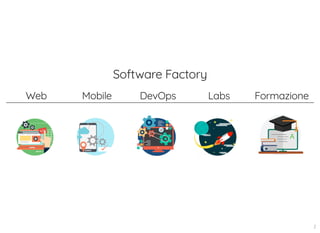
Software Factory
Web Mobile DevOps Labs Formazione
2
google cloud platform
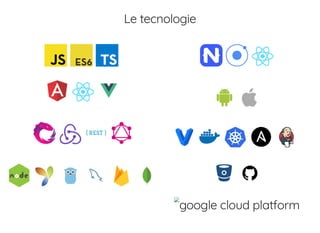
Le tecnologie
google cloud platform
redis
3
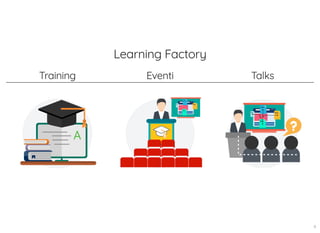
Learning Factory
Training Eventi Talks
4
Chi Sono?
Developer per scelta e per passione,
amante di nerdaggini di ogni tipo
ed amante della condivisione del sapere!
5 . 1
TypeScript
oh no, un altro xyzScript!
6
TypeScript
Javascript che scala o semplicemente... JS con i types!
7
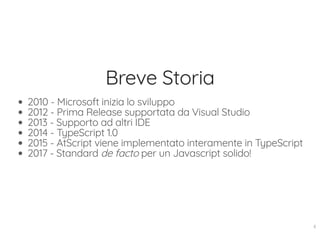
Breve Storia
2010 - Microsoft inizia lo sviluppo
2012 - Prima Release supportata da Visual Studio
2013 - Supporto ad altri IDE
2014 - TypeScript 1.0
2015 - AtScript viene implementato interamente in TypeScript
2017 - Standard de facto per un Javascript solido!
8
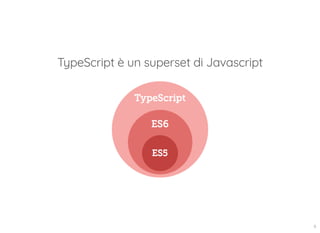
TypeScript è un superset di Javascript
9
Ricordiamo che...
...per usare ES6 (e successivi) è richiesto l'uso di
transpiler/compiler:
Babel, Traceur, Typescript compiler, ...
Tabella di compatibilità
10
Transpiler
TypeScript
https://www.typescriptlang.org/
Babel
https://babeljs.io/
11
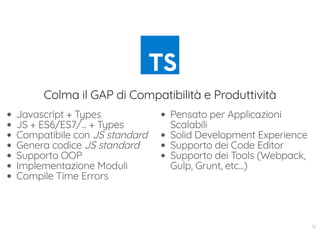
Javascript + Types
JS + ES6/ES7/... + Types
Compatibile con JS standard
Genera codice JS standard
Supporto OOP
Implementazione Moduli
Compile Time Errors
Pensato per Applicazioni
Scalabili
Solid Development Experience
Supporto dei Code Editor
Supporto dei Tools (Webpack,
Gulp, Grunt, etc...)
Colma il GAP di Compatibilità e Produttività
12
...e se lo dice Anders Hejlsberg...
01:00:36
13
Strumenti di Lavoro Fondamentali
npm
tsc
editor/IDE
oppure usare per rapide proveTS Playground
14
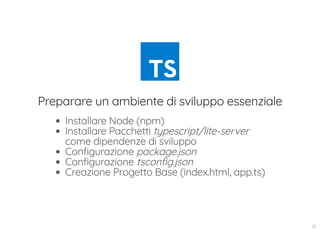
Preparare un ambiente di sviluppo essenziale
Installare Node (npm)
Installare Pacchetti typescript/lite-server
come dipendenze di sviluppo
Configurazione package.json
Configurazione tsconfig.json
Creazione Progetto Base (index.html, app.ts)
15
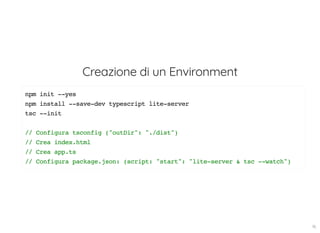
Creazione di un Environment
npm init --yes
npm install --save-dev typescript lite-server
tsc --init
// Configura tsconfig ("outDir": "./dist")
// Crea index.html
// Crea app.ts
// Configura package.json: (script: "start": "lite-server & tsc --watch")
16
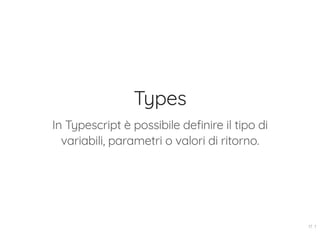
Types
In Typescript è possibile definire il tipo di
variabili, parametri o valori di ritorno.
17 . 1
Staticamente tipizzati vs Dinamicamente tipizzati
“Quando io vedo un uccello che cammina come
un’anatra, nuota come un’anatra e starnazza come
un’anatra, io chiamo quell’uccello 'anatra'”.
Whitcomb Riley
17 . 2
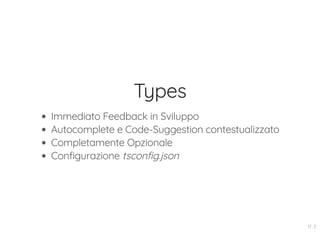
Types
Immediato Feedback in Sviluppo
Autocomplete e Code-Suggestion contestualizzato
Completamente Opzionale
Configurazione tsconfig.json
17 . 3
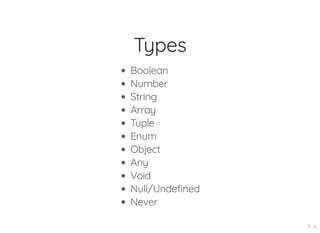
Types
Boolean
Number
String
Array
Tuple
Enum
Object
Any
Void
Null/Undefined
Never
17 . 4
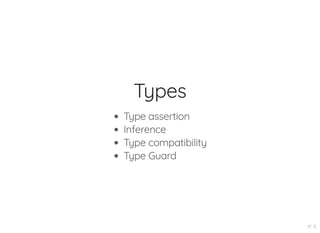
Types
Type assertion
Inference
Type compatibility
Type Guard
17 . 5
Type definition
let myName = "Francesco";
let otherName: string = "Aurelio";
let num: number = 2;
//questo non verrà compilato!
num = "test";
let arr: Array<number> = [1, 2, 3, 4];
let arr2: string[] = ["one", "two"];
17 . 6
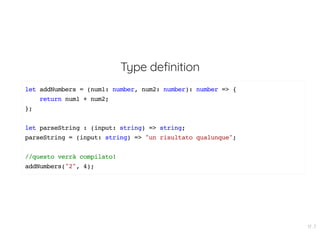
Type definition
let addNumbers = (num1: number, num2: number): number => {
return num1 + num2;
};
let parseString : (input: string) => string;
parseString = (input: string) => "un risultato qualunque";
//questo verrà compilato!
addNumbers("2", 4);
17 . 7
Type definition
//Tuples
let tuple : [string, number];
tuple = ["devil", 666];
tuple[0];
tuple[1];
//enums
enum Color {Red, Green, Blue};
let c: Color = Color.Red;
if (c === Color.Red) {
//farai qualcosa qui...
}
17 . 8
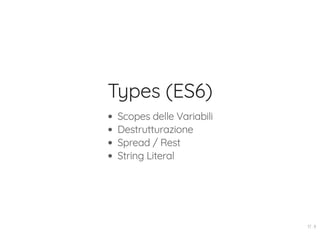
Types (ES6)
Scopes delle Variabili
Destrutturazione
Spread / Rest
String Literal
17 . 9
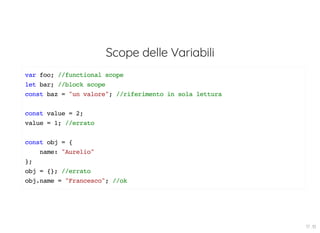
Scope delle Variabili
var foo; //functional scope
let bar; //block scope
const baz = "un valore"; //riferimento in sola lettura
const value = 2;
value = 1; //errato
const obj = {
name: "Aurelio"
};
obj = {}; //errato
obj.name = "Francesco"; //ok
17 . 10
Destrutturazione
//Arrays e Tuples
let [firsts, second, third] = [1, 2, 3];
console.log(firsts); // 1
console.log(second); // 2
console.log(third); // 3
//objects
let {a, b} = { a: "test1", b: "test2" };
let { a: betterName1, b: betterName2 } = { a: "test1", b: "test2" };
//Spread / Rest
let arr: number[] = [1, 2];
let concat = [...arr, 3, 4];
let [a, b, ...rest] = concat;
17 . 11
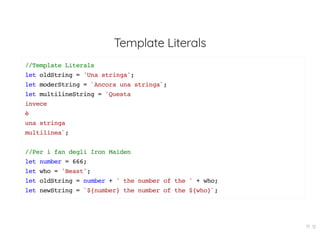
Template Literals
//Template Literals
let oldString = 'Una stringa';
let moderString = `Ancora una stringa`;
let multilineString = `Questa
invece
è
una stringa
multilinea`;
//Per i fan degli Iron Maiden
let number = 666;
let who = 'Beast';
let oldString = number + ' the number of the ' + who;
let newString = `${number} the number of the ${who}`;
17 . 12
Definizione di Funzioni
let fun = (param: number): string => {
return "string";
};
//parametri opzionali
let fun = (arg1: number, arg2?: number) => {
//...
}
//rest
let fun2 = (arg1: number, ...restOfArgs: number[]) => {
//...
};
//valore di default
let fun2 = (arg1 = 0) => {
//
17 . 13
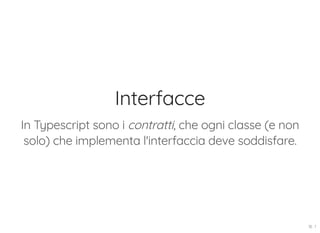
Interfacce
In Typescript sono i contratti, che ogni classe (e non
solo) che implementa l'interfaccia deve soddisfare.
18 . 1
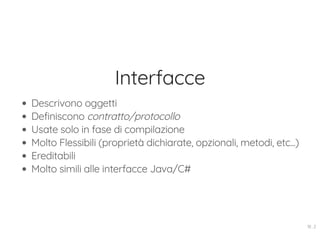
Interfacce
Descrivono oggetti
Definiscono contratto/protocollo
Usate solo in fase di compilazione
Molto Flessibili (proprietà dichiarate, opzionali, metodi, etc...)
Ereditabili
Molto simili alle interfacce Java/C#
18 . 2
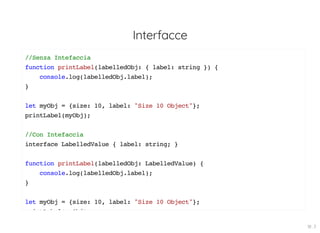
Interfacce
//Senza Intefaccia
function printLabel(labelledObj: { label: string }) {
console.log(labelledObj.label);
}
let myObj = {size: 10, label: "Size 10 Object"};
printLabel(myObj);
//Con Intefaccia
interface LabelledValue { label: string; }
function printLabel(labelledObj: LabelledValue) {
console.log(labelledObj.label);
}
let myObj = {size: 10, label: "Size 10 Object"};
i tL b l( Obj)
18 . 3
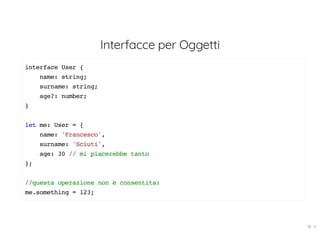
Interfacce per Oggetti
interface User {
name: string;
surname: string;
age?: number;
}
let me: User = {
name: 'Francesco',
surname: 'Sciuti',
age: 30 // mi piacerebbe tanto
};
//questa operazione non è consentita:
me.something = 123;
18 . 4
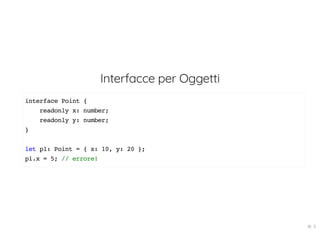
Interfacce per Oggetti
interface Point {
readonly x: number;
readonly y: number;
}
let p1: Point = { x: 10, y: 20 };
p1.x = 5; // errore!
18 . 5
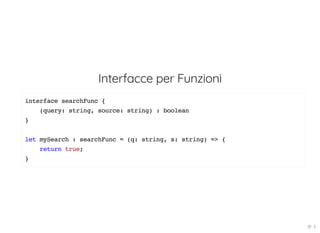
Interfacce per Funzioni
interface searchFunc {
(query: string, source: string) : boolean
}
let mySearch : searchFunc = (q: string, s: string) => {
return true;
}
18 . 6
Classi
Se ES6 introduce le classi in JS,
TypeScript le rende migliori!
19 . 1
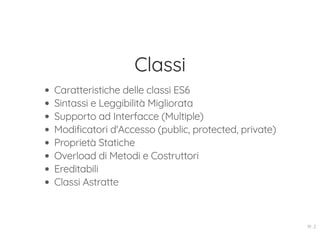
Classi
Caratteristiche delle classi ES6
Sintassi e Leggibilità Migliorata
Supporto ad Interfacce (Multiple)
Modificatori d'Accesso (public, protected, private)
Proprietà Statiche
Overload di Metodi e Costruttori
Ereditabili
Classi Astratte
19 . 2
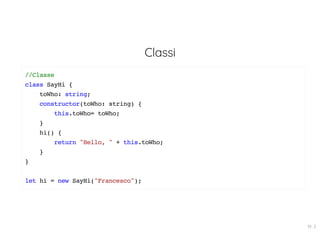
Classi
//Classe
class SayHi {
toWho: string;
constructor(toWho: string) {
this.toWho= toWho;
}
hi() {
return "Hello, " + this.toWho;
}
}
let hi = new SayHi("Francesco");
19 . 3
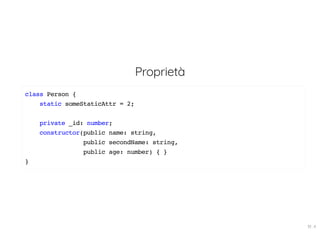
Proprietà
class Person {
static someStaticAttr = 2;
private _id: number;
constructor(public name: string,
public secondName: string,
public age: number) { }
}
19 . 4
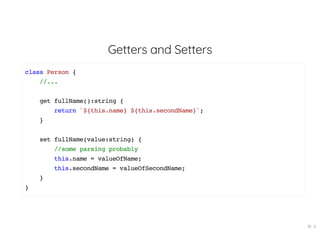
Getters and Setters
class Person {
//...
get fullName():string {
return `${this.name} ${this.secondName}`;
}
set fullName(value:string) {
//some parsing probably
this.name = valueOfName;
this.secondName = valueOfSecondName;
}
}
19 . 5
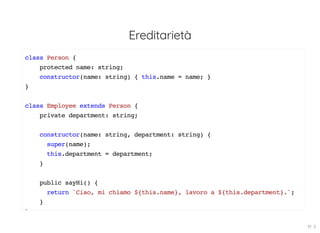
Ereditarietà
class Person {
protected name: string;
constructor(name: string) { this.name = name; }
}
class Employee extends Person {
private department: string;
constructor(name: string, department: string) {
super(name);
this.department = department;
}
public sayHi() {
return `Ciao, mi chiamo ${this.name}, lavoro a ${this.department}.`;
}
}
19 . 6
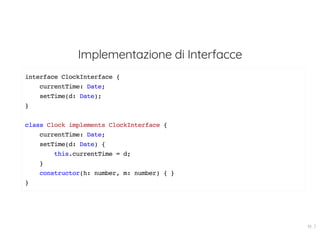
Implementazione di Interfacce
interface ClockInterface {
currentTime: Date;
setTime(d: Date);
}
class Clock implements ClockInterface {
currentTime: Date;
setTime(d: Date) {
this.currentTime = d;
}
constructor(h: number, m: number) { }
}
19 . 7
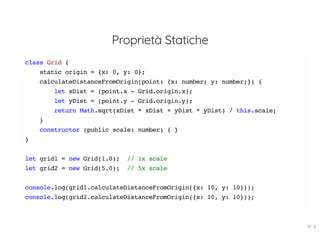
Proprietà Statiche
class Grid {
static origin = {x: 0, y: 0};
calculateDistanceFromOrigin(point: {x: number; y: number;}) {
let xDist = (point.x - Grid.origin.x);
let yDist = (point.y - Grid.origin.y);
return Math.sqrt(xDist * xDist + yDist * yDist) / this.scale;
}
constructor (public scale: number) { }
}
let grid1 = new Grid(1.0); // 1x scale
let grid2 = new Grid(5.0); // 5x scale
console.log(grid1.calculateDistanceFromOrigin({x: 10, y: 10}));
console.log(grid2.calculateDistanceFromOrigin({x: 10, y: 10}));
19 . 8
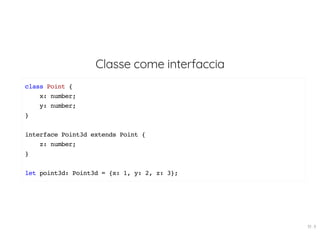
Classe come interfaccia
class Point {
x: number;
y: number;
}
interface Point3d extends Point {
z: number;
}
let point3d: Point3d = {x: 1, y: 2, z: 3};
19 . 9
Modules
TypeScript sfrutta un sistema modulare basato sui
moduli di ES6!
20 . 1
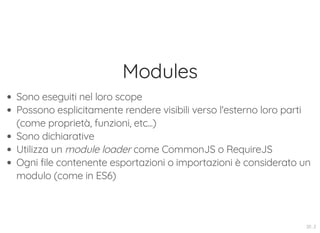
Modules
Sono eseguiti nel loro scope
Possono esplicitamente rendere visibili verso l'esterno loro parti
(come proprietà, funzioni, etc...)
Sono dichiarative
Utilizza un module loader come CommonJS o RequireJS
Ogni file contenente esportazioni o importazioni è considerato un
modulo (come in ES6)
20 . 2
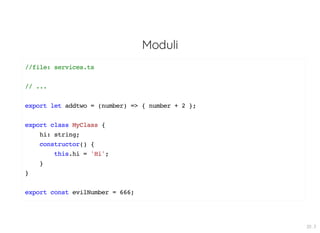
Moduli
//file: services.ts
// ...
export let addtwo = (number) => { number + 2 };
export class MyClass {
hi: string;
constructor() {
this.hi = 'Hi';
}
}
export const evilNumber = 666;
20 . 3
Moduli
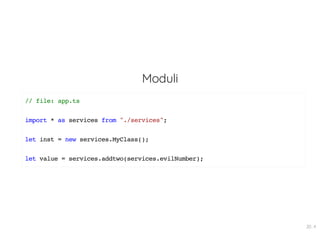
// file: app.ts
import * as services from "./services";
let inst = new services.MyClass();
let value = services.addtwo(services.evilNumber);
20 . 4
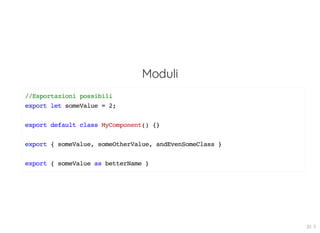
Moduli
//Esportazioni possibili
export let someValue = 2;
export default class MyComponent() {}
export { someValue, someOtherValue, andEvenSomeClass }
export { someValue as betterName }
20 . 5
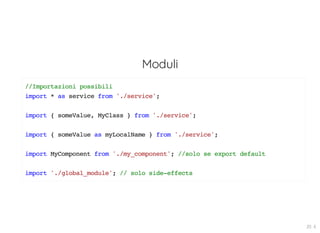
Moduli
//Importazioni possibili
import * as service from './service';
import { someValue, MyClass } from './service';
import { someValue as myLocalName } from './service';
import MyComponent from './my_component'; //solo se export default
import './global_module'; // solo side-effects
20 . 6
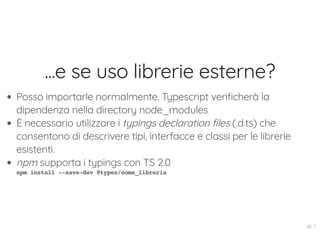
...e se uso librerie esterne?
Posso importarle normalmente. Typescript verificherà la
dipendenza nella directory node_modules
È necessario utilizzare i typings declaration files (.d.ts) che
consentono di descrivere tipi, interfacce e classi per le librerie
esistenti.
npm supporta i typings con TS 2.0
npm install --save-dev @types/nome_libreria
20 . 7
Moduli
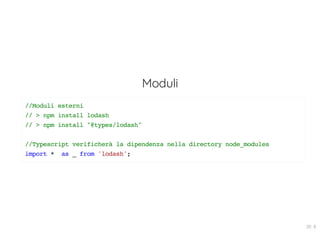
//Moduli esterni
// > npm install lodash
// > npm install "@types/lodash"
//Typescript verificherà la dipendenza nella directory node_modules
import * as _ from 'lodash';
20 . 8
Generics
I componenti riutilizzabili grazie alla varietà di tipi con i
quali possono lavorare!
21 . 1
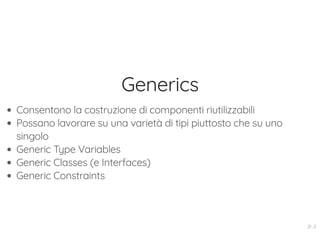
Generics
Consentono la costruzione di componenti riutilizzabili
Possano lavorare su una varietà di tipi piuttosto che su uno
singolo
Generic Type Variables
Generic Classes (e Interfaces)
Generic Constraints
21 . 2
Generics
//Funzione con un tipo definito
let pickFirst = (list: number[]): number => {
return list[0];
};
//Funzione con tipo any
let pickFirst = (list: any[]): any => {
return list[0];
};
21 . 3
Generics
//Funzione con generics
let pickFirst = <T>(list: T[]): T => {
return list[0];
};
// oppure
function pickFirst<T>(list: T[]): T {
return list[0];
}
let res1: string = pickFirst<string>(['1', '2', '3']);
let res2: number = pickFirst<number>([1, 2, 3, 4]);
let res3: Date = pickFirst<Date>([
new Date(), new Date(), new Date()
]);
21 . 4
Generics
class Movie { title: string; }
function getAsync<T>(url: string): Promise<T[]> {
return fetch(url)
.then((response: Response) => response.json());
}
getAsync<Movie>("/movies")
.then(movies => {
movies.forEach(movie => {
console.log(movie.title);
});
});
21 . 5
Generics
class Queue<T> {
private data = [];
push = (item: T) => this.data.push(item);
pop = (): T => this.data.shift();
}
const queue = new Queue<number>();
queue.push(0);
queue.push("1"); // ERROR : non pushare una stringa ma solo un tipo numero!
21 . 6
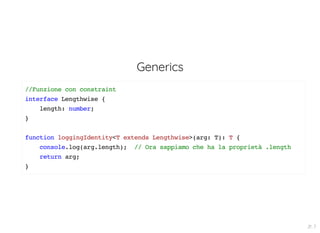
Generics
//Funzione con constraint
interface Lengthwise {
length: number;
}
function loggingIdentity<T extends Lengthwise>(arg: T): T {
console.log(arg.length); // Ora sappiamo che ha la proprietà .length
return arg;
}
21 . 7
Generics
// keyof Constraint
function getProperty<T, K extends keyof T> (obj: T, key: K) {
return obj[key];
}
let x = { a: 1, b: 2, c: 3, d: 4 };
getProperty(x, "a"); // Ok
getProperty(x, "m"); // error: l'argomento di tipo 'm' non è assegnabile!
21 . 8
Generics
//Interfaccia
interface Container<T> {
value: T
};
let cont: Container<string> = {
value: 'test'
};
//Classe
class GenericCollection<T> {
private store: T[];
add(value: T): void { this.store.push(value); }
get(index: number): T { return this.store[index]; }
}
21 . 9
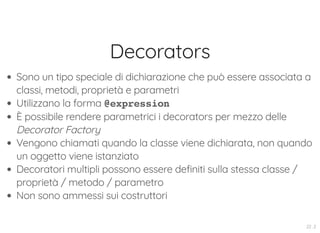
Decorators
Consentono la modifica di classi e membri attraverso
semplici annotazioni!
22 . 1
Decorators
Sono un tipo speciale di dichiarazione che può essere associata a
classi, metodi, proprietà e parametri
Utilizzano la forma @expression
È possibile rendere parametrici i decorators per mezzo delle
Decorator Factory
Vengono chiamati quando la classe viene dichiarata, non quando
un oggetto viene istanziato
Decoratori multipli possono essere definiti sulla stessa classe /
proprietà / metodo / parametro
Non sono ammessi sui costruttori
22 . 2
Decoratori
class MyClass {
@log
myMethod(arg: string) { return "Message -- " + arg; }
}
function log(target: Object,
propertyKey: string,
descriptor: TypedPropertyDescriptor<any>) {
const originalMethod = descriptor.value;
descriptor.value = function(...args: any[]) {
console.log("args è: " + JSON.stringify(args));
const result = originalMethod.apply(this, args);
console.log("Il valore tornato è: " + result);
return result;
};
return descriptor;
}
M Cl () M th d("t ti ")
22 . 3
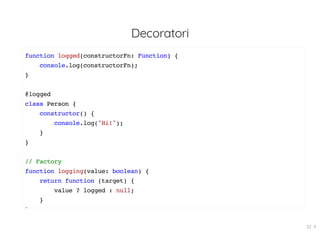
Decoratori
function logged(constructorFn: Function) {
console.log(constructorFn);
}
@logged
class Person {
constructor() {
console.log("Hi!");
}
}
// Factory
function logging(value: boolean) {
return function (target) {
value ? logged : null;
}
}
22 . 4
Decoratori
class Car {
@capitalize
modelloVettura(marca: string, modello: string) {
return `${marca} - ${modello}`;
}
}
// definizione funzione Decorator capitalize()
function capitalize(target: any, propertyKey: string, descriptor: PropertyDes
const oldFunction = descriptor.value;
console.log('Decorator invocato in fase di definizione della classe')
descriptor.value = function(...args: string[]) {
const newArgs = args.map(
arg => arg.charAt(0).toUpperCase() + arg.slice(1)
)
22 . 5
Decoratori
function validate(target: any, propertyKey: string) {
let value = target[propertyKey];
Object.defineProperty(target, propertyKey, {
get: () => value,
set: (newValue) => {
const pattern = /^[A-Z]{2}s?[0-9]{3}s?[A-Z]{2}$/;
if (pattern.test(newValue)) {
value = newValue;
} else {
console.error('Formato targa non valido');
}
}
})
}
class Car {
@ lid t
22 . 6
Decoratori
interface AutonomousCar {
autoPilot: boolean | undefined;
startAutoPilot(): void;
stopAutoPilot(): void;
}
interface Constructor<T> {
new(...args:any[]):T
}
function addFeature<T extends Constructor<Car>>(constructor:T) {
return class extends constructor implements AutonomousCar {
autoPilot: boolean | undefined;
startAutoPilot(): void{
this.autoPilot = true;
console.log('Autopilot ON');
}
22 . 7
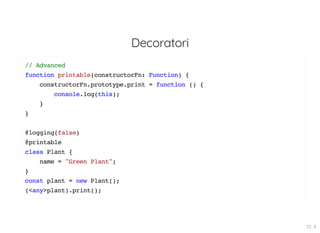
Decoratori
// Advanced
function printable(constructorFn: Function) {
constructorFn.prototype.print = function () {
console.log(this);
}
}
@logging(false)
@printable
class Plant {
name = "Green Plant";
}
const plant = new Plant();
(<any>plant).print();
22 . 8
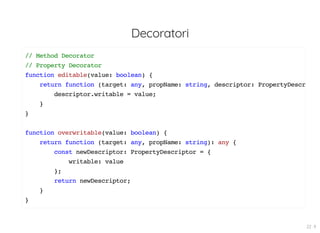
Decoratori
// Method Decorator
// Property Decorator
function editable(value: boolean) {
return function (target: any, propName: string, descriptor: PropertyDescr
descriptor.writable = value;
}
}
function overwritable(value: boolean) {
return function (target: any, propName: string): any {
const newDescriptor: PropertyDescriptor = {
writable: value
};
return newDescriptor;
}
}
22 . 9
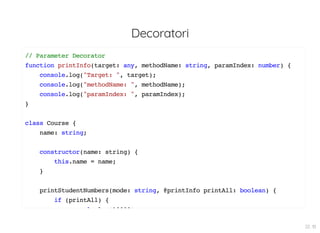
Decoratori
// Parameter Decorator
function printInfo(target: any, methodName: string, paramIndex: number) {
console.log("Target: ", target);
console.log("methodName: ", methodName);
console.log("paramIndex: ", paramIndex);
}
class Course {
name: string;
constructor(name: string) {
this.name = name;
}
printStudentNumbers(mode: string, @printInfo printAll: boolean) {
if (printAll) {
l l (10000)
22 . 10
Qualche link utile
https://www.typescriptlang.org/docs/home.html
https://github.com/Microsoft/TypeScript/wiki/What's-new-in-
TypeScript
https://blogs.msdn.microsoft.com/typescript/
https://www.gitbook.com/book/basarat/typescript/details
https://github.com/bitjson/typescript-starter
23

Acadevmy - TypeScript Overview

  • 1.
  • 2.
    Software Factory Web MobileDevOps Labs Formazione 2
  • 3.
  • 4.
  • 5.
  • 6.
    Chi Sono? Developer perscelta e per passione, amante di nerdaggini di ogni tipo ed amante della condivisione del sapere! 5 . 1
  • 7.
    TypeScript oh no, unaltro xyzScript! 6
  • 8.
    TypeScript Javascript che scalao semplicemente... JS con i types! 7
  • 9.
    Breve Storia 2010 -Microsoft inizia lo sviluppo 2012 - Prima Release supportata da Visual Studio 2013 - Supporto ad altri IDE 2014 - TypeScript 1.0 2015 - AtScript viene implementato interamente in TypeScript 2017 - Standard de facto per un Javascript solido! 8
  • 10.
    TypeScript è unsuperset di Javascript 9
  • 11.
    Ricordiamo che... ...per usareES6 (e successivi) è richiesto l'uso di transpiler/compiler: Babel, Traceur, Typescript compiler, ... Tabella di compatibilità 10
  • 12.
  • 13.
    Javascript + Types JS+ ES6/ES7/... + Types Compatibile con JS standard Genera codice JS standard Supporto OOP Implementazione Moduli Compile Time Errors Pensato per Applicazioni Scalabili Solid Development Experience Supporto dei Code Editor Supporto dei Tools (Webpack, Gulp, Grunt, etc...) Colma il GAP di Compatibilità e Produttività 12
  • 14.
    ...e se lodice Anders Hejlsberg... 01:00:36 13
  • 15.
    Strumenti di LavoroFondamentali npm tsc editor/IDE oppure usare per rapide proveTS Playground 14
  • 16.
    Preparare un ambientedi sviluppo essenziale Installare Node (npm) Installare Pacchetti typescript/lite-server come dipendenze di sviluppo Configurazione package.json Configurazione tsconfig.json Creazione Progetto Base (index.html, app.ts) 15
  • 17.
    Creazione di unEnvironment npm init --yes npm install --save-dev typescript lite-server tsc --init // Configura tsconfig ("outDir": "./dist") // Crea index.html // Crea app.ts // Configura package.json: (script: "start": "lite-server & tsc --watch") 16
  • 18.
    Types In Typescript èpossibile definire il tipo di variabili, parametri o valori di ritorno. 17 . 1
  • 19.
    Staticamente tipizzati vsDinamicamente tipizzati “Quando io vedo un uccello che cammina come un’anatra, nuota come un’anatra e starnazza come un’anatra, io chiamo quell’uccello 'anatra'”. Whitcomb Riley 17 . 2
  • 20.
    Types Immediato Feedback inSviluppo Autocomplete e Code-Suggestion contestualizzato Completamente Opzionale Configurazione tsconfig.json 17 . 3
  • 21.
  • 22.
  • 23.
    Type definition let myName= "Francesco"; let otherName: string = "Aurelio"; let num: number = 2; //questo non verrà compilato! num = "test"; let arr: Array<number> = [1, 2, 3, 4]; let arr2: string[] = ["one", "two"]; 17 . 6
  • 24.
    Type definition let addNumbers= (num1: number, num2: number): number => { return num1 + num2; }; let parseString : (input: string) => string; parseString = (input: string) => "un risultato qualunque"; //questo verrà compilato! addNumbers("2", 4); 17 . 7
  • 25.
    Type definition //Tuples let tuple: [string, number]; tuple = ["devil", 666]; tuple[0]; tuple[1]; //enums enum Color {Red, Green, Blue}; let c: Color = Color.Red; if (c === Color.Red) { //farai qualcosa qui... } 17 . 8
  • 26.
    Types (ES6) Scopes delleVariabili Destrutturazione Spread / Rest String Literal 17 . 9
  • 27.
    Scope delle Variabili varfoo; //functional scope let bar; //block scope const baz = "un valore"; //riferimento in sola lettura const value = 2; value = 1; //errato const obj = { name: "Aurelio" }; obj = {}; //errato obj.name = "Francesco"; //ok 17 . 10
  • 28.
    Destrutturazione //Arrays e Tuples let[firsts, second, third] = [1, 2, 3]; console.log(firsts); // 1 console.log(second); // 2 console.log(third); // 3 //objects let {a, b} = { a: "test1", b: "test2" }; let { a: betterName1, b: betterName2 } = { a: "test1", b: "test2" }; //Spread / Rest let arr: number[] = [1, 2]; let concat = [...arr, 3, 4]; let [a, b, ...rest] = concat; 17 . 11
  • 29.
    Template Literals //Template Literals letoldString = 'Una stringa'; let moderString = `Ancora una stringa`; let multilineString = `Questa invece è una stringa multilinea`; //Per i fan degli Iron Maiden let number = 666; let who = 'Beast'; let oldString = number + ' the number of the ' + who; let newString = `${number} the number of the ${who}`; 17 . 12
  • 30.
    Definizione di Funzioni letfun = (param: number): string => { return "string"; }; //parametri opzionali let fun = (arg1: number, arg2?: number) => { //... } //rest let fun2 = (arg1: number, ...restOfArgs: number[]) => { //... }; //valore di default let fun2 = (arg1 = 0) => { // 17 . 13
  • 31.
    Interfacce In Typescript sonoi contratti, che ogni classe (e non solo) che implementa l'interfaccia deve soddisfare. 18 . 1
  • 32.
    Interfacce Descrivono oggetti Definiscono contratto/protocollo Usatesolo in fase di compilazione Molto Flessibili (proprietà dichiarate, opzionali, metodi, etc...) Ereditabili Molto simili alle interfacce Java/C# 18 . 2
  • 33.
    Interfacce //Senza Intefaccia function printLabel(labelledObj:{ label: string }) { console.log(labelledObj.label); } let myObj = {size: 10, label: "Size 10 Object"}; printLabel(myObj); //Con Intefaccia interface LabelledValue { label: string; } function printLabel(labelledObj: LabelledValue) { console.log(labelledObj.label); } let myObj = {size: 10, label: "Size 10 Object"}; i tL b l( Obj) 18 . 3
  • 34.
    Interfacce per Oggetti interfaceUser { name: string; surname: string; age?: number; } let me: User = { name: 'Francesco', surname: 'Sciuti', age: 30 // mi piacerebbe tanto }; //questa operazione non è consentita: me.something = 123; 18 . 4
  • 35.
    Interfacce per Oggetti interfacePoint { readonly x: number; readonly y: number; } let p1: Point = { x: 10, y: 20 }; p1.x = 5; // errore! 18 . 5
  • 36.
    Interfacce per Funzioni interfacesearchFunc { (query: string, source: string) : boolean } let mySearch : searchFunc = (q: string, s: string) => { return true; } 18 . 6
  • 37.
    Classi Se ES6 introducele classi in JS, TypeScript le rende migliori! 19 . 1
  • 38.
    Classi Caratteristiche delle classiES6 Sintassi e Leggibilità Migliorata Supporto ad Interfacce (Multiple) Modificatori d'Accesso (public, protected, private) Proprietà Statiche Overload di Metodi e Costruttori Ereditabili Classi Astratte 19 . 2
  • 39.
    Classi //Classe class SayHi { toWho:string; constructor(toWho: string) { this.toWho= toWho; } hi() { return "Hello, " + this.toWho; } } let hi = new SayHi("Francesco"); 19 . 3
  • 40.
    Proprietà class Person { staticsomeStaticAttr = 2; private _id: number; constructor(public name: string, public secondName: string, public age: number) { } } 19 . 4
  • 41.
    Getters and Setters classPerson { //... get fullName():string { return `${this.name} ${this.secondName}`; } set fullName(value:string) { //some parsing probably this.name = valueOfName; this.secondName = valueOfSecondName; } } 19 . 5
  • 42.
    Ereditarietà class Person { protectedname: string; constructor(name: string) { this.name = name; } } class Employee extends Person { private department: string; constructor(name: string, department: string) { super(name); this.department = department; } public sayHi() { return `Ciao, mi chiamo ${this.name}, lavoro a ${this.department}.`; } } 19 . 6
  • 43.
    Implementazione di Interfacce interfaceClockInterface { currentTime: Date; setTime(d: Date); } class Clock implements ClockInterface { currentTime: Date; setTime(d: Date) { this.currentTime = d; } constructor(h: number, m: number) { } } 19 . 7
  • 44.
    Proprietà Statiche class Grid{ static origin = {x: 0, y: 0}; calculateDistanceFromOrigin(point: {x: number; y: number;}) { let xDist = (point.x - Grid.origin.x); let yDist = (point.y - Grid.origin.y); return Math.sqrt(xDist * xDist + yDist * yDist) / this.scale; } constructor (public scale: number) { } } let grid1 = new Grid(1.0); // 1x scale let grid2 = new Grid(5.0); // 5x scale console.log(grid1.calculateDistanceFromOrigin({x: 10, y: 10})); console.log(grid2.calculateDistanceFromOrigin({x: 10, y: 10})); 19 . 8
  • 45.
    Classe come interfaccia classPoint { x: number; y: number; } interface Point3d extends Point { z: number; } let point3d: Point3d = {x: 1, y: 2, z: 3}; 19 . 9
  • 46.
    Modules TypeScript sfrutta unsistema modulare basato sui moduli di ES6! 20 . 1
  • 47.
    Modules Sono eseguiti nelloro scope Possono esplicitamente rendere visibili verso l'esterno loro parti (come proprietà, funzioni, etc...) Sono dichiarative Utilizza un module loader come CommonJS o RequireJS Ogni file contenente esportazioni o importazioni è considerato un modulo (come in ES6) 20 . 2
  • 48.
    Moduli //file: services.ts // ... exportlet addtwo = (number) => { number + 2 }; export class MyClass { hi: string; constructor() { this.hi = 'Hi'; } } export const evilNumber = 666; 20 . 3
  • 49.
    Moduli // file: app.ts import* as services from "./services"; let inst = new services.MyClass(); let value = services.addtwo(services.evilNumber); 20 . 4
  • 50.
    Moduli //Esportazioni possibili export letsomeValue = 2; export default class MyComponent() {} export { someValue, someOtherValue, andEvenSomeClass } export { someValue as betterName } 20 . 5
  • 51.
    Moduli //Importazioni possibili import *as service from './service'; import { someValue, MyClass } from './service'; import { someValue as myLocalName } from './service'; import MyComponent from './my_component'; //solo se export default import './global_module'; // solo side-effects 20 . 6
  • 52.
    ...e se usolibrerie esterne? Posso importarle normalmente. Typescript verificherà la dipendenza nella directory node_modules È necessario utilizzare i typings declaration files (.d.ts) che consentono di descrivere tipi, interfacce e classi per le librerie esistenti. npm supporta i typings con TS 2.0 npm install --save-dev @types/nome_libreria 20 . 7
  • 53.
    Moduli //Moduli esterni // >npm install lodash // > npm install "@types/lodash" //Typescript verificherà la dipendenza nella directory node_modules import * as _ from 'lodash'; 20 . 8
  • 54.
    Generics I componenti riutilizzabiligrazie alla varietà di tipi con i quali possono lavorare! 21 . 1
  • 55.
    Generics Consentono la costruzionedi componenti riutilizzabili Possano lavorare su una varietà di tipi piuttosto che su uno singolo Generic Type Variables Generic Classes (e Interfaces) Generic Constraints 21 . 2
  • 56.
    Generics //Funzione con untipo definito let pickFirst = (list: number[]): number => { return list[0]; }; //Funzione con tipo any let pickFirst = (list: any[]): any => { return list[0]; }; 21 . 3
  • 57.
    Generics //Funzione con generics letpickFirst = <T>(list: T[]): T => { return list[0]; }; // oppure function pickFirst<T>(list: T[]): T { return list[0]; } let res1: string = pickFirst<string>(['1', '2', '3']); let res2: number = pickFirst<number>([1, 2, 3, 4]); let res3: Date = pickFirst<Date>([ new Date(), new Date(), new Date() ]); 21 . 4
  • 58.
    Generics class Movie {title: string; } function getAsync<T>(url: string): Promise<T[]> { return fetch(url) .then((response: Response) => response.json()); } getAsync<Movie>("/movies") .then(movies => { movies.forEach(movie => { console.log(movie.title); }); }); 21 . 5
  • 59.
    Generics class Queue<T> { privatedata = []; push = (item: T) => this.data.push(item); pop = (): T => this.data.shift(); } const queue = new Queue<number>(); queue.push(0); queue.push("1"); // ERROR : non pushare una stringa ma solo un tipo numero! 21 . 6
  • 60.
    Generics //Funzione con constraint interfaceLengthwise { length: number; } function loggingIdentity<T extends Lengthwise>(arg: T): T { console.log(arg.length); // Ora sappiamo che ha la proprietà .length return arg; } 21 . 7
  • 61.
    Generics // keyof Constraint functiongetProperty<T, K extends keyof T> (obj: T, key: K) { return obj[key]; } let x = { a: 1, b: 2, c: 3, d: 4 }; getProperty(x, "a"); // Ok getProperty(x, "m"); // error: l'argomento di tipo 'm' non è assegnabile! 21 . 8
  • 62.
    Generics //Interfaccia interface Container<T> { value:T }; let cont: Container<string> = { value: 'test' }; //Classe class GenericCollection<T> { private store: T[]; add(value: T): void { this.store.push(value); } get(index: number): T { return this.store[index]; } } 21 . 9
  • 63.
    Decorators Consentono la modificadi classi e membri attraverso semplici annotazioni! 22 . 1
  • 64.
    Decorators Sono un tipospeciale di dichiarazione che può essere associata a classi, metodi, proprietà e parametri Utilizzano la forma @expression È possibile rendere parametrici i decorators per mezzo delle Decorator Factory Vengono chiamati quando la classe viene dichiarata, non quando un oggetto viene istanziato Decoratori multipli possono essere definiti sulla stessa classe / proprietà / metodo / parametro Non sono ammessi sui costruttori 22 . 2
  • 65.
    Decoratori class MyClass { @log myMethod(arg:string) { return "Message -- " + arg; } } function log(target: Object, propertyKey: string, descriptor: TypedPropertyDescriptor<any>) { const originalMethod = descriptor.value; descriptor.value = function(...args: any[]) { console.log("args è: " + JSON.stringify(args)); const result = originalMethod.apply(this, args); console.log("Il valore tornato è: " + result); return result; }; return descriptor; } M Cl () M th d("t ti ") 22 . 3
  • 66.
    Decoratori function logged(constructorFn: Function){ console.log(constructorFn); } @logged class Person { constructor() { console.log("Hi!"); } } // Factory function logging(value: boolean) { return function (target) { value ? logged : null; } } 22 . 4
  • 67.
    Decoratori class Car { @capitalize modelloVettura(marca:string, modello: string) { return `${marca} - ${modello}`; } } // definizione funzione Decorator capitalize() function capitalize(target: any, propertyKey: string, descriptor: PropertyDes const oldFunction = descriptor.value; console.log('Decorator invocato in fase di definizione della classe') descriptor.value = function(...args: string[]) { const newArgs = args.map( arg => arg.charAt(0).toUpperCase() + arg.slice(1) ) 22 . 5
  • 68.
    Decoratori function validate(target: any,propertyKey: string) { let value = target[propertyKey]; Object.defineProperty(target, propertyKey, { get: () => value, set: (newValue) => { const pattern = /^[A-Z]{2}s?[0-9]{3}s?[A-Z]{2}$/; if (pattern.test(newValue)) { value = newValue; } else { console.error('Formato targa non valido'); } } }) } class Car { @ lid t 22 . 6
  • 69.
    Decoratori interface AutonomousCar { autoPilot:boolean | undefined; startAutoPilot(): void; stopAutoPilot(): void; } interface Constructor<T> { new(...args:any[]):T } function addFeature<T extends Constructor<Car>>(constructor:T) { return class extends constructor implements AutonomousCar { autoPilot: boolean | undefined; startAutoPilot(): void{ this.autoPilot = true; console.log('Autopilot ON'); } 22 . 7
  • 70.
    Decoratori // Advanced function printable(constructorFn:Function) { constructorFn.prototype.print = function () { console.log(this); } } @logging(false) @printable class Plant { name = "Green Plant"; } const plant = new Plant(); (<any>plant).print(); 22 . 8
  • 71.
    Decoratori // Method Decorator //Property Decorator function editable(value: boolean) { return function (target: any, propName: string, descriptor: PropertyDescr descriptor.writable = value; } } function overwritable(value: boolean) { return function (target: any, propName: string): any { const newDescriptor: PropertyDescriptor = { writable: value }; return newDescriptor; } } 22 . 9
  • 72.
    Decoratori // Parameter Decorator functionprintInfo(target: any, methodName: string, paramIndex: number) { console.log("Target: ", target); console.log("methodName: ", methodName); console.log("paramIndex: ", paramIndex); } class Course { name: string; constructor(name: string) { this.name = name; } printStudentNumbers(mode: string, @printInfo printAll: boolean) { if (printAll) { l l (10000) 22 . 10
  • 73.