HTML5 Data storage
binary-studio.com
Storage
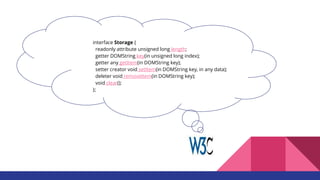
interface Storage {
readonly attribute unsigned long length;
getter DOMString key(in unsigned long index);
getter any getItem(in DOMString key);
setter creator void setItem(in DOMString key, in any data);
deleter void removeItem(in DOMString key);
void clear();
};
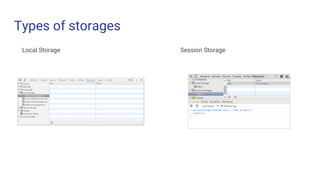
Types of storages
Local Storage Session Storage
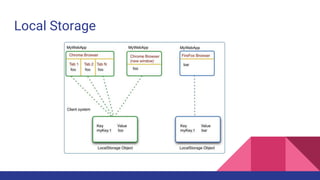
Local Storage
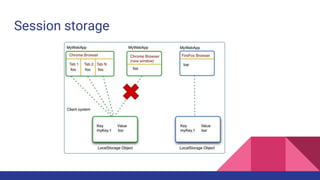
Session storage
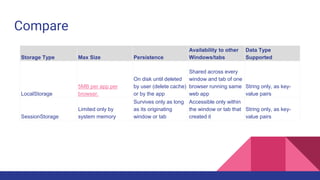
Compare
Storage Type Max Size Persistence
Availability to other
Windows/tabs
Data Type
Supported
LocalStorage
5MB per app per
browser.
On disk until deleted
by user (delete cache)
or by the app
Shared across every
window and tab of one
browser running same
web app
String only, as key-
value pairs
SessionStorage
Limited only by
system memory
Survives only as long
as its originating
window or tab
Accessible only within
the window or tab that
created it
String only, as key-
value pairs
Insecurity
App cache
Usage
<html manifest="example.appcache">
...
</html>
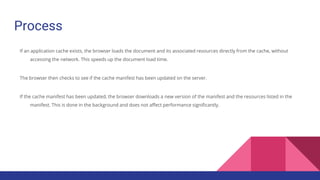
Process
If an application cache exists, the browser loads the document and its associated resources directly from the cache, without
accessing the network. This speeds up the document load time.
The browser then checks to see if the cache manifest has been updated on the server.
If the cache manifest has been updated, the browser downloads a new version of the manifest and the resources listed in the
manifest. This is done in the background and does not affect performance significantly.
In details
1. When the browser visits a document that includes the manifest attribute, if no application cache exists, the browser loads the document and then
fetches all the entries listed in the manifest file, creating the first version of the application cache.
2. Subsequent visits to that document cause the browser to load the document and other assets specified in the manifest file from the application
cache (not from the server). In addition, the browser also sends a checking event to the window.applicationCacheobject, and fetches the manifest
file, following the appropriate HTTP caching rules.
3. If the currently-cached copy of the manifest is up-to-date, the browser sends a noupdateevent to the applicationCache object, and the update
process is complete. Note that if you change any cached resources on the server, you must also change the manifest file itself, so that the browser
knows it needs to fetch all the resources again.
4. If the manifest file has changed, all the files listed in the manifest—as well as those added to the cache by calling applicationCache.add()—are
fetched into a temporary cache, following the appropriate HTTP caching rules. For each file fetched into this temporary cache, the browser sends a
progress event to the applicationCache object. If any errors occur, the browser sends an error event, and the update halts.
5. Once all the files have been successfully retrieved, they are moved into the real offline cache automatically, and a cached event is sent to the
applicationCache object. Since the document has already been loaded into the browser from the cache, the updated document will not be
Manifest
file
CACHE MANIFEST
index.html
stylesheet.css
images/logo.png
scripts/main.js
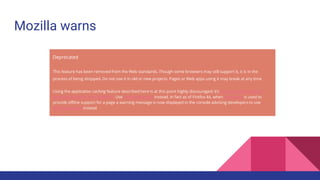
Mozilla warns
Deprecated
This feature has been removed from the Web standards. Though some browsers may still support it, it is in the
process of being dropped. Do not use it in old or new projects. Pages or Web apps using it may break at any time.
Using the application caching feature described here is at this point highly discouraged; it’s in the process of being
removed from the Web platform. Use Service Workers instead. In fact as of Firefox 44, when AppCache is used to
provide offline support for a page a warning message is now displayed in the console advising developers to use
Service workers instead
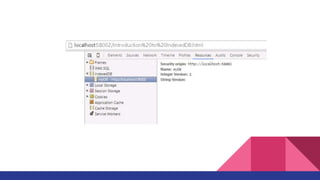
Indexed DB
Features
Asynchronous means that IndexedDB won’t block the user interface. Operations happen “soon” rather than immediately. This allows the user
interface to respond to other input. To contrast: localStorage is synchronous. Operations are processed immediately, and nothing else will happen
until the operation completes. Large reads and writes can slow your application significantly.
Transactional means that operations in IndexedDB are all-or-nothing. Should an operation fail for some reason, the database will revert to its
previous state. You’ll never have a partially-written record with an IndexedDB database.
A key-value object store means that each record is an object, as opposed to a row. Traditional databases use a relational model. Data is organized
by table, typically with relationships between the values of one table and the keys of another (Figure 1).
In a key-value object store, each record is a self-contained object. It may, but usually doesn’t have a relationship to records in another object store.
Each record may even differ radically from other objects in the same store.
Can access the data from the same domain
Bottlenecks
Internationalized sorting. Not all languages sort strings in the same way, so internationalized sorting is not supported. While the database
can't store data in a specific internationalized order, you can sort the data that you've read out of the database yourself. Note, however,
that locale-aware sorting has been allowed with an experimental flag enabled (currently for Firefox only) since Firefox 43.
Synchronizing. The API is not designed to take care of synchronizing with a server-side database. You have to write code that synchronizes
a client-side indexedDB database with a server-side database.
Full text searching. The API does not have an equivalent of the LIKE operator in SQL.
Create request
Working with records — adding, updating, deleting, or retrieving — is generally a four-step process.
1. Create a transaction connection to one or more object stores using readwrite or readonly mode.
2. Specify which object store to query with our transaction request.
3. Make a request using the one of the request methods, or a cursor object.
4. Do something with the results, if any, using an onsuccess callback.
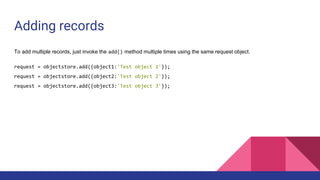
Adding records
To add multiple records, just invoke the add() method multiple times using the same request object.
request = objectstore.add({object1:'Test object 1'});
request = objectstore.add({object2:'Test object 2'});
request = objectstore.add({object3:'Test object 3'});
Limits of indexes
Unfortunately, IndexedDB lacks the kind of full-text searching that you would find with SQL databases such as MySQL or
PostgreSQL. Instead, we need to filter our results using a regular expression. Let’s look at an example using our search
form. When it’s submitted, we’ll grab the form value and use it to create a regular expression. Then we’ll test each task for a
match.
Cursors for getting multiple rows
Retrieving sets of records works a bit differently. For that, we need to use a cursor. Cursors are, as explained by the
IndexedDB specification, are a transient mechanism used to iterate over multiple records in a database. In a range of
records, the cursor keeps track of where it is in the sequence. The cursor moves in ascending or descending order,
depending on which direction chosen when opening the cursor. Cursors are a little bit like using a while loop.
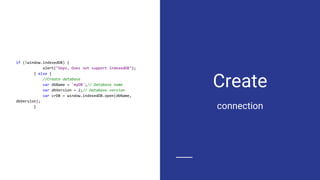
Create
if (!window.indexedDB) {
alert("Oops, Does not support IndexedDB");
} else {
//Create database
var dbName = 'myDB';// Database name
var dbVersion = 2;// Database version
var crDB = window.indexedDB.open(dbName,
dbVersion);
} connection
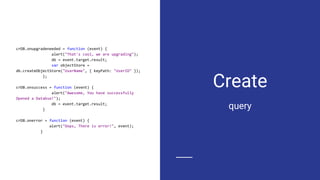
Create
crDB.onupgradeneeded = function (event) {
alert("That's cool, we are upgrading");
db = event.target.result;
var objectStore =
db.createObjectStore("UserName", { keyPath: "UserID" });
};
crDB.onsuccess = function (event) {
alert("Awesome, You have successfully
Opened a Databse!");
db = event.target.result;
}
crDB.onerror = function (event) {
alert("Oops, There is error!", event);
}
query
Web SQL
How to
db = openDatabase("ToDo", "0.1", "A list of to do
items.", 200000);
db.transaction(function(tx) {
tx.executeSql("SELECT COUNT(*) FROM ToDo", [],
function(result) { alert('dsfsdf') }, function(tx,
error) {
tx.executeSql("CREATE TABLE ToDo (id REAL
UNIQUE, label TEXT, timestamp REAL)", [], null,
null);
})
});
db.transaction(function(tx) {
tx.executeSql("INSERT INTO ToDo (label,
timestamp) values(?, ?)", ["Купить iPad или HP
Slate", new Date().getTime()], null, null);
});
use
Reality
Beware. This
specification is no longer
in active maintenance
and the Web
Applications Working
Group does not intend to
maintain it further.
Cache storage
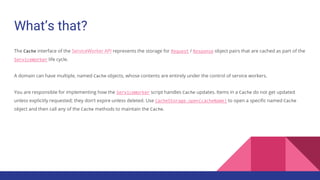
What’s that?
The Cache interface of the ServiceWorker API represents the storage for Request / Response object pairs that are cached as part of the
ServiceWorker life cycle.
A domain can have multiple, named Cache objects, whose contents are entirely under the control of service workers.
You are responsible for implementing how the ServiceWorker script handles Cache updates. Items in a Cache do not get updated
unless explicitly requested; they don’t expire unless deleted. Use CacheStorage.open(cacheName) to open a specific named Cache
object and then call any of the Cache methods to maintain the Cache.
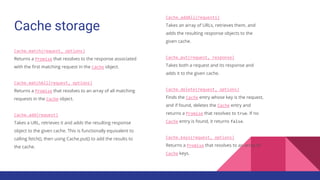
Cache storage
Cache.match(request, options)
Returns a Promise that resolves to the response associated
with the first matching request in the Cache object.
Cache.matchAll(request, options)
Returns a Promise that resolves to an array of all matching
requests in the Cache object.
Cache.add(request)
Takes a URL, retrieves it and adds the resulting response
object to the given cache. This is functionally equivalent to
calling fetch(), then using Cache.put() to add the results to
the cache.
Cache.addAll(requests)
Takes an array of URLs, retrieves them, and
adds the resulting response objects to the
given cache.
Cache.put(request, response)
Takes both a request and its response and
adds it to the given cache.
Cache.delete(request, options)
Finds the Cache entry whose key is the request,
and if found, deletes the Cache entry and
returns a Promise that resolves to true. If no
Cache entry is found, it returns false.
Cache.keys(request, options)
Returns a Promise that resolves to an array of
Cache keys.
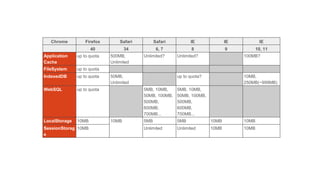
Chrome Firefox Safari Safari IE IE IE
40 34 6, 7 8 9 10, 11
Application
Cache
up to quota 500MB,
Unlimited
Unlimited? Unlimited? 100MB?
FileSystem up to quota
IndexedDB up to quota 50MB,
Unlimited
up to quota? 10MB,
250MB(~999MB)
WebSQL up to quota 5MB, 10MB,
50MB, 100MB,
500MB,
600MB,
700MB...
5MB, 10MB,
50MB, 100MB,
500MB,
600MB,
700MB...
LocalStorage 10MB 10MB 5MB 5MB 10MB 10MB
SessionStorag
e
10MB Unlimited Unlimited 10MB 10MB
Service workers
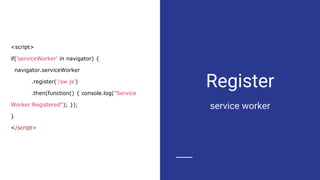
Register
service worker
<script>
if('serviceWorker' in navigator) {
navigator.serviceWorker
.register('/sw.js')
.then(function() { console.log("Service
Worker Registered"); });
}
</script>
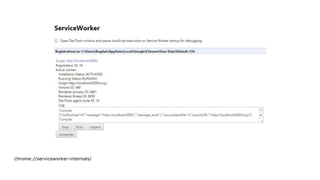
chrome://serviceworker-internals/
Import
cache-polyfill
importScripts('/cache-polyfill.js');
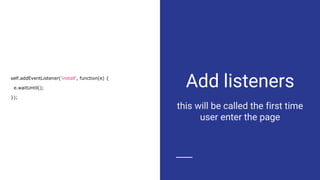
Add listeners
this will be called the first time
user enter the page
self.addEventListener('install', function(e) {
e.waitUntil();
});
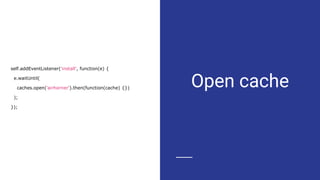
Open cache
self.addEventListener('install', function(e) {
e.waitUntil(
caches.open('airhorner').then(function(cache) {})
);
});
Add elements
you want to cache. fails one -
fail all
self.addEventListener('install', function(e) {
e.waitUntil(
caches.open('airhorner').then(function(cache) {
return cache.addAll([
'/',
'/index.html',
'/index.html?homescreen=1',
'/?homescreen=1',
'/styles/main.css',
'/scripts/main.min.js',
'/sounds/airhorn.mp3'
]);
})
);
});
Add listener
for fetch
self.addEventListener('fetch', function(event) {
console.log(event.request.url);
});
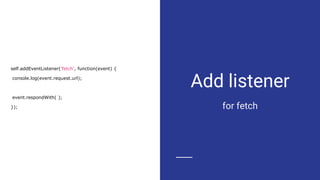
Add listener
for fetch
self.addEventListener('fetch', function(event) {
console.log(event.request.url);
event.respondWith( );
});
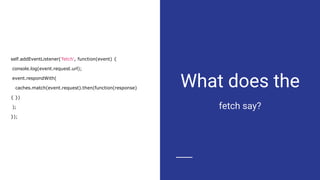
What does the
fetch say?
self.addEventListener('fetch', function(event) {
console.log(event.request.url);
event.respondWith(
caches.match(event.request).then(function(response)
{ })
);
});
Enjoy!
self.addEventListener('fetch', function(event) {
console.log(event.request.url);
event.respondWith(
caches.match(event.request).then(function(response)
{
return response || fetch(event.request);
})
);
});
Academy PRO: HTML5 Data storage

Academy PRO: HTML5 Data storage

  • 1.
  • 2.
  • 4.
    interface Storage { readonlyattribute unsigned long length; getter DOMString key(in unsigned long index); getter any getItem(in DOMString key); setter creator void setItem(in DOMString key, in any data); deleter void removeItem(in DOMString key); void clear(); };
  • 5.
    Types of storages LocalStorage Session Storage
  • 6.
  • 7.
  • 8.
    Compare Storage Type MaxSize Persistence Availability to other Windows/tabs Data Type Supported LocalStorage 5MB per app per browser. On disk until deleted by user (delete cache) or by the app Shared across every window and tab of one browser running same web app String only, as key- value pairs SessionStorage Limited only by system memory Survives only as long as its originating window or tab Accessible only within the window or tab that created it String only, as key- value pairs
  • 9.
  • 11.
  • 12.
  • 13.
    Process If an applicationcache exists, the browser loads the document and its associated resources directly from the cache, without accessing the network. This speeds up the document load time. The browser then checks to see if the cache manifest has been updated on the server. If the cache manifest has been updated, the browser downloads a new version of the manifest and the resources listed in the manifest. This is done in the background and does not affect performance significantly.
  • 14.
    In details 1. Whenthe browser visits a document that includes the manifest attribute, if no application cache exists, the browser loads the document and then fetches all the entries listed in the manifest file, creating the first version of the application cache. 2. Subsequent visits to that document cause the browser to load the document and other assets specified in the manifest file from the application cache (not from the server). In addition, the browser also sends a checking event to the window.applicationCacheobject, and fetches the manifest file, following the appropriate HTTP caching rules. 3. If the currently-cached copy of the manifest is up-to-date, the browser sends a noupdateevent to the applicationCache object, and the update process is complete. Note that if you change any cached resources on the server, you must also change the manifest file itself, so that the browser knows it needs to fetch all the resources again. 4. If the manifest file has changed, all the files listed in the manifest—as well as those added to the cache by calling applicationCache.add()—are fetched into a temporary cache, following the appropriate HTTP caching rules. For each file fetched into this temporary cache, the browser sends a progress event to the applicationCache object. If any errors occur, the browser sends an error event, and the update halts. 5. Once all the files have been successfully retrieved, they are moved into the real offline cache automatically, and a cached event is sent to the applicationCache object. Since the document has already been loaded into the browser from the cache, the updated document will not be
  • 15.
  • 16.
    Mozilla warns Deprecated This featurehas been removed from the Web standards. Though some browsers may still support it, it is in the process of being dropped. Do not use it in old or new projects. Pages or Web apps using it may break at any time. Using the application caching feature described here is at this point highly discouraged; it’s in the process of being removed from the Web platform. Use Service Workers instead. In fact as of Firefox 44, when AppCache is used to provide offline support for a page a warning message is now displayed in the console advising developers to use Service workers instead
  • 17.
  • 19.
    Features Asynchronous means thatIndexedDB won’t block the user interface. Operations happen “soon” rather than immediately. This allows the user interface to respond to other input. To contrast: localStorage is synchronous. Operations are processed immediately, and nothing else will happen until the operation completes. Large reads and writes can slow your application significantly. Transactional means that operations in IndexedDB are all-or-nothing. Should an operation fail for some reason, the database will revert to its previous state. You’ll never have a partially-written record with an IndexedDB database. A key-value object store means that each record is an object, as opposed to a row. Traditional databases use a relational model. Data is organized by table, typically with relationships between the values of one table and the keys of another (Figure 1). In a key-value object store, each record is a self-contained object. It may, but usually doesn’t have a relationship to records in another object store. Each record may even differ radically from other objects in the same store. Can access the data from the same domain
  • 20.
    Bottlenecks Internationalized sorting. Notall languages sort strings in the same way, so internationalized sorting is not supported. While the database can't store data in a specific internationalized order, you can sort the data that you've read out of the database yourself. Note, however, that locale-aware sorting has been allowed with an experimental flag enabled (currently for Firefox only) since Firefox 43. Synchronizing. The API is not designed to take care of synchronizing with a server-side database. You have to write code that synchronizes a client-side indexedDB database with a server-side database. Full text searching. The API does not have an equivalent of the LIKE operator in SQL.
  • 21.
    Create request Working withrecords — adding, updating, deleting, or retrieving — is generally a four-step process. 1. Create a transaction connection to one or more object stores using readwrite or readonly mode. 2. Specify which object store to query with our transaction request. 3. Make a request using the one of the request methods, or a cursor object. 4. Do something with the results, if any, using an onsuccess callback.
  • 22.
    Adding records To addmultiple records, just invoke the add() method multiple times using the same request object. request = objectstore.add({object1:'Test object 1'}); request = objectstore.add({object2:'Test object 2'}); request = objectstore.add({object3:'Test object 3'});
  • 23.
    Limits of indexes Unfortunately,IndexedDB lacks the kind of full-text searching that you would find with SQL databases such as MySQL or PostgreSQL. Instead, we need to filter our results using a regular expression. Let’s look at an example using our search form. When it’s submitted, we’ll grab the form value and use it to create a regular expression. Then we’ll test each task for a match.
  • 24.
    Cursors for gettingmultiple rows Retrieving sets of records works a bit differently. For that, we need to use a cursor. Cursors are, as explained by the IndexedDB specification, are a transient mechanism used to iterate over multiple records in a database. In a range of records, the cursor keeps track of where it is in the sequence. The cursor moves in ascending or descending order, depending on which direction chosen when opening the cursor. Cursors are a little bit like using a while loop.
  • 25.
    Create if (!window.indexedDB) { alert("Oops,Does not support IndexedDB"); } else { //Create database var dbName = 'myDB';// Database name var dbVersion = 2;// Database version var crDB = window.indexedDB.open(dbName, dbVersion); } connection
  • 26.
    Create crDB.onupgradeneeded = function(event) { alert("That's cool, we are upgrading"); db = event.target.result; var objectStore = db.createObjectStore("UserName", { keyPath: "UserID" }); }; crDB.onsuccess = function (event) { alert("Awesome, You have successfully Opened a Databse!"); db = event.target.result; } crDB.onerror = function (event) { alert("Oops, There is error!", event); } query
  • 27.
  • 28.
    How to db =openDatabase("ToDo", "0.1", "A list of to do items.", 200000); db.transaction(function(tx) { tx.executeSql("SELECT COUNT(*) FROM ToDo", [], function(result) { alert('dsfsdf') }, function(tx, error) { tx.executeSql("CREATE TABLE ToDo (id REAL UNIQUE, label TEXT, timestamp REAL)", [], null, null); }) }); db.transaction(function(tx) { tx.executeSql("INSERT INTO ToDo (label, timestamp) values(?, ?)", ["Купить iPad или HP Slate", new Date().getTime()], null, null); }); use
  • 29.
    Reality Beware. This specification isno longer in active maintenance and the Web Applications Working Group does not intend to maintain it further.
  • 30.
  • 31.
    What’s that? The Cacheinterface of the ServiceWorker API represents the storage for Request / Response object pairs that are cached as part of the ServiceWorker life cycle. A domain can have multiple, named Cache objects, whose contents are entirely under the control of service workers. You are responsible for implementing how the ServiceWorker script handles Cache updates. Items in a Cache do not get updated unless explicitly requested; they don’t expire unless deleted. Use CacheStorage.open(cacheName) to open a specific named Cache object and then call any of the Cache methods to maintain the Cache.
  • 32.
    Cache storage Cache.match(request, options) Returnsa Promise that resolves to the response associated with the first matching request in the Cache object. Cache.matchAll(request, options) Returns a Promise that resolves to an array of all matching requests in the Cache object. Cache.add(request) Takes a URL, retrieves it and adds the resulting response object to the given cache. This is functionally equivalent to calling fetch(), then using Cache.put() to add the results to the cache. Cache.addAll(requests) Takes an array of URLs, retrieves them, and adds the resulting response objects to the given cache. Cache.put(request, response) Takes both a request and its response and adds it to the given cache. Cache.delete(request, options) Finds the Cache entry whose key is the request, and if found, deletes the Cache entry and returns a Promise that resolves to true. If no Cache entry is found, it returns false. Cache.keys(request, options) Returns a Promise that resolves to an array of Cache keys.
  • 33.
    Chrome Firefox SafariSafari IE IE IE 40 34 6, 7 8 9 10, 11 Application Cache up to quota 500MB, Unlimited Unlimited? Unlimited? 100MB? FileSystem up to quota IndexedDB up to quota 50MB, Unlimited up to quota? 10MB, 250MB(~999MB) WebSQL up to quota 5MB, 10MB, 50MB, 100MB, 500MB, 600MB, 700MB... 5MB, 10MB, 50MB, 100MB, 500MB, 600MB, 700MB... LocalStorage 10MB 10MB 5MB 5MB 10MB 10MB SessionStorag e 10MB Unlimited Unlimited 10MB 10MB
  • 35.
  • 36.
    Register service worker <script> if('serviceWorker' innavigator) { navigator.serviceWorker .register('/sw.js') .then(function() { console.log("Service Worker Registered"); }); } </script>
  • 37.
  • 38.
  • 39.
    Add listeners this willbe called the first time user enter the page self.addEventListener('install', function(e) { e.waitUntil(); });
  • 40.
    Open cache self.addEventListener('install', function(e){ e.waitUntil( caches.open('airhorner').then(function(cache) {}) ); });
  • 41.
    Add elements you wantto cache. fails one - fail all self.addEventListener('install', function(e) { e.waitUntil( caches.open('airhorner').then(function(cache) { return cache.addAll([ '/', '/index.html', '/index.html?homescreen=1', '/?homescreen=1', '/styles/main.css', '/scripts/main.min.js', '/sounds/airhorn.mp3' ]); }) ); });
  • 42.
    Add listener for fetch self.addEventListener('fetch',function(event) { console.log(event.request.url); });
  • 43.
    Add listener for fetch self.addEventListener('fetch',function(event) { console.log(event.request.url); event.respondWith( ); });
  • 44.
    What does the fetchsay? self.addEventListener('fetch', function(event) { console.log(event.request.url); event.respondWith( caches.match(event.request).then(function(response) { }) ); });
  • 45.