A Guide to Using Katalon Studio with the
HeadSpin Platform
Delivering high-quality software efficiently is more critical than ever. Automation testing has
become a cornerstone in achieving this goal, enabling teams to execute repetitive test cases
quickly and accurately. Katalon Studio, a powerful test automation tool, has become popular for
many organizations due to its ease of use and robust features. When combined with the
capabilities of the HeadSpin Platform, testers can leverage a global device infrastructure to
enhance their testing processes further.
This comprehensive guide explores how to integrate Katalon Studio with the HeadSpin
Platform, providing a step-by-step walkthrough to help you optimize your automation testing
efforts.
Understanding Katalon Studio
Katalon Studio is an all-in-one automation testing solution that supports web, API, mobile, and
desktop applications. It has a user-friendly interface and many features, making it accessible to
all testers.
Key Features
●​ Record and Playback: Easily create automated tests without extensive programming
knowledge.
●​ Built-in Keywords: Utilize a library of predefined actions to simplify test case creation.
●​ Data-Driven Testing: Execute tests with multiple data sets to ensure comprehensive
coverage.
●​ Integration Capabilities: Seamlessly integrate with CI/CD tools, test management
platforms, and other third-party applications.
Why Choose Katalon Studio for Automation Testing?
Katalon Studio is a comprehensive automation testing platform offering features catering to
beginners and seasoned testers. Here are several reasons why Katalon Studio has become a
go-to test automation tool:
1.​ Ease of Use and Accessibility: Katalon Studio provides an intuitive interface to create
automated tests without extensive programming knowledge. Testers can start with
simple drag-and-drop actions, making it accessible to those new to test automation. For
experienced testers, it offers scripting capabilities that allow for custom test scripts and
complex workflows.
2.​ All-in-One Solution: Unlike many automation tools that specialize in just one type of
testing, Katalon Studio supports web, mobile, API, and desktop application testing within
a single platform. This versatility means teams can execute various tests without
switching between tools, streamlining the testing process and increasing productivity.
3.​ Rich Library of Built-in Keywords: Katalon Studio includes a comprehensive library of
built-in keywords that simplify creating test cases. Users can quickly define test actions
without needing to code, speeding up the creation process and reducing errors. This
feature is great for repetitive tasks, like filling out forms, clicking buttons, or verifying
page content.
4.​ Flexible Test Execution: Katalon Studio offers multiple options for running tests,
including data-driven testing, which allows tests to be executed with different input data
sets to validate various scenarios. Additionally, Katalon supports cross-platform and
cross-browser testing, enabling teams to run test suites seamlessly on different devices
and operating systems.
5.​ Integration with CI/CD Pipelines: Katalon Studio makes it easy to integrate automation
tests into the continuous integration and continuous delivery pipeline with out-of-the-box
integrations with CI/CD tools like Jenkins, Git, and Azure DevOps. This integration
ensures that testing occurs continuously with every code change, helping to catch bugs
early and reducing the risk of critical issues.
6.​ Comprehensive Reporting and Analytics: Katalon Studio provides detailed reports
and analytics, which help teams identify trends, analyze test results, and understand the
root causes of failures. This data-driven approach supports better decision-making,
allowing teams to focus on high-impact issues and improve overall test coverage.
Introducing the HeadSpin Platform
HeadSpin is a powerful testing platform that provides global access to real devices and
networks. It enables teams to test their applications under real-world conditions, ensuring
optimal performance and user experience.
Core Benefits of Using the HeadSpin Platform
Integrating HeadSpin into your testing framework opens the door to a comprehensive suite of
tools and features designed to improve test accuracy, accelerate release cycles, and enhance
the overall quality of applications. Here are some of the core benefits:
1. Global Device Infrastructure
HeadSpin provides access to thousands of geographically distributed devices across multiple
networks and regions. This allows testers to evaluate application performance and functionality
on the devices and networks their target users would experience, from the U.S. to Europe, Asia,
and beyond. Unlike emulators or simulators, real devices provide more accurate results by
capturing factors like real network latency, carrier-specific issues, and device-specific behaviors.
This infrastructure supports iOS and Android devices, making cross-platform testing seamless
and accurate.
2. End-to-End Performance Monitoring
With HeadSpin, teams can monitor their applications' end-to-end performance in real-time.
HeadSpin’s performance insights cover critical metrics such as loading time, response time,
battery consumption, memory usage, and CPU usage. By leveraging these insights, teams can
quickly identify performance bottlenecks, debug issues, and fine-tune the application to ensure
optimal performance across devices and networks. This feature is especially valuable in
high-stakes applications where user experience is directly tied to app performance.
3. Comprehensive Automation Integrations
HeadSpin’s integration with popular test automation tools like Katalon Studio, Appium, and
Selenium makes incorporating real-device testing into existing automation workflows easier.
This compatibility with industry-standard tools reduces the learning curve and enables seamless
integration with CI/CD pipelines. As a result, teams can efficiently execute automated tests
across HeadSpin devices, making it a flexible addition to a modern development lifecycle.
4. Network and Carrier Testing Capabilities
HeadSpin supports carrier testing, which helps teams understand how applications perform on
specific networks, including 5G, LTE, and Wi-Fi. This is particularly valuable for testing mobile
applications that need to function reliably under varying network conditions. The platform also
enables teams to perform tests on network-specific scenarios, such as network degradation,
packet loss, and jitter, to ensure that applications provide a consistent UX regardless of network
quality.
5. Actionable Insights and Analytics
HeadSpin’s advanced analytics capabilities provide actionable insights based on test data.
These insights are presented in user-friendly dashboards that make identifying issues and
optimization opportunities easy. Detailed reports can help pinpoint problematic areas within the
application, whether it’s a specific feature, device, or network condition. This in-depth analysis
can reduce debugging time and ensure teams know about critical issues before release.
6. Scalability and Flexibility
HeadSpin’s cloud-based infrastructure allows easy scalability, so teams can run tests on
multiple devices and networks simultaneously. This flexibility is crucial for large projects with
extensive test case requirements or when testing applications with high usage volumes.
Whether a small team or a large enterprise, HeadSpin provides the necessary resources to
scale testing efforts in line with business needs.
7. Security and Compliance
HeadSpin is committed to providing a secure testing environment, ensuring that all data is
handled with the highest level of security and compliance. With features like data anonymization
and secure connections, HeadSpin meets regulatory requirements for finance, healthcare, and
e-commerce industries. This secure environment allows teams to confidently test applications
that handle sensitive information, knowing their data and user information are protected.
The Synergy Between Katalon Studio and HeadSpin
Integrating Katalon Studio with the HeadSpin Platform allows testers to execute automated tests
remotely on real devices. This combination enhances the testing process by providing more
accurate results and reducing the time and resources required for setting up physical devices.
Preparing for Integration
Before diving into the integration process, ensure you have the following prerequisites:
●​ Katalon Studio Installed: Download and install the latest version from the official
website.
●​ HeadSpin Account: Sign up for a HeadSpin account and obtain access to the desired
devices.
●​ Appium Server URL: Note the Appium server URL provided by HeadSpin for remote
device access.
Configuring Katalon Studio with HeadSpin Devices
Follow these steps to set up Katalon Studio with the HeadSpin Platform:
Step 1: Access Project Settings
Open Katalon Studio and navigate to Project > Settings > Desired Capabilities > Remote.
Step 2: Add Remote Server Details
Enter the following information:
●​ Server Type: Select Appium.
●​ Server URL: Input the Appium server URL from HeadSpin.
●​ Desired Capabilities: Specify the desired capabilities for the device you wish to test.
Step 3: Configure Desired Capabilities
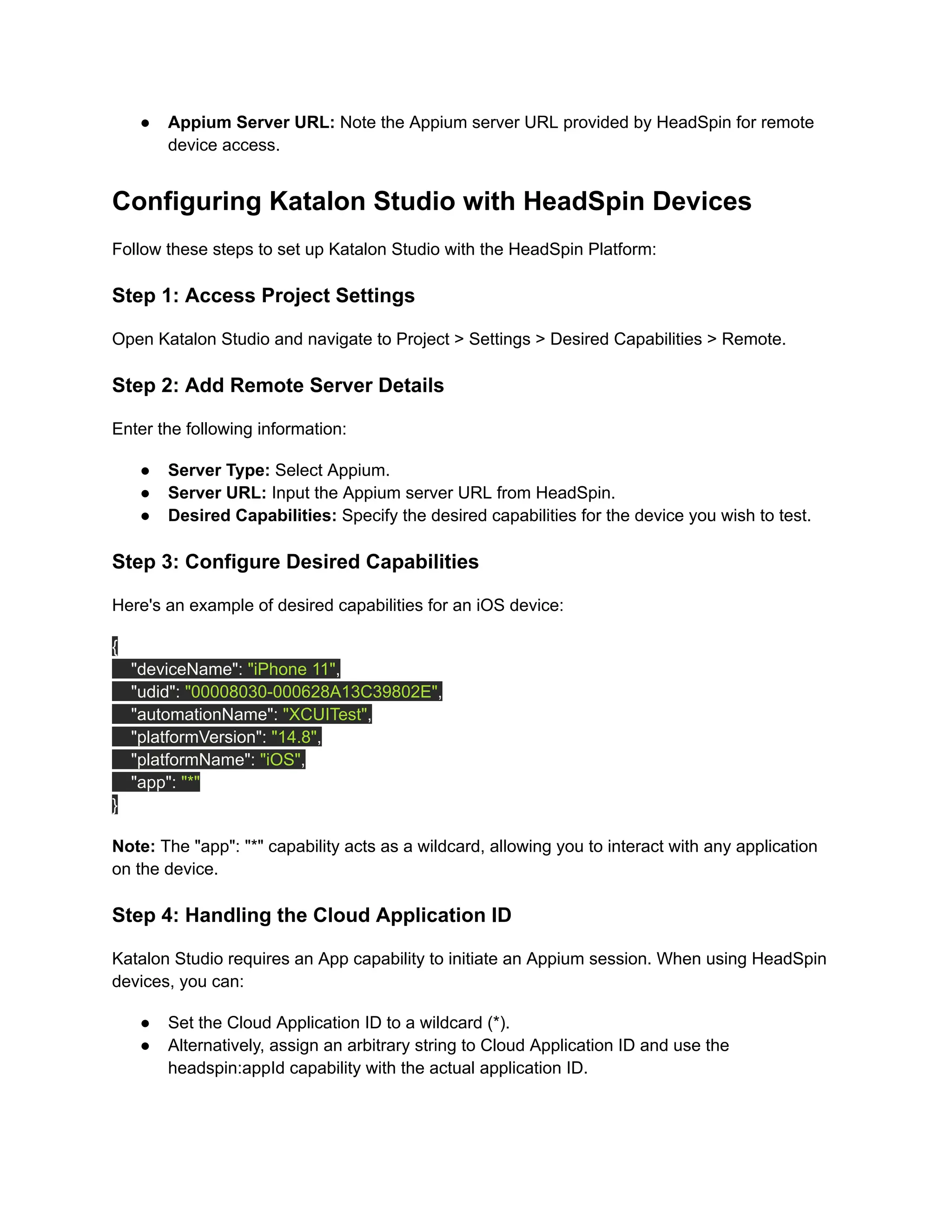
Here's an example of desired capabilities for an iOS device:
{
"deviceName": "iPhone 11",
"udid": "00008030-000628A13C39802E",
"automationName": "XCUITest",
"platformVersion": "14.8",
"platformName": "iOS",
"app": "*"
}
Note: The "app": "*" capability acts as a wildcard, allowing you to interact with any application
on the device.
Step 4: Handling the Cloud Application ID
Katalon Studio requires an App capability to initiate an Appium session. When using HeadSpin
devices, you can:
●​ Set the Cloud Application ID to a wildcard (*).
●​ Alternatively, assign an arbitrary string to Cloud Application ID and use the
headspin:appId capability with the actual application ID.
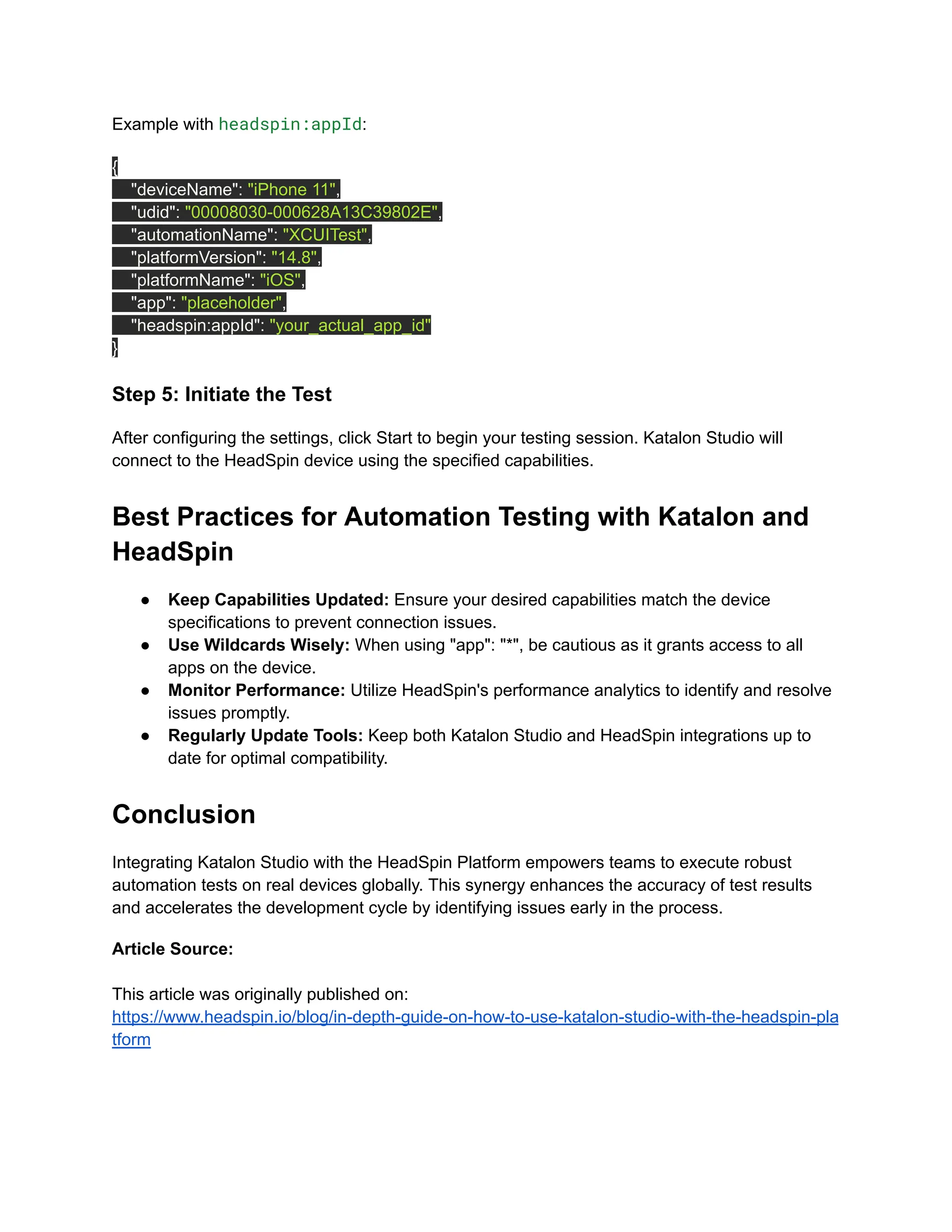
Example with headspin:appId:
{
"deviceName": "iPhone 11",
"udid": "00008030-000628A13C39802E",
"automationName": "XCUITest",
"platformVersion": "14.8",
"platformName": "iOS",
"app": "placeholder",
"headspin:appId": "your_actual_app_id"
}
Step 5: Initiate the Test
After configuring the settings, click Start to begin your testing session. Katalon Studio will
connect to the HeadSpin device using the specified capabilities.
Best Practices for Automation Testing with Katalon and
HeadSpin
●​ Keep Capabilities Updated: Ensure your desired capabilities match the device
specifications to prevent connection issues.
●​ Use Wildcards Wisely: When using "app": "*", be cautious as it grants access to all
apps on the device.
●​ Monitor Performance: Utilize HeadSpin's performance analytics to identify and resolve
issues promptly.
●​ Regularly Update Tools: Keep both Katalon Studio and HeadSpin integrations up to
date for optimal compatibility.
Conclusion
Integrating Katalon Studio with the HeadSpin Platform empowers teams to execute robust
automation tests on real devices globally. This synergy enhances the accuracy of test results
and accelerates the development cycle by identifying issues early in the process.
Article Source:
This article was originally published on:
https://www.headspin.io/blog/in-depth-guide-on-how-to-use-katalon-studio-with-the-headspin-pla
tform

A Guide to Using Katalon Studio with the HeadSpin Platform.pdf

  • 1.
    A Guide toUsing Katalon Studio with the HeadSpin Platform Delivering high-quality software efficiently is more critical than ever. Automation testing has become a cornerstone in achieving this goal, enabling teams to execute repetitive test cases quickly and accurately. Katalon Studio, a powerful test automation tool, has become popular for many organizations due to its ease of use and robust features. When combined with the capabilities of the HeadSpin Platform, testers can leverage a global device infrastructure to enhance their testing processes further. This comprehensive guide explores how to integrate Katalon Studio with the HeadSpin Platform, providing a step-by-step walkthrough to help you optimize your automation testing efforts. Understanding Katalon Studio Katalon Studio is an all-in-one automation testing solution that supports web, API, mobile, and desktop applications. It has a user-friendly interface and many features, making it accessible to all testers. Key Features
  • 2.
    ●​ Record andPlayback: Easily create automated tests without extensive programming knowledge. ●​ Built-in Keywords: Utilize a library of predefined actions to simplify test case creation. ●​ Data-Driven Testing: Execute tests with multiple data sets to ensure comprehensive coverage. ●​ Integration Capabilities: Seamlessly integrate with CI/CD tools, test management platforms, and other third-party applications. Why Choose Katalon Studio for Automation Testing? Katalon Studio is a comprehensive automation testing platform offering features catering to beginners and seasoned testers. Here are several reasons why Katalon Studio has become a go-to test automation tool: 1.​ Ease of Use and Accessibility: Katalon Studio provides an intuitive interface to create automated tests without extensive programming knowledge. Testers can start with simple drag-and-drop actions, making it accessible to those new to test automation. For experienced testers, it offers scripting capabilities that allow for custom test scripts and complex workflows. 2.​ All-in-One Solution: Unlike many automation tools that specialize in just one type of testing, Katalon Studio supports web, mobile, API, and desktop application testing within a single platform. This versatility means teams can execute various tests without switching between tools, streamlining the testing process and increasing productivity. 3.​ Rich Library of Built-in Keywords: Katalon Studio includes a comprehensive library of built-in keywords that simplify creating test cases. Users can quickly define test actions without needing to code, speeding up the creation process and reducing errors. This feature is great for repetitive tasks, like filling out forms, clicking buttons, or verifying page content. 4.​ Flexible Test Execution: Katalon Studio offers multiple options for running tests, including data-driven testing, which allows tests to be executed with different input data sets to validate various scenarios. Additionally, Katalon supports cross-platform and cross-browser testing, enabling teams to run test suites seamlessly on different devices and operating systems. 5.​ Integration with CI/CD Pipelines: Katalon Studio makes it easy to integrate automation tests into the continuous integration and continuous delivery pipeline with out-of-the-box integrations with CI/CD tools like Jenkins, Git, and Azure DevOps. This integration ensures that testing occurs continuously with every code change, helping to catch bugs early and reducing the risk of critical issues. 6.​ Comprehensive Reporting and Analytics: Katalon Studio provides detailed reports and analytics, which help teams identify trends, analyze test results, and understand the root causes of failures. This data-driven approach supports better decision-making, allowing teams to focus on high-impact issues and improve overall test coverage.
  • 3.
    Introducing the HeadSpinPlatform HeadSpin is a powerful testing platform that provides global access to real devices and networks. It enables teams to test their applications under real-world conditions, ensuring optimal performance and user experience. Core Benefits of Using the HeadSpin Platform Integrating HeadSpin into your testing framework opens the door to a comprehensive suite of tools and features designed to improve test accuracy, accelerate release cycles, and enhance the overall quality of applications. Here are some of the core benefits: 1. Global Device Infrastructure HeadSpin provides access to thousands of geographically distributed devices across multiple networks and regions. This allows testers to evaluate application performance and functionality on the devices and networks their target users would experience, from the U.S. to Europe, Asia, and beyond. Unlike emulators or simulators, real devices provide more accurate results by capturing factors like real network latency, carrier-specific issues, and device-specific behaviors. This infrastructure supports iOS and Android devices, making cross-platform testing seamless and accurate. 2. End-to-End Performance Monitoring With HeadSpin, teams can monitor their applications' end-to-end performance in real-time. HeadSpin’s performance insights cover critical metrics such as loading time, response time, battery consumption, memory usage, and CPU usage. By leveraging these insights, teams can quickly identify performance bottlenecks, debug issues, and fine-tune the application to ensure optimal performance across devices and networks. This feature is especially valuable in high-stakes applications where user experience is directly tied to app performance. 3. Comprehensive Automation Integrations HeadSpin’s integration with popular test automation tools like Katalon Studio, Appium, and Selenium makes incorporating real-device testing into existing automation workflows easier. This compatibility with industry-standard tools reduces the learning curve and enables seamless integration with CI/CD pipelines. As a result, teams can efficiently execute automated tests across HeadSpin devices, making it a flexible addition to a modern development lifecycle. 4. Network and Carrier Testing Capabilities HeadSpin supports carrier testing, which helps teams understand how applications perform on specific networks, including 5G, LTE, and Wi-Fi. This is particularly valuable for testing mobile
  • 4.
    applications that needto function reliably under varying network conditions. The platform also enables teams to perform tests on network-specific scenarios, such as network degradation, packet loss, and jitter, to ensure that applications provide a consistent UX regardless of network quality. 5. Actionable Insights and Analytics HeadSpin’s advanced analytics capabilities provide actionable insights based on test data. These insights are presented in user-friendly dashboards that make identifying issues and optimization opportunities easy. Detailed reports can help pinpoint problematic areas within the application, whether it’s a specific feature, device, or network condition. This in-depth analysis can reduce debugging time and ensure teams know about critical issues before release. 6. Scalability and Flexibility HeadSpin’s cloud-based infrastructure allows easy scalability, so teams can run tests on multiple devices and networks simultaneously. This flexibility is crucial for large projects with extensive test case requirements or when testing applications with high usage volumes. Whether a small team or a large enterprise, HeadSpin provides the necessary resources to scale testing efforts in line with business needs. 7. Security and Compliance HeadSpin is committed to providing a secure testing environment, ensuring that all data is handled with the highest level of security and compliance. With features like data anonymization and secure connections, HeadSpin meets regulatory requirements for finance, healthcare, and e-commerce industries. This secure environment allows teams to confidently test applications that handle sensitive information, knowing their data and user information are protected. The Synergy Between Katalon Studio and HeadSpin Integrating Katalon Studio with the HeadSpin Platform allows testers to execute automated tests remotely on real devices. This combination enhances the testing process by providing more accurate results and reducing the time and resources required for setting up physical devices. Preparing for Integration Before diving into the integration process, ensure you have the following prerequisites: ●​ Katalon Studio Installed: Download and install the latest version from the official website. ●​ HeadSpin Account: Sign up for a HeadSpin account and obtain access to the desired devices.
  • 5.
    ●​ Appium ServerURL: Note the Appium server URL provided by HeadSpin for remote device access. Configuring Katalon Studio with HeadSpin Devices Follow these steps to set up Katalon Studio with the HeadSpin Platform: Step 1: Access Project Settings Open Katalon Studio and navigate to Project > Settings > Desired Capabilities > Remote. Step 2: Add Remote Server Details Enter the following information: ●​ Server Type: Select Appium. ●​ Server URL: Input the Appium server URL from HeadSpin. ●​ Desired Capabilities: Specify the desired capabilities for the device you wish to test. Step 3: Configure Desired Capabilities Here's an example of desired capabilities for an iOS device: { "deviceName": "iPhone 11", "udid": "00008030-000628A13C39802E", "automationName": "XCUITest", "platformVersion": "14.8", "platformName": "iOS", "app": "*" } Note: The "app": "*" capability acts as a wildcard, allowing you to interact with any application on the device. Step 4: Handling the Cloud Application ID Katalon Studio requires an App capability to initiate an Appium session. When using HeadSpin devices, you can: ●​ Set the Cloud Application ID to a wildcard (*). ●​ Alternatively, assign an arbitrary string to Cloud Application ID and use the headspin:appId capability with the actual application ID.
  • 6.
    Example with headspin:appId: { "deviceName":"iPhone 11", "udid": "00008030-000628A13C39802E", "automationName": "XCUITest", "platformVersion": "14.8", "platformName": "iOS", "app": "placeholder", "headspin:appId": "your_actual_app_id" } Step 5: Initiate the Test After configuring the settings, click Start to begin your testing session. Katalon Studio will connect to the HeadSpin device using the specified capabilities. Best Practices for Automation Testing with Katalon and HeadSpin ●​ Keep Capabilities Updated: Ensure your desired capabilities match the device specifications to prevent connection issues. ●​ Use Wildcards Wisely: When using "app": "*", be cautious as it grants access to all apps on the device. ●​ Monitor Performance: Utilize HeadSpin's performance analytics to identify and resolve issues promptly. ●​ Regularly Update Tools: Keep both Katalon Studio and HeadSpin integrations up to date for optimal compatibility. Conclusion Integrating Katalon Studio with the HeadSpin Platform empowers teams to execute robust automation tests on real devices globally. This synergy enhances the accuracy of test results and accelerates the development cycle by identifying issues early in the process. Article Source: This article was originally published on: https://www.headspin.io/blog/in-depth-guide-on-how-to-use-katalon-studio-with-the-headspin-pla tform