Print & Spool System
    ď‚—The main tasks of the SAP spool system are the
      processing and administration of print requests as
      well as the administration of output devices and
      their mapping in the SAP System
Information Flow
R/3 System
                                   Hello       Create document
                                                                 User action
               Document            World

                                                    Print


   Spool Request          Spool Data   TemSe


                                                   Output

             Output Request


                 R/3
             Spool System


       Operating System spool                           Hello
                                                        World
Access Methods: Local Printing
                     R/3 Application Server

    Dispatcher


               ...
S      S             D
                                                        Physically
                                                        local
           C         L              OS spool
               or


                                               Print
                                               server
                                                        Physically
                                                        remote
Access Methods: Remote Printing
R/3 Application Server


        Dispatcher


                    ...
  S         S              D
                                                        Network
                                                        printer
           U
                          UNIX

           U                        OS spool

                                               Print
                                               server
                          WinPC

       S        U          saplpd   OS spool
           or

                                               Print
                                               server
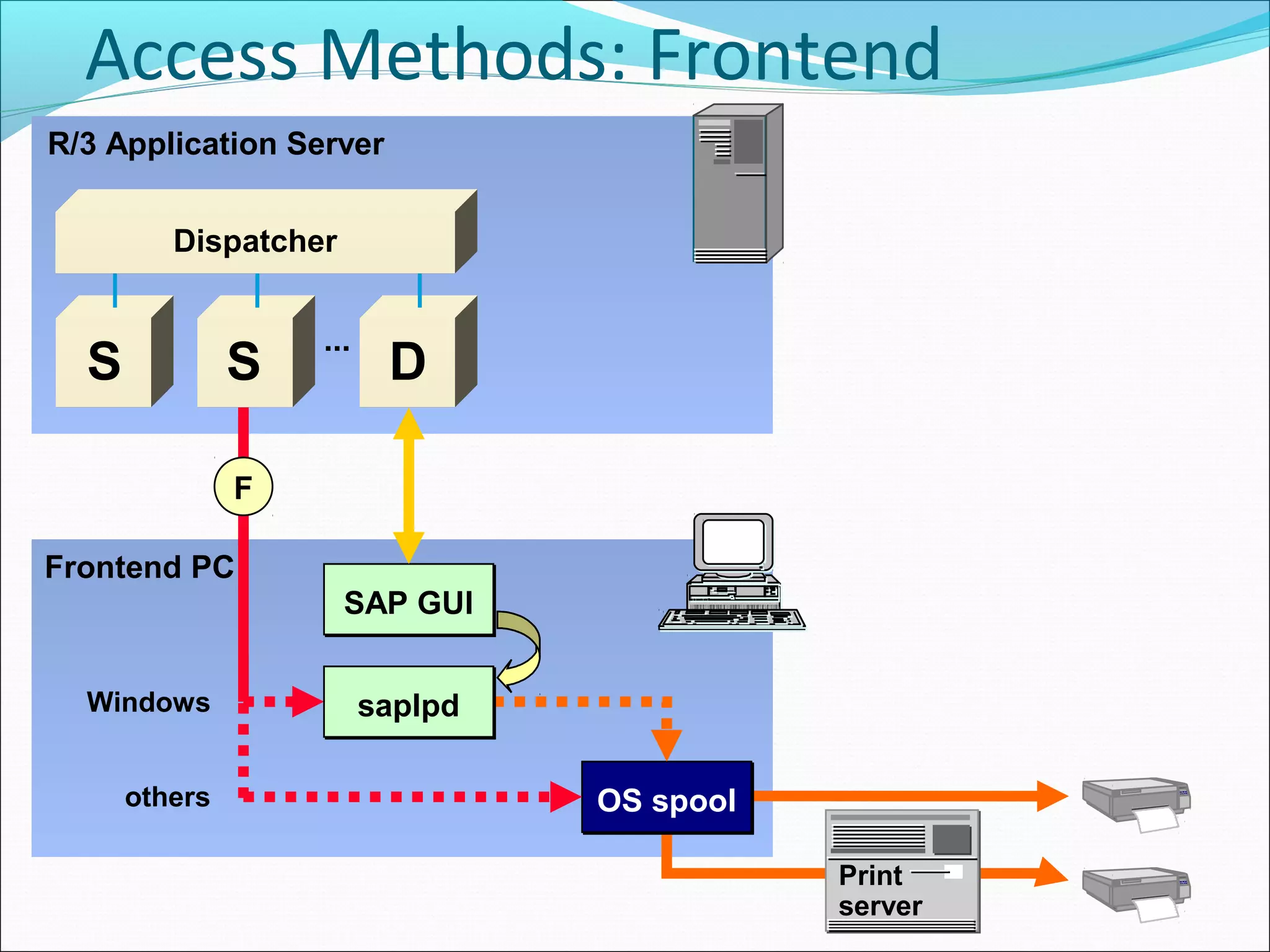
Access Methods: Frontend
  Printing
R/3 Application Server


         Dispatcher


                   ...
  S            S          D

               F

Frontend PC
                      SAP GUI


  Windows                saplpd

      others                      OS spool

                                             Print
                                             server
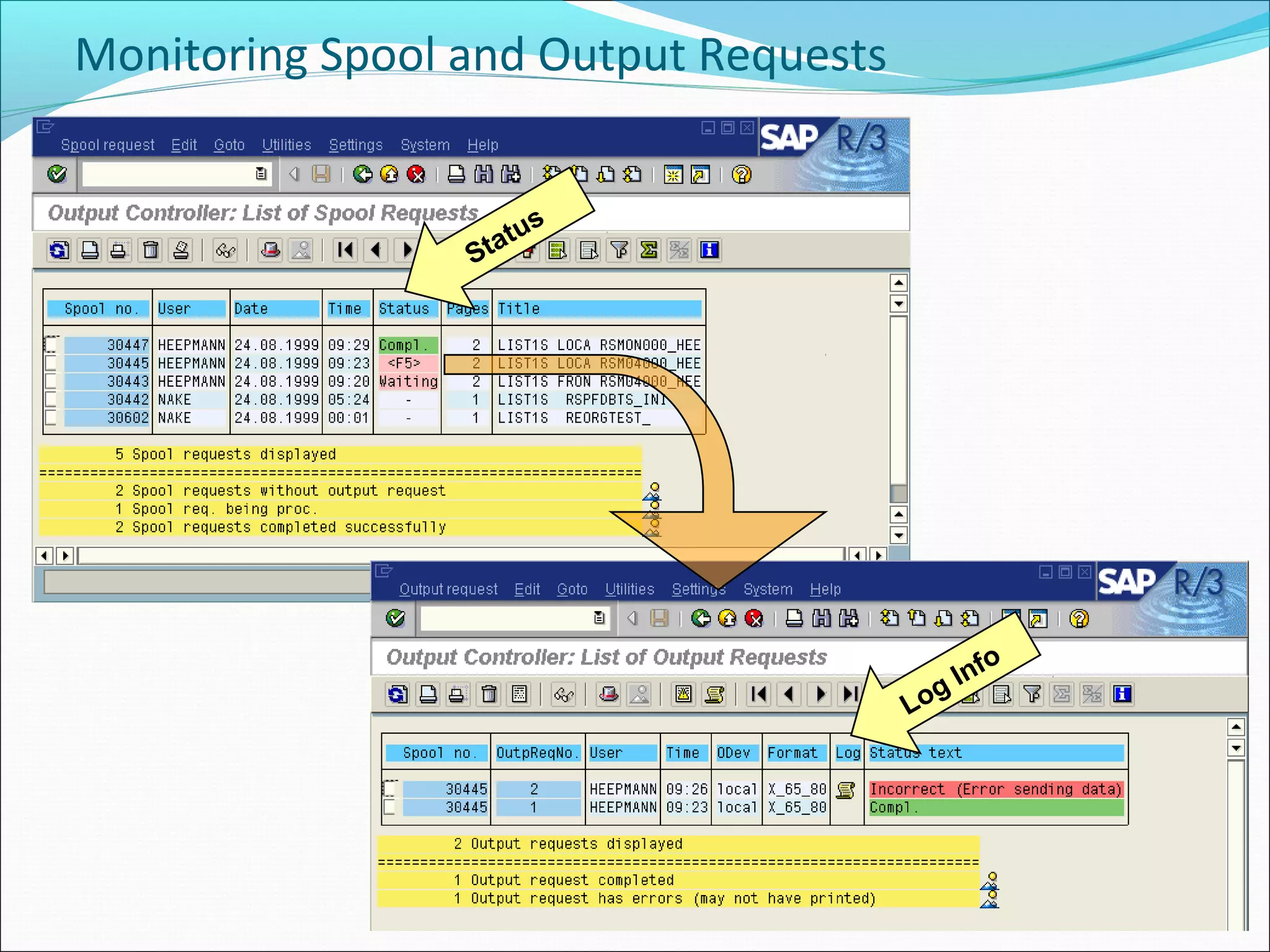
Monitoring Spool and Output Requests


                      s
                 Statu


                                              o
                                         g Inf
                                       Lo
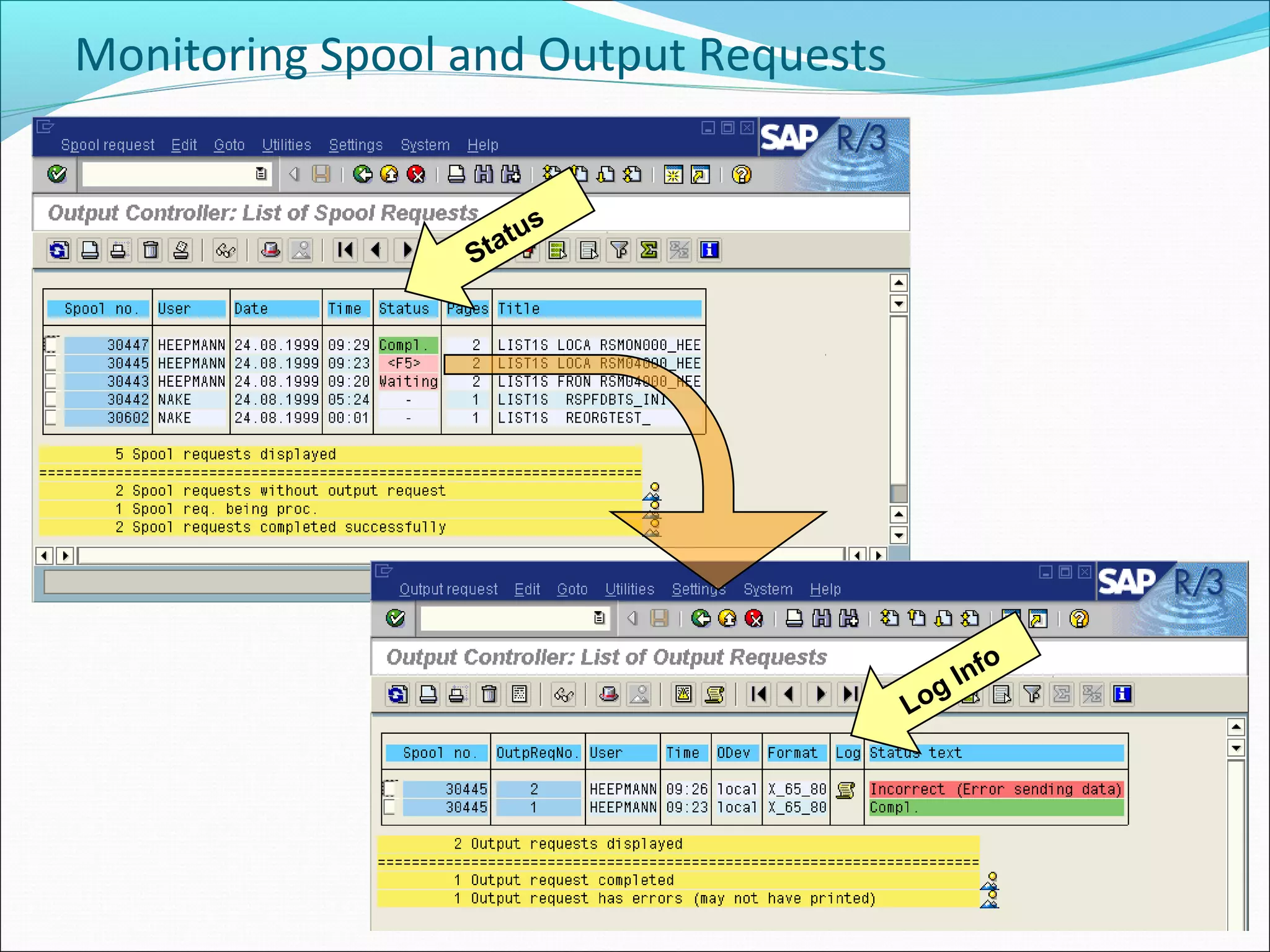
Monitoring Spool and Output Requests


                      s
                 Statu


                                              o
                                         g Inf
                                       Lo

9 print-spool-system

  • 1.
    Print & SpoolSystem ď‚—The main tasks of the SAP spool system are the processing and administration of print requests as well as the administration of output devices and their mapping in the SAP System
  • 2.
    Information Flow R/3 System Hello Create document User action Document World Print Spool Request Spool Data TemSe Output Output Request R/3 Spool System Operating System spool Hello World
  • 3.
    Access Methods: LocalPrinting R/3 Application Server Dispatcher ... S S D Physically local C L OS spool or Print server Physically remote
  • 4.
    Access Methods: RemotePrinting R/3 Application Server Dispatcher ... S S D Network printer U UNIX U OS spool Print server WinPC S U saplpd OS spool or Print server
  • 5.
    Access Methods: Frontend Printing R/3 Application Server Dispatcher ... S S D F Frontend PC SAP GUI Windows saplpd others OS spool Print server
  • 6.
    Monitoring Spool andOutput Requests s Statu o g Inf Lo
  • 7.
    Monitoring Spool andOutput Requests s Statu o g Inf Lo

Editor's Notes

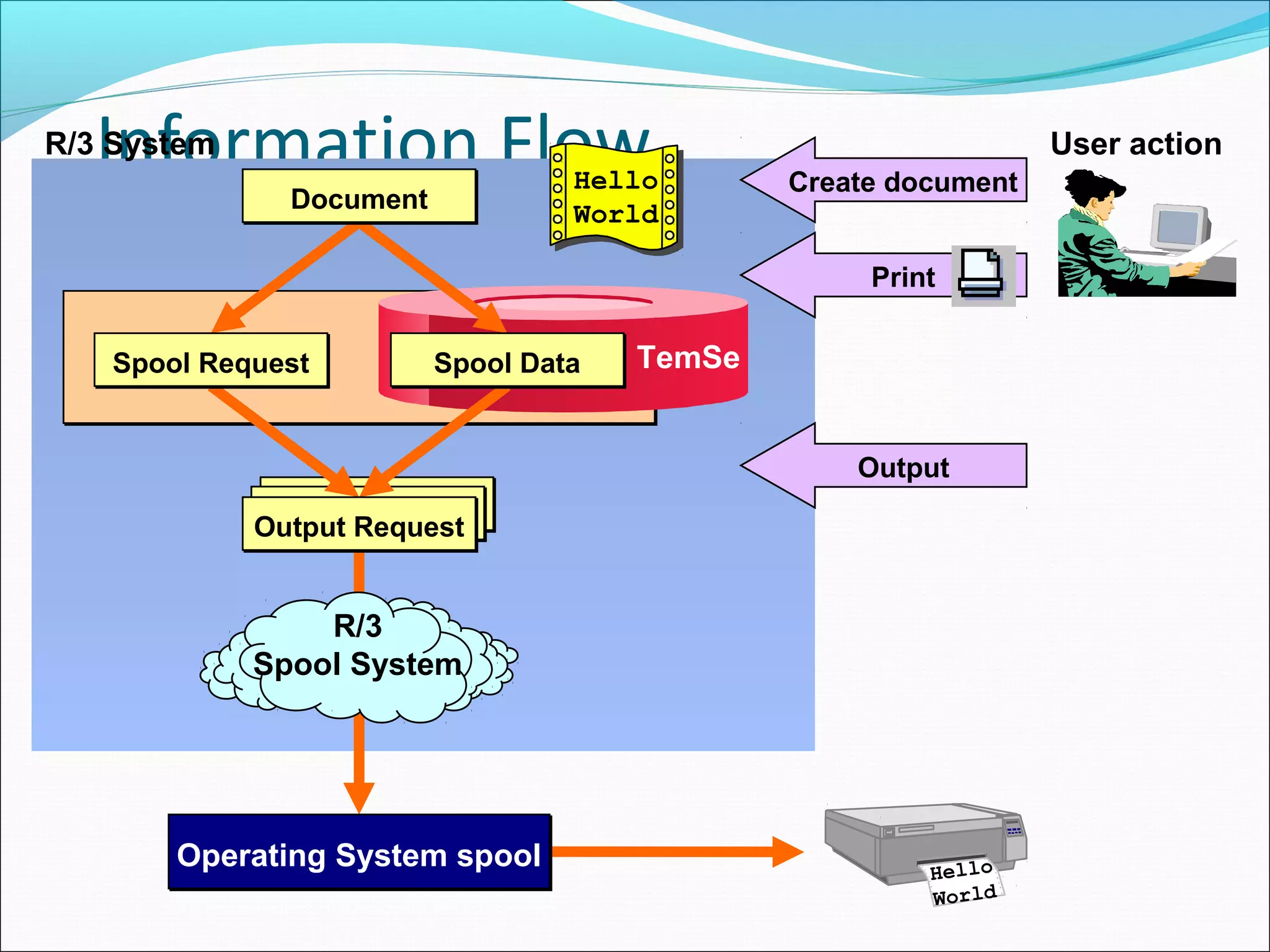
  • #3 The R/3 System recognizes several classes of documents (for example, SAPscript texts or report lists) that can be printed. When a request is made to print a document, a spool request is created. A spool request has two parts: Administrative information (origin, date, author name, logical printer) is stored in the R/3 database The data to be printed is stored in a repository called the temporary sequential database (TemSe). The R/3 Spool System uses generic representations of printer formatting commands and the R/3 internal character set to represent the characters to be printed. TemSe data can be stored inside the R/3 database or at operating system level. Profile parameter rspo/store_location (see SAP Note 20176) determines where TemSe is located: db stores the data in the database (default) G stores the data in an operating system file in the global directory The preparation of a spool request for printing is an output request. In R/3, you can either print immediately (an output request is generated immediately) or delay printing (the spool request does not lead immediately to an output request). A spool can correspond to several output requests. These can be sent to different output devices. Usually (but not in certain printing scenarios), the R/3 System generates a device-specific, print-ready output stream, which is sent via an operating system spooler to a printer.
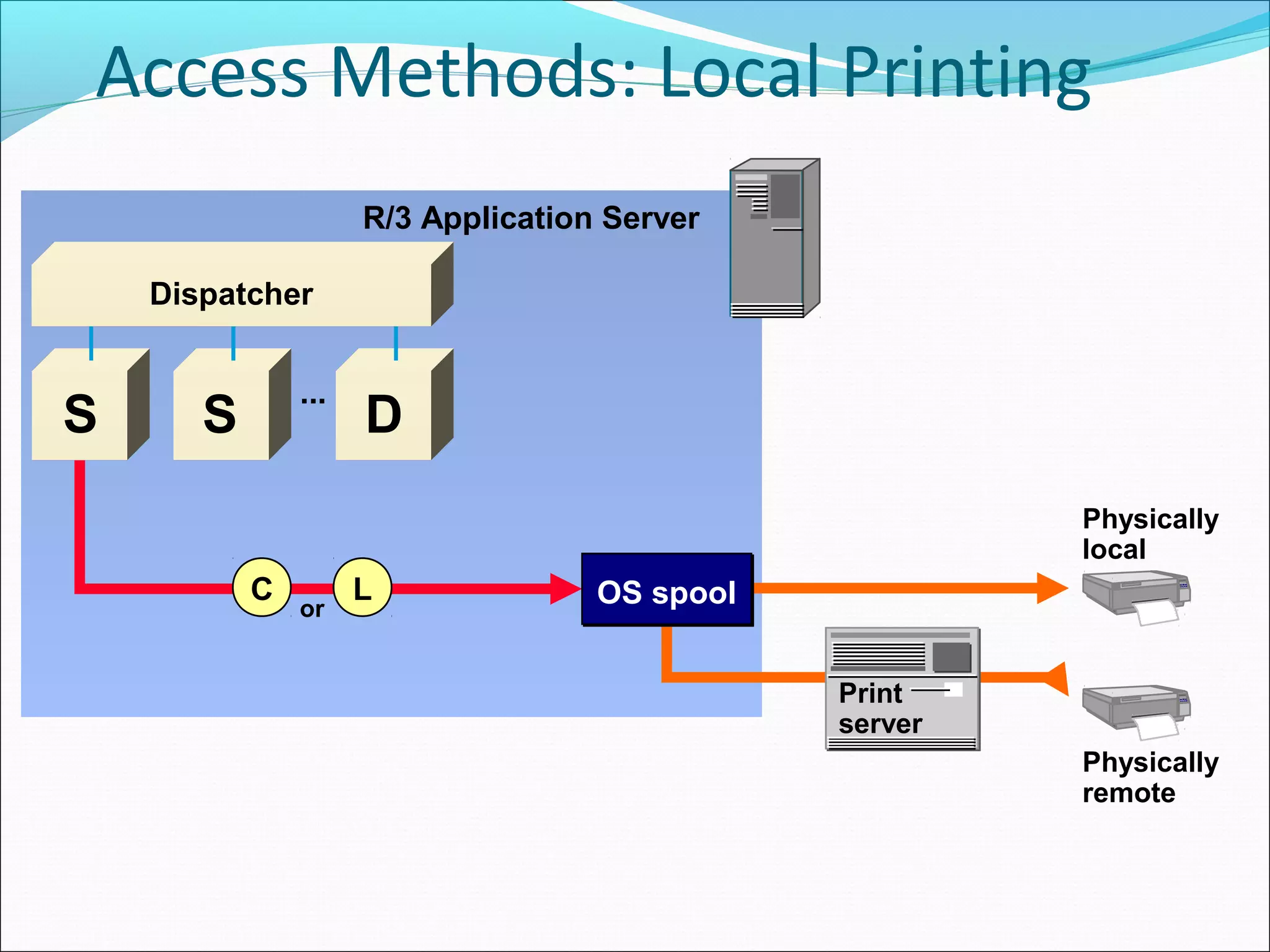
  • #4 You can configure your R/3 instance to run multiple spool work processes. This affects sequential request processing. See SAP Note 108799. Output requests are usually sent to the spool server in the order they were created, but if more than one spool work process is configured, the requests may be printed in a different order. If necessary, you can specify that output requests are transmitted to the host spool system in the order they were generated. This option causes request processing for this device to be restricted to a single work process within the spool server. A spool work process is temporarily reserved for this device, and all output requests for this device are stored in an internal queue in the reserved work process. Once the internal queue has been processed, the reserved work process is released. There are various methods an R/3 Spool System can use to access an operating system spooler. Local printing The operating system spooler runs on the same host as the R/3 spool work process. In Windows NT systems, the spool work process uses operating system calls to pass output to the printer manager using the Windows NT API (access method C ). In UNIX systems, the output request is passed to the operating system spooler using UNIX commands, for example lp or lpr (access method L ). The form of the command is specified in the R/3 System profile. Local printing is the fastest and most reliable way of printing in R/3. Local printing does not mean that the printer is physically attached to the host running the R/3 spool work process. The operating system spooler can print on either a locally or remotely attached printer.
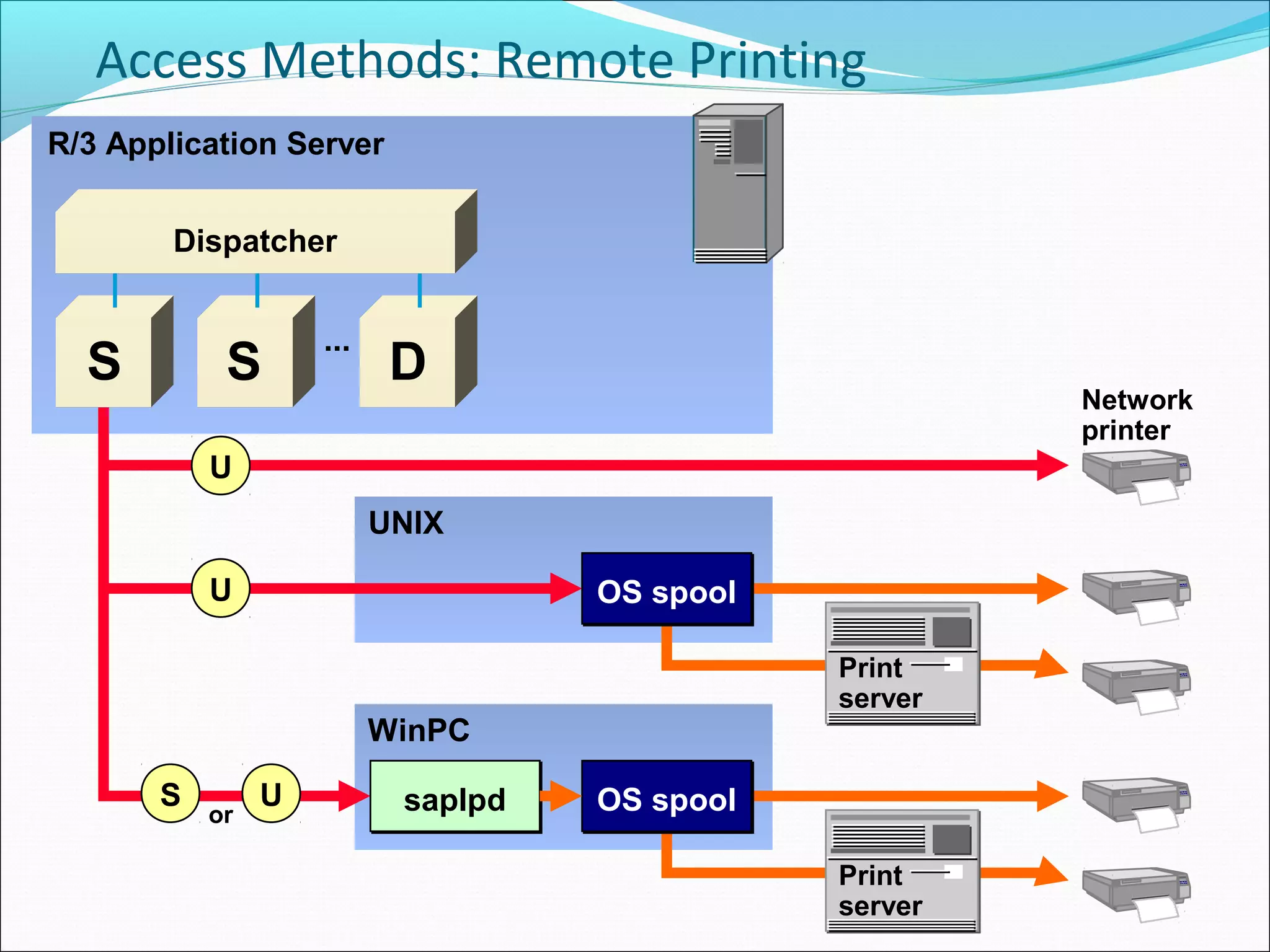
  • #5 Remote printing When using remote printing, an R/3 spool work process passes the print-ready output stream to the operating system spooler on a different host. This data transfer requires moving the output stream across a network link. The operating system spooler can then print on either a locally or remotely attached printer. Some printers haver their own operating system spooler. They can be directly attached to a network through a network card interface. They are called network printers, and can also receive output from R/3 (access method U ). In UNIX systems, the output stream is sent to a line printer demon lpd (access method U ). In Windows systems and other systems without an lpd , SAP provides the program saplpd, which receives the output stream and transfers it to the operating system spooler (access method S for a proprietary SAP protocol or U for the UNIX Berkeley protocol). For performance reasons, the remote access methods are only suitable for LAN environments and require reliable communication partners.
  • #6 Frontend printing Frontend printing allows R/3 users to send output to printers that are defined on their local frontend PCs (access method F ). The spool administrator does not need to define these printers as output devices in R/3. In Windows systems, the output is sent to program saplpd on the frontend PC. If saplpd is not running, it is started automatically. In other systems (UNIX, Macintosh, ...), the output is passed to the operating system spooler. As of Release 4.6A, all spool processing takes place in a spool work process. The spool work process waits until the output has been sent to the frontend before it continues to process other requests. Therefore, performance problems can occur when frontend printing is used. You can set an upper limit to the number of spool work processes used for frontend printing using parameter rdisp/wp_no_spo_Fro_max. The default value of the parameter is 1. Frontend printing only works as long as there is an active connection to the frontend PC. Therefore, frontend printing cannot be used in background processing. For more information on frontend printing and release dependencies, see SAP Collective Note 114426.
  • #7 The displayed list shows the status of the spool or output requests that meet your selection criteria. The ABAP List Viewer (ALV) is used to display this list and enables you to store multiple display variants. The status of a spool request is one of the following: - : no output request for this spool request Proc. : a spool work process is processing the corresponding output request Waiting : a spool work process is waiting for a return code from the operating system spool Compl. : the corresponding output request(s) has (have) been printed successfully Error : the corresponding output request(s) has (have) not been printed successfully <F5> : the corresponding output requests have different statuses To navigate from a spool request to its output requests, double-click on its status. To navigate from several spool requests to their output requests, select their lines and click the Output request icon. A log is written for every unsuccessful output request. You can use the log for error analysis.