9 Frame Analysis
Systematically analyse the codes and
conventions of Opening Title
Sequences
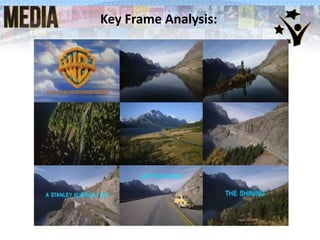
Key Frame Analysis:
Frame 1
This is the logo of the
production company
for the film.
This shows the viewer
who produced the
film and could cause
the viewer to watch
another film by this
production company.
Frame 2
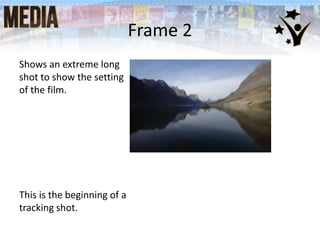
Shows an extreme long
shot to show the setting
of the film.
This is the beginning of a
tracking shot.
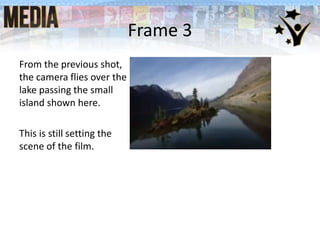
Frame 3
From the previous shot,
the camera flies over the
lake passing the small
island shown here.
This is still setting the
scene of the film.
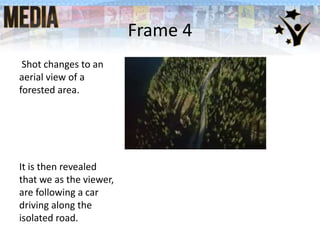
Frame 4
Shot changes to an
aerial view of a
forested area.
It is then revealed
that we as the viewer,
are following a car
driving along the
isolated road.
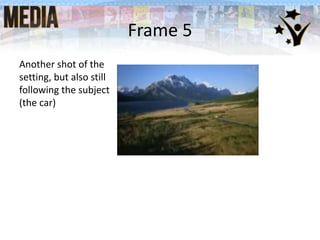
Frame 5
Another shot of the
setting, but also still
following the subject
(the car)
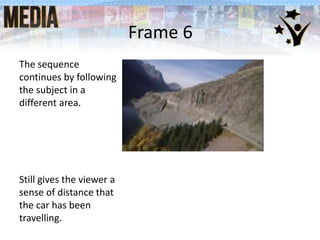
Frame 6
The sequence
continues by following
the subject in a
different area.
Still gives the viewer a
sense of distance that
the car has been
travelling.
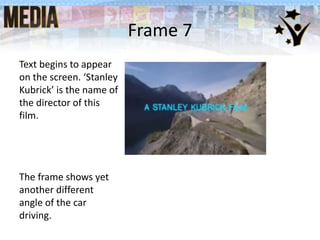
Frame 7
Text begins to appear
on the screen. ‘Stanley
Kubrick’ is the name of
the director of this
film.
The frame shows yet
another different
angle of the car
driving.
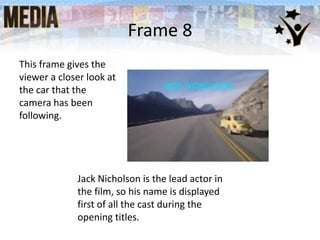
Frame 8
This frame gives the
viewer a closer look at
the car that the
camera has been
following.
Jack Nicholson is the lead actor in
the film, so his name is displayed
first of all the cast during the
opening titles.
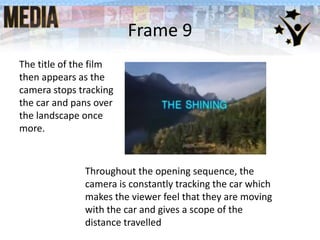
Frame 9
The title of the film
then appears as the
camera stops tracking
the car and pans over
the landscape once
more.
Throughout the opening sequence, the
camera is constantly tracking the car which
makes the viewer feel that they are moving
with the car and gives a scope of the
distance travelled
Homework
The following tasks need to be completed, saved and
available for uploading to websites when we set them up
after half term:
1. Your mind map of the conventions of a title sequence (using
www.bubbl.us or mindmapfree.com)
2. Your 9 Key Frames Analysis
3. Your Prelim Evaluation
4. Your Thriller Analysis
5. Any other bits that may be missing or need improving
Develop

9 Key Frames

  • 1.
    9 Frame Analysis Systematicallyanalyse the codes and conventions of Opening Title Sequences
  • 2.
  • 3.
    Frame 1 This isthe logo of the production company for the film. This shows the viewer who produced the film and could cause the viewer to watch another film by this production company.
  • 4.
    Frame 2 Shows anextreme long shot to show the setting of the film. This is the beginning of a tracking shot.
  • 5.
    Frame 3 From theprevious shot, the camera flies over the lake passing the small island shown here. This is still setting the scene of the film.
  • 6.
    Frame 4 Shot changesto an aerial view of a forested area. It is then revealed that we as the viewer, are following a car driving along the isolated road.
  • 7.
    Frame 5 Another shotof the setting, but also still following the subject (the car)
  • 8.
    Frame 6 The sequence continuesby following the subject in a different area. Still gives the viewer a sense of distance that the car has been travelling.
  • 9.
    Frame 7 Text beginsto appear on the screen. ‘Stanley Kubrick’ is the name of the director of this film. The frame shows yet another different angle of the car driving.
  • 10.
    Frame 8 This framegives the viewer a closer look at the car that the camera has been following. Jack Nicholson is the lead actor in the film, so his name is displayed first of all the cast during the opening titles.
  • 11.
    Frame 9 The titleof the film then appears as the camera stops tracking the car and pans over the landscape once more. Throughout the opening sequence, the camera is constantly tracking the car which makes the viewer feel that they are moving with the car and gives a scope of the distance travelled
  • 12.
    Homework The following tasksneed to be completed, saved and available for uploading to websites when we set them up after half term: 1. Your mind map of the conventions of a title sequence (using www.bubbl.us or mindmapfree.com) 2. Your 9 Key Frames Analysis 3. Your Prelim Evaluation 4. Your Thriller Analysis 5. Any other bits that may be missing or need improving Develop