PYHTON PROGRAMMING
ECE - I SEMESTER
D. Khalandar Basha
What about Python?
 Is it Functional Programming language? (OR)
 Is it Object Oriented Programming language? (OR)
 Is it Scripting Language?
 While developing Python, Guido Van Rossum borrowed -
Functional programming features from C Object Oriented
Programming features from C++ (Because, Java was not
developed at that time) Scripting language features from Perl,
Shell Script.
 So, Python is considered as All Rounder. Python can enjoy the
benefits of all types of programming language paradigms
Python as All Rounder
 C --> Procedural/Functional Programming Language
 C++, Java --> Object Oriented Programming Languages
 Perl, Shell Script ---> Scripting Languages
 Every Programming language having it's own specific behaviour,
that specific pradigm benefits only they are going to get
Features of Python Language
 Simple and easy to learn
 Freeware and Open Source
 High Level Programming Language
 Platform Independent
 Portability
 Dynamically Typed
 Python is both Procedure oriented and Object oriented
 Interpreted
 Extensible
 Extensive Library
Features of Python Language
 The code written in python is automatically compiled to byte
code and executed.
 Extending python with C or C++.
 Python supports lot of features such as nested code blocks,
functions, classes, modules and packages.
 Python is an object-oriented programming language.
 It has many built-in data types: strings, lists, tuples,
dictionaries, etc.,
 It supports control statements such as if, if-else, if-eif-else,
while, iterative for, etc.,
 It has functions, classes, modules and packages.
Features of Python Language
 Simple
 Easy to learn
 Open source
 High level language
 Dynamically typed
 Platform independent
 Portable
 Procedure and object oriented
Python application areas
 For developing Desktop Applications
The Applications which are running on a single systems (i.e., Stand
alone applications) Eg: Simple Calculator application
 For developing Web Applications
Eg: Gmail Application, Online E-commerce applications, Facebook
application, Blog applications etc.,
 For Network Applications
Eg: Chatting applications, Client-Server applicataions etc.,
 For Games development
 For Data Analysis Applications
Python application areas
 For Machine Learning applications
 For developing Artificial Intelligence, Deep Learning,
Neural Network Applications.
 For IOT
 For Data Sciene
That's why Python is called as General Purpose Programming
Language.
GETTING STARTED WITH PYTHON
There are three ways of staring python:
 Running a script written in python. -> text editor requires
 Using Graphical user interface (GUI) from an Integrated
Development environment (IDE) -> GUI application
 Employing an interactive approach -> command line
interpreter
GETTING STARTED WITH PYTHON
 Once python starts, you can see the interpreter startup
message, indication version and platform.
 You can also be given the python interpreter prompt,
ie., “>>>” which is also known as python chevron prompt.
 The “>>>” indicates that python interpreter is waiting for
an expression or command.
 The interacting environment where we are interaction
with the Python interpreter is called the console or
command shell.
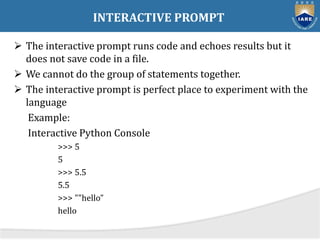
INTERACTIVE PROMPT
 The interactive prompt runs code and echoes results but it
does not save code in a file.
 We cannot do the group of statements together.
 The interactive prompt is perfect place to experiment with the
language
Example:
Interactive Python Console
>>> 5
5
>>> 5.5
5.5
>>> ""hello”
hello
IDLE USER INTERFACE
 IDLE is a graphical user interface for doing Python
development, and is a standard and free part of the Python
system.
 In short, IDLE is a GUI that lets you edit, run, browse, and
debug Python programs, all from a single interface.
 Moreover, because IDLE is a Python program that uses the
Tkinter GUI tool kit
 It runs portably on most Python platforms: MSWindows,
Xwindows (Unix, Linux), and Macs.
 For many, IDLE is an easy – to – use alternative to typing
command lines, and a less problem – prone alternative to
clicking on icons.
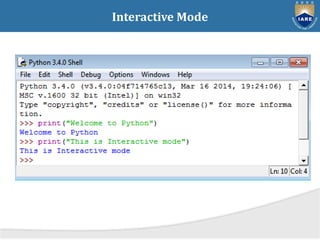
Interactive Mode
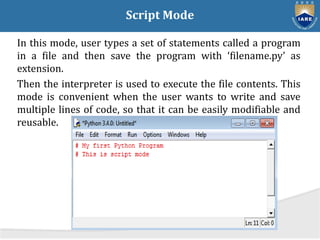
Script Mode
In this mode, user types a set of statements called a program
in a file and then save the program with ‘filename.py’ as
extension.
Then the interpreter is used to execute the file contents. This
mode is convenient when the user wants to write and save
multiple lines of code, so that it can be easily modifiable and
reusable.
Python Shell as a Simple Calculator

637b4894085c4_ppt.pptx

  • 1.
    PYHTON PROGRAMMING ECE -I SEMESTER D. Khalandar Basha
  • 2.
    What about Python? Is it Functional Programming language? (OR)  Is it Object Oriented Programming language? (OR)  Is it Scripting Language?  While developing Python, Guido Van Rossum borrowed - Functional programming features from C Object Oriented Programming features from C++ (Because, Java was not developed at that time) Scripting language features from Perl, Shell Script.  So, Python is considered as All Rounder. Python can enjoy the benefits of all types of programming language paradigms
  • 3.
    Python as AllRounder  C --> Procedural/Functional Programming Language  C++, Java --> Object Oriented Programming Languages  Perl, Shell Script ---> Scripting Languages  Every Programming language having it's own specific behaviour, that specific pradigm benefits only they are going to get
  • 4.
    Features of PythonLanguage  Simple and easy to learn  Freeware and Open Source  High Level Programming Language  Platform Independent  Portability  Dynamically Typed  Python is both Procedure oriented and Object oriented  Interpreted  Extensible  Extensive Library
  • 5.
    Features of PythonLanguage  The code written in python is automatically compiled to byte code and executed.  Extending python with C or C++.  Python supports lot of features such as nested code blocks, functions, classes, modules and packages.  Python is an object-oriented programming language.  It has many built-in data types: strings, lists, tuples, dictionaries, etc.,  It supports control statements such as if, if-else, if-eif-else, while, iterative for, etc.,  It has functions, classes, modules and packages.
  • 6.
    Features of PythonLanguage  Simple  Easy to learn  Open source  High level language  Dynamically typed  Platform independent  Portable  Procedure and object oriented
  • 7.
    Python application areas For developing Desktop Applications The Applications which are running on a single systems (i.e., Stand alone applications) Eg: Simple Calculator application  For developing Web Applications Eg: Gmail Application, Online E-commerce applications, Facebook application, Blog applications etc.,  For Network Applications Eg: Chatting applications, Client-Server applicataions etc.,  For Games development  For Data Analysis Applications
  • 8.
    Python application areas For Machine Learning applications  For developing Artificial Intelligence, Deep Learning, Neural Network Applications.  For IOT  For Data Sciene That's why Python is called as General Purpose Programming Language.
  • 9.
    GETTING STARTED WITHPYTHON There are three ways of staring python:  Running a script written in python. -> text editor requires  Using Graphical user interface (GUI) from an Integrated Development environment (IDE) -> GUI application  Employing an interactive approach -> command line interpreter
  • 10.
    GETTING STARTED WITHPYTHON  Once python starts, you can see the interpreter startup message, indication version and platform.  You can also be given the python interpreter prompt, ie., “>>>” which is also known as python chevron prompt.  The “>>>” indicates that python interpreter is waiting for an expression or command.  The interacting environment where we are interaction with the Python interpreter is called the console or command shell.
  • 11.
    INTERACTIVE PROMPT  Theinteractive prompt runs code and echoes results but it does not save code in a file.  We cannot do the group of statements together.  The interactive prompt is perfect place to experiment with the language Example: Interactive Python Console >>> 5 5 >>> 5.5 5.5 >>> ""hello” hello
  • 12.
    IDLE USER INTERFACE IDLE is a graphical user interface for doing Python development, and is a standard and free part of the Python system.  In short, IDLE is a GUI that lets you edit, run, browse, and debug Python programs, all from a single interface.  Moreover, because IDLE is a Python program that uses the Tkinter GUI tool kit  It runs portably on most Python platforms: MSWindows, Xwindows (Unix, Linux), and Macs.  For many, IDLE is an easy – to – use alternative to typing command lines, and a less problem – prone alternative to clicking on icons.
  • 13.
  • 14.
    Script Mode In thismode, user types a set of statements called a program in a file and then save the program with ‘filename.py’ as extension. Then the interpreter is used to execute the file contents. This mode is convenient when the user wants to write and save multiple lines of code, so that it can be easily modifiable and reusable.
  • 15.
    Python Shell asa Simple Calculator