BY
     G.SIDDARTH
     08Q61A0553
CONTENTS
 INTRODUCTION
 HISTORY
 WORKINGPROCESS
 TECHNOLOGIES
 ADVANTAGES
 DISADVANTAGES
 CONCLUSION
 BIBLOGRAPHY
INTRODUCTION
 WordPress is free open-source software that you can
  download For free.
 Most people will tell you that WordPress is for blogging,
  which is true, but that’s not the only way you can use it.
 WordPress is not only the best blogging tool you can get
  for free, but it can also be used to build lightning fast
  websites.
 WordPress is a Content Management System(CMS)
HISTORY
WordPress started in 2003 with a single bit of code to
enhance the typography of everyday writing and with
fewer users than you can count on your fingers and toes.
Since then it has grown to be the largest self-hosted
blogging tool in the world, used on millions of sites and
seen by tens of millions of people every day.
Everything you see here, from the documentation to the
 code itself, was created by and for the community.
 WordPress is an Open Source project, which means there
 are hundreds of people all over the world working on it.
 (More than most commercial platforms.) It also means
 you are free to use it for anything from your cat’s home
 page to a Fortune 500 web site without paying anyone a
 license fee and a number of other important freedoms.
WORKINGPROCESS
 Installation
 Working with Themes
 Creating Posts in WordPress
 File and Plugging Management
 Creating pages in WordPress
 Widgets
INSTALLATION
 Download and unzip the WordPress package, if you haven't
    already.
   Create a database for WordPress on your web server, as well
    as a MySQL user who has all privileges for accessing and
    modifying it.
   Rename the wp-config-sample.php file to wp-config.php.
   Open wp-config.php in a text editor and fill in your
    database details as explained in editing wp-config.php to
    generate and use your secret key password.
   Upload the WordPress files in the desired location on your
    web server.
   Run the WordPress installation script by accessing wp-
    admin/install.php in a web browser.
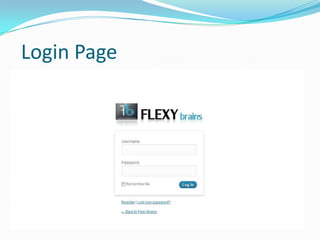
Login Page
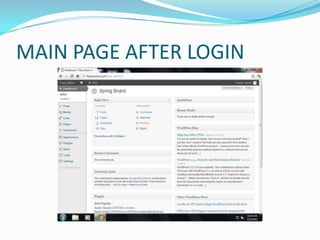
MAIN PAGE AFTER LOGIN
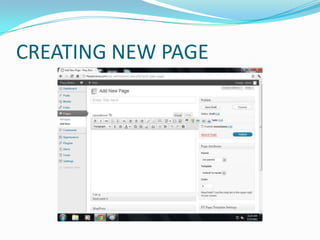
CREATING NEW PAGE
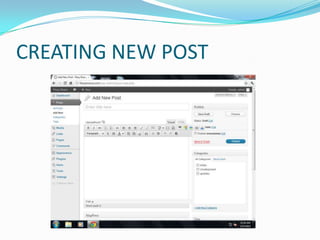
CREATING NEW POST
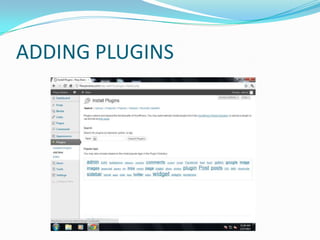
ADDING PLUGINS
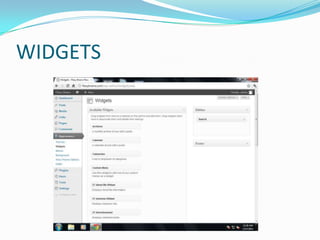
WIDGETS
Technologies
Frontend:
               HTML
               JavaScript
               CSS
               Flash
               Jquery
               Macromedia Flash

Backend:
               MySQL

Middle wear:
               PHP
Advantages
 It’s easy to design
 It’s easy to customize
 It’s easy to make changes
 It’s SEO friendly
 It’s easy to connect with other social sites
 It’s spam-resistant
Disadvantages
 Design Knowledge Required
 Too Many Plugins
 Tables and Graphics
Conclusion

 WP is a great platform to begin blogging or simple
 website design. It is the most easy to use solution and
 offers a great toolset to beginners. For more advanced
 users, you may find that you need to install a throng of
 Plugins to get the design capabilities you want, in which
 case a more advanced CMS might be in order for you
Bibliography
   WordPress for Dummies
   WordPress Ultimate security
   Professional WordPress Plugin Development
   WordPress for business bloggers
THANK YOU

WORDPRESS

  • 1.
    BY G.SIDDARTH 08Q61A0553
  • 2.
    CONTENTS  INTRODUCTION  HISTORY WORKINGPROCESS  TECHNOLOGIES  ADVANTAGES  DISADVANTAGES  CONCLUSION  BIBLOGRAPHY
  • 3.
    INTRODUCTION  WordPress isfree open-source software that you can download For free.  Most people will tell you that WordPress is for blogging, which is true, but that’s not the only way you can use it.  WordPress is not only the best blogging tool you can get for free, but it can also be used to build lightning fast websites.  WordPress is a Content Management System(CMS)
  • 4.
    HISTORY WordPress started in2003 with a single bit of code to enhance the typography of everyday writing and with fewer users than you can count on your fingers and toes. Since then it has grown to be the largest self-hosted blogging tool in the world, used on millions of sites and seen by tens of millions of people every day.
  • 5.
    Everything you seehere, from the documentation to the code itself, was created by and for the community. WordPress is an Open Source project, which means there are hundreds of people all over the world working on it. (More than most commercial platforms.) It also means you are free to use it for anything from your cat’s home page to a Fortune 500 web site without paying anyone a license fee and a number of other important freedoms.
  • 6.
    WORKINGPROCESS  Installation  Workingwith Themes  Creating Posts in WordPress  File and Plugging Management  Creating pages in WordPress  Widgets
  • 7.
    INSTALLATION  Download andunzip the WordPress package, if you haven't already.  Create a database for WordPress on your web server, as well as a MySQL user who has all privileges for accessing and modifying it.  Rename the wp-config-sample.php file to wp-config.php.  Open wp-config.php in a text editor and fill in your database details as explained in editing wp-config.php to generate and use your secret key password.  Upload the WordPress files in the desired location on your web server.  Run the WordPress installation script by accessing wp- admin/install.php in a web browser.
  • 8.
  • 9.
  • 10.
  • 11.
  • 12.
  • 13.
  • 14.
    Technologies Frontend: HTML JavaScript CSS Flash Jquery Macromedia Flash Backend: MySQL Middle wear: PHP
  • 15.
    Advantages  It’s easyto design  It’s easy to customize  It’s easy to make changes  It’s SEO friendly  It’s easy to connect with other social sites  It’s spam-resistant
  • 16.
    Disadvantages  Design KnowledgeRequired  Too Many Plugins  Tables and Graphics
  • 17.
    Conclusion WP isa great platform to begin blogging or simple website design. It is the most easy to use solution and offers a great toolset to beginners. For more advanced users, you may find that you need to install a throng of Plugins to get the design capabilities you want, in which case a more advanced CMS might be in order for you
  • 18.
    Bibliography WordPress for Dummies  WordPress Ultimate security  Professional WordPress Plugin Development  WordPress for business bloggers
  • 19.