A utility-first CSS framework for
rapidly building custom designs.
Tailwind CSS -A
utility-first CSS
I am Naveen Kharwar
I am a Web Developer, who usually works with front-end
technologies and CMSs’. I have developed several projects using
WordPress and GatsbyJS. I like to contribute to Open Source
Technologies And WordPress stuffs, it helps me to stay
productive as well as collaborative. Apart from this, I love to
participate in technological events, such as WordCamps.
https://wayoutworks.in
TABLE OF
CONTENTS
INTRODUCTION
Introducing Tailwind CSS
CSS Framework vs
Tailwind CSS
Utility Based CSS Framework vs
CSS Framework
01
03
02
04
05
BENEFITS
Why people are crazy about
Tailwind CSS
Installation
Install Tailwind CSS
Taking Advantage
How to use Tailwind CSS Fully.
INTRODUCTION
01
What is Tailwind CSS
According to the official website, Tailwind CSS is a utility-first CSS
framework for rapidly building custom designs. Some developers don't like
it because it makes the HTML/JSX or any markup look busier. But I found it
cool as I don't have to write any single CSS for a website it doesn't matter if
it's a big as E-commerce or just a simple landing page.
With Tailwind CSS you have full control over your component not like
Bootstrap. You will not get ready-made styles classes you have to create
your own.
CSS Frameworks vs
Tailwind CSS
02
1... 2.. 3.. Let’s Fight
Bootstrap
Power of Bootstrap
Bootstrap is a free and open-source CSS framework
directed at responsive, mobile-first front-end web
development. It contains CSS- and JavaScript-based
design templates for typography, forms, buttons,
navigation, and other interface components.
Tailwind CSS
Tailwind is a utility-first CSS framework for rapidly
building custom user interfaces. The beauty about this
thing called tailwind is it doesn't impose design
specification or how your site should look like, you
simply bring tiny components together to construct a
user interface that are unique and is also Open Source.
Power of
Tailwind CSS
Stars on Github
141K
24.1K
21.4K
Bootstrap
Tailwind CSS
Foundation
BENEFITS
03
Let’s discuss power of Tailwind CSS
BENEFITS
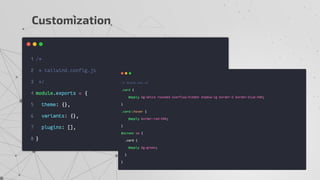
Customization
It comes with a default
configuration, but it’s
straightforward to override
the default configuration with
a tailwind.config.js file in
your project.
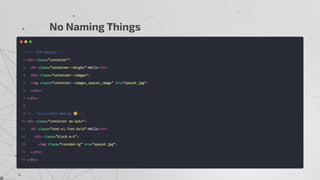
No Naming Things
Tailwind provide utility
classes that can be used 99%
of the time. The only time
you’ll have to name things is
when you extract a
component,
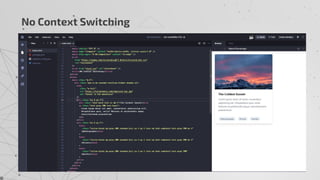
No Context
Switching
One of the reasons Tailwind
is so much faster to use is
you barely ever have to
switch contexts.
HTML -CSS
Development
Speed
Because you don’t need to
name things, you don’t have
to switch context as much,
and you’re not fighting the
framework to make
customizations, prototyping
and implementing custom
designs is really fast using
Tailwind.
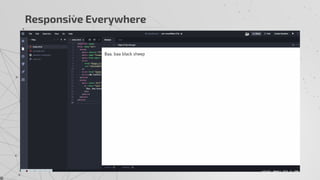
Responsive
Everywhere
All of Tailwind’s utilities are
generated with responsive
versions that you can use to
make your site look different
on mobile, tablet, and
desktop screen sizes. On top
of that, it offers the @screen
and @responsive directives
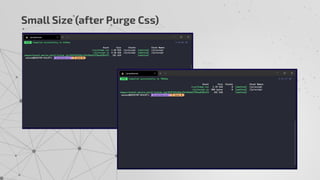
Small Size (after
Purge CSS)
Initially, when you see the
CSS file outputted by
Tailwind, you might be
shocked at the large file size
(477.6kb unminified).
Thankfully, there are a few
things that can help reduce
the file size tremendously.
Customization
No Naming Things
No Context Switching
Development Speed
Customization + No Naming Things + No Context Switching =
Fast Development
Responsive Everywhere
Small Size (after Purge Css)
Installation
04
Installing TailwindCSS
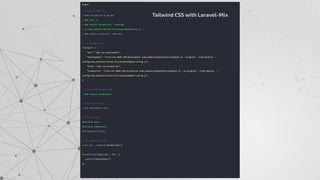
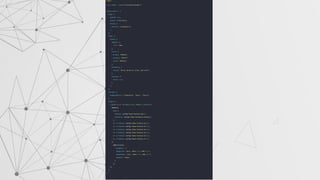
Tailwind CSS with Laravel-Mix
Taking Full Advantage
05
■ https://tailwindcss.com/
■ https://tailwindcss.com/screencasts/
■ https://tailwindcss.com/docs/functions-and-directives
■ https://dev.to/naveenkharwar/scope-of-tailwindcss-e85
RESOURCES
CREDITS: This presentation template was created by Slidesgo, including
icons by Flaticon, and infographics & images by Freepik.
Please keep this slide for attribution.
THANKS

Tailwind CSS - KanpurJS

  • 1.
    A utility-first CSSframework for rapidly building custom designs. Tailwind CSS -A utility-first CSS
  • 2.
    I am NaveenKharwar I am a Web Developer, who usually works with front-end technologies and CMSs’. I have developed several projects using WordPress and GatsbyJS. I like to contribute to Open Source Technologies And WordPress stuffs, it helps me to stay productive as well as collaborative. Apart from this, I love to participate in technological events, such as WordCamps. https://wayoutworks.in
  • 3.
    TABLE OF CONTENTS INTRODUCTION Introducing TailwindCSS CSS Framework vs Tailwind CSS Utility Based CSS Framework vs CSS Framework 01 03 02 04 05 BENEFITS Why people are crazy about Tailwind CSS Installation Install Tailwind CSS Taking Advantage How to use Tailwind CSS Fully.
  • 4.
  • 5.
    What is TailwindCSS According to the official website, Tailwind CSS is a utility-first CSS framework for rapidly building custom designs. Some developers don't like it because it makes the HTML/JSX or any markup look busier. But I found it cool as I don't have to write any single CSS for a website it doesn't matter if it's a big as E-commerce or just a simple landing page. With Tailwind CSS you have full control over your component not like Bootstrap. You will not get ready-made styles classes you have to create your own.
  • 6.
    CSS Frameworks vs TailwindCSS 02 1... 2.. 3.. Let’s Fight
  • 7.
    Bootstrap Power of Bootstrap Bootstrapis a free and open-source CSS framework directed at responsive, mobile-first front-end web development. It contains CSS- and JavaScript-based design templates for typography, forms, buttons, navigation, and other interface components.
  • 8.
    Tailwind CSS Tailwind isa utility-first CSS framework for rapidly building custom user interfaces. The beauty about this thing called tailwind is it doesn't impose design specification or how your site should look like, you simply bring tiny components together to construct a user interface that are unique and is also Open Source. Power of Tailwind CSS
  • 9.
  • 10.
  • 11.
    BENEFITS Customization It comes witha default configuration, but it’s straightforward to override the default configuration with a tailwind.config.js file in your project. No Naming Things Tailwind provide utility classes that can be used 99% of the time. The only time you’ll have to name things is when you extract a component, No Context Switching One of the reasons Tailwind is so much faster to use is you barely ever have to switch contexts. HTML -CSS Development Speed Because you don’t need to name things, you don’t have to switch context as much, and you’re not fighting the framework to make customizations, prototyping and implementing custom designs is really fast using Tailwind. Responsive Everywhere All of Tailwind’s utilities are generated with responsive versions that you can use to make your site look different on mobile, tablet, and desktop screen sizes. On top of that, it offers the @screen and @responsive directives Small Size (after Purge CSS) Initially, when you see the CSS file outputted by Tailwind, you might be shocked at the large file size (477.6kb unminified). Thankfully, there are a few things that can help reduce the file size tremendously.
  • 12.
  • 13.
  • 14.
  • 15.
    Development Speed Customization +No Naming Things + No Context Switching = Fast Development
  • 16.
  • 17.
  • 18.
  • 19.
    Tailwind CSS withLaravel-Mix
  • 20.
  • 22.
    ■ https://tailwindcss.com/ ■ https://tailwindcss.com/screencasts/ ■https://tailwindcss.com/docs/functions-and-directives ■ https://dev.to/naveenkharwar/scope-of-tailwindcss-e85 RESOURCES
  • 23.
    CREDITS: This presentationtemplate was created by Slidesgo, including icons by Flaticon, and infographics & images by Freepik. Please keep this slide for attribution. THANKS