Touch Screen
Technology
RESEARCHER: RAZZESH SHAH.
14 ‘A’
1
What are Touch Screens ?
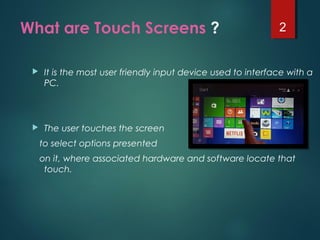
 It is the most user friendly input device used to interface with a
PC.
 The user touches the screen
to select options presented
on it, where associated hardware and software locate that
touch.
2
History and Development
 In 1971 Dr. Sam Hurst, founder of Elographics
developed the first touch opaque sensor
“Elograph” at the University of Kentucky.
 In 1974 He developed the first real touch
screen.
 In 1977, Elographics developed the five-wire
resistive technology then with the backing of
Siemens Corporation, developed a curved
glass sensor called the touch screen.
 The new transparent technology, AccuTouch,
was later developed by the founders of
Elographics, Dr. Hurst and Bill Colwell.
3
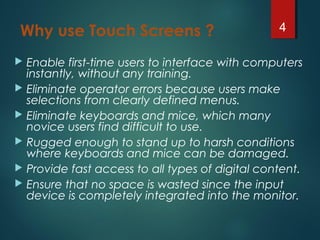
Why use Touch Screens ?
 Enable first-time users to interface with computers
instantly, without any training.
 Eliminate operator errors because users make
selections from clearly defined menus.
 Eliminate keyboards and mice, which many
novice users find difficult to use.
 Rugged enough to stand up to harsh conditions
where keyboards and mice can be damaged.
 Provide fast access to all types of digital content.
 Ensure that no space is wasted since the input
device is completely integrated into the monitor.
4
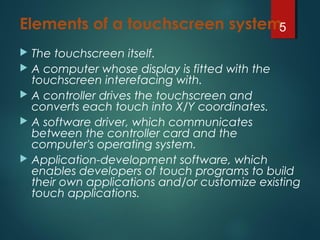
Elements of a touchscreen system
 The touchscreen itself.
 A computer whose display is fitted with the
touchscreen interefacing with.
 A controller drives the touchscreen and
converts each touch into X/Y coordinates.
 A software driver, which communicates
between the controller card and the
computer's operating system.
 Application-development software, which
enables developers of touch programs to build
their own applications and/or customize existing
touch applications.
5
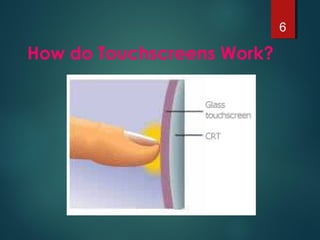
How do Touchscreens Work?
6
TOUCH TECHNOLOGIES
Here are some technologies that are used in making
touch screens:
 Resistive
 Capacitive
 Surface Acoustic Wave (SAW)
 Scanning Infrared
 Near Field Imaging
7
Resistive touch screen
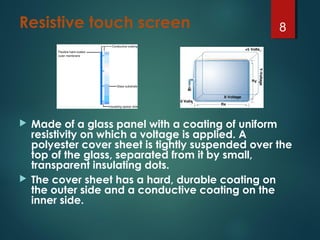
 Made of a glass panel with a coating of uniform
resistivity on which a voltage is applied. A
polyester cover sheet is tightly suspended over the
top of the glass, separated from it by small,
transparent insulating dots.
 The cover sheet has a hard, durable coating on
the outer side and a conductive coating on the
inner side.
8
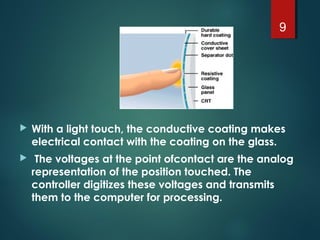
 With a light touch, the conductive coating makes
electrical contact with the coating on the glass.
  The voltages at the point ofcontact are the analog
representation of the position touched. The
controller digitizes these voltages and transmits
them to the computer for processing.
9
Advantages of Resistive
– High Resolution and Accuracy
– Fast Response
– Pressure-activated by finger or gloved hand with a very
light touch
– Durable hard-coat front surface can be nonglare treated
for     reflection control or polished for maximum clarity
– Touchscreens and controllers are safety agency-
approved components,so certification of your system is
easier
Disadvantages of Resistive
– 80 % Clarity
– Resistive layers can be damaged by a sharp object
10
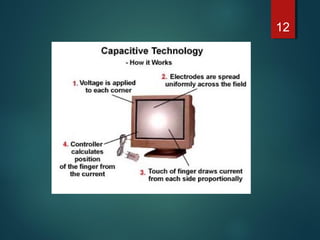
Capacitive Touch screen
There are 2 types of capacitive touch screens:
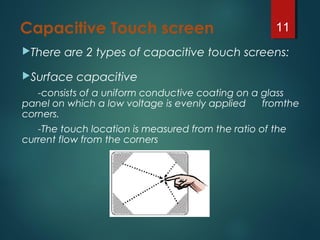
Surface capacitive
-consists of a uniform conductive coating on a glass
panel on which a low voltage is evenly applied fromthe
corners.
-The touch location is measured from the ratio of the
current flow from the corners
11
12
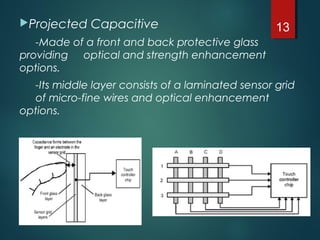
Projected Capacitive
-Made of a front and back protective glass
providing optical and strength enhancement
options.
-Its middle layer consists of a laminated sensor grid
of micro-fine wires and optical enhancement
options.
13
Advantages of Capacitive
– High Touch Resolution
– High Clarity
– Completely Sealable
Disadvantages of Capacitive 
– Must be touched by finger- will not work with any
non- conductive input
– Can be affected by electricity
– May need re-calibration often
14
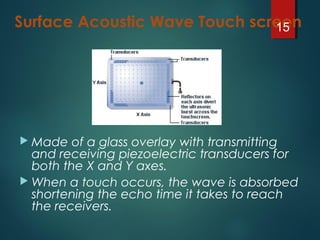
Surface Acoustic Wave Touch screen
 Made of a glass overlay with transmitting
and receiving piezoelectric transducers for
both the X and Y axes.
 When a touch occurs, the wave is absorbed
shortening the echo time it takes to reach
the receivers.
15
Advantages of Surface Acoustic Wave
Excellent Image Clarity -Very High
LightTransmission
Excellent Durability -Stable "No-Drift" Operation
High Resolution - Very Light Touch
Fast Touch Response -X,Y and Z-axis Response
Finger or Gloved-Hand Operation
Disadvantages of Surface Acoustic Wave
Must be touched by finger, gloved hand, or soft-tip
stylus.  Something hard like a pen won't work
Not completely sealable, can be affected by
large  amounts of grease, water,  or dirt on the
touchscreen
16
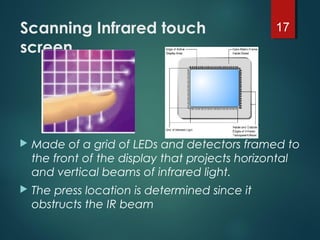
Scanning Infrared touch
screen
 Made of a grid of LEDs and detectors framed to
the front of the display that projects horizontal
and vertical beams of infrared light.
 The press location is determined since it
obstructs the IR beam
17
Advantages
– Mostly used in manufacturing and medical applications since it
can be completely sealed.
– operated using a stylus or a gloved finger.
– mechanically stronger
– Clearer
– more wear resistant
Disadvantages
– it is very sensitive and can be activated by stray touches.
– Low resolution
– Parallax problems
18
Near Field Imaging touch
screen
 Made of two laminated glass sheets having a
transparent metal oxide coating in between.
 An AC signal is applied to the patterned
conductive coating creating an electrostatic
field on the surface of the screen.
 It is used only in the toughest environments and
applications due to its high cost.
19
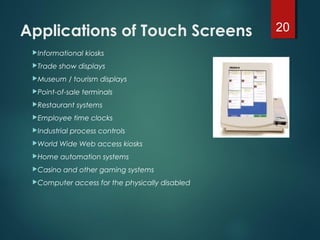
Applications of Touch Screens 
Informational kiosks
Trade show displays
Museum / tourism displays
Point-of-sale terminals
Restaurant systems
Employee time clocks
Industrial process controls
World Wide Web access kiosks
Home automation systems
Casino and other gaming systems
Computer access for the physically disabled
20
Thank you Sir !
21

38822545 touch-screen-technology

  • 1.
  • 2.
    What are TouchScreens ?  It is the most user friendly input device used to interface with a PC.  The user touches the screen to select options presented on it, where associated hardware and software locate that touch. 2
  • 3.
    History and Development In 1971 Dr. Sam Hurst, founder of Elographics developed the first touch opaque sensor “Elograph” at the University of Kentucky.  In 1974 He developed the first real touch screen.  In 1977, Elographics developed the five-wire resistive technology then with the backing of Siemens Corporation, developed a curved glass sensor called the touch screen.  The new transparent technology, AccuTouch, was later developed by the founders of Elographics, Dr. Hurst and Bill Colwell. 3
  • 4.
    Why use TouchScreens ?  Enable first-time users to interface with computers instantly, without any training.  Eliminate operator errors because users make selections from clearly defined menus.  Eliminate keyboards and mice, which many novice users find difficult to use.  Rugged enough to stand up to harsh conditions where keyboards and mice can be damaged.  Provide fast access to all types of digital content.  Ensure that no space is wasted since the input device is completely integrated into the monitor. 4
  • 5.
    Elements of atouchscreen system  The touchscreen itself.  A computer whose display is fitted with the touchscreen interefacing with.  A controller drives the touchscreen and converts each touch into X/Y coordinates.  A software driver, which communicates between the controller card and the computer's operating system.  Application-development software, which enables developers of touch programs to build their own applications and/or customize existing touch applications. 5
  • 6.
  • 7.
    TOUCH TECHNOLOGIES Here aresome technologies that are used in making touch screens:  Resistive  Capacitive  Surface Acoustic Wave (SAW)  Scanning Infrared  Near Field Imaging 7
  • 8.
    Resistive touch screen Made of a glass panel with a coating of uniform resistivity on which a voltage is applied. A polyester cover sheet is tightly suspended over the top of the glass, separated from it by small, transparent insulating dots.  The cover sheet has a hard, durable coating on the outer side and a conductive coating on the inner side. 8
  • 9.
     With alight touch, the conductive coating makes electrical contact with the coating on the glass.   The voltages at the point ofcontact are the analog representation of the position touched. The controller digitizes these voltages and transmits them to the computer for processing. 9
  • 10.
    Advantages of Resistive –High Resolution and Accuracy – Fast Response – Pressure-activated by finger or gloved hand with a very light touch – Durable hard-coat front surface can be nonglare treated for     reflection control or polished for maximum clarity – Touchscreens and controllers are safety agency- approved components,so certification of your system is easier Disadvantages of Resistive – 80 % Clarity – Resistive layers can be damaged by a sharp object 10
  • 11.
    Capacitive Touch screen Thereare 2 types of capacitive touch screens: Surface capacitive -consists of a uniform conductive coating on a glass panel on which a low voltage is evenly applied fromthe corners. -The touch location is measured from the ratio of the current flow from the corners 11
  • 12.
  • 13.
    Projected Capacitive -Made ofa front and back protective glass providing optical and strength enhancement options. -Its middle layer consists of a laminated sensor grid of micro-fine wires and optical enhancement options. 13
  • 14.
    Advantages of Capacitive –High Touch Resolution – High Clarity – Completely Sealable Disadvantages of Capacitive  – Must be touched by finger- will not work with any non- conductive input – Can be affected by electricity – May need re-calibration often 14
  • 15.
    Surface Acoustic WaveTouch screen  Made of a glass overlay with transmitting and receiving piezoelectric transducers for both the X and Y axes.  When a touch occurs, the wave is absorbed shortening the echo time it takes to reach the receivers. 15
  • 16.
    Advantages of SurfaceAcoustic Wave Excellent Image Clarity -Very High LightTransmission Excellent Durability -Stable "No-Drift" Operation High Resolution - Very Light Touch Fast Touch Response -X,Y and Z-axis Response Finger or Gloved-Hand Operation Disadvantages of Surface Acoustic Wave Must be touched by finger, gloved hand, or soft-tip stylus.  Something hard like a pen won't work Not completely sealable, can be affected by large  amounts of grease, water,  or dirt on the touchscreen 16
  • 17.
    Scanning Infrared touch screen Made of a grid of LEDs and detectors framed to the front of the display that projects horizontal and vertical beams of infrared light.  The press location is determined since it obstructs the IR beam 17
  • 18.
    Advantages – Mostly usedin manufacturing and medical applications since it can be completely sealed. – operated using a stylus or a gloved finger. – mechanically stronger – Clearer – more wear resistant Disadvantages – it is very sensitive and can be activated by stray touches. – Low resolution – Parallax problems 18
  • 19.
    Near Field Imagingtouch screen  Made of two laminated glass sheets having a transparent metal oxide coating in between.  An AC signal is applied to the patterned conductive coating creating an electrostatic field on the surface of the screen.  It is used only in the toughest environments and applications due to its high cost. 19
  • 20.
    Applications of TouchScreens  Informational kiosks Trade show displays Museum / tourism displays Point-of-sale terminals Restaurant systems Employee time clocks Industrial process controls World Wide Web access kiosks Home automation systems Casino and other gaming systems Computer access for the physically disabled 20
  • 21.