



2017 Deliverability & Beyond
What Eloquans Need to Know
Chris Arrendale
Inbox Pros
www.inboxpros.com
@Arrendale
@inboxpros
WHAT IS DELIVERABILITY?
 Delivered is the way to
measure that the email was
accepted by the recipient’s
mail server
 Deliverability is getting to the
inbox and measuring the
open/click statistics
 Getting your email into your
subscriber’s inbox is the only
way to get opens, clicks, and
conversions
 Deliverability is constantly
changing and evolving
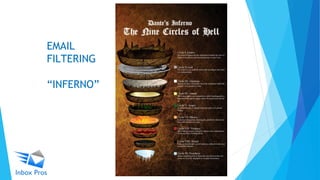
EMAIL
FILTERING
“INFERNO”
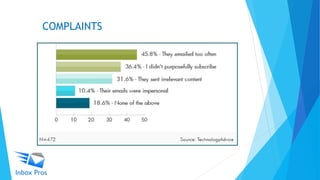
COMPLAINTS
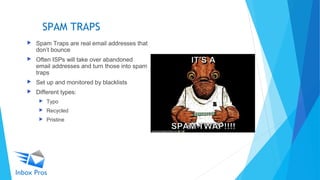
SPAM TRAPS
 Spam Traps are real email addresses that
don’t bounce
 Often ISPs will take over abandoned
email addresses and turn those into spam
traps
 Set up and monitored by blacklists
 Different types:
 Typo
 Recycled
 Pristine
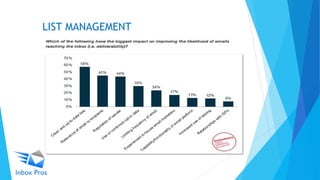
LIST MANAGEMENT
CONTENT
 Recipient engagement is focus for 2017 – make subject lines and content
count!
 Landing page and image path domains
 Check for blacklist or reputation issues.
 Are images being hosted by Eloqua, internal server, Amazon, etc.?
 Social media links
 Higher risk for possible target of reputation problems.
 Sending domain versus bounce domain (return-path)
 Whitelisting both (not just the IP) to help ensure delivery of the message.
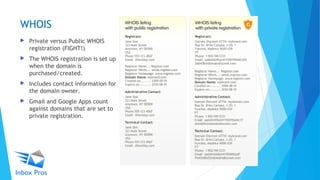
WHOIS
 Private versus Public WHOIS
registration (FIGHT!)
 The WHOIS registration is set up
when the domain is
purchased/created.
 Includes contact information for
the domain owner.
 Gmail and Google Apps count
against domains that are set to
private registration.
AUTHENTICATION - DMARC
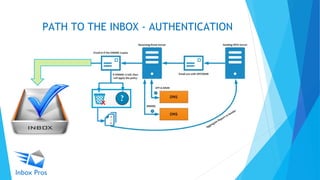
PATH TO THE INBOX - AUTHENTICATION
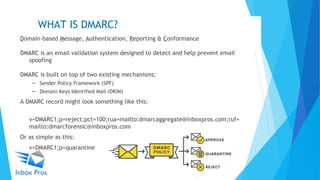
WHAT IS DMARC?
Domain-based Message, Authentication, Reporting & Conformance
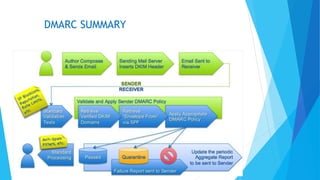
DMARC is an email validation system designed to detect and help prevent email
spoofing
DMARC is built on top of two existing mechanisms:
– Sender Policy Framework (SPF)
– Domain Keys Identified Mail (DKIM)
A DMARC record might look something like this:
v=DMARC1;p=reject;pct=100;rua=mailto:dmarcaggregate@inboxpros.com;ruf=
mailto:dmarcforensic@inboxpros.com
Or as simple as this:
v=DMARC1;p=quarantine
TXT INSTRUCTIONS
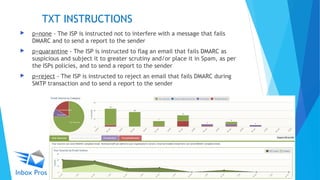
 p=none - The ISP is instructed not to interfere with a message that fails
DMARC and to send a report to the sender
 p=quarantine - The ISP is instructed to flag an email that fails DMARC as
suspicious and subject it to greater scrutiny and/or place it in Spam, as per
the ISPs policies, and to send a report to the sender
 p=reject - The ISP is instructed to reject an email that fails DMARC during
SMTP transaction and to send a report to the sender
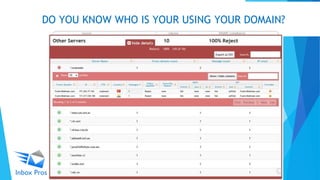
DO YOU KNOW WHO IS YOUR USING YOUR DOMAIN?
COMMON ALIGNMENT ISSUES
 Even if SPF and DKIM pass authentication, DMARC will fail if the identifiers are
not aligned
DMARC SUMMARY
FEEDBACK RESOURCES & TOOLS
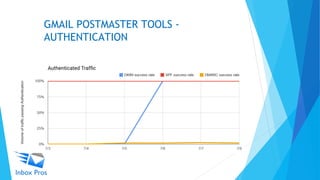
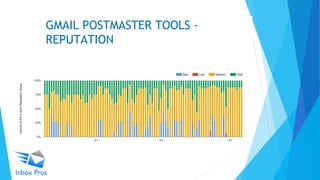
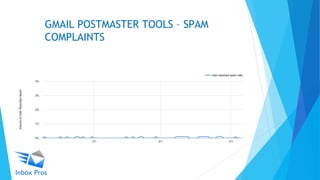
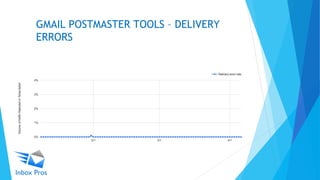
GMAIL POSTMASTER TOOLS
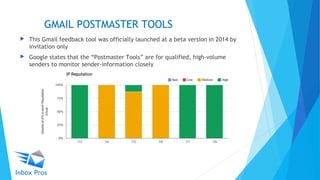
 This Gmail feedback tool was officially launched at a beta version in 2014 by
invitation only
 Google states that the “Postmaster Tools” are for qualified, high-volume
senders to monitor sender-information closely
GMAIL POSTMASTER TOOLS -
AUTHENTICATION
GMAIL POSTMASTER TOOLS -
REPUTATION
GMAIL POSTMASTER TOOLS – SPAM
COMPLAINTS
GMAIL POSTMASTER TOOLS – DELIVERY
ERRORS
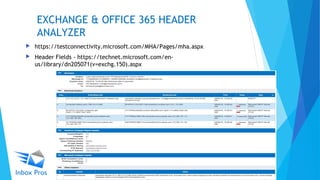
EXCHANGE & OFFICE 365 HEADER
ANALYZER
 https://testconnectivity.microsoft.com/MHA/Pages/mha.aspx
 Header Fields - https://technet.microsoft.com/en-
us/library/dn205071(v=exchg.150).aspx
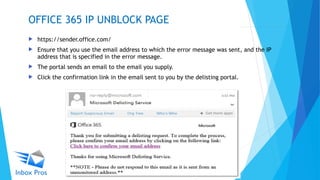
 https://sender.office.com/
 Ensure that you use the email address to which the error message was sent, and the IP
address that is specified in the error message.
 The portal sends an email to the email you supply.
 Click the confirmation link in the email sent to you by the delisting portal.
OFFICE 365 IP UNBLOCK PAGE
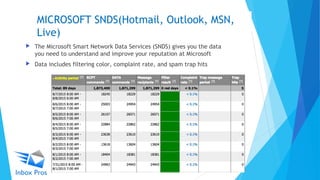
MICROSOFT SNDS(Hotmail, Outlook, MSN,
Live)
 The Microsoft Smart Network Data Services (SNDS) gives you the data
you need to understand and improve your reputation at Microsoft
 Data includes filtering color, complaint rate, and spam trap hits
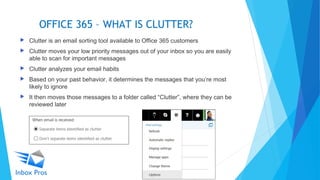
OFFICE 365 – WHAT IS CLUTTER?
 Clutter is an email sorting tool available to Office 365 customers
 Clutter moves your low priority messages out of your inbox so you are easily
able to scan for important messages
 Clutter analyzes your email habits
 Based on your past behavior, it determines the messages that you’re most
likely to ignore
 It then moves those messages to a folder called “Clutter”, where they can be
reviewed later
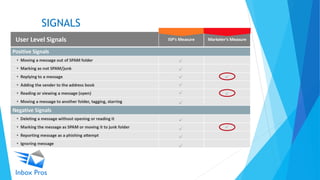
SIGNALS
PRIVACY & PERMISSION
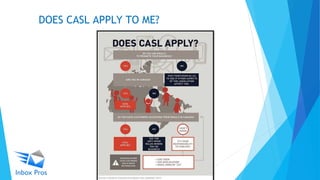
DOES CASL APPLY TO ME?
CASL BREAKDOWN
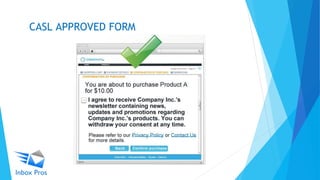
CASL: WHAT IS CONSENT?
 Implied Consent
 The sender & recipient have an existing
business (or non business) relationship
 Implied Consent is where the recipient has
supplied an email address and they have not
included a statement that indicates they do
not wish to receive CEMs
 Express Consent
 Recipients give a positive or explicit
indication of consent to receive CEM’s
 They may check a box or type/write in their
email address
CASL APPROVED FORM
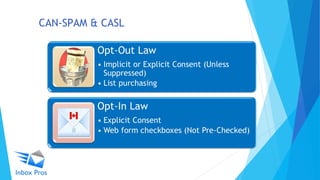
CAN-SPAM & CASL
PRIVACY COMPLIANCE - GDPR
 Brands have two years to become GDPR compliant or risk fines of up to
4% of global annual turnover. That gives brands until May 2018 to clean
up their data sets and make sure that contacts, email ones in
particular, have given their free, unambiguous, and informed consent
to be contacted.
 For B2B marketers, used to opt-out arrangements in the U.K, it means
no more assumptions somebody cannot be emailed just because they
dropped a card in a hat to enter a competition or appeared on a
conference list and has yet to get around to requesting you stop
emailing them.
 For B2C marketers, already used to opt-in, it means no more
permission creep. If a brand wants its other brands to get in contact or
wants to add that customer to another email list, it needs to first offer
a tick list for an unambiguous opt-in or out of each use of their data.
Questions?
Thank you!
 (678) 214-3739
 chris@inboxpros.com
 www.inboxpros.com
 @Arrendale & @inboxpros
 https://www.linkedin.com/company/inbox-pros

2017 Deliverabilty & Beyond - What Eloquans Need to Know

  • 1.
    2017 Deliverability &Beyond What Eloquans Need to Know Chris Arrendale Inbox Pros www.inboxpros.com @Arrendale @inboxpros
  • 4.
    WHAT IS DELIVERABILITY? Delivered is the way to measure that the email was accepted by the recipient’s mail server  Deliverability is getting to the inbox and measuring the open/click statistics  Getting your email into your subscriber’s inbox is the only way to get opens, clicks, and conversions  Deliverability is constantly changing and evolving
  • 5.
  • 7.
  • 8.
    SPAM TRAPS  SpamTraps are real email addresses that don’t bounce  Often ISPs will take over abandoned email addresses and turn those into spam traps  Set up and monitored by blacklists  Different types:  Typo  Recycled  Pristine
  • 9.
  • 10.
    CONTENT  Recipient engagementis focus for 2017 – make subject lines and content count!  Landing page and image path domains  Check for blacklist or reputation issues.  Are images being hosted by Eloqua, internal server, Amazon, etc.?  Social media links  Higher risk for possible target of reputation problems.  Sending domain versus bounce domain (return-path)  Whitelisting both (not just the IP) to help ensure delivery of the message.
  • 11.
    WHOIS  Private versusPublic WHOIS registration (FIGHT!)  The WHOIS registration is set up when the domain is purchased/created.  Includes contact information for the domain owner.  Gmail and Google Apps count against domains that are set to private registration.
  • 12.
  • 13.
    PATH TO THEINBOX - AUTHENTICATION
  • 14.
    WHAT IS DMARC? Domain-basedMessage, Authentication, Reporting & Conformance DMARC is an email validation system designed to detect and help prevent email spoofing DMARC is built on top of two existing mechanisms: – Sender Policy Framework (SPF) – Domain Keys Identified Mail (DKIM) A DMARC record might look something like this: v=DMARC1;p=reject;pct=100;rua=mailto:dmarcaggregate@inboxpros.com;ruf= mailto:dmarcforensic@inboxpros.com Or as simple as this: v=DMARC1;p=quarantine
  • 15.
    TXT INSTRUCTIONS  p=none- The ISP is instructed not to interfere with a message that fails DMARC and to send a report to the sender  p=quarantine - The ISP is instructed to flag an email that fails DMARC as suspicious and subject it to greater scrutiny and/or place it in Spam, as per the ISPs policies, and to send a report to the sender  p=reject - The ISP is instructed to reject an email that fails DMARC during SMTP transaction and to send a report to the sender
  • 16.
    DO YOU KNOWWHO IS YOUR USING YOUR DOMAIN?
  • 17.
    COMMON ALIGNMENT ISSUES Even if SPF and DKIM pass authentication, DMARC will fail if the identifiers are not aligned
  • 18.
  • 19.
  • 20.
    GMAIL POSTMASTER TOOLS This Gmail feedback tool was officially launched at a beta version in 2014 by invitation only  Google states that the “Postmaster Tools” are for qualified, high-volume senders to monitor sender-information closely
  • 21.
    GMAIL POSTMASTER TOOLS- AUTHENTICATION
  • 22.
  • 23.
    GMAIL POSTMASTER TOOLS– SPAM COMPLAINTS
  • 24.
    GMAIL POSTMASTER TOOLS– DELIVERY ERRORS
  • 25.
    EXCHANGE & OFFICE365 HEADER ANALYZER  https://testconnectivity.microsoft.com/MHA/Pages/mha.aspx  Header Fields - https://technet.microsoft.com/en- us/library/dn205071(v=exchg.150).aspx
  • 26.
     https://sender.office.com/  Ensurethat you use the email address to which the error message was sent, and the IP address that is specified in the error message.  The portal sends an email to the email you supply.  Click the confirmation link in the email sent to you by the delisting portal. OFFICE 365 IP UNBLOCK PAGE
  • 27.
    MICROSOFT SNDS(Hotmail, Outlook,MSN, Live)  The Microsoft Smart Network Data Services (SNDS) gives you the data you need to understand and improve your reputation at Microsoft  Data includes filtering color, complaint rate, and spam trap hits
  • 28.
    OFFICE 365 –WHAT IS CLUTTER?  Clutter is an email sorting tool available to Office 365 customers  Clutter moves your low priority messages out of your inbox so you are easily able to scan for important messages  Clutter analyzes your email habits  Based on your past behavior, it determines the messages that you’re most likely to ignore  It then moves those messages to a folder called “Clutter”, where they can be reviewed later
  • 29.
  • 30.
  • 31.
  • 32.
  • 33.
    CASL: WHAT ISCONSENT?  Implied Consent  The sender & recipient have an existing business (or non business) relationship  Implied Consent is where the recipient has supplied an email address and they have not included a statement that indicates they do not wish to receive CEMs  Express Consent  Recipients give a positive or explicit indication of consent to receive CEM’s  They may check a box or type/write in their email address
  • 34.
  • 35.
  • 36.
    PRIVACY COMPLIANCE -GDPR  Brands have two years to become GDPR compliant or risk fines of up to 4% of global annual turnover. That gives brands until May 2018 to clean up their data sets and make sure that contacts, email ones in particular, have given their free, unambiguous, and informed consent to be contacted.  For B2B marketers, used to opt-out arrangements in the U.K, it means no more assumptions somebody cannot be emailed just because they dropped a card in a hat to enter a competition or appeared on a conference list and has yet to get around to requesting you stop emailing them.  For B2C marketers, already used to opt-in, it means no more permission creep. If a brand wants its other brands to get in contact or wants to add that customer to another email list, it needs to first offer a tick list for an unambiguous opt-in or out of each use of their data.
  • 37.
    Questions? Thank you!  (678)214-3739  chris@inboxpros.com  www.inboxpros.com  @Arrendale & @inboxpros  https://www.linkedin.com/company/inbox-pros

Editor's Notes