JSP Application Models 
©FPT SOFTWARE – TRAINING MATERIAL – Internal use 04e-BM/NS/HDCV/FSOFT v2/3
Review 
 A JavaBean is a reusable software component that is manipulated in a 
builder tool. 
 get() and set() methods are used with the property for which the data 
has to be set. 
 The features of JavaBeans are methods, events, properties, 
introspection and serialization. 
 JavaBeans have four scopes; page, request, session and application. 
 JAR is a compressed file containing the Java classes. 
 Every JavaBean is a Java class, but every Java class may not be a 
JavaBean. 
 <jsp:useBean> tag is used for creating reference in any code. 
 The Bean tag provides the page a means to encapsulate business logic 
separately from the content presentation. 
 The key components of JavaMail APIs are session, message and 
transport. 
©FPT SOFTWARE – TRAINING MATERIAL – Internal use 04e-BM/NS/HDCV/FSOFT v2/3
JSP Application Models Overview 
 Consists of Java code, HTML codes, and JSP 
tags 
 Two approaches for building JSP 
applications are: 
 Model 1 
 Model 2 
©FPT SOFTWARE – TRAINING MATERIAL – Internal use 04e-BM/NS/HDCV/FSOFT v2/3
Model 1 Architecture 
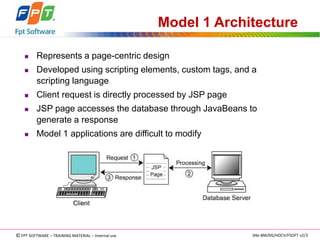
 Represents a page-centric design 
 Developed using scripting elements, custom tags, and a 
scripting language 
 Client request is directly processed by JSP page 
 JSP page accesses the database through JavaBeans to 
generate a response 
 Model 1 applications are difficult to modify 
©FPT SOFTWARE – TRAINING MATERIAL – Internal use 04e-BM/NS/HDCV/FSOFT v2/3
Model 2 Architecture 
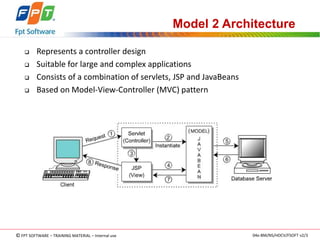
 Represents a controller design 
 Suitable for large and complex applications 
 Consists of a combination of servlets, JSP and JavaBeans 
 Based on Model-View-Controller (MVC) pattern 
©FPT SOFTWARE – TRAINING MATERIAL – Internal use 04e-BM/NS/HDCV/FSOFT v2/3
Model 2 Architecture (cont.) 
 The MVC pattern includes: 
 Model – Represents the application object or data that serves 
multiple views 
 View – Represents the presentation component or the user 
interface component of the data model 
 Controller – Responds to the input in the user interface. The 
controller transmits the request, and selects a view for presenting 
data to the user. 
©FPT SOFTWARE – TRAINING MATERIAL – Internal use 04e-BM/NS/HDCV/FSOFT v2/3
Implementing Model 2 Architecture 
 Requires controller servlet, request handler, page beans and JSP 
views 
 Controller servlet handles the incoming request, and forwards to the 
request handler for further processing 
 The handleRequest() method of the RequestHandler 
interface processes the request, and returns the URL of the JSP view 
©FPT SOFTWARE – TRAINING MATERIAL – Internal use 04e-BM/NS/HDCV/FSOFT v2/3
J2EE Framework 
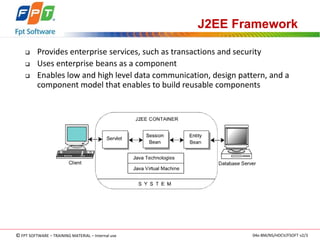
 Provides enterprise services, such as transactions and security 
 Uses enterprise beans as a component 
 Enables low and high level data communication, design pattern, and a 
component model that enables to build reusable components 
©FPT SOFTWARE – TRAINING MATERIAL – Internal use 04e-BM/NS/HDCV/FSOFT v2/3
J2EE Framework - Components 
 Servlet – Consists of get() and post() methods, that are 
used for requesting data in dynamic Web applications 
 Session bean – Consist of temporary objects that enable to 
distribute and isolate the processing task. The two forms of 
shared data are: 
 Stateful 
 Stateless 
 Entity bean – Represents the data items, such as rows in a 
result set. The two forms of entity beans are: 
 Container managed persistence 
 Bean managed persistence 
©FPT SOFTWARE – TRAINING MATERIAL – Internal use 04e-BM/NS/HDCV/FSOFT v2/3
J2EE Framework – Components (cont.) 
 Java terminologies – Includes terminologies, such as Java 
Naming and Directory Interface (JNDI), Enterprise JavaBeans 
(EJB), servlets, JavaServer Pages (JSP), Extensible Markup 
Language (XML) and Remote Method Invocation (RMI) that are 
used in Web applications 
 Java Virtual Machine (JVM) – Provides a consistent execution 
platform for running Java codes 
©FPT SOFTWARE – TRAINING MATERIAL – Internal use 04e-BM/NS/HDCV/FSOFT v2/3
J2EE Framework - Benefits 
 Common application model – Enables to create distributed, 
reliable, scalable and secure Web applications 
 Generic infrastructure - Provides compatibility across vendors by 
introducing a standard Application Program Interface (API) 
 Easy deployment and execution - Simplifies the task of deploying 
and running the Web application 
©FPT SOFTWARE – TRAINING MATERIAL – Internal use 04e-BM/NS/HDCV/FSOFT v2/3
RequestDispatcher Interface 
 Forwards the request from a JSP page or a servlet to other resources 
 Other resources process the request and send a response to the client 
 The RequestDispatcher interface encapsulates the URL of a resource 
 Two methods of RequestDispatcher interface are: 
 Include() 
 Forward() 
©FPT SOFTWARE – TRAINING MATERIAL – Internal use 04e-BM/NS/HDCV/FSOFT v2/3
RequestDispatcher Interface Methods 
Methods Syntax Description 
include() 
<jsp:include 
page="localURL" 
flush = "true") 
Invokes one JSP page or 
servlet from another 
forward() <jsp:forward 
page="Nextpage. 
jsp"/> 
Forwards a request from 
one JSP page or servlet to 
another 
©FPT SOFTWARE – TRAINING MATERIAL – Internal use 04e-BM/NS/HDCV/FSOFT v2/3
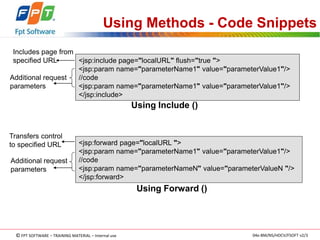
Includes page from 
specified URL 
Additional request 
parameters 
Transfers control 
to specified URL 
Additional request 
parameters 
Using Methods - Code Snippets 
<jsp:include page="localURL" flush="true "> 
<jsp:param name="parameterName1" value="parameterValue1"/> 
//code 
<jsp:param name="parameterName1" value="parameterValue1"/> 
</jsp:include> 
Using Include () 
<jsp:forward page="localURL "> 
<jsp:param name="parameterName1" value="parameterValue1"/> 
//code 
<jsp:param name="parameterNameN" value="parameterValueN "/> 
</jsp:forward> 
Using Forward () 
©FPT SOFTWARE – TRAINING MATERIAL – Internal use 04e-BM/NS/HDCV/FSOFT v2/3
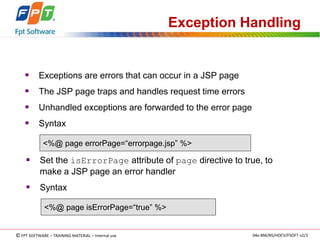
Exception Handling 
 Exceptions are errors that can occur in a JSP page 
 The JSP page traps and handles request time errors 
 Unhandled exceptions are forwarded to the error page 
 Syntax 
<%@ page errorPage=“errorpage.jsp” %> 
 Set the isErrorPage attribute of page directive to true, to 
make a JSP page an error handler 
 Syntax 
<%@ page isErrorPage=“true” %> 
©FPT SOFTWARE – TRAINING MATERIAL – Internal use 04e-BM/NS/HDCV/FSOFT v2/3
Exception Handling - Cont… 
 Translation time - Occurs when the JSP source file is converted to 
servlets class file. The JSP engine handles translation time errors. 
 Request time - Occurs during the processing of the request. Request 
time errors are the runtime errors that throw exceptions. 
Makes JSP page an 
error handler 
Returns error 
message 
<html> 
<body> 
<%@ page isErrorPage="true" %> 
Detected Error: <br> 
<%= exception.getMessage() %> 
</body> 
</html> 
Code Snippet to create an error page 
©FPT SOFTWARE – TRAINING MATERIAL – Internal use 04e-BM/NS/HDCV/FSOFT v2/3
Exception Handling - Cont… 
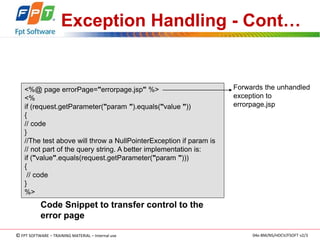
<%@ page errorPage="errorpage.jsp" %> 
<% 
if (request.getParameter("param ").equals("value ")) 
{ 
// code 
} 
//The test above will throw a NullPointerException if param is 
// not part of the query string. A better implementation is: 
if ("value".equals(request.getParameter("param "))) 
{ 
// code 
} 
%> 
Forwards the unhandled 
exception to 
errorpage.jsp 
Code Snippet to transfer control to the 
error page 
©FPT SOFTWARE – TRAINING MATERIAL – Internal use 04e-BM/NS/HDCV/FSOFT v2/3
Summary 
 JSP technology enables the user to separate the presentation logic with the 
programming logic 
 The user can make JSP page easy to read and maintain, by embedding 
HTML or XML in the JSP page 
 Model 1 application is developed using scripting elements, custom tags, 
and a scripting language, such as JavaScript 
 JSP page directly processes the request, and sends response to the client in 
Model 1 architecture 
 The Model 2 applications are based on Model-View-Controller (MVC) 
pattern: 
 Model 
 View 
 Controller 
©FPT SOFTWARE – TRAINING MATERIAL – Internal use 04e-BM/NS/HDCV/FSOFT v2/3
Summary – Cont… 
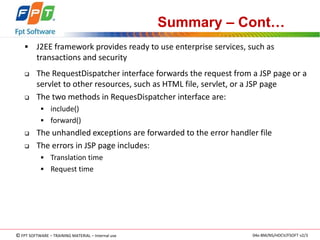
 J2EE framework provides ready to use enterprise services, such as 
transactions and security 
 The RequestDispatcher interface forwards the request from a JSP page or a 
servlet to other resources, such as HTML file, servlet, or a JSP page 
 The two methods in RequesDispatcher interface are: 
 include() 
 forward() 
 The unhandled exceptions are forwarded to the error handler file 
 The errors in JSP page includes: 
 Translation time 
 Request time 
©FPT SOFTWARE – TRAINING MATERIAL – Internal use 04e-BM/NS/HDCV/FSOFT v2/3
Q & A 
©FPT SOFTWARE – TRAINING MATERIAL – Internal use 04e-BM/NS/HDCV/FSOFT v2/3

1.jsp application models

  • 1.
    JSP Application Models ©FPT SOFTWARE – TRAINING MATERIAL – Internal use 04e-BM/NS/HDCV/FSOFT v2/3
  • 2.
    Review  AJavaBean is a reusable software component that is manipulated in a builder tool.  get() and set() methods are used with the property for which the data has to be set.  The features of JavaBeans are methods, events, properties, introspection and serialization.  JavaBeans have four scopes; page, request, session and application.  JAR is a compressed file containing the Java classes.  Every JavaBean is a Java class, but every Java class may not be a JavaBean.  <jsp:useBean> tag is used for creating reference in any code.  The Bean tag provides the page a means to encapsulate business logic separately from the content presentation.  The key components of JavaMail APIs are session, message and transport. ©FPT SOFTWARE – TRAINING MATERIAL – Internal use 04e-BM/NS/HDCV/FSOFT v2/3
  • 3.
    JSP Application ModelsOverview  Consists of Java code, HTML codes, and JSP tags  Two approaches for building JSP applications are:  Model 1  Model 2 ©FPT SOFTWARE – TRAINING MATERIAL – Internal use 04e-BM/NS/HDCV/FSOFT v2/3
  • 4.
    Model 1 Architecture  Represents a page-centric design  Developed using scripting elements, custom tags, and a scripting language  Client request is directly processed by JSP page  JSP page accesses the database through JavaBeans to generate a response  Model 1 applications are difficult to modify ©FPT SOFTWARE – TRAINING MATERIAL – Internal use 04e-BM/NS/HDCV/FSOFT v2/3
  • 5.
    Model 2 Architecture  Represents a controller design  Suitable for large and complex applications  Consists of a combination of servlets, JSP and JavaBeans  Based on Model-View-Controller (MVC) pattern ©FPT SOFTWARE – TRAINING MATERIAL – Internal use 04e-BM/NS/HDCV/FSOFT v2/3
  • 6.
    Model 2 Architecture(cont.)  The MVC pattern includes:  Model – Represents the application object or data that serves multiple views  View – Represents the presentation component or the user interface component of the data model  Controller – Responds to the input in the user interface. The controller transmits the request, and selects a view for presenting data to the user. ©FPT SOFTWARE – TRAINING MATERIAL – Internal use 04e-BM/NS/HDCV/FSOFT v2/3
  • 7.
    Implementing Model 2Architecture  Requires controller servlet, request handler, page beans and JSP views  Controller servlet handles the incoming request, and forwards to the request handler for further processing  The handleRequest() method of the RequestHandler interface processes the request, and returns the URL of the JSP view ©FPT SOFTWARE – TRAINING MATERIAL – Internal use 04e-BM/NS/HDCV/FSOFT v2/3
  • 8.
    J2EE Framework Provides enterprise services, such as transactions and security  Uses enterprise beans as a component  Enables low and high level data communication, design pattern, and a component model that enables to build reusable components ©FPT SOFTWARE – TRAINING MATERIAL – Internal use 04e-BM/NS/HDCV/FSOFT v2/3
  • 9.
    J2EE Framework -Components  Servlet – Consists of get() and post() methods, that are used for requesting data in dynamic Web applications  Session bean – Consist of temporary objects that enable to distribute and isolate the processing task. The two forms of shared data are:  Stateful  Stateless  Entity bean – Represents the data items, such as rows in a result set. The two forms of entity beans are:  Container managed persistence  Bean managed persistence ©FPT SOFTWARE – TRAINING MATERIAL – Internal use 04e-BM/NS/HDCV/FSOFT v2/3
  • 10.
    J2EE Framework –Components (cont.)  Java terminologies – Includes terminologies, such as Java Naming and Directory Interface (JNDI), Enterprise JavaBeans (EJB), servlets, JavaServer Pages (JSP), Extensible Markup Language (XML) and Remote Method Invocation (RMI) that are used in Web applications  Java Virtual Machine (JVM) – Provides a consistent execution platform for running Java codes ©FPT SOFTWARE – TRAINING MATERIAL – Internal use 04e-BM/NS/HDCV/FSOFT v2/3
  • 11.
    J2EE Framework -Benefits  Common application model – Enables to create distributed, reliable, scalable and secure Web applications  Generic infrastructure - Provides compatibility across vendors by introducing a standard Application Program Interface (API)  Easy deployment and execution - Simplifies the task of deploying and running the Web application ©FPT SOFTWARE – TRAINING MATERIAL – Internal use 04e-BM/NS/HDCV/FSOFT v2/3
  • 12.
    RequestDispatcher Interface Forwards the request from a JSP page or a servlet to other resources  Other resources process the request and send a response to the client  The RequestDispatcher interface encapsulates the URL of a resource  Two methods of RequestDispatcher interface are:  Include()  Forward() ©FPT SOFTWARE – TRAINING MATERIAL – Internal use 04e-BM/NS/HDCV/FSOFT v2/3
  • 13.
    RequestDispatcher Interface Methods Methods Syntax Description include() <jsp:include page="localURL" flush = "true") Invokes one JSP page or servlet from another forward() <jsp:forward page="Nextpage. jsp"/> Forwards a request from one JSP page or servlet to another ©FPT SOFTWARE – TRAINING MATERIAL – Internal use 04e-BM/NS/HDCV/FSOFT v2/3
  • 14.
    Includes page from specified URL Additional request parameters Transfers control to specified URL Additional request parameters Using Methods - Code Snippets <jsp:include page="localURL" flush="true "> <jsp:param name="parameterName1" value="parameterValue1"/> //code <jsp:param name="parameterName1" value="parameterValue1"/> </jsp:include> Using Include () <jsp:forward page="localURL "> <jsp:param name="parameterName1" value="parameterValue1"/> //code <jsp:param name="parameterNameN" value="parameterValueN "/> </jsp:forward> Using Forward () ©FPT SOFTWARE – TRAINING MATERIAL – Internal use 04e-BM/NS/HDCV/FSOFT v2/3
  • 15.
    Exception Handling Exceptions are errors that can occur in a JSP page  The JSP page traps and handles request time errors  Unhandled exceptions are forwarded to the error page  Syntax <%@ page errorPage=“errorpage.jsp” %>  Set the isErrorPage attribute of page directive to true, to make a JSP page an error handler  Syntax <%@ page isErrorPage=“true” %> ©FPT SOFTWARE – TRAINING MATERIAL – Internal use 04e-BM/NS/HDCV/FSOFT v2/3
  • 16.
    Exception Handling -Cont…  Translation time - Occurs when the JSP source file is converted to servlets class file. The JSP engine handles translation time errors.  Request time - Occurs during the processing of the request. Request time errors are the runtime errors that throw exceptions. Makes JSP page an error handler Returns error message <html> <body> <%@ page isErrorPage="true" %> Detected Error: <br> <%= exception.getMessage() %> </body> </html> Code Snippet to create an error page ©FPT SOFTWARE – TRAINING MATERIAL – Internal use 04e-BM/NS/HDCV/FSOFT v2/3
  • 17.
    Exception Handling -Cont… <%@ page errorPage="errorpage.jsp" %> <% if (request.getParameter("param ").equals("value ")) { // code } //The test above will throw a NullPointerException if param is // not part of the query string. A better implementation is: if ("value".equals(request.getParameter("param "))) { // code } %> Forwards the unhandled exception to errorpage.jsp Code Snippet to transfer control to the error page ©FPT SOFTWARE – TRAINING MATERIAL – Internal use 04e-BM/NS/HDCV/FSOFT v2/3
  • 18.
    Summary  JSPtechnology enables the user to separate the presentation logic with the programming logic  The user can make JSP page easy to read and maintain, by embedding HTML or XML in the JSP page  Model 1 application is developed using scripting elements, custom tags, and a scripting language, such as JavaScript  JSP page directly processes the request, and sends response to the client in Model 1 architecture  The Model 2 applications are based on Model-View-Controller (MVC) pattern:  Model  View  Controller ©FPT SOFTWARE – TRAINING MATERIAL – Internal use 04e-BM/NS/HDCV/FSOFT v2/3
  • 19.
    Summary – Cont…  J2EE framework provides ready to use enterprise services, such as transactions and security  The RequestDispatcher interface forwards the request from a JSP page or a servlet to other resources, such as HTML file, servlet, or a JSP page  The two methods in RequesDispatcher interface are:  include()  forward()  The unhandled exceptions are forwarded to the error handler file  The errors in JSP page includes:  Translation time  Request time ©FPT SOFTWARE – TRAINING MATERIAL – Internal use 04e-BM/NS/HDCV/FSOFT v2/3
  • 20.
    Q & A ©FPT SOFTWARE – TRAINING MATERIAL – Internal use 04e-BM/NS/HDCV/FSOFT v2/3