
Necto Training
Module 11: Necto
Installation and
Migration
Objectives

  By the end of this lesson you will be able
  to
    Perform a Necto Installation
    Perform a migration from NovaView to Necto
Agenda

  Server Architecture
  Prerequisites
  Windows 2008 configuration
  Installation Process
  Post Installation Configuration
  Migration from NovaView to Necto
Server Architecture
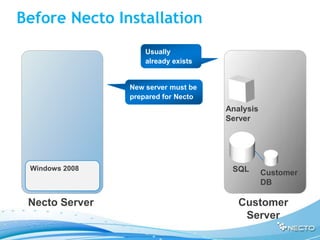
Before Necto Installation
                    Usually
                    already exists


                New server must be
                prepared for Necto
                                     Analysis
                                     Server


 Windows 2008                         SQL       Customer
                                                DB

 Necto Server                           Customer
                                         Server
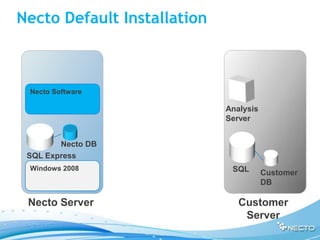
Necto Default Installation


 Necto Software

                             Analysis
                             Server


        Necto DB
 SQL Express
 Windows 2008                 SQL       Customer
                                        DB

 Necto Server                   Customer
                                 Server
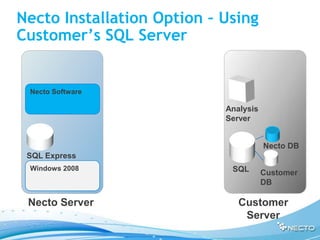
Necto Installation Option – Using
Customer’s SQL Server


 Necto Software

                            Analysis
                            Server


                                       Necto DB
 SQL Express
 Windows 2008                SQL       Customer
                                       DB

 Necto Server                  Customer
                                Server
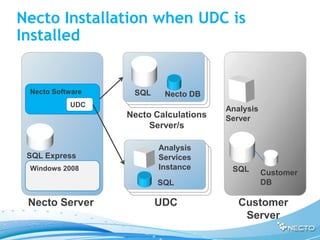
Necto Installation when UDC is
Installed


 Necto Software    SQL    Necto DB
           UDC
                                       Analysis
                  Necto Calculations   Server
                       Server/s

                         Analysis
 SQL Express             Services
 Windows 2008            Instance       SQL       Customer
                         SQL                      DB

 Necto Server            UDC              Customer
                                           Server
Prerequisites
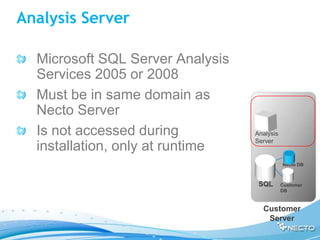
Analysis Server

  Microsoft SQL Server Analysis
  Services 2005 or 2008
  Must be in same domain as
  Necto Server
  Is not accessed during          Analysis
                                  Server
  installation, only at runtime
                                             Necto DB


                                   SQL       Customer
                                             DB


                                    Customer
                                     Server
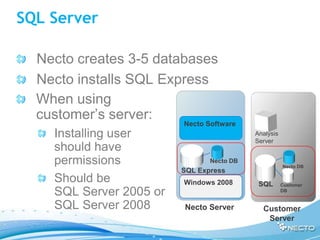
SQL Server

  Necto creates 3-5 databases
  Necto installs SQL Express
  When using
  customer’s server:
                         Necto Software
    Installing user                        Analysis
                                           Server
    should have
    permissions                 Necto DB
                                                      Necto DB
                         SQL Express
    Should be            Windows 2008       SQL       Customer
    SQL Server 2005 or                                DB


    SQL Server 2008      Necto Server        Customer
                                              Server
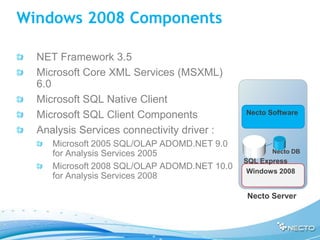
Windows 2008 Components

  NET Framework 3.5
  Microsoft Core XML Services (MSXML)
  6.0
  Microsoft SQL Native Client
  Microsoft SQL Client Components             Necto Software

  Analysis Services connectivity driver :
     Microsoft 2005 SQL/OLAP ADOMD.NET 9.0
     for Analysis Services 2005                      Necto DB
                                              SQL Express
     Microsoft 2008 SQL/OLAP ADOMD.NET 10.0
                                               Windows 2008
     for Analysis Services 2008

                                              Necto Server
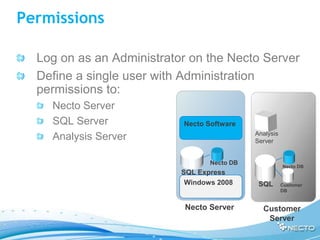
Permissions

  Log on as an Administrator on the Necto Server
  Define a single user with Administration
  permissions to:
    Necto Server
    SQL Server             Necto Software
                                             Analysis
    Analysis Server                          Server


                                  Necto DB
                                                        Necto DB
                           SQL Express
                            Windows 2008      SQL       Customer
                                                        DB


                           Necto Server        Customer
                                                Server
Ports

  Necto uses the following ports (should be
  opened)
    4444 – Website (user interface)
    2383 – Connection to Analysis Server
    9985, 9999, 9961 – Necto services
Installation Process
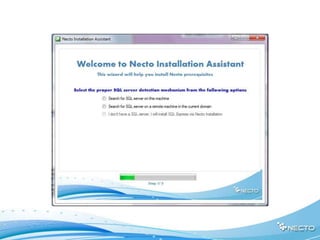
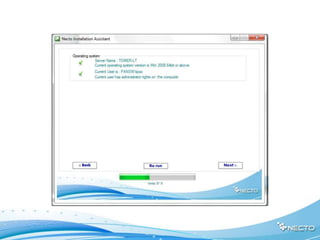
Necto Installation Assistant

  The Necto Installation Assistant runs
  before the actual Necto installer and does
  the following:
    Checks for missing components in the
    Windows 2008 and IIS7 and automatically
    installs the required components or lets the
    user know what to do about them
    Checks needed permissions for the
    installation and other system requirements
    and alerts for missing information
Necto Installation Files

  Necto Installation file:
  PanoramaSetup.exe
  Necto License file
Extract Installation Files
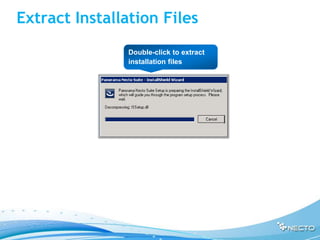
               Double-click to extract
               installation files
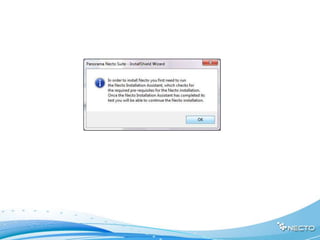
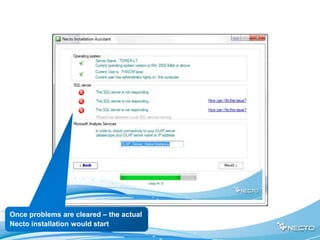
Once problems are cleared – the actual
Necto installation would start
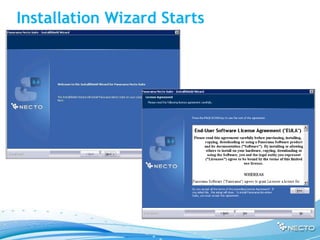
Installation Wizard Starts
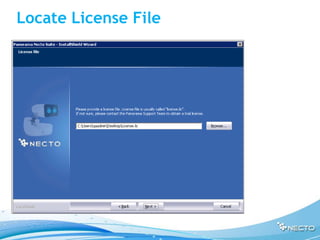
Locate License File
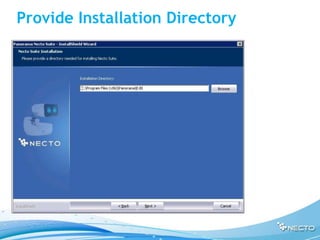
Provide Installation Directory
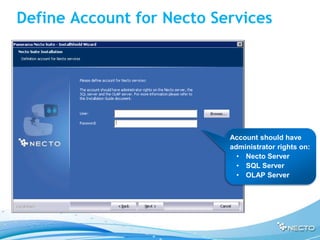
Define Account for Necto Services


                           Account should have
                           administrator rights on:
                             • Necto Server
                             • SQL Server
                             • OLAP Server
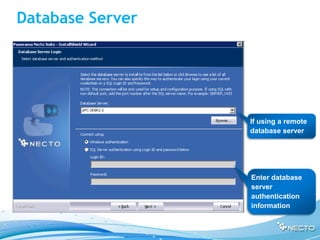
Database Server


                  If using a remote
                  database server


                  Enter database
                  server
                  authentication
                  information
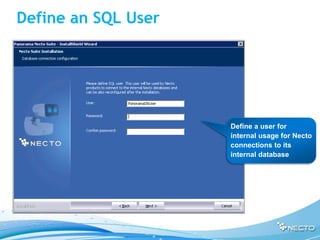
Define an SQL User


                     Define a user for
                     internal usage for Necto
                     connections to its
                     internal database
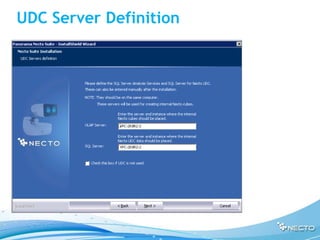
UDC Server Definition
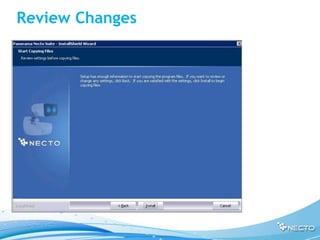
Review Changes
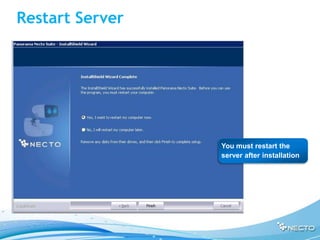
Restart Server


                 You must restart the
                 server after installation
Post Installation Configuration
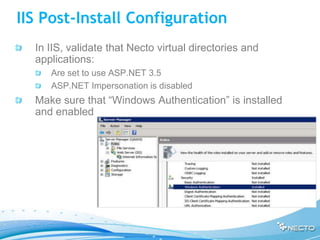
IIS Post-Install Configuration
  In IIS, validate that Necto virtual directories and
  applications:
     Are set to use ASP.NET 3.5
     ASP.NET Impersonation is disabled
  Make sure that “Windows Authentication” is installed
  and enabled
SQL Post-Install Configuration

  SQL must be set to Mixed Authentication mode
  Using a named SQL instance as Necto's
  repository ("SQLServerinstancename") requires
  additional configuration
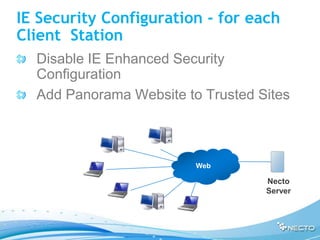
IE Security Configuration - for each
Client Station
  Disable IE Enhanced Security
  Configuration
  Add Panorama Website to Trusted Sites


                         Web

                                   Necto
                                   Server
Validating Installation

  Open Necto Web UI
Migrating from NovaView to
Necto
Software

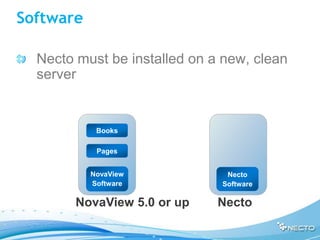
  Necto must be installed on a new, clean
  server


            Books

            Pages


           NovaView            Necto
           Software           Software

        NovaView 5.0 or up    Necto
Starting Migration
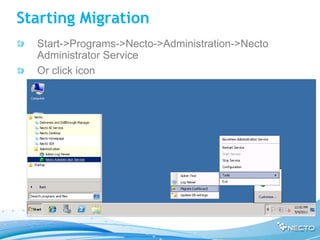
  Start->Programs->Necto->Administration->Necto
  Administrator Service
  Or click icon
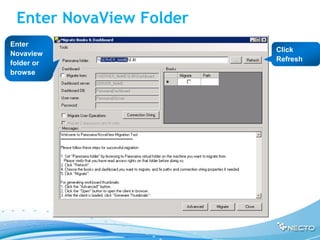
Enter NovaView Folder
Enter
                         Click
Novaview
                         Refresh
folder or
browse
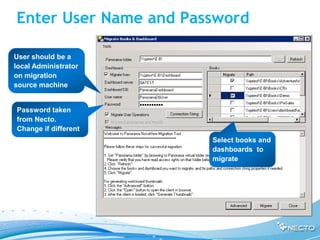
Enter User Name and Password

User should be a
local Administrator
on migration
source machine


Password taken
from Necto.
Change if different
                       Select books and
                       dashboards to
                       migrate
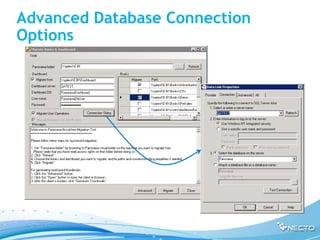
Advanced Database Connection
Options
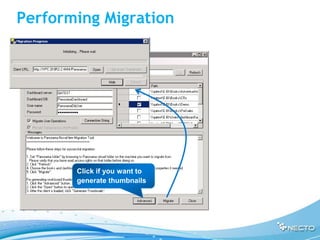
Performing Migration


       Click if you want to
       generate thumbnails
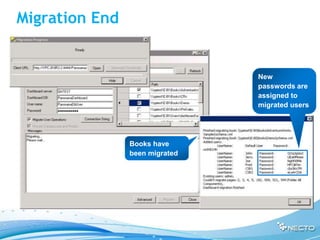
Migration End


                                New
                                passwords are
                                assigned to
                                migrated users


                Books have
                been migrated
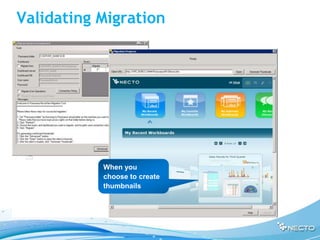
Validating Migration


           When you
           choose to create
           thumbnails
Review
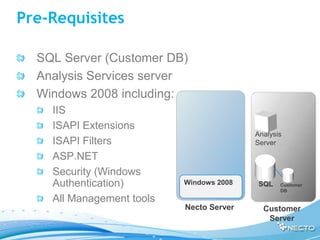
Pre-Requisites

  SQL Server (Customer DB)
  Analysis Services server
  Windows 2008 including:
    IIS
    ISAPI Extensions
                                          Analysis
    ISAPI Filters                         Server

    ASP.NET
    Security (Windows
    Authentication)        Windows 2008    SQL   Customer
                                                 DB

    All Management tools
                           Necto Server     Customer
                                             Server
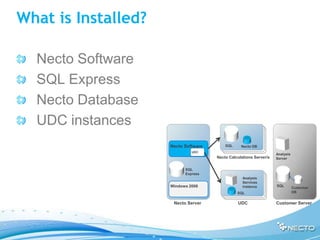
What is Installed?

  Necto Software
  SQL Express
  Necto Database
  UDC instances
                     Necto Software       SQL     Necto DB
                              UDC
                                                                    Analysis
                                      Necto Calculations Server/s   Server


                           SQL
                           Express
                                                   Analysis
                                                   Services
                     Windows 2008                  instance         SQL
                                                                               Customer
                                                SQL                            DB


                      Necto Server              UDC                 Customer Server
Thank you
Any Questions?

11 necto installation_ready

  • 1.
    Necto Training Module 11:Necto Installation and Migration
  • 2.
    Objectives Bythe end of this lesson you will be able to Perform a Necto Installation Perform a migration from NovaView to Necto
  • 3.
    Agenda ServerArchitecture Prerequisites Windows 2008 configuration Installation Process Post Installation Configuration Migration from NovaView to Necto
  • 4.
  • 5.
    Before Necto Installation Usually already exists New server must be prepared for Necto Analysis Server Windows 2008 SQL Customer DB Necto Server Customer Server
  • 6.
    Necto Default Installation Necto Software Analysis Server Necto DB SQL Express Windows 2008 SQL Customer DB Necto Server Customer Server
  • 7.
    Necto Installation Option– Using Customer’s SQL Server Necto Software Analysis Server Necto DB SQL Express Windows 2008 SQL Customer DB Necto Server Customer Server
  • 8.
    Necto Installation whenUDC is Installed Necto Software SQL Necto DB UDC Analysis Necto Calculations Server Server/s Analysis SQL Express Services Windows 2008 Instance SQL Customer SQL DB Necto Server UDC Customer Server
  • 9.
  • 10.
    Analysis Server Microsoft SQL Server Analysis Services 2005 or 2008 Must be in same domain as Necto Server Is not accessed during Analysis Server installation, only at runtime Necto DB SQL Customer DB Customer Server
  • 11.
    SQL Server Necto creates 3-5 databases Necto installs SQL Express When using customer’s server: Necto Software Installing user Analysis Server should have permissions Necto DB Necto DB SQL Express Should be Windows 2008 SQL Customer SQL Server 2005 or DB SQL Server 2008 Necto Server Customer Server
  • 12.
    Windows 2008 Components NET Framework 3.5 Microsoft Core XML Services (MSXML) 6.0 Microsoft SQL Native Client Microsoft SQL Client Components Necto Software Analysis Services connectivity driver : Microsoft 2005 SQL/OLAP ADOMD.NET 9.0 for Analysis Services 2005 Necto DB SQL Express Microsoft 2008 SQL/OLAP ADOMD.NET 10.0 Windows 2008 for Analysis Services 2008 Necto Server
  • 13.
    Permissions Logon as an Administrator on the Necto Server Define a single user with Administration permissions to: Necto Server SQL Server Necto Software Analysis Analysis Server Server Necto DB Necto DB SQL Express Windows 2008 SQL Customer DB Necto Server Customer Server
  • 14.
    Ports Nectouses the following ports (should be opened) 4444 – Website (user interface) 2383 – Connection to Analysis Server 9985, 9999, 9961 – Necto services
  • 15.
  • 16.
    Necto Installation Assistant The Necto Installation Assistant runs before the actual Necto installer and does the following: Checks for missing components in the Windows 2008 and IIS7 and automatically installs the required components or lets the user know what to do about them Checks needed permissions for the installation and other system requirements and alerts for missing information
  • 17.
    Necto Installation Files Necto Installation file: PanoramaSetup.exe Necto License file
  • 18.
    Extract Installation Files Double-click to extract installation files
  • 22.
    Once problems arecleared – the actual Necto installation would start
  • 23.
  • 24.
  • 25.
  • 26.
    Define Account forNecto Services Account should have administrator rights on: • Necto Server • SQL Server • OLAP Server
  • 27.
    Database Server If using a remote database server Enter database server authentication information
  • 28.
    Define an SQLUser Define a user for internal usage for Necto connections to its internal database
  • 29.
  • 30.
  • 31.
    Restart Server You must restart the server after installation
  • 32.
  • 33.
    IIS Post-Install Configuration In IIS, validate that Necto virtual directories and applications: Are set to use ASP.NET 3.5 ASP.NET Impersonation is disabled Make sure that “Windows Authentication” is installed and enabled
  • 34.
    SQL Post-Install Configuration SQL must be set to Mixed Authentication mode Using a named SQL instance as Necto's repository ("SQLServerinstancename") requires additional configuration
  • 35.
    IE Security Configuration- for each Client Station Disable IE Enhanced Security Configuration Add Panorama Website to Trusted Sites Web Necto Server
  • 36.
    Validating Installation Open Necto Web UI
  • 37.
  • 38.
    Software Nectomust be installed on a new, clean server Books Pages NovaView Necto Software Software NovaView 5.0 or up Necto
  • 39.
    Starting Migration Start->Programs->Necto->Administration->Necto Administrator Service Or click icon
  • 40.
    Enter NovaView Folder Enter Click Novaview Refresh folder or browse
  • 41.
    Enter User Nameand Password User should be a local Administrator on migration source machine Password taken from Necto. Change if different Select books and dashboards to migrate
  • 42.
  • 43.
    Performing Migration Click if you want to generate thumbnails
  • 44.
    Migration End New passwords are assigned to migrated users Books have been migrated
  • 45.
    Validating Migration When you choose to create thumbnails
  • 46.
  • 47.
    Pre-Requisites SQLServer (Customer DB) Analysis Services server Windows 2008 including: IIS ISAPI Extensions Analysis ISAPI Filters Server ASP.NET Security (Windows Authentication) Windows 2008 SQL Customer DB All Management tools Necto Server Customer Server
  • 48.
    What is Installed? Necto Software SQL Express Necto Database UDC instances Necto Software SQL Necto DB UDC Analysis Necto Calculations Server/s Server SQL Express Analysis Services Windows 2008 instance SQL Customer SQL DB Necto Server UDC Customer Server
  • 49.