SQL Server and Data Warehousing
 SQL Server 2008 R2 Parallel Data Warehouse Appliance

         Speaker: Phil Hummel of WinWire Technologies
          Presentation developed by: Bruce Campbell
        Western Region Data Warehouse Specialist, Microsoft


                Silicon Valley SQL Server User Group
                          February 16, 2009


                   Mark Ginnebaugh, User Group Leader,
                         mark@designmind.com
Agenda
• SLQ 2008 R2 Parallel DW Appliance
  – Hardware and Software Architecture
  – Case Study
  – Customer Experience Opportunities
• Next Steps
SQL Server Parallel Data Warehouse
             Formerly Project Madison


 Project
 Madison                    Madison MPP Layer


             INDUSTRY STANDARD
             SERVERS
 Reference
 Hardware
 Platforms   INDUSTRY STANDARD
             NETWORKING


             INDUSTRY STANDARD
             STORAGE
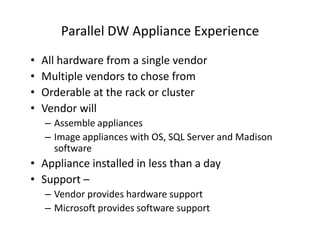
Parallel DW Appliance Experience
•   All hardware from a single vendor
•   Multiple vendors to chose from
•   Orderable at the rack or cluster
•   Vendor will
    – Assemble appliances
    – Image appliances with OS, SQL Server and Madison
      software
• Appliance installed in less than a day
• Support –
    – Vendor provides hardware support
    – Microsoft provides software support
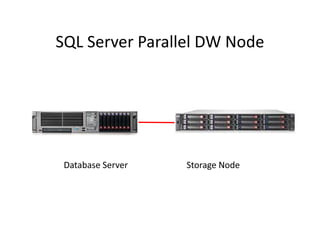
SQL Server Parallel DW Node
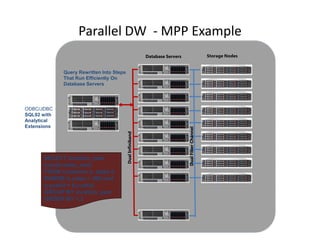
Parallel DW - MPP Example
                                                            Database Servers


             Query Rewritten Into Steps
             That Run Efficiently On
             Database Servers


ODBC/JDBC
SQL92 with
Analytical
Extensions


                                                                               Dual Fiber Channel
                                          Dual Infiniband


      SELECT location, year
      sum(b.sales_amt)
      FROM customer a, sales b
      WHERE b.sales > 500 and
      a.custid = b.custid
      GROUP BY location, year
      ORDER BY 1,2
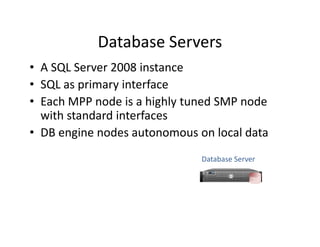
Database Servers
• A SQL Server 2008 instance
• SQL as primary interface
• Each MPP node is a highly tuned SMP node
  with standard interfaces
• DB engine nodes autonomous on local data
                              Database Server

                                           SQL
Ultra Shared Nothing
• An extension of traditional shared nothing design
   – Push shared nothing architecture into SMP node
      • IO and CPU affinity within SMP nodes
          – Eliminate contention per user query
          – Use full PDW Node resources for each user query
   – Multiple physical instances of tables
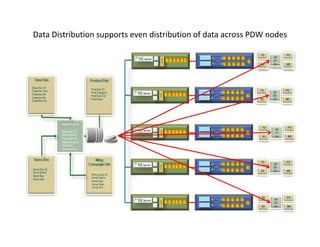
      • Distribute large tables
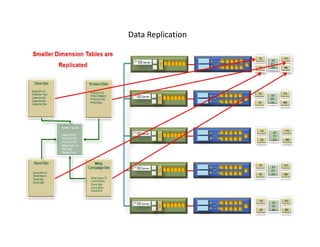
      • Replicate small tables
   – Re-Distribute rows “on-the-fly” when necessary
Control Node & Client Drivers
• Client connections always go through the control node
    – Clustered to a passive node to support High Availability
• Processes SQL requests
• Prepares execution plan
• Orchestrates distributed execution
• Local SQL Server to do final query plan processing / result
  aggregation
• Drivers
        • ODBC
        • OLE-DB
        • Ado.Net client drivers
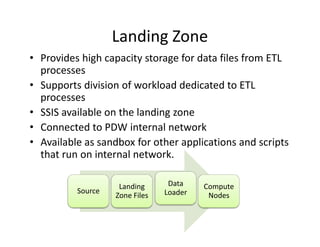
Landing Zone
• Provides high capacity storage for data files from ETL
  processes
• Supports division of workload dedicated to ETL
  processes
• SSIS available on the landing zone
• Connected to PDW internal network
• Available as sandbox for other applications and scripts
  that run on internal network.

                    Landing      Data    Compute
          Source                Loader
                   Zone Files             Nodes
Backup Node
• Builds on SQL Server native backup/restore
  facility
• Executes at Infiniband network speeds
• Database-level backup
• Subsequent Back Ups are Optimized
• Coordinated backup across the nodes
• Quiesce write activity to synchronize
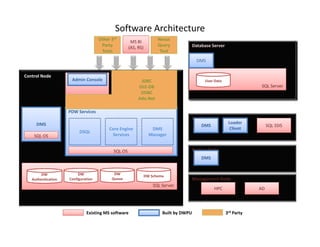
Software Architecture
                                    Other 3rd                        Nexus
                                                     MS BI
                                     Party                           Query             Database Server
                                                                                       Compute Nodes
                                                    (AS, RS)
                                     Tools                            Tool

                                                                                        DMS


Control Node        IIS
                       Admin Console                      JDBC                              User Data
                                                         OLE-DB                                                      SQL Server
                                                          ODBC
                                                         Ado.Net

                    PDW Services
                                                                                       Landing Zone
     DMS                                                                                                 Loader
                                                                                           DMS                           SQL SSIS
                                         Core Engine              DMS                                     Client
                         DSQL
    SQL OS                                Services               Manager


                                           SQL OS                                      Backup Node
                                                                                           DMS


        DW               DW                DW
                                                               DW Schema
   Authentication   Configuration         Queue                                        Management Node
                                                                   SQL Server
                                                                                                 HPC                AD


                             Existing MS software                      Built by DWPU                    3rd Party
Data Distribution supports even distribution of data across PDW nodes
Data Replication
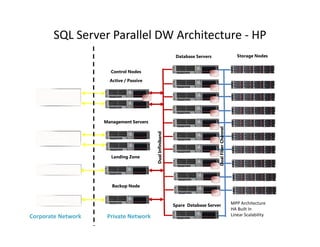
SQL Server Parallel DW Architecture - HP
                                                                    Database Servers


                         Control Nodes
                                                                                       SQL
                        Active / Passive
                                                                                       SQL

     Client Drivers                        SQL
                                                                                       SQL


                                                                                       SQL


                                                                                             Dual Fiber Channel
                                                                                       SQL


                                                 Dual Infiniband
     Data Center
     Monitoring                                                                        SQL


                                                                                       SQL


                                                                                       SQL
   ETL Load Interface

                                                                                       SQL


                                                                                       SQL
   Corporate Backup
   Solution                                                        Spare Database Server                          MPP Architecture
                                                                                                                  HA Built In
Corporate Network       Private Network                                                                           Linear Scalability
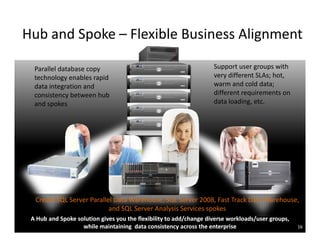
Hub and Spoke – Flexible Business Alignment

  Parallel database copy                                            Support user groups with
  technology enables rapid                                          very different SLAs; hot,
  data integration and                                              warm and cold data;
  consistency between hub                                           different requirements on
  and spokes                                                        data loading, etc.


  Create SQL Server Parallel Data Warehouse, SQL Server 2008, Fast Track Data Warehouse,
                           and SQL Server Analysis Services spokes
 A Hub and Spoke solution gives you the flexibility to add/change diverse workloads/user groups,
                   while maintaining data consistency across the enterprise                        16
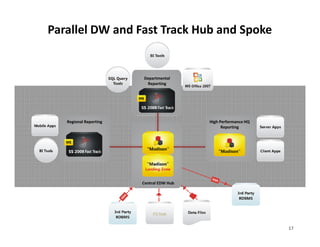
Parallel DW and Fast Track Hub and Spoke


                        Departmental
                         Reporting


   Regional Reporting                     High Performance HQ
                                                Reporting


                        Central EDW Hub


                             ETLTools


                                                                17
Microsoft Released first Technology Preview for
               Parallel Data Warehouse
•    First Technology Preview released on August 14
•    DATAllegro’s MPP engine is now ported to SQL Server 2008 and
     Windows Server 2008
•    10 customers from 7 industries signed up
      – First Premier BankCard was the first customer to enlist on
           Madison
      – Internally – ICE, MSIT, ADCenter, XBOX
•    Appliances with 8 to 20 nodes now ready to host customers test
     drives

Early Results
• Data Loading rates of 1 TB per hour
• Query executions at over 1.5 TB per minute
• Madison running 5 times faster than DATAllegro with Ingres DBMS
    before acquisition!

Launch of Parallel Data Warehouse:
• Next Technology Preview due early CY2010
• Technology Adoption Program (TAP) due early CY2010
     • Nominations now open
• Parallel Data warehouse to launch in summer 2010
Parallel DW Beta Programs
• Two Programs
  – MTP – Madison Technology Preview
     • 20 – 30 participants
     • Duration of 4 to 6 weeks
  – TAP – Beta production implementation
     • 6 – 8 customers
     • First iteration 9 to 12 weeks
Parallel DW Beta Programs
• Requirements
  –   Focus on EDW and large data marts
  –   Migration projects, not green field
  –   Open to customers & prospects
  –   30+ TB of data…at least 4 100+ TB
  –   Hub-and-spoke in only a select few cases
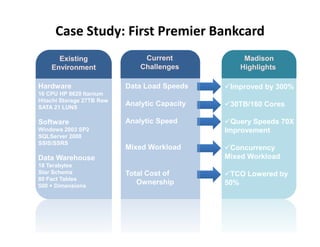
Case Study: First Premier Bankcard
      Existing                  Current             Madison
    Environment                Challenges          Highlights

Hardware                   Data Load Speeds     Improved by 300%
16 CPU HP 8620 Itanium
Hitachi Storage 27TB Raw
SATA 21 LUNS
                           Analytic Capacity    30TB/160 Cores

Software                   Analytic Speed        Query Speeds 70X
Windows 2003 SP2                               Improvement
SQLServer 2008
SSIS/SSRS
                           Mixed Workload       Concurrency
Data Warehouse                                 Mixed Workload
18 Terabytes
Star Schema                Total Cost of        TCO Lowered by
80 Fact Tables
500 + Dimensions
                              Ownership        50%
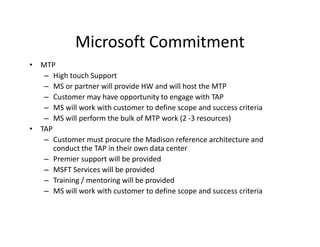
Microsoft Commitment
• MTP
   – High touch Support
   – MS or partner will provide HW and will host the MTP
   – Customer may have opportunity to engage with TAP
   – MS will work with customer to define scope and success criteria
   – MS will perform the bulk of MTP work (2 -3 resources)
• TAP
   – Customer must procure the Madison reference architecture and
      conduct the TAP in their own data center
   – Premier support will be provided
   – MSFT Services will be provided
   – Training / mentoring will be provided
   – MS will work with customer to define scope and success criteria
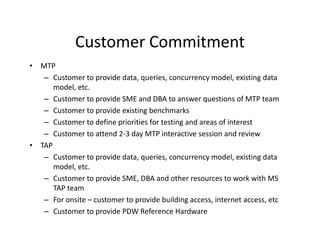
Customer Commitment
• MTP
   – Customer to provide data, queries, concurrency model, existing data
      model, etc.
   – Customer to provide SME and DBA to answer questions of MTP team
   – Customer to provide existing benchmarks
   – Customer to define priorities for testing and areas of interest
   – Customer to attend 2-3 day MTP interactive session and review
• TAP
   – Customer to provide data, queries, concurrency model, existing data
      model, etc.
   – Customer to provide SME, DBA and other resources to work with MS
      TAP team
   – For onsite – customer to provide building access, internet access, etc
   – Customer to provide PDW Reference Hardware
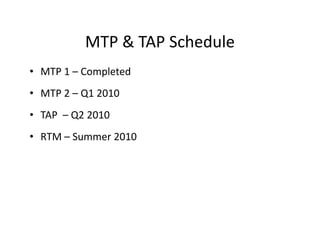
MTP & TAP Schedule
• MTP 1 – Completed
• MTP 2 – Q1 2010
• TAP – Q2 2010
• RTM – Summer 2010
Next Steps
Proof Steps
    Quick Start DW Roadmap Service
    Architectural Design Session
    Madison Technology Preview (MTP)
    Review Madison, SQL Server Classic or Fast Track
    DW HW/SW configurations and pricing
www.bayareasql.org

To attend our meetings or inquire about speaking opportunities,
                        please contact:

Mark Ginnebaugh, User Group Leader mark@designmind.com
© 2009 Microsoft Corporation. All rights reserved. Microsoft, Windows, Windows Vista and other product names are or may be registered trademarks and/or trademarks in the U.S. and/or other countries.
The information herein is for informational purposes only and represents the current view of Microsoft Corporation as of the date of this presentation. Because Microsoft must respond to changing market
                                                                                                 conditions,
          it should not be interpreted to be a commitment on the part of Microsoft, and Microsoft cannot guarantee the accuracy of any information provided after the date of this presentation.
                                 MICROSOFT MAKES NO WARRANTIES, EXPRESS, IMPLIED OR STATUTORY, AS TO THE INFORMATION IN THIS PRESENTATION.

SQL Server 2008 R2 Parallel Data Warehouse

  • 1.
    SQL Server andData Warehousing SQL Server 2008 R2 Parallel Data Warehouse Appliance Speaker: Phil Hummel of WinWire Technologies Presentation developed by: Bruce Campbell Western Region Data Warehouse Specialist, Microsoft Silicon Valley SQL Server User Group February 16, 2009 Mark Ginnebaugh, User Group Leader, mark@designmind.com
  • 2.
    Agenda • SLQ 2008R2 Parallel DW Appliance – Hardware and Software Architecture – Case Study – Customer Experience Opportunities • Next Steps
  • 3.
    SQL Server ParallelData Warehouse Formerly Project Madison Project Madison Madison MPP Layer INDUSTRY STANDARD SERVERS Reference Hardware Platforms INDUSTRY STANDARD NETWORKING INDUSTRY STANDARD STORAGE
  • 4.
    Parallel DW ApplianceExperience • All hardware from a single vendor • Multiple vendors to chose from • Orderable at the rack or cluster • Vendor will – Assemble appliances – Image appliances with OS, SQL Server and Madison software • Appliance installed in less than a day • Support – – Vendor provides hardware support – Microsoft provides software support
  • 5.
  • 6.
    Parallel DW -MPP Example Database Servers Query Rewritten Into Steps That Run Efficiently On Database Servers ODBC/JDBC SQL92 with Analytical Extensions Dual Fiber Channel Dual Infiniband SELECT location, year sum(b.sales_amt) FROM customer a, sales b WHERE b.sales > 500 and a.custid = b.custid GROUP BY location, year ORDER BY 1,2
  • 7.
    Database Servers • ASQL Server 2008 instance • SQL as primary interface • Each MPP node is a highly tuned SMP node with standard interfaces • DB engine nodes autonomous on local data Database Server SQL
  • 8.
    Ultra Shared Nothing •An extension of traditional shared nothing design – Push shared nothing architecture into SMP node • IO and CPU affinity within SMP nodes – Eliminate contention per user query – Use full PDW Node resources for each user query – Multiple physical instances of tables • Distribute large tables • Replicate small tables – Re-Distribute rows “on-the-fly” when necessary
  • 9.
    Control Node &Client Drivers • Client connections always go through the control node – Clustered to a passive node to support High Availability • Processes SQL requests • Prepares execution plan • Orchestrates distributed execution • Local SQL Server to do final query plan processing / result aggregation • Drivers • ODBC • OLE-DB • Ado.Net client drivers
  • 10.
    Landing Zone • Provideshigh capacity storage for data files from ETL processes • Supports division of workload dedicated to ETL processes • SSIS available on the landing zone • Connected to PDW internal network • Available as sandbox for other applications and scripts that run on internal network. Landing Data Compute Source Loader Zone Files Nodes
  • 11.
    Backup Node • Buildson SQL Server native backup/restore facility • Executes at Infiniband network speeds • Database-level backup • Subsequent Back Ups are Optimized • Coordinated backup across the nodes • Quiesce write activity to synchronize
  • 12.
    Software Architecture Other 3rd Nexus MS BI Party Query Database Server Compute Nodes (AS, RS) Tools Tool DMS Control Node IIS Admin Console JDBC User Data OLE-DB SQL Server ODBC Ado.Net PDW Services Landing Zone DMS Loader DMS SQL SSIS Core Engine DMS Client DSQL SQL OS Services Manager SQL OS Backup Node DMS DW DW DW DW Schema Authentication Configuration Queue Management Node SQL Server HPC AD Existing MS software Built by DWPU 3rd Party
  • 13.
    Data Distribution supportseven distribution of data across PDW nodes
  • 14.
  • 15.
    SQL Server ParallelDW Architecture - HP Database Servers Control Nodes SQL Active / Passive SQL Client Drivers SQL SQL SQL Dual Fiber Channel SQL Dual Infiniband Data Center Monitoring SQL SQL SQL ETL Load Interface SQL SQL Corporate Backup Solution Spare Database Server MPP Architecture HA Built In Corporate Network Private Network Linear Scalability
  • 16.
    Hub and Spoke– Flexible Business Alignment Parallel database copy Support user groups with technology enables rapid very different SLAs; hot, data integration and warm and cold data; consistency between hub different requirements on and spokes data loading, etc. Create SQL Server Parallel Data Warehouse, SQL Server 2008, Fast Track Data Warehouse, and SQL Server Analysis Services spokes A Hub and Spoke solution gives you the flexibility to add/change diverse workloads/user groups, while maintaining data consistency across the enterprise 16
  • 17.
    Parallel DW andFast Track Hub and Spoke Departmental Reporting Regional Reporting High Performance HQ Reporting Central EDW Hub ETLTools 17
  • 18.
    Microsoft Released firstTechnology Preview for Parallel Data Warehouse • First Technology Preview released on August 14 • DATAllegro’s MPP engine is now ported to SQL Server 2008 and Windows Server 2008 • 10 customers from 7 industries signed up – First Premier BankCard was the first customer to enlist on Madison – Internally – ICE, MSIT, ADCenter, XBOX • Appliances with 8 to 20 nodes now ready to host customers test drives Early Results • Data Loading rates of 1 TB per hour • Query executions at over 1.5 TB per minute • Madison running 5 times faster than DATAllegro with Ingres DBMS before acquisition! Launch of Parallel Data Warehouse: • Next Technology Preview due early CY2010 • Technology Adoption Program (TAP) due early CY2010 • Nominations now open • Parallel Data warehouse to launch in summer 2010
  • 19.
    Parallel DW BetaPrograms • Two Programs – MTP – Madison Technology Preview • 20 – 30 participants • Duration of 4 to 6 weeks – TAP – Beta production implementation • 6 – 8 customers • First iteration 9 to 12 weeks
  • 20.
    Parallel DW BetaPrograms • Requirements – Focus on EDW and large data marts – Migration projects, not green field – Open to customers & prospects – 30+ TB of data…at least 4 100+ TB – Hub-and-spoke in only a select few cases
  • 21.
    Case Study: FirstPremier Bankcard Existing Current Madison Environment Challenges Highlights Hardware Data Load Speeds Improved by 300% 16 CPU HP 8620 Itanium Hitachi Storage 27TB Raw SATA 21 LUNS Analytic Capacity 30TB/160 Cores Software Analytic Speed Query Speeds 70X Windows 2003 SP2 Improvement SQLServer 2008 SSIS/SSRS Mixed Workload Concurrency Data Warehouse Mixed Workload 18 Terabytes Star Schema Total Cost of TCO Lowered by 80 Fact Tables 500 + Dimensions Ownership 50%
  • 22.
    Microsoft Commitment • MTP – High touch Support – MS or partner will provide HW and will host the MTP – Customer may have opportunity to engage with TAP – MS will work with customer to define scope and success criteria – MS will perform the bulk of MTP work (2 -3 resources) • TAP – Customer must procure the Madison reference architecture and conduct the TAP in their own data center – Premier support will be provided – MSFT Services will be provided – Training / mentoring will be provided – MS will work with customer to define scope and success criteria
  • 23.
    Customer Commitment • MTP – Customer to provide data, queries, concurrency model, existing data model, etc. – Customer to provide SME and DBA to answer questions of MTP team – Customer to provide existing benchmarks – Customer to define priorities for testing and areas of interest – Customer to attend 2-3 day MTP interactive session and review • TAP – Customer to provide data, queries, concurrency model, existing data model, etc. – Customer to provide SME, DBA and other resources to work with MS TAP team – For onsite – customer to provide building access, internet access, etc – Customer to provide PDW Reference Hardware
  • 24.
    MTP & TAPSchedule • MTP 1 – Completed • MTP 2 – Q1 2010 • TAP – Q2 2010 • RTM – Summer 2010
  • 25.
    Next Steps Proof Steps Quick Start DW Roadmap Service Architectural Design Session Madison Technology Preview (MTP) Review Madison, SQL Server Classic or Fast Track DW HW/SW configurations and pricing
  • 26.
    www.bayareasql.org To attend ourmeetings or inquire about speaking opportunities, please contact: Mark Ginnebaugh, User Group Leader mark@designmind.com
  • 27.
    © 2009 MicrosoftCorporation. All rights reserved. Microsoft, Windows, Windows Vista and other product names are or may be registered trademarks and/or trademarks in the U.S. and/or other countries. The information herein is for informational purposes only and represents the current view of Microsoft Corporation as of the date of this presentation. Because Microsoft must respond to changing market conditions, it should not be interpreted to be a commitment on the part of Microsoft, and Microsoft cannot guarantee the accuracy of any information provided after the date of this presentation. MICROSOFT MAKES NO WARRANTIES, EXPRESS, IMPLIED OR STATUTORY, AS TO THE INFORMATION IN THIS PRESENTATION.