Windows Server 2008Hyper-VJeff WoolseySenior Program ManagerWindows VirtualizationMicrosoft Corporation
Objectives And TakeawaysObjective(s):  Windows Server 2008 Hyper-VArchitectureSecurityVirtualization DemoSystem CenterVirtual Machine ManagerOperations ManagerConfiguration ManagerData Protection ManagerCompare current Microsoft offerings with Windows Server virtualization
Virtualization in the Industry
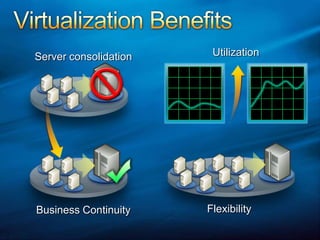
Virtualization BenefitsUtilizationServer consolidationFlexibilityBusiness Continuity
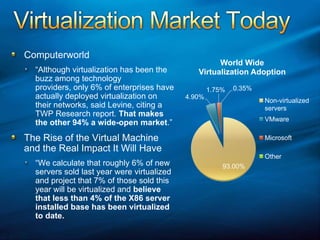
Virtualization Market TodayComputerworld“Although virtualization has been the buzz among technology providers, only 6% of enterprises have actually deployed virtualization on their networks, said Levine, citing a TWP Research report. That makes the other 94% a wide-open market.”The Rise of the Virtual Machine and the Real Impact It Will Have“We calculate that roughly 6% of new servers sold last year were virtualized and project that 7% of those sold this year will be virtualized and believe that less than 4% of the X86 server installed base has been virtualized to date.
Virtualization 2010Information Week Oct. 2007“The [virtualization field] is nowhere near saturated. IDC estimates that only 17% of the worldwide server market will be virtualized by 2010, up from 5% in 2005.”
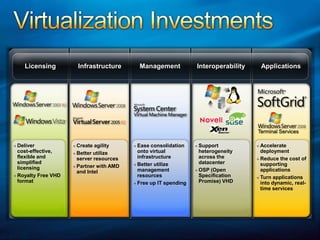
Virtualization InvestmentsManagementInfrastructureApplications InteroperabilityLicensingTerminal ServicesCreate agilityBetter utilizeserver resourcesPartner with AMD and IntelEase consolidationonto virtual infrastructureBetter utilizemanagementresourcesFree up IT spendingSupportheterogeneityacross thedatacenterOSP (Open Specification Promise) VHDAcceleratedeploymentReduce the cost of supportingapplicationsTurn applications into dynamic, real-time servicesDeliver cost-effective, flexible and simplified licensingRoyalty Free VHD format
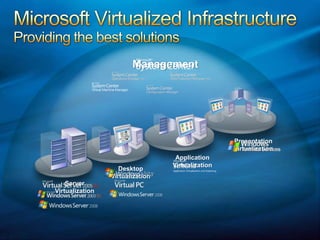
Microsoft Virtualized InfrastructureProviding the best solutionsManagement PresentationVirtualizationApplicationVirtualizationDesktop VirtualizationServer Virtualization
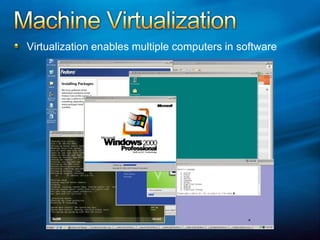
Machine VirtualizationVirtualization enables multiple computers in software
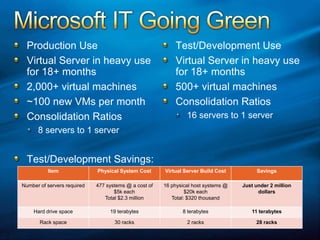
Microsoft IT Going GreenTest/Development UseVirtual Server in heavy use for 18+ months500+ virtual machinesConsolidation Ratios16 servers to 1 serverProduction UseVirtual Server in heavy use for 18+ months2,000+ virtual machines~100 new VMs per monthConsolidation Ratios8 servers to 1 server Test/Development Savings:
Windows Server 2008
Windows Server 2008Server RolesActive Directory Certificate ServicesActive Directory Domain ServicesActive Directory Federation ServicesActive Directory Lightweight Directory ServicesActive Directory Rights Managements ServicesApplication ServerDHCP ServerDNS ServerFax ServerServer RolesFile ServicesHyper-VNetwork Policy and Access ServicesPrint ServicesStreaming Media ServicesTerminal ServicesUDDI ServicesWeb Server/IIS 7.0Windows Deployment ServicesWindows SharePoint Services
Hyper-VDescription:Hypervisor based virtualization platformWindows Server 2008 x64 Edition technologyStandard, Enterprise and Datacenter EditionsStandards basedHardware RequirementsHardware assisted virtualizationAMD AMD-V or Intel VTHardware enabled Data Execution Prevention (DEP) requiredAMD (NX no execute bit)Intel (XD execute disable)
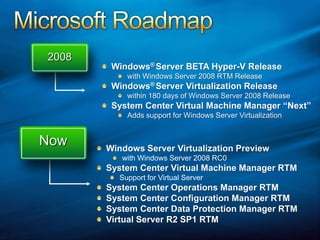
Hot off the PresseWEEK Labs Tests Windows Server 2008 Virtualization“Along with the Release Candidate 0 build of Windows 2008 that Microsoft recently released came the debut public appearance of Microsoft's Windows Hypervisor, once known by the code name Viridian. Based on eWEEK Labs' early tests of the RC0 code, Microsoft's VMware challenger appears to be off to a good start.”Source: http://www.eweek.com/slideshow/0,1206,a=215966,00.asp
Architecture
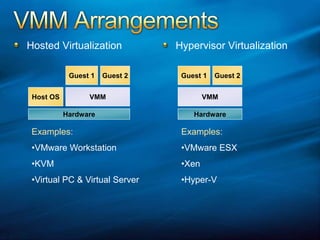
VMM ArrangementsHypervisor VirtualizationHosted VirtualizationGuest 1Guest 2Guest 1Guest 2VMMHost OSVMMHardwareHardwareExamples:VMware Workstation
KVM
Virtual PC & Virtual ServerExamples:VMware ESX
Xen
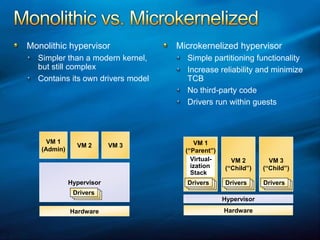
Hyper-VDriversDriversDriversDriversDriversDriversDriversDriversDriversDriversDriversDriversMonolithic vs. MicrokernelizedMonolithic hypervisorSimpler than a modern kernel, but still complexContains its own drivers modelMicrokernelized hypervisorSimple partitioning functionalityIncrease reliability and minimize TCBNo third-party codeDrivers run within guestsVM 1(Admin)VM 2VM 3VM 2(“Child”)VM 3(“Child”)VM 1(“Parent”)Virtual-izationStackHypervisorHypervisorHardwareHardware
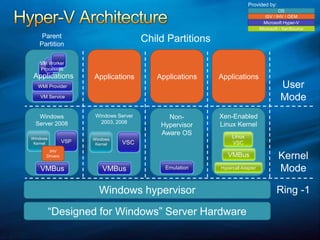
Provided by:Hyper-V ArchitectureOSISV / IHV / OEMVM Worker ProcessesMicrosoft Hyper-VMicrosoft / XenSourceParent PartitionChild PartitionsApplicationsApplicationsApplicationsApplicationsUser ModeWMI ProviderVM ServiceWindows KernelWindows KernelXen-Enabled Linux KernelWindows Server 2003, 2008Windows Server 2008Non-Hypervisor Aware OSLinux VSCVSCVSPIHV DriversKernel ModeVMBusHypercall AdapterEmulationVMBusVMBusWindows hypervisorRing -1“Designed for Windows” Server Hardware
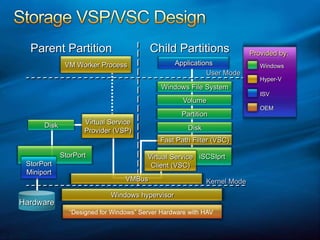
ApplicationsParent PartitionChild PartitionsProvided by:WindowsHyper-VISVUser ModeOEMiSCSIprtStorPortVolumePartitionWindows File SystemDiskDiskStorPortMiniportWindows hypervisorKernel Mode“Designed for Windows” Server Hardware with HAVHardwareVMBusFast Path Filter (VSC)Virtual ServiceClient (VSC)Virtual ServiceProvider (VSP)VM Worker ProcessStorage VSP/VSC Design
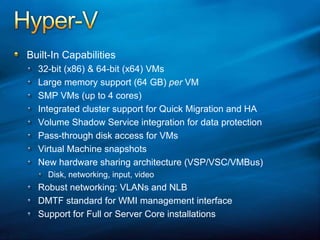
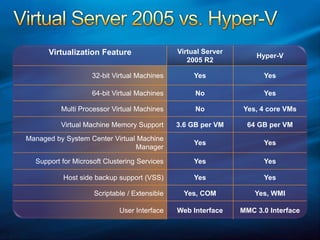
Hyper-VBuilt-In Capabilities32-bit (x86) & 64-bit (x64) VMsLarge memory support (64 GB) per VMSMP VMs (up to 4 cores)Integrated cluster support for Quick Migration and HAVolume Shadow Service integration for data protectionPass-through disk access for VMsVirtual Machine snapshotsNew hardware sharing architecture (VSP/VSC/VMBus)Disk, networking, input, videoRobust networking: VLANs and NLBDMTF standard for WMI management interfaceSupport for Full or Server Core installations
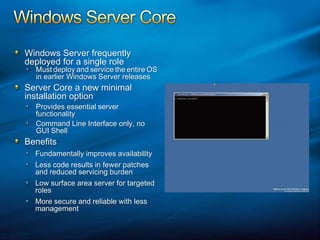
Windows Server CoreWindows Server frequently deployed for a single roleMustdeployandservicetheentireOS in earlier Windows Server releasesServer Core a new minimal installation optionProvides essential server functionalityCommand Line Interface only, no GUI ShellBenefitsFundamentally improves availabilityLess code results in fewer patches and reduced servicing burdenLow surface area server for targeted rolesMore secure and reliable with less management
SecurityIsolationNo sharing of virtualized devicesSeparate VMBus per vm to the parent No sharing of memoryEach has its own address spaceVMs cannot communicate with each other, except through traditional networkingGuests can’t perform DMA attacks because they’re never mapped to physical devicesGuests cannot write to the hypervisorParent partition cannot write to the hypervisor
Virtualization Demo
Windows Virtualization High Availability & Quick Migration
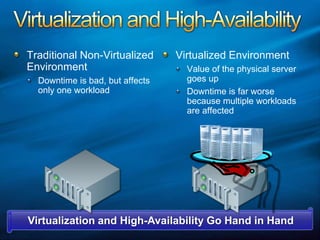
Virtualization and High-AvailabilityTraditional Non-Virtualized EnvironmentDowntime is bad, but affects only one workloadVirtualized EnvironmentValue of the physical server goes upDowntime is far worse because multiple workloads are affectedVirtualization and High-Availability Go Hand in Hand
Windows Server VirtualizationHigh AvailabilityProviding solutions for both planned and unplanned downtimePlanned downtimeQuickly move virtualized workloads to service underlying hardwareMore common than unplannedUnplanned downtimeAutomatic failover to other nodes (hardware or power failure)Not as common and more difficult
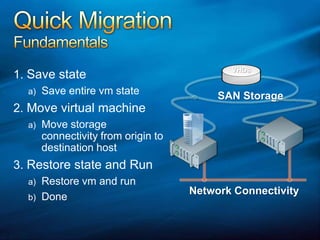
Quick MigrationFundamentalsSave stateSave entire vm stateMove virtual machineMove storage connectivity from origin to destination hostRestore state and RunRestore vm and runDoneVHDsSAN StorageNetwork Connectivity
Quick Migration Video
Microsoft System Center
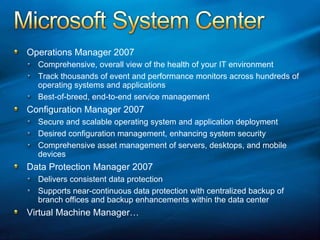
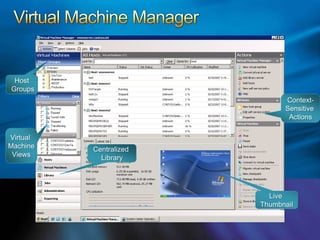
Microsoft System CenterOperations Manager 2007Comprehensive, overall view of the health of your IT environmentTrack thousands of event and performance monitors across hundreds of operating systems and applicationsBest-of-breed, end-to-end service managementConfiguration Manager 2007Secure and scalable operating system and application deploymentDesired configuration management, enhancing system securityComprehensive asset management of servers, desktops, and mobile devicesData Protection Manager 2007Delivers consistent data protectionSupports near-continuous data protection with centralized backup of branch offices and backup enhancements within the data centerVirtual Machine Manager…
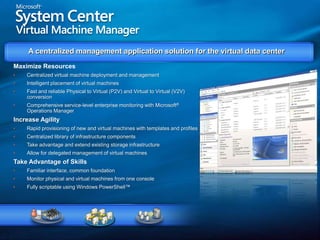
VMVMVMVMVMVMVMVMVMVMVMVMVMVMVMVMVMVMVMVMVMVMVMVMA centralized management application solution for the virtual data center Maximize ResourcesCentralized virtual machine deployment and management
Intelligent placement of virtual machines
Fast and reliable Physical to Virtual (P2V) and Virtual to Virtual (V2V) conversion

Windows Server 2008 Hyper-V

  • 1.
    Windows Server 2008Hyper-VJeffWoolseySenior Program ManagerWindows VirtualizationMicrosoft Corporation
  • 2.
    Objectives And TakeawaysObjective(s): Windows Server 2008 Hyper-VArchitectureSecurityVirtualization DemoSystem CenterVirtual Machine ManagerOperations ManagerConfiguration ManagerData Protection ManagerCompare current Microsoft offerings with Windows Server virtualization
  • 3.
  • 4.
  • 5.
    Virtualization Market TodayComputerworld“Althoughvirtualization has been the buzz among technology providers, only 6% of enterprises have actually deployed virtualization on their networks, said Levine, citing a TWP Research report. That makes the other 94% a wide-open market.”The Rise of the Virtual Machine and the Real Impact It Will Have“We calculate that roughly 6% of new servers sold last year were virtualized and project that 7% of those sold this year will be virtualized and believe that less than 4% of the X86 server installed base has been virtualized to date.
  • 6.
    Virtualization 2010Information WeekOct. 2007“The [virtualization field] is nowhere near saturated. IDC estimates that only 17% of the worldwide server market will be virtualized by 2010, up from 5% in 2005.”
  • 7.
    Virtualization InvestmentsManagementInfrastructureApplications InteroperabilityLicensingTerminalServicesCreate agilityBetter utilizeserver resourcesPartner with AMD and IntelEase consolidationonto virtual infrastructureBetter utilizemanagementresourcesFree up IT spendingSupportheterogeneityacross thedatacenterOSP (Open Specification Promise) VHDAcceleratedeploymentReduce the cost of supportingapplicationsTurn applications into dynamic, real-time servicesDeliver cost-effective, flexible and simplified licensingRoyalty Free VHD format
  • 8.
    Microsoft Virtualized InfrastructureProvidingthe best solutionsManagement PresentationVirtualizationApplicationVirtualizationDesktop VirtualizationServer Virtualization
  • 9.
    Machine VirtualizationVirtualization enablesmultiple computers in software
  • 10.
    Microsoft IT GoingGreenTest/Development UseVirtual Server in heavy use for 18+ months500+ virtual machinesConsolidation Ratios16 servers to 1 serverProduction UseVirtual Server in heavy use for 18+ months2,000+ virtual machines~100 new VMs per monthConsolidation Ratios8 servers to 1 server Test/Development Savings:
  • 11.
  • 12.
    Windows Server 2008ServerRolesActive Directory Certificate ServicesActive Directory Domain ServicesActive Directory Federation ServicesActive Directory Lightweight Directory ServicesActive Directory Rights Managements ServicesApplication ServerDHCP ServerDNS ServerFax ServerServer RolesFile ServicesHyper-VNetwork Policy and Access ServicesPrint ServicesStreaming Media ServicesTerminal ServicesUDDI ServicesWeb Server/IIS 7.0Windows Deployment ServicesWindows SharePoint Services
  • 13.
    Hyper-VDescription:Hypervisor based virtualizationplatformWindows Server 2008 x64 Edition technologyStandard, Enterprise and Datacenter EditionsStandards basedHardware RequirementsHardware assisted virtualizationAMD AMD-V or Intel VTHardware enabled Data Execution Prevention (DEP) requiredAMD (NX no execute bit)Intel (XD execute disable)
  • 14.
    Hot off thePresseWEEK Labs Tests Windows Server 2008 Virtualization“Along with the Release Candidate 0 build of Windows 2008 that Microsoft recently released came the debut public appearance of Microsoft's Windows Hypervisor, once known by the code name Viridian. Based on eWEEK Labs' early tests of the RC0 code, Microsoft's VMware challenger appears to be off to a good start.”Source: http://www.eweek.com/slideshow/0,1206,a=215966,00.asp
  • 15.
  • 16.
    VMM ArrangementsHypervisor VirtualizationHostedVirtualizationGuest 1Guest 2Guest 1Guest 2VMMHost OSVMMHardwareHardwareExamples:VMware Workstation
  • 17.
  • 18.
    Virtual PC &Virtual ServerExamples:VMware ESX
  • 19.
  • 20.
    Hyper-VDriversDriversDriversDriversDriversDriversDriversDriversDriversDriversDriversDriversMonolithic vs. MicrokernelizedMonolithichypervisorSimpler than a modern kernel, but still complexContains its own drivers modelMicrokernelized hypervisorSimple partitioning functionalityIncrease reliability and minimize TCBNo third-party codeDrivers run within guestsVM 1(Admin)VM 2VM 3VM 2(“Child”)VM 3(“Child”)VM 1(“Parent”)Virtual-izationStackHypervisorHypervisorHardwareHardware
  • 21.
    Provided by:Hyper-V ArchitectureOSISV/ IHV / OEMVM Worker ProcessesMicrosoft Hyper-VMicrosoft / XenSourceParent PartitionChild PartitionsApplicationsApplicationsApplicationsApplicationsUser ModeWMI ProviderVM ServiceWindows KernelWindows KernelXen-Enabled Linux KernelWindows Server 2003, 2008Windows Server 2008Non-Hypervisor Aware OSLinux VSCVSCVSPIHV DriversKernel ModeVMBusHypercall AdapterEmulationVMBusVMBusWindows hypervisorRing -1“Designed for Windows” Server Hardware
  • 22.
    ApplicationsParent PartitionChild PartitionsProvidedby:WindowsHyper-VISVUser ModeOEMiSCSIprtStorPortVolumePartitionWindows File SystemDiskDiskStorPortMiniportWindows hypervisorKernel Mode“Designed for Windows” Server Hardware with HAVHardwareVMBusFast Path Filter (VSC)Virtual ServiceClient (VSC)Virtual ServiceProvider (VSP)VM Worker ProcessStorage VSP/VSC Design
  • 23.
    Hyper-VBuilt-In Capabilities32-bit (x86)& 64-bit (x64) VMsLarge memory support (64 GB) per VMSMP VMs (up to 4 cores)Integrated cluster support for Quick Migration and HAVolume Shadow Service integration for data protectionPass-through disk access for VMsVirtual Machine snapshotsNew hardware sharing architecture (VSP/VSC/VMBus)Disk, networking, input, videoRobust networking: VLANs and NLBDMTF standard for WMI management interfaceSupport for Full or Server Core installations
  • 24.
    Windows Server CoreWindowsServer frequently deployed for a single roleMustdeployandservicetheentireOS in earlier Windows Server releasesServer Core a new minimal installation optionProvides essential server functionalityCommand Line Interface only, no GUI ShellBenefitsFundamentally improves availabilityLess code results in fewer patches and reduced servicing burdenLow surface area server for targeted rolesMore secure and reliable with less management
  • 25.
    SecurityIsolationNo sharing ofvirtualized devicesSeparate VMBus per vm to the parent No sharing of memoryEach has its own address spaceVMs cannot communicate with each other, except through traditional networkingGuests can’t perform DMA attacks because they’re never mapped to physical devicesGuests cannot write to the hypervisorParent partition cannot write to the hypervisor
  • 26.
  • 27.
    Windows Virtualization HighAvailability & Quick Migration
  • 28.
    Virtualization and High-AvailabilityTraditionalNon-Virtualized EnvironmentDowntime is bad, but affects only one workloadVirtualized EnvironmentValue of the physical server goes upDowntime is far worse because multiple workloads are affectedVirtualization and High-Availability Go Hand in Hand
  • 29.
    Windows Server VirtualizationHighAvailabilityProviding solutions for both planned and unplanned downtimePlanned downtimeQuickly move virtualized workloads to service underlying hardwareMore common than unplannedUnplanned downtimeAutomatic failover to other nodes (hardware or power failure)Not as common and more difficult
  • 30.
    Quick MigrationFundamentalsSave stateSaveentire vm stateMove virtual machineMove storage connectivity from origin to destination hostRestore state and RunRestore vm and runDoneVHDsSAN StorageNetwork Connectivity
  • 31.
  • 32.
  • 33.
    Microsoft System CenterOperationsManager 2007Comprehensive, overall view of the health of your IT environmentTrack thousands of event and performance monitors across hundreds of operating systems and applicationsBest-of-breed, end-to-end service managementConfiguration Manager 2007Secure and scalable operating system and application deploymentDesired configuration management, enhancing system securityComprehensive asset management of servers, desktops, and mobile devicesData Protection Manager 2007Delivers consistent data protectionSupports near-continuous data protection with centralized backup of branch offices and backup enhancements within the data centerVirtual Machine Manager…
  • 34.
    VMVMVMVMVMVMVMVMVMVMVMVMVMVMVMVMVMVMVMVMVMVMVMVMA centralized managementapplication solution for the virtual data center Maximize ResourcesCentralized virtual machine deployment and management
  • 35.
    Intelligent placement ofvirtual machines
  • 36.
    Fast and reliablePhysical to Virtual (P2V) and Virtual to Virtual (V2V) conversion

Editor's Notes

  • #5 Computerworld: http://www.computerworld.com/action/article.do?command=viewArticleBasic&articleId=9002540&source=rss_topic88The Rise of the Virtual Machine: http://www.xensource.com/files/VM_Whitepaper_TWP.pdf
  • #6 Computerworld: http://www.computerworld.com/action/article.do?command=viewArticleBasic&articleId=9002540&source=rss_topic88The Rise of the Virtual Machine: http://www.xensource.com/files/VM_Whitepaper_TWP.pdf
  • #18 Linus quote: https://lists.linux-foundation.org/pipermail/desktop_architects/2007-August/002446.html
  • #33 Microsoft System Center Virtual Machine Manager is a comprehensive management solution for the virtualized data center. It enables increased physical server utilization, centralized management of virtual machine infrastructure, and rapid provisioning of new virtual machines by the administrator and certified end users.