M P et g te1 Lpo
 A T s in h :1 atp
      in
    Ev o mn
     nirn et
  T s n t k f sces l s g vn
   ip ad r so ucsut t eet
         ic r    f e in    s
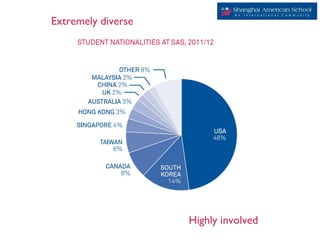
Extremely diverse


                    Highly involved
Pilot
Spring 2010
Spring 2010
Pilot Testing
  Spring 2011
  Spring 2011
Pilot Testing
  Spring 2011
  Spring 2011
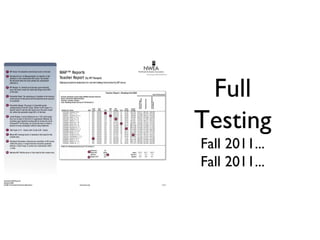
Full
Testing
Fall 2011...
Fall 2011...
Testing 1:1
What we’ve
 learned...
What we’ve
 learned...
What we’ve
 learned...
MS Student Screen Cover and
Laptop Test Preparation Guide
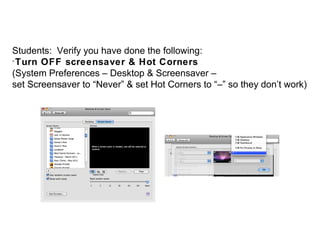
Students: Verify you have done the following:

 Turn OFF screensaver & Hot Corners
(System Preferences – Desktop & Screensaver –
set Screensaver to “Never” & set Hot Corners to “–” so they don’t work)

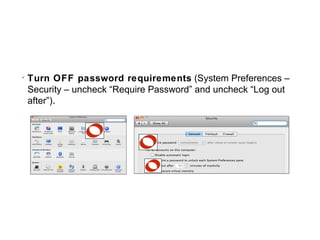
    Turn OFF password requirements (System Preferences –
    Security – uncheck “Require Password” and uncheck “Log out
    after”).

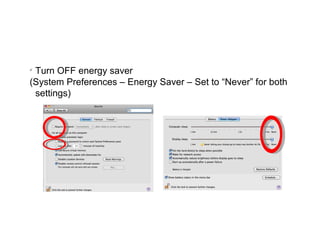
 Turn OFF energy saver
(System Preferences – Energy Saver – Set to “Never” for both
 settings)

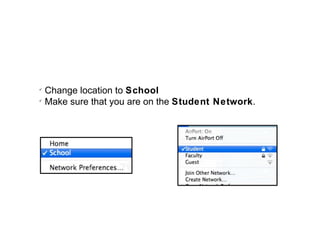
    Change location to School

    Make sure that you are on the Student Network.

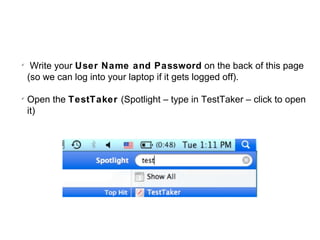
     Write your User Name and Password on the back of this page
    (so we can log into your laptop if it gets logged off).


    Open the TestTaker (Spotlight – type in TestTaker – click to open
    it)
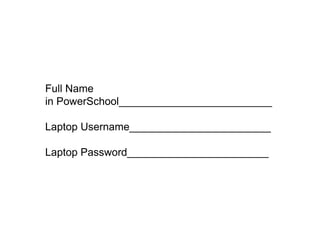
Full Name
in PowerSchool__________________________

Laptop Username________________________

Laptop Password________________________
Jeff Dungan
         jeff.dungan@saschina.org

     Fusion Presentations and Resources
http://jdungan-fusion12.wikispaces.com/home

1 to1 testing

  • 1.
    M P etg te1 Lpo A T s in h :1 atp in Ev o mn nirn et T s n t k f sces l s g vn ip ad r so ucsut t eet ic r f e in s
  • 7.
    Extremely diverse Highly involved
  • 8.
  • 10.
    Pilot Testing Spring 2011 Spring 2011
  • 11.
    Pilot Testing Spring 2011 Spring 2011
  • 12.
  • 13.
    Testing 1:1 What we’ve learned... What we’ve learned... What we’ve learned...
  • 19.
    MS Student ScreenCover and Laptop Test Preparation Guide
  • 20.
    Students: Verify youhave done the following:  Turn OFF screensaver & Hot Corners (System Preferences – Desktop & Screensaver – set Screensaver to “Never” & set Hot Corners to “–” so they don’t work)
  • 21.
    Turn OFF password requirements (System Preferences – Security – uncheck “Require Password” and uncheck “Log out after”).
  • 22.
     Turn OFFenergy saver (System Preferences – Energy Saver – Set to “Never” for both settings)
  • 23.
    Change location to School  Make sure that you are on the Student Network.
  • 24.
    Write your User Name and Password on the back of this page (so we can log into your laptop if it gets logged off).  Open the TestTaker (Spotlight – type in TestTaker – click to open it)
  • 25.
    Full Name in PowerSchool__________________________ LaptopUsername________________________ Laptop Password________________________
  • 26.
    Jeff Dungan jeff.dungan@saschina.org Fusion Presentations and Resources http://jdungan-fusion12.wikispaces.com/home

Editor's Notes

  • #3 -Brief description on my job title and responsibilities -ES Technology Resource Facilitator -ADE 2011 -MAP Coordinator -ES Curriculum Facilitator
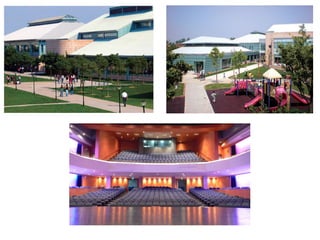
  • #4 Start with a little introduction about yourself 1 minute. -Pk-12 college prepatory International School offering IB and AP programs - -Largest expat employer in mainland China -U.S. Consular school-Shanghai, China -Students representing over 40 countries -dual campuses with total enrollment of nearly 3000 students.
  • #5 -Pk-12 college prepatory International School offering IB and AP programs -Dual Campuses of roughly equal size but varying demographics-This can make testing and coordination of test events problematic-Coordination, Communication key -Accredited by Westeran Association of Schools and Colleges (WASC) -9 person board of directors -Largest expat employer in mainland China -U.S. Consular school-Shanghai, China -dual campuses with total enrollment of nearly 3000 students.
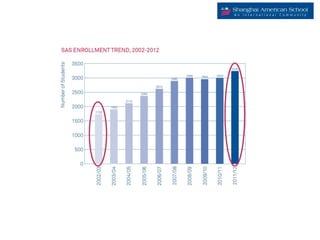
  • #6 -Pk-12 college prepatory International School offering IB and AP programs -Accredited by Westeran Association of Schools and Colleges (WASC) -9 person board of directors -Staff <700 -Largest expat employer in mainland China -U.S. Consular school-Shanghai, China -Students representing over 40 countries with a total enrollment of nearly 3250 students -dual campuses with total enrollment of nearly 3000 students.
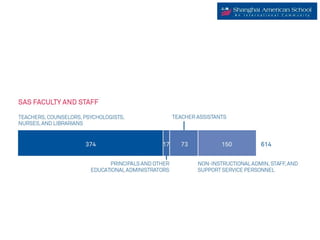
  • #7 -Pk-12 college prepatory International School offering IB and AP programs -Accredited by Westeran Association of Schools and Colleges (WASC) -9 person board of directors -Staff <700 -Largest expat employer in mainland China -U.S. Consular school-Shanghai, China -Diverse population of staff and families -Staff <700
  • #8 -Americans (including Chinese Americans), Koreans, Canadians and Taiwanese -U.S. Consular school-Shanghai, China -Students representing over 40 countries with a total enrollment of nearly 3250 students
  • #9 -Lost ITBIS Tests -Perfect oppportunity to “dip toes” into MAP testing -School had few people on staff familiar with MAP testing -2 classes of 19 students grade 3,4,5 -Results-Technology/Network/Student feedback/Teacher Feedback/Administration Reporting -
  • #10 -Fall 2010 ES switches platform to MAC OSX and completes the 1:1 rollout period for SAS. -1:1 laptop MAC laptop school -Spring of 2012 awarded as a Distinguished Apple School
  • #11 -Considered Fall Testing-Parent Communication fell through-Irony of other presentation -Leadership decided late to cut cord with ITBIS -Sent core team to HK for Climbing the data ladder -Planned communication and rollout plan for Spring 2011 and beyond -Decalred ITBIS over in Spring 2011 -First full testing grades 3-8 -Logistics especially in the MS and ES become very important to ensure loading of tests and shuffling of machines (ES)
  • #12 -Considered Fall Testing-Parent Communication fell through-Irony of other presentation -Leadership decided late to cut cord with ITBIS -Sent core team to HK for Climbing the data ladder -Planned communication and rollout plan for Spring 2011 and beyond -Decalred ITBIS over in Spring 2011 -First full testing grades 3-8 -Logistics especially in the MS and ES become very important to ensure loading of tests and shuffling of machines (ES)
  • #13 -Now finishing our “pilot period” spring 2012 -Testing grades 3-9 and 3-10 in fall 2012 -Logistics of testing in 1:1 still requiring careful planning and coordination
  • #15 ROSTERING-working backwards -Use 3 week buffer from firsts divisions testing -All planning works backward from testing calendar -Testing events normally scheduled year prior in May for upcoming academic year
  • #16 STUDENT MACHINES AND IMAGING -All machines reimaged every year. Test Taker included on images -Upgraded to latest test taker version -Students 6-12 are on MAC Lion -Students 3-6 are on MAC Snow Leopard (applications needed for instruction not supported in Lion) -Student machines in grades 6-10 are checked by TRF prior to testing -Study halls or electives-Only checking application opens and connects to testing server -Student machines ES Carts-2:1 Grades 4 and 5, Grade 3 2 carts of 20. Rotate in with carts from other grades to accomodate 6 sections of classes in 4,5 and 180 in grade 5 X 2 Campuses
  • #17 Work Within the Network -All testing done via wireless network -Work within the parameters of the network -Shuffle loading of tests and staggering start of testing -We have tested up to ~360 students across two different campuses -Novell Network with MS server for testing -Migrating to MS Servers summer of 2012-???? -Largest server loads are when we search for student names-roughly 1200 students in our student data. -Stagger starting tests by classroom. Only one grade level testing at time/division, however, multiple divisions means the possibility of testing overlaps.
  • #18 Failure is an option -We usually realize between 1-3% failure on tests. Typically more like 1% but I couldn’t find an image for 1% (Smile) -Not to worry-How you handle the failure is of importance. -Time is tight-Many people take care of this as well as having tech support as part of proctor team
  • #19 ES Loading machines-Teamwork -Classroom Teachers, Specialists, Tech Support, Divisional TRFs loading machines -Averages to 2-3 people per room for loading. -Loading 120-180 machines in ~40 minutes -In MS this is important because of small window to get 180 machines loaded
  • #20 ES Loading machines-Teamwork -Classroom Teachers, Specialists, Tech Support, Divisional TRFs loading machines -Averages to 2-3 people per room for loading. -Loading 120-180 machines in ~40 minutes -In MS this is important because of small window to get 180 machines loaded
  • #21 -Classroom Teachers, Specialists, Tech Support, Divisional TRFs loading machines -Averages to 2-3 people per room for loading. -In MS this is important because of small window to get 180 machines loaded
  • #22 -Classroom Teachers, Specialists, Tech Support, Divisional TRFs loading machines -Averages to 2-3 people per room for loading. -In MS this is important because of small window to get 180 machines loaded
  • #23 -Classroom Teachers, Specialists, Tech Support, Divisional TRFs loading machines -Averages to 2-3 people per room for loading. -In MS this is important because of small window to get 180 machines loaded
  • #24 -Classroom Teachers, Specialists, Tech Support, Divisional TRFs loading machines -Averages to 2-3 people per room for loading. -In MS this is important because of small window to get 180 machines loaded
  • #25 -Classroom Teachers, Specialists, Tech Support, Divisional TRFs loading machines -Averages to 2-3 people per room for loading. -In MS this is important because of small window to get 180 machines loaded
  • #26 -Classroom Teachers, Specialists, Tech Support, Divisional TRFs loading machines -Averages to 2-3 people per room for loading. -In MS this is important because of small window to get 180 machines loaded
  • #27 -Finish wth tour and discussion of Moodle Staff MAP resource site. -Open discussion with other participants. -Problems issues with testing in 1:1? Are you considering the move to 1:1? -What works well?