UITableView 和 UITableViewController


范圣刚,princetoad@gmail.com, www.tfan.org
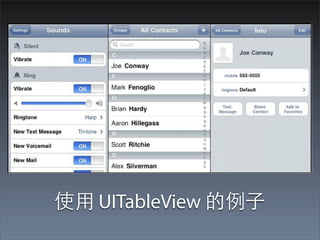
使⽤用 UITableView 的例⼦子
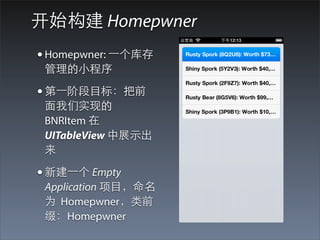
开始构建 Homepwner
• Homepwner: ⼀一个库存
 管理的⼩小程序

• 第⼀一阶段⺫⽬目标:把前
 ⾯面我们实现的
 BNRItem 在
 UITableView 中展⽰示出
 来

• 新建⼀一个 Empty
 Application 项⺫⽬目,命名
 为 Homepwner,类前
 缀:Homepwner
UITableViewController
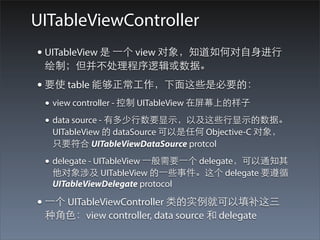
• UITableView 是 ⼀一个 view 对象,知道如何对⾃自⾝身进⾏行
 绘制;但并不处理程序逻辑或数据。
• 要使 table 能够正常⼯工作,下⾯面这些是必要的:
 • view controller - 控制 UITableView 在屏幕上的样⼦子
 • data source - 有多少⾏行数要显⽰示,以及这些⾏行显⽰示的数据。
  UITableView 的 dataSource 可以是任何 Objective-C 对象,
  只要符合 UITableViewDataSource protcol

 • delegate - UITableView ⼀一般需要⼀一个 delegate,可以通知其
  他对象涉及 UITableView 的⼀一些事件。这个 delegate 要遵循
  UITableViewDelegate protocol

• ⼀一个 UITableViewController 类的实例就可以填补这三
 种⾓角⾊色:view controller, data source 和 delegate
UITableViewController 和 UITableView
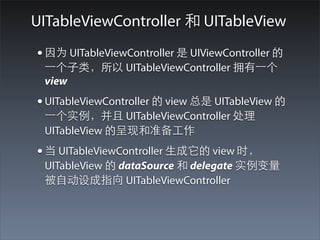
• 因为 UITableViewController 是 UIViewController 的
 ⼀一个⼦子类,所以 UITableViewController 拥有⼀一个
 view
• UITableViewController 的 view 总是 UITableView 的
 ⼀一个实例,并且 UITableViewController 处理
 UITableView 的呈现和准备⼯工作
• 当 UITableViewController ⽣生成它的 view 时,
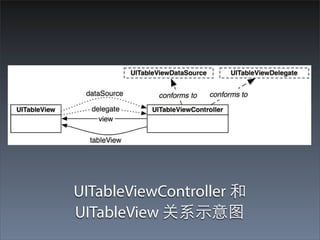
 UITableView 的 dataSource 和 delegate 实例变量
 被⾃自动设成指向 UITableViewController
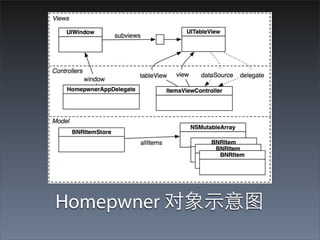
UITableViewController 和
UITableView 关系⽰示意图
⼦子类化 UITableViewController
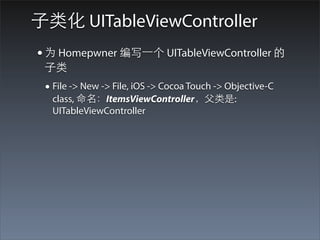
• 为 Homepwner 编写⼀一个 UITableViewController 的
 ⼦子类
 • File -> New -> File, iOS -> Cocoa Touch -> Objective-C
  class, 命名:ItemsViewController,⽗父类是:
  UITableViewController
• UITableViewController 的 designated initializer 是
 initWithStyle:,使⽤用⼀一个常量来确定 table view 的
 样式,有两个选项:
 • UITableViewStylePlain: 每⾏行是⼀一个矩形
 • UITableViewStyleGrouped: 顶部和底部⾏行具有圆⾓角
• 实现下列的 initializers: init 和 initWithStyle
- (id)init
   {
       // 调⽤用超类的 designated initializer
       self = [super initWithStyle:UITableViewStyleGrouped];

       if (self) {

       }
       return self;
   }

   - (id)initWithStyle:(UITableViewStyle)style
   {
       return [self init];
   }


• 这就确保了不管发送什么初始化消息给
ItemsViewController, 所有的 ItemsViewController
的实例都使⽤用 UITableViewStyleGrouped 样式。
• 打开 HomepwnerAppDelegate.m, 在
        application:didFinishLaunchingWithOptions: 中,
        创建⼀一个 ItemsViewController 的实例并把它设成
        window 的 rootViewController

      • 确保在⽂文件顶部导⼊入 ItemsViewController 头⽂文件
#import "ItemsViewController.h"

@implementation HomepwnerAppDelegate

- (BOOL)application:(UIApplication *)application didFinishLaunchingWithOptions:
(NSDictionary *)launchOptions
{
    self.window = [[UIWindow alloc] initWithFrame:[[UIScreen mainScreen] bounds]];
    // Override point for customization after application launch.
    ItemsViewController *ivc = [[ItemsViewController alloc] init];

    [[self window] setRootViewController:ivc];

    self.window.backgroundColor = [UIColor whiteColor];
    [self.window makeKeyAndVisible];
    return YES;
}
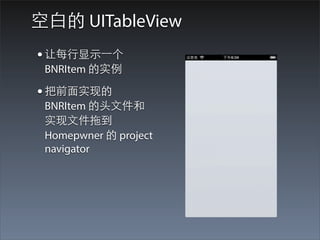
空⽩白的 UITableView
• 让每⾏行显⽰示⼀一个
 BNRItem 的实例

• 把前⾯面实现的
 BNRItem 的头⽂文件和
 实现⽂文件拖到
 Homepwner 的 project
 navigator
UITableView 的 Data Source
• table view 会询问另⼀一个对象 - 它的 dataSource -
 应该显⽰示什么

• ItemsViewController 就是 data source,因此需要
 ⼀一种⽅方法来存储 item 数据

• 我们在前⾯面使⽤用⼀一个 NSMutableArray 来存储
 BNRItem 实例,现在还是使⽤用 NSMutableArray,
 但是会把它抽象成另⼀一个对象 - BNRItemStore
Homepwner 对象⽰示意图
BNRItemStore 介绍
• BNRItemStore 本⾝身包含⼀一个数组,它负责在这个
 数组上执⾏行操作,像排序,增加和删除 BNRItem
• 也将负责从磁盘保存和加载 BNRItem
• 下⾯面我们开始创建 BNRItemStore 对象
创建 BNRItemStore
    • 创建⼀一个新的 NSObject 的⼦子类,命名:
     BNRItemStore
    • 增加⼀一个类⽅方法:defaultStore: ,实现单例模式
#import <Foundation/Foundation.h>

@interface BNRItemStore : NSObject

// 增加⼀一个类⽅方法,前缀 +
+ (BNRItemStore *)defaultStore;

@end

+ (BNRItemStore *)defaultStore
{
    static BNRItemStore *defaultStore = nil;
    if (!defaultStore) {
        defaultStore = [[super allocWithZone:nil] init];
    }

     return defaultStore;
}
静态变量
• 静态变量不在栈内存放,当⽅方法返回时不会被销
毁
• 静态变量会在程序被加载时只声明⼀一次,并且永
远不会被销毁
• 静态变量(static variable)有点像本地变量,只能
从声明它的⽅方法内访问它。因此没有其他的对象
或⽅方法可以使⽤用由这个变量指向的
BNRItemStore, 除了通过 defaultStore ⽅方法
静态变量指向的对象
• defaultStore 的初始值是 nil
• 这个⽅方法第⼀一次被调⽤用的时候呢,⼀一个
BNRItemStore 的实例将被创建,并且 defaultStore
将会指向它
• 在后续的对这个⽅方法的调⽤用中,defaultStore 仍将
指向 BNRItemStore 的这个实例
• 这个变量具有对 BNRItemStore 的强引⽤用,并且由
于这个变量永远不会被销毁,因此它指向的对象
也永远不会被销毁
确保 BNRItemStore 的单例状态
• 就要确保不会有另⼀一个 BNRItemStore 被分配
• ⼀一种⽅方法是重写 BNRItemStore 中的 alloc ,让它不
 创建⼀一个新的实例,⽽而是返回⼀一个已经存在的实
 例
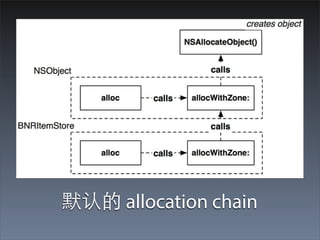
• 这种⽅方法有⼀一个问题就是:因为历史的原因,
 alloc 仅仅是对 allocWithZone: 的调⽤用,
 allocWithZone: 然后调⽤用 C 函数
 NSAllocateObject,NSAllocateObject 再执⾏行真正
 的内存分配
• 为了防⽌止跳过 alloc: 直接调⽤用 allocWithZone:, 我们
 要对 allocWitheZone: 进⾏行重写
重写 initWithZone:
// zone 参数在 Objective-C ⾥里⾯面是没有⽤用的,忽略即可
+ (id)allocWithZone:(NSZone *)zone
{
    return [self defaultStore];
}


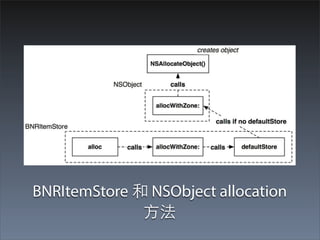
 • 调⽤用 NSObject 的 allocWithZone: 实现, ⽽而不是⾃自⾝身
  的 allocWithZone:
 • defaultStore = [[super allocWithZone:nil] init];
默认的 allocation chain
BNRItemStore 和 NSObject allocation
              ⽅方法
保存 BNRItem 的数组
• 通过上⾯面的操作,我们就确保了不会创建多个
 BNRItemStore 的实例,同时我们也确保了⼀一旦
 BNRItemStore 的实例被创建,它就不会被销毁,
 因为⼀一个永远不会被销毁的静态变量⼀一直维护对
 它的 ownership
• 下⾯面我们创建⼀一个⽤用于保存 BNRItem 的数组,和
 两个⽅方法
@class
#import <Foundation/Foundation.h>

@class BNRItem;

@interface BNRItemStore : NSObject
{
    NSMutableArray *allItems;
}

// 增加⼀一个类⽅方法,前缀 +
+ (BNRItemStore *)defaultStore;

- (NSArray *)allItems;
- (BNRItem *)createItem;

@end

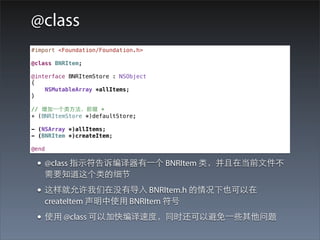
 • @class 指⽰示符告诉编译器有⼀一个 BNRItem 类,并且在当前⽂文件不
   需要知道这个类的细节
 • 这样就允许我们在没有导⼊入 BNRItem.h 的情况下也可以在
   createItem 声明中使⽤用 BNRItem 符号
 • 使⽤用 @class 可以加快编译速度,同时还可以避免⼀一些其他问题
创建数组并实现相应⽅方法
• 在真正给 BNRItem 类发送消息或者对它进⾏行实例
 化的类中,必须导⼊入声明它的⽂文件,这样编译器
 才能知道它的细节
• 在 BNRItemStore.m 中,导⼊入 BNRItem.h
• 在 BNRItemStore.m 中,重写 init 来⽣生成⼀一个
 NSMutableArray 的实例并把它分配给实例变量
• 并且实现前⾯面声明的两个⽅方法
代码
#import "BNRItemStore.h"
// 导⼊入 BNRItem 头⽂文件
#import "BNRItem.h"

@implementation BNRItemStore

- (id)init
{
    self = [super init];
    if (self) {
        allItems = [[NSMutableArray alloc] init];
    }

    return self;
}

- (NSArray *)allItems
{
    return allItems;
}

- (BNRItem *)createItem
{
    BNRItem *p = [BNRItem randomItem];
    [allItems addObject:p];
    return p;
}
实现数据源⽅方法
• 导⼊入头⽂文件
• 在 designated initializer 中增加5个随机条⺫⽬目到
 BNRItemStore

• UITableViewDataSource
 • tableView:numberOfRowsInSection:
 • tableView:cellForRowAtIndexPath:
在 designated initializer 中增加5个随机条⺫⽬目到
BNRItemStore


#import "ItemsViewController.h"
#import "BNRItemStore.h"
#import "BNRItem.h"

@implementation ItemsViewController

- (id)init
{
    self = [super initWithStyle:UITableViewStyleGrouped];
    if (self) {
        for (int i = 0; i < 5; i++) {
            [[BNRItemStore defaultStore] createItem];
        }
    }
    return self;
}
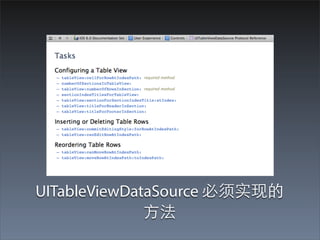
UITableViewDataSource 必须实现的
              ⽅方法
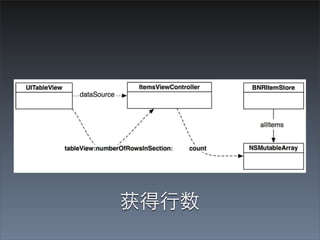
获得⾏行数
tableView:numberOfRowsInSection:
- (NSInteger)tableView:(UITableView *)tableView numberOfRowsInSection:(NSInteger)section
{
    return [[[BNRItemStore defaultStore] allItems] count];
}


       • 第⼆二个必须要实现的⽅方法是:
          tableView:cellForRowAtIndexPath:
       • 要实现这个⽅方法,我们要先了解另外⼀一个类 -
          UITableViewCell
UITableViewCells
• UITableViewCell 是 UIView 的⼦子类,并且
 UITableView 的每⼀一⾏行都是⼀一个 UITableViewCell

• iOS 中的 table 只能有⼀一列,所以⼀一⾏行只有⼀一个单
 元格

• UITableViewCells 都是 UITableView 的⼦子视图
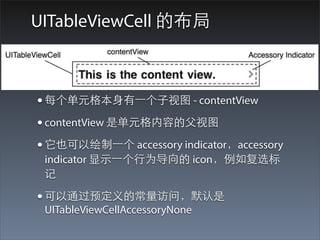
UITableViewCell 的布局


• 每个单元格本⾝身有⼀一个⼦子视图 - contentView
• contentView 是单元格内容的⽗父视图
• 它也可以绘制⼀一个 accessory indicator,accessory
 indicator 显⽰示⼀一个⾏行为导向的 icon,例如复选标
 记

• 可以通过预定义的常量访问,默认是
 UITableViewCellAccessoryNone
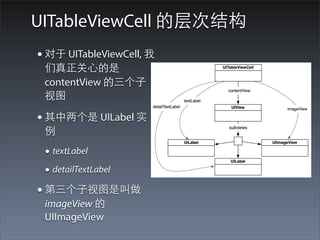
UITableViewCell 的层次结构
• 对于 UITableViewCell, 我
 们真正关⼼心的是
 contentView 的三个⼦子
 视图

• 其中两个是 UILabel 实
 例
 • textLabel
 • detailTextLabel
• 第三个⼦子视图是叫做
 imageView 的
 UIImageView
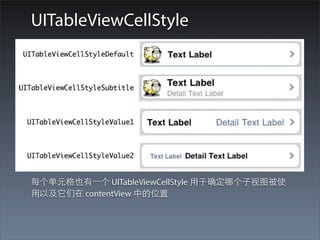
UITableViewCellStyle


每个单元格也有⼀一个 UITableViewCellStyle ⽤用于确定哪个⼦子视图被使
⽤用以及它们在 contentView 中的位置
创建和获取 UITableViewCells
• 每个单元格将显⽰示 BNRItem 的 description,作为
 它的 textLabel
• 我们将实现 UITableViewDataSource protocol 的第
 ⼆二个必要⽅方法:tableView:cellForRowAtIndexPath:
• 这个⽅方法将创建⼀一个单元格,把它的 textLabel 设
 成对应的 BNRItem 的 description,然后把它返回
 给 UITableView
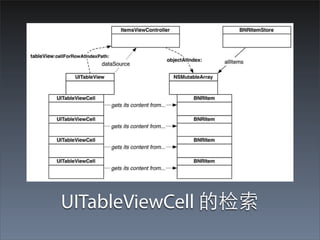
UITableViewCell 的检索
实现单元格的获取
- (UITableViewCell *)tableView:(UITableView *)tableView
cellForRowAtIndexPath:(NSIndexPath *)indexPath
{
    // 使⽤用默认的外观⽣生成⼀一个 UITableViewCell 的实例
    UITableViewCell *cell = [[UITableViewCell alloc]
initWithStyle:UITableViewCellStyleDefault
reuseIdentifier:@"UITableViewCell"];
    // 使⽤用 item 的 description 设置单元格的⽂文本
    BNRItem *p = [[[BNRItemStore defaultStore] allItems]
                  objectAtIndex:[indexPath row]];
    [[cell textLabel] setText:[p description]];

     return cell;
}


    • tableView:cellForRowAtIndexPath: 的⼀一个参数是
     NSIndexPath, 它具有两个属性:section 和 row
    • 因为我们只有⼀一个section,我们就让第 n ⾏行显⽰示
     allItems 数组中的第 n 条记录
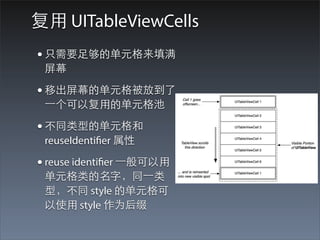
复⽤用 UITableViewCells
• 只需要⾜足够的单元格来填满
 屏幕

• 移出屏幕的单元格被放到了
 ⼀一个可以复⽤用的单元格池

• 不同类型的单元格和
 reuseIdentifier 属性

• reuse identifier ⼀一般可以⽤用
 单元格类的名字,同⼀一类
 型,不同 style 的单元格可
 以使⽤用 style 作为后缀
单元格复⽤用的实现
- (UITableViewCell *)tableView:(UITableView *)tableView cellForRowAtIndexPath:
(NSIndexPath *)indexPath
{
    // ⾸首先检查是否有可以重⽤用的单元格,如果存在的化就使⽤用
    UITableViewCell *cell = [tableView
dequeueReusableCellWithIdentifier:@"UITableViewCell"];
    if (!cell) {
        cell = [[UITableViewCell alloc] initWithStyle:UITableViewCellStyleDefault
reuseIdentifier:@"UITableViewCell"];
    }
    // 使⽤用 item 的 description 设置单元格的⽂文本
    BNRItem *p = [[[BNRItemStore defaultStore] allItems]
                  objectAtIndex:[indexPath row]];
    [[cell textLabel] setText:[p description]];

    return cell;
}

09 UITableView and UITableViewController

  • 1.
  • 2.
  • 3.
    开始构建 Homepwner • Homepwner:⼀一个库存 管理的⼩小程序 • 第⼀一阶段⺫⽬目标:把前 ⾯面我们实现的 BNRItem 在 UITableView 中展⽰示出 来 • 新建⼀一个 Empty Application 项⺫⽬目,命名 为 Homepwner,类前 缀:Homepwner
  • 4.
    UITableViewController • UITableView 是⼀一个 view 对象,知道如何对⾃自⾝身进⾏行 绘制;但并不处理程序逻辑或数据。 • 要使 table 能够正常⼯工作,下⾯面这些是必要的: • view controller - 控制 UITableView 在屏幕上的样⼦子 • data source - 有多少⾏行数要显⽰示,以及这些⾏行显⽰示的数据。 UITableView 的 dataSource 可以是任何 Objective-C 对象, 只要符合 UITableViewDataSource protcol • delegate - UITableView ⼀一般需要⼀一个 delegate,可以通知其 他对象涉及 UITableView 的⼀一些事件。这个 delegate 要遵循 UITableViewDelegate protocol • ⼀一个 UITableViewController 类的实例就可以填补这三 种⾓角⾊色:view controller, data source 和 delegate
  • 5.
    UITableViewController 和 UITableView •因为 UITableViewController 是 UIViewController 的 ⼀一个⼦子类,所以 UITableViewController 拥有⼀一个 view • UITableViewController 的 view 总是 UITableView 的 ⼀一个实例,并且 UITableViewController 处理 UITableView 的呈现和准备⼯工作 • 当 UITableViewController ⽣生成它的 view 时, UITableView 的 dataSource 和 delegate 实例变量 被⾃自动设成指向 UITableViewController
  • 6.
  • 7.
    ⼦子类化 UITableViewController • 为Homepwner 编写⼀一个 UITableViewController 的 ⼦子类 • File -> New -> File, iOS -> Cocoa Touch -> Objective-C class, 命名:ItemsViewController,⽗父类是: UITableViewController
  • 8.
    • UITableViewController 的designated initializer 是 initWithStyle:,使⽤用⼀一个常量来确定 table view 的 样式,有两个选项: • UITableViewStylePlain: 每⾏行是⼀一个矩形 • UITableViewStyleGrouped: 顶部和底部⾏行具有圆⾓角 • 实现下列的 initializers: init 和 initWithStyle
  • 9.
    - (id)init { // 调⽤用超类的 designated initializer self = [super initWithStyle:UITableViewStyleGrouped]; if (self) { } return self; } - (id)initWithStyle:(UITableViewStyle)style { return [self init]; } • 这就确保了不管发送什么初始化消息给 ItemsViewController, 所有的 ItemsViewController 的实例都使⽤用 UITableViewStyleGrouped 样式。
  • 10.
    • 打开 HomepwnerAppDelegate.m,在 application:didFinishLaunchingWithOptions: 中, 创建⼀一个 ItemsViewController 的实例并把它设成 window 的 rootViewController • 确保在⽂文件顶部导⼊入 ItemsViewController 头⽂文件 #import "ItemsViewController.h" @implementation HomepwnerAppDelegate - (BOOL)application:(UIApplication *)application didFinishLaunchingWithOptions: (NSDictionary *)launchOptions { self.window = [[UIWindow alloc] initWithFrame:[[UIScreen mainScreen] bounds]]; // Override point for customization after application launch. ItemsViewController *ivc = [[ItemsViewController alloc] init]; [[self window] setRootViewController:ivc]; self.window.backgroundColor = [UIColor whiteColor]; [self.window makeKeyAndVisible]; return YES; }
  • 11.
    空⽩白的 UITableView • 让每⾏行显⽰示⼀一个 BNRItem 的实例 • 把前⾯面实现的 BNRItem 的头⽂文件和 实现⽂文件拖到 Homepwner 的 project navigator
  • 12.
  • 13.
    • table view会询问另⼀一个对象 - 它的 dataSource - 应该显⽰示什么 • ItemsViewController 就是 data source,因此需要 ⼀一种⽅方法来存储 item 数据 • 我们在前⾯面使⽤用⼀一个 NSMutableArray 来存储 BNRItem 实例,现在还是使⽤用 NSMutableArray, 但是会把它抽象成另⼀一个对象 - BNRItemStore
  • 14.
  • 15.
    BNRItemStore 介绍 • BNRItemStore本⾝身包含⼀一个数组,它负责在这个 数组上执⾏行操作,像排序,增加和删除 BNRItem • 也将负责从磁盘保存和加载 BNRItem • 下⾯面我们开始创建 BNRItemStore 对象
  • 16.
    创建 BNRItemStore • 创建⼀一个新的 NSObject 的⼦子类,命名: BNRItemStore • 增加⼀一个类⽅方法:defaultStore: ,实现单例模式 #import <Foundation/Foundation.h> @interface BNRItemStore : NSObject // 增加⼀一个类⽅方法,前缀 + + (BNRItemStore *)defaultStore; @end + (BNRItemStore *)defaultStore { static BNRItemStore *defaultStore = nil; if (!defaultStore) { defaultStore = [[super allocWithZone:nil] init]; } return defaultStore; }
  • 17.
    静态变量 • 静态变量不在栈内存放,当⽅方法返回时不会被销 毁 • 静态变量会在程序被加载时只声明⼀一次,并且永 远不会被销毁 •静态变量(static variable)有点像本地变量,只能 从声明它的⽅方法内访问它。因此没有其他的对象 或⽅方法可以使⽤用由这个变量指向的 BNRItemStore, 除了通过 defaultStore ⽅方法
  • 18.
    静态变量指向的对象 • defaultStore 的初始值是nil • 这个⽅方法第⼀一次被调⽤用的时候呢,⼀一个 BNRItemStore 的实例将被创建,并且 defaultStore 将会指向它 • 在后续的对这个⽅方法的调⽤用中,defaultStore 仍将 指向 BNRItemStore 的这个实例 • 这个变量具有对 BNRItemStore 的强引⽤用,并且由 于这个变量永远不会被销毁,因此它指向的对象 也永远不会被销毁
  • 19.
    确保 BNRItemStore 的单例状态 •就要确保不会有另⼀一个 BNRItemStore 被分配 • ⼀一种⽅方法是重写 BNRItemStore 中的 alloc ,让它不 创建⼀一个新的实例,⽽而是返回⼀一个已经存在的实 例 • 这种⽅方法有⼀一个问题就是:因为历史的原因, alloc 仅仅是对 allocWithZone: 的调⽤用, allocWithZone: 然后调⽤用 C 函数 NSAllocateObject,NSAllocateObject 再执⾏行真正 的内存分配 • 为了防⽌止跳过 alloc: 直接调⽤用 allocWithZone:, 我们 要对 allocWitheZone: 进⾏行重写
  • 20.
    重写 initWithZone: // zone参数在 Objective-C ⾥里⾯面是没有⽤用的,忽略即可 + (id)allocWithZone:(NSZone *)zone { return [self defaultStore]; } • 调⽤用 NSObject 的 allocWithZone: 实现, ⽽而不是⾃自⾝身 的 allocWithZone: • defaultStore = [[super allocWithZone:nil] init];
  • 21.
  • 22.
    BNRItemStore 和 NSObjectallocation ⽅方法
  • 23.
    保存 BNRItem 的数组 •通过上⾯面的操作,我们就确保了不会创建多个 BNRItemStore 的实例,同时我们也确保了⼀一旦 BNRItemStore 的实例被创建,它就不会被销毁, 因为⼀一个永远不会被销毁的静态变量⼀一直维护对 它的 ownership • 下⾯面我们创建⼀一个⽤用于保存 BNRItem 的数组,和 两个⽅方法
  • 24.
    @class #import <Foundation/Foundation.h> @class BNRItem; @interfaceBNRItemStore : NSObject { NSMutableArray *allItems; } // 增加⼀一个类⽅方法,前缀 + + (BNRItemStore *)defaultStore; - (NSArray *)allItems; - (BNRItem *)createItem; @end • @class 指⽰示符告诉编译器有⼀一个 BNRItem 类,并且在当前⽂文件不 需要知道这个类的细节 • 这样就允许我们在没有导⼊入 BNRItem.h 的情况下也可以在 createItem 声明中使⽤用 BNRItem 符号 • 使⽤用 @class 可以加快编译速度,同时还可以避免⼀一些其他问题
  • 25.
    创建数组并实现相应⽅方法 • 在真正给 BNRItem类发送消息或者对它进⾏行实例 化的类中,必须导⼊入声明它的⽂文件,这样编译器 才能知道它的细节 • 在 BNRItemStore.m 中,导⼊入 BNRItem.h • 在 BNRItemStore.m 中,重写 init 来⽣生成⼀一个 NSMutableArray 的实例并把它分配给实例变量 • 并且实现前⾯面声明的两个⽅方法
  • 26.
    代码 #import "BNRItemStore.h" // 导⼊入BNRItem 头⽂文件 #import "BNRItem.h" @implementation BNRItemStore - (id)init { self = [super init]; if (self) { allItems = [[NSMutableArray alloc] init]; } return self; } - (NSArray *)allItems { return allItems; } - (BNRItem *)createItem { BNRItem *p = [BNRItem randomItem]; [allItems addObject:p]; return p; }
  • 27.
  • 28.
    • 导⼊入头⽂文件 • 在designated initializer 中增加5个随机条⺫⽬目到 BNRItemStore • UITableViewDataSource • tableView:numberOfRowsInSection: • tableView:cellForRowAtIndexPath:
  • 29.
    在 designated initializer中增加5个随机条⺫⽬目到 BNRItemStore #import "ItemsViewController.h" #import "BNRItemStore.h" #import "BNRItem.h" @implementation ItemsViewController - (id)init { self = [super initWithStyle:UITableViewStyleGrouped]; if (self) { for (int i = 0; i < 5; i++) { [[BNRItemStore defaultStore] createItem]; } } return self; }
  • 30.
  • 31.
  • 32.
    tableView:numberOfRowsInSection: - (NSInteger)tableView:(UITableView *)tableViewnumberOfRowsInSection:(NSInteger)section { return [[[BNRItemStore defaultStore] allItems] count]; } • 第⼆二个必须要实现的⽅方法是: tableView:cellForRowAtIndexPath: • 要实现这个⽅方法,我们要先了解另外⼀一个类 - UITableViewCell
  • 33.
  • 34.
    • UITableViewCell 是UIView 的⼦子类,并且 UITableView 的每⼀一⾏行都是⼀一个 UITableViewCell • iOS 中的 table 只能有⼀一列,所以⼀一⾏行只有⼀一个单 元格 • UITableViewCells 都是 UITableView 的⼦子视图
  • 35.
    UITableViewCell 的布局 • 每个单元格本⾝身有⼀一个⼦子视图- contentView • contentView 是单元格内容的⽗父视图 • 它也可以绘制⼀一个 accessory indicator,accessory indicator 显⽰示⼀一个⾏行为导向的 icon,例如复选标 记 • 可以通过预定义的常量访问,默认是 UITableViewCellAccessoryNone
  • 36.
    UITableViewCell 的层次结构 • 对于UITableViewCell, 我 们真正关⼼心的是 contentView 的三个⼦子 视图 • 其中两个是 UILabel 实 例 • textLabel • detailTextLabel • 第三个⼦子视图是叫做 imageView 的 UIImageView
  • 37.
  • 38.
    创建和获取 UITableViewCells • 每个单元格将显⽰示BNRItem 的 description,作为 它的 textLabel • 我们将实现 UITableViewDataSource protocol 的第 ⼆二个必要⽅方法:tableView:cellForRowAtIndexPath: • 这个⽅方法将创建⼀一个单元格,把它的 textLabel 设 成对应的 BNRItem 的 description,然后把它返回 给 UITableView
  • 39.
  • 40.
    实现单元格的获取 - (UITableViewCell *)tableView:(UITableView*)tableView cellForRowAtIndexPath:(NSIndexPath *)indexPath { // 使⽤用默认的外观⽣生成⼀一个 UITableViewCell 的实例 UITableViewCell *cell = [[UITableViewCell alloc] initWithStyle:UITableViewCellStyleDefault reuseIdentifier:@"UITableViewCell"]; // 使⽤用 item 的 description 设置单元格的⽂文本 BNRItem *p = [[[BNRItemStore defaultStore] allItems] objectAtIndex:[indexPath row]]; [[cell textLabel] setText:[p description]]; return cell; } • tableView:cellForRowAtIndexPath: 的⼀一个参数是 NSIndexPath, 它具有两个属性:section 和 row • 因为我们只有⼀一个section,我们就让第 n ⾏行显⽰示 allItems 数组中的第 n 条记录
  • 41.
    复⽤用 UITableViewCells • 只需要⾜足够的单元格来填满 屏幕 • 移出屏幕的单元格被放到了 ⼀一个可以复⽤用的单元格池 • 不同类型的单元格和 reuseIdentifier 属性 • reuse identifier ⼀一般可以⽤用 单元格类的名字,同⼀一类 型,不同 style 的单元格可 以使⽤用 style 作为后缀
  • 42.
    单元格复⽤用的实现 - (UITableViewCell *)tableView:(UITableView*)tableView cellForRowAtIndexPath: (NSIndexPath *)indexPath { // ⾸首先检查是否有可以重⽤用的单元格,如果存在的化就使⽤用 UITableViewCell *cell = [tableView dequeueReusableCellWithIdentifier:@"UITableViewCell"]; if (!cell) { cell = [[UITableViewCell alloc] initWithStyle:UITableViewCellStyleDefault reuseIdentifier:@"UITableViewCell"]; } // 使⽤用 item 的 description 设置单元格的⽂文本 BNRItem *p = [[[BNRItemStore defaultStore] allItems] objectAtIndex:[indexPath row]]; [[cell textLabel] setText:[p description]]; return cell; }