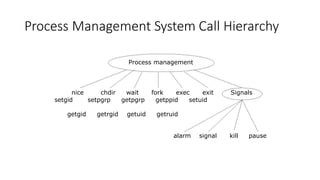
Process Management SystemCall Hierarchy
Process Management System Call Hierarchy
Process management
nice
setgid
chdir wait fork exec exit
setpgrp getpgrp getppid setuid
Signals
getgid getrgid getuid getruid
alarm signal kill pause
3.
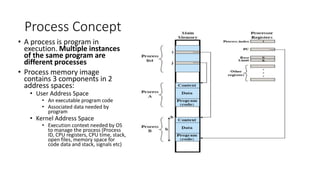
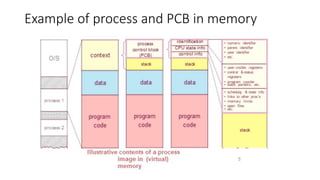
Process Concept
• Aprocess is program in
execution. Multiple instances
of the same program are
different processes
• Process memory image
contains 3 components in 2
address spaces:
• User Address Space
• An executable program code
• Associated data needed by
program
• Kernel Address Space
• Execution context needed by OS
to manage the process (Process
ID, CPU registers, CPU time, stack,
open files, memory space for
code data and stack, signals etc)
4.
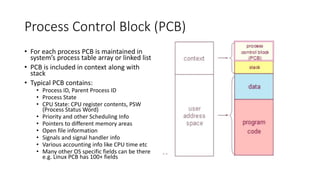
Process Control Block(PCB)
• For each process PCB is maintained in
system’s process table array or linked list
• PCB is included in context along with
stack
• Typical PCB contains:
• Process ID, Parent Process ID
• Process State
• CPU State: CPU register contents, PSW
(Process Status Word)
• Priority and other Scheduling Info
• Pointers to different memory areas
• Open file information
• Signals and signal handler info
• Various accounting info like CPU time etc
• Many other OS specific fields can be there
e.g. Linux PCB has 100+ fields
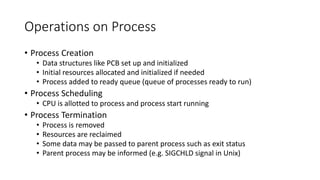
Operations on Process
•Process Creation
• Data structures like PCB set up and initialized
• Initial resources allocated and initialized if needed
• Process added to ready queue (queue of processes ready to run)
• Process Scheduling
• CPU is allotted to process and process start running
• Process Termination
• Process is removed
• Resources are reclaimed
• Some data may be passed to parent process such as exit status
• Parent process may be informed (e.g. SIGCHLD signal in Unix)
7.
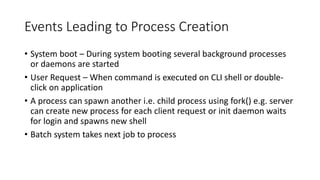
Events Leading toProcess Creation
• System boot – During system booting several background processes
or daemons are started
• User Request – When command is executed on CLI shell or double-
click on application
• A process can spawn another i.e. child process using fork() e.g. server
can create new process for each client request or init daemon waits
for login and spawns new shell
• Batch system takes next job to process
8.
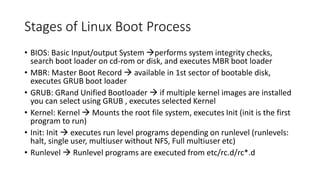
Stages of LinuxBoot Process
• BIOS: Basic Input/output System →performs system integrity checks,
search boot loader on cd-rom or disk, and executes MBR boot loader
• MBR: Master Boot Record → available in 1st sector of bootable disk,
executes GRUB boot loader
• GRUB: GRand Unified Bootloader → if multiple kernel images are installed
you can select using GRUB , executes selected Kernel
• Kernel: Kernel → Mounts the root file system, executes Init (init is the first
program to run)
• Init: Init → executes run level programs depending on runlevel (runlevels:
halt, single user, multiuser without NFS, Full multiuser etc)
• Runlevel → Runlevel programs are executed from etc/rc.d/rc*.d
9.
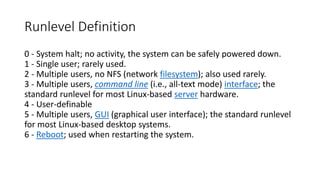
Runlevel Definition
0 -System halt; no activity, the system can be safely powered down.
1 - Single user; rarely used.
2 - Multiple users, no NFS (network filesystem); also used rarely.
3 - Multiple users, command line (i.e., all-text mode) interface; the
standard runlevel for most Linux-based server hardware.
4 - User-definable
5 - Multiple users, GUI (graphical user interface); the standard runlevel
for most Linux-based desktop systems.
6 - Reboot; used when restarting the system.
10.
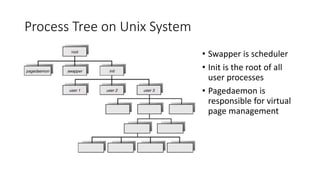
Process Tree onUnix System
• Swapper is scheduler
• Init is the root of all
user processes
• Pagedaemon is
responsible for virtual
page management
11.
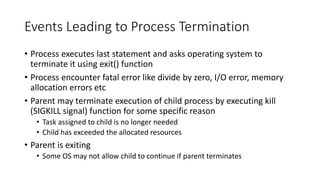
Events Leading toProcess Termination
• Process executes last statement and asks operating system to
terminate it using exit() function
• Process encounter fatal error like divide by zero, I/O error, memory
allocation errors etc
• Parent may terminate execution of child process by executing kill
(SIGKILL signal) function for some specific reason
• Task assigned to child is no longer needed
• Child has exceeded the allocated resources
• Parent is exiting
• Some OS may not allow child to continue if parent terminates
12.
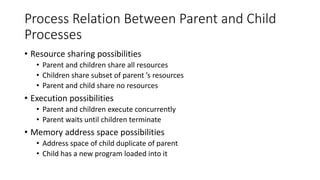
Process Relation BetweenParent and Child
Processes
• Resource sharing possibilities
• Parent and children share all resources
• Children share subset of parent ’s resources
• Parent and child share no resources
• Execution possibilities
• Parent and children execute concurrently
• Parent waits until children terminate
• Memory address space possibilities
• Address space of child duplicate of parent
• Child has a new program loaded into it
13.
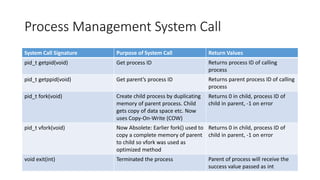
Process Management SystemCall
System Call Signature Purpose of System Call Return Values
pid_t getpid(void) Get process ID Returns process ID of calling
process
pid_t getppid(void) Get parent’s process ID Returns parent process ID of calling
process
pid_t fork(void) Create child process by duplicating
memory of parent process. Child
gets copy of data space etc. Now
uses Copy-On-Write (COW)
Returns 0 in child, process ID of
child in parent, -1 on error
pid_t vfork(void) Now Absolete: Earlier fork() used to
copy a complete memory of parent
to child so vfork was used as
optimized method
Returns 0 in child, process ID of
child in parent, -1 on error
void exit(int) Terminated the process Parent of process will receive the
success value passed as int
14.
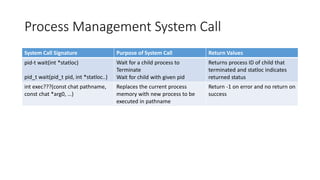
Process Management SystemCall
System Call Signature Purpose of System Call Return Values
pid-t wait(int *statloc)
pid_t wait(pid_t pid, int *statloc..)
Wait for a child process to
Terminate
Wait for child with given pid
Returns process ID of child that
terminated and statloc indicates
returned status
int exec???(const chat pathname,
const chat *arg0, …)
Replaces the current process
memory with new process to be
executed in pathname
Return -1 on error and no return on
success
15.
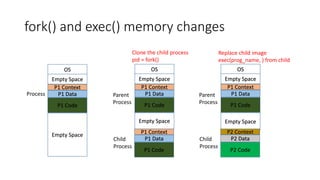
fork() and exec()memory changes
P1 Context
P1 Data
P1 Code
Process
OS
Empty Space
Empty Space
P1 Context
P1 Data
P1 Code
Clone the child process
pid = fork()
OS
Empty Space
Empty Space
P1 Context
P1 Data
P1 Code
Parent
Process
Child
Process
P1 Context
P1 Data
P1 Code
Replace child image
exec(prog_name, ) from child
OS
Empty Space
Empty Space
P2 Context
P2 Data
P2 Code
Parent
Process
Child
Process
16.
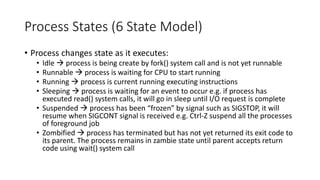
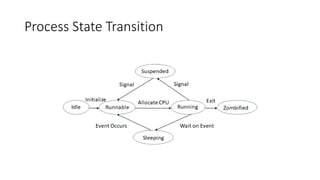
Process States (6State Model)
• Process changes state as it executes:
• Idle → process is being create by fork() system call and is not yet runnable
• Runnable → process is waiting for CPU to start running
• Running → process is current running executing instructions
• Sleeping → process is waiting for an event to occur e.g. if process has
executed read() system calls, it will go in sleep until I/O request is complete
• Suspended → process has been “frozen” by signal such as SIGSTOP, it will
resume when SIGCONT signal is received e.g. Ctrl-Z suspend all the processes
of foreground job
• Zombified → process has terminated but has not yet returned its exit code to
its parent. The process remains in zambie state until parent accepts return
code using wait() system call
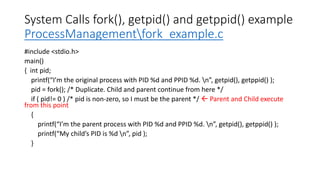
System Calls fork(),getpid() and getppid() example
ProcessManagementfork_example.c
#include <stdio.h>
main()
{ int pid;
printf(“I’m the original process with PID %d and PPID %d. n”, getpid(), getppid() );
pid = fork(); /* Duplicate. Child and parent continue from here */
if ( pid!= 0 ) /* pid is non-zero, so I must be the parent */ Parent and Child execute
from this point
{
printf(“I’m the parent process with PID %d and PPID %d. n”, getpid(), getppid() );
printf(“My child’s PID is %d n”, pid );
}
19.
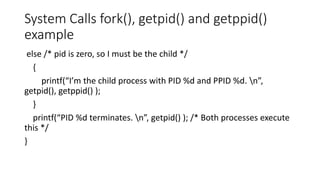
System Calls fork(),getpid() and getppid()
example
else /* pid is zero, so I must be the child */
{
printf(“I’m the child process with PID %d and PPID %d. n”,
getpid(), getppid() );
}
printf(“PID %d terminates. n”, getpid() ); /* Both processes execute
this */
}
20.
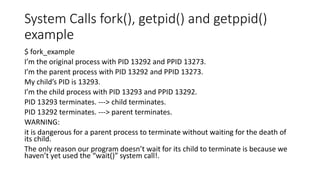
System Calls fork(),getpid() and getppid()
example
$ fork_example
I’m the original process with PID 13292 and PPID 13273.
I’m the parent process with PID 13292 and PPID 13273.
My child’s PID is 13293.
I’m the child process with PID 13293 and PPID 13292.
PID 13293 terminates. ---> child terminates.
PID 13292 terminates. ---> parent terminates.
WARNING:
it is dangerous for a parent process to terminate without waiting for the death of
its child.
The only reason our program doesn’t wait for its child to terminate is because we
haven’t yet used the “wait()” system call!.
21.
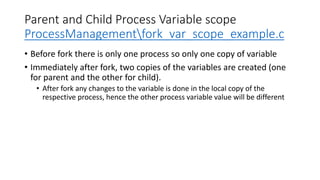
Parent and ChildProcess Variable scope
ProcessManagementfork_var_scope_example.c
• Before fork there is only one process so only one copy of variable
• Immediately after fork, two copies of the variables are created (one
for parent and the other for child).
• After fork any changes to the variable is done in the local copy of the
respective process, hence the other process variable value will be different
22.
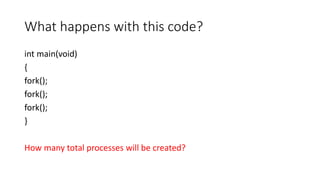
What happens withthis code?
int main(void)
{
fork();
fork();
fork();
}
How many total processes will be created?
23.
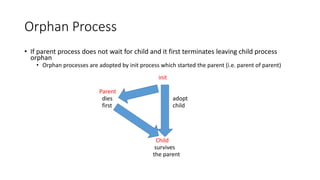
Orphan Process
• Ifparent process does not wait for child and it first terminates leaving child process
orphan
• Orphan processes are adopted by init process which started the parent (i.e. parent of parent)
init
Parent
dies adopt
first child
Child
survives
the parent
24.
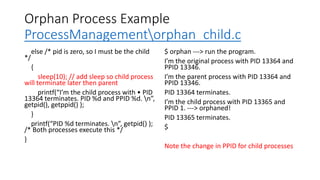
Orphan Process Example
ProcessManagementorphan_child.c
else/* pid is zero, so I must be the child
*/
{
sleep(10); // add sleep so child process
will terminate later then parent
printf(“I’m the child process with • PID
13364 terminates. PID %d and PPID %d. n”,
getpid(), getppid() );
}
printf(“PID %d terminates. n”, getpid() );
/* Both processes execute this */
}
$ orphan ---> run the program.
I’m the original process with PID 13364 and
PPID 13346.
I’m the parent process with PID 13364 and
PPID 13346.
PID 13364 terminates.
I’m the child process with PID 13365 and
PPID 1. ---> orphaned!
PID 13365 terminates.
$
Note the change in PPID for child processes
25.
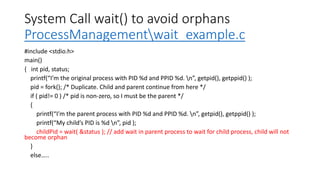
System Call wait()to avoid orphans
ProcessManagementwait_example.c
#include <stdio.h>
main()
{ int pid, status;
printf(“I’m the original process with PID %d and PPID %d. n”, getpid(), getppid() );
pid = fork(); /* Duplicate. Child and parent continue from here */
if ( pid!= 0 ) /* pid is non-zero, so I must be the parent */
{
printf(“I’m the parent process with PID %d and PPID %d. n”, getpid(), getppid() );
printf(“My child’s PID is %d n”, pid );
childPid = wait( &status ); // add wait in parent process to wait for child process, child will not
become orphan
}
else…..
26.
Zombie Process
ProcessManagementzambi_example.c
#include <stdio.h>
main()
{
intpid;
pid = fork(); /* Duplicate */
if ( pid!= 0 ) /* Branch based on return value from fork() */
{
while (1) /* Never terminate, and never execute a wait() */
sleep(1000);
}
else
{
exit(42); /* Exit with a silly number */
}
}
$ zombie & ---> execute the program in the background using &
[1] 13545
$ ps ---> obtain process status.
PID TT STAT TIME COMMAND
13535 p2 S 0:00 -ksh (ksh) ---> the shell.
13545 p2 S 0:00 zombie ---> the parent process.
13546 p2 Z 0:00 <defunct> ---> the zombile child.
13547 p2 R 0:00 ps
$ kill 13545 ---> kill the parent process.
[1] Terminated zombie
$ ps ---> notice that the zombie is gone now.
PID TT STAT TIME COMMAND
13535 p2 S 0:00 -ksh (ksh)
13547 p2 R 0:00 ps
27.
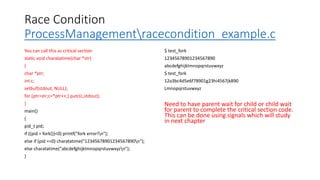
Race Condition
ProcessManagementracecondition_example.c
You cancall this as critical section
static void charatatime(char *str)
{
char *ptr;
int c;
setbuf(stdout, NULL);
for (ptr=str;c=*ptr++;) putc(c,stdout);
}
main()
{
pid_t pid;
if ((pid = fork())<0) printf("fork error!n");
else if (pid ==0) charatatime("12345678901234567890n");
else charatatime("abcdefghijklmnopqrstuvwxyzn");
}
$ test_fork
12345678901234567890
abcdefghijklmnopqrstuvwxyz
$ test_fork
12a3bc4d5e6f78901g23hi4567jk890
Lmnopqrstuvwxyz
Need to have parent wait for child or child wait
for parent to complete the critical section code.
This can be done using signals which will study
in next chapter
28.
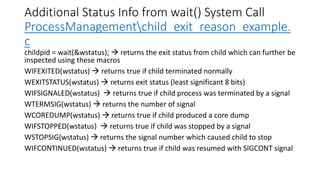
Additional Status Infofrom wait() System Call
ProcessManagementchild_exit_reason_example.
c
childpid = wait(&wstatus); → returns the exit status from child which can further be
inspected using these macros
WIFEXITED(wstatus) → returns true if child terminated normally
WEXITSTATUS(wstatus) → returns exit status (least significant 8 bits)
WIFSIGNALED(wstatus) → returns true if child process was terminated by a signal
WTERMSIG(wstatus) → returns the number of signal
WCOREDUMP(wstatus) → returns true if child produced a core dump
WIFSTOPPED(wstatus) → returns true if child was stopped by a signal
WSTOPSIG(wstatus) → returns the signal number which caused child to stop
WIFCONTINUED(wstatus) → returns true if child was resumed with SIGCONT signal
29.
exec() family ofSystem Calls
When fork() creates a child process with a copy of same code, data etc as parent process
but if you need to run another process as child process then →
A process may replace its current code, data, and stack with those of another executable
by using one of the “exec()” family of system calls
When a process executes an “exec()” system call, its PID and PPID numbers stay the same -
only the code that the process is executing changes.
System Call:
int execl( const char* path, const char* arg0, const char* arg1,…, const char* argn, NULL )
int execv( const char* path, const char* argv[] )
int execlp( const char* path, const char* arg0, const char* arg1, …, const char* argn, NULL)
int execvp( const char* path, const char* argv[] )
The “exec()” family of system calls replaces the calling process’ code, data, and stack with
those of the executable whose pathname is stored in path.
30.
Difference in exec()System Calls
• “execlp()” and “execvp()” use the $ PATH environment variable to find
path.
• If the executable is not found, the system call returns a value of -1; otherwise,
the calling process replaces its code, data, and stack with those of the
executable and starts to execute the new code.
• “execl()” and “execlp()” invoke the executable with the string
arguments pointed to by arg1 through argn.
• arg0 must be the name of the executable file itself, and the list of arguments
must be null terminated.
• “execv()” and “execvp()” invoke the executable with the string
arguments pointed to by argv[1] to argv[n], where argv[n+1] is NULL.
• argv[0] must be the name of the executable file itself.
31.
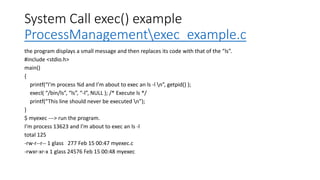
System Call exec()example
ProcessManagementexec_example.c
the program displays a small message and then replaces its code with that of the “ls”.
#include <stdio.h>
main()
{
printf(“I’m process %d and I’m about to exec an ls -l n”, getpid() );
execl( “/bin/ls”, “ls”, “-l”, NULL ); /* Execute ls */
printf(“This line should never be executed n”);
}
$ myexec ---> run the program.
I’m process 13623 and I’m about to exec an ls -l
total 125
-rw-r--r-- 1 glass 277 Feb 15 00:47 myexec.c
-rwxr-xr-x 1 glass 24576 Feb 15 00:48 myexec
32.
Background Process usingfork() and exec() System
Calls ProcessManagementrun_exec_in_child.c
#include <stdio.h>
int main( int argc, char* argv[] )
{
if ( fork() == 0 ) /* Child */
{
execvp( argv[1], &argv[1] ); /*
Execute other program */
fprintf( stderr, “Could not execute %s
n”, argv[1] );
}
}
$ ./background ls -R -ltr /usr/ ---> run
the program.
Confirm that “ls” command is
showing up in ps listing
faculty@faculty-OptiPlex-3040:~$ ps
2579
PID TTY STAT TIME COMMAND
2579 pts/22 D 0:24 ls -R -ltr /usr/
33.
Master-Slave implementation
• Masteraccepts n values from
command line
• Set of 2 values to be passed to
each child process i.e. argv[1] and
argv[2] pass to child 1, argv[2] and
argv[3] pass tp child 2 and so on
• forks as many child processes as
required i.e. n/2
• Reads the value returned using
exit() call using WEXISTSTATUS
macro
• ProcessManagementprocess_pare
nt.c
• Child process accepts the 2
command line arguments as
argv[1] and argv[2]
• Perform the required processing
• Return the result back as exit status
using exit() system call
• ProcessManagementprocess_child
.c
34.
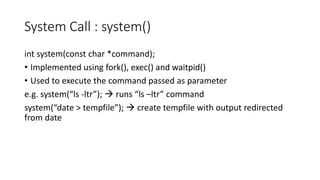
System Call :system()
int system(const char *command);
• Implemented using fork(), exec() and waitpid()
• Used to execute the command passed as parameter
e.g. system(“ls -ltr”); → runs “ls –ltr” command
system(“date > tempfile”); → create tempfile with output redirected
from date
35.
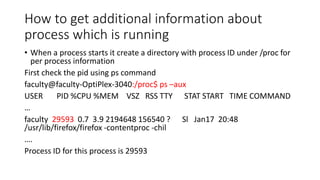
How to getadditional information about
process which is running
• When a process starts it create a directory with process ID under /proc for
per process information
First check the pid using ps command
faculty@faculty-OptiPlex-3040:/proc$ ps –aux
USER PID %CPU %MEM VSZ RSS TTY STAT START TIME COMMAND
…
faculty 29593 0.7 3.9 2194648 156540 ? Sl Jan17 20:48
/usr/lib/firefox/firefox -contentproc -chil
….
Process ID for this process is 29593
36.
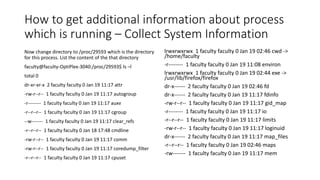
How to getadditional information about process
which is running – Collect System Information
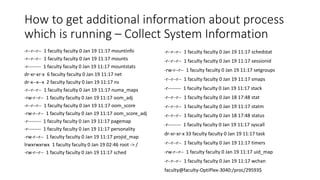
Now change directory to /proc/29593 which is the directory
for this process. List the content of the that directory
faculty@faculty-OptiPlex-3040:/proc/29593$ ls –l
total 0
dr-xr-xr-x 2 faculty faculty 0 Jan 19 11:17 attr
-rw-r--r-- 1 faculty faculty 0 Jan 19 11:17 autogroup
-r-------- 1 faculty faculty 0 Jan 19 11:17 auxv
-r--r--r-- 1 faculty faculty 0 Jan 19 11:17 cgroup
--w------- 1 faculty faculty 0 Jan 19 11:17 clear_refs
-r--r--r-- 1 faculty faculty 0 Jan 18 17:48 cmdline
-rw-r--r-- 1 faculty faculty 0 Jan 19 11:17 comm
-rw-r--r-- 1 faculty faculty 0 Jan 19 11:17 coredump_filter
-r--r--r-- 1 faculty faculty 0 Jan 19 11:17 cpuset
lrwxrwxrwx 1 faculty faculty 0 Jan 19 02:46 cwd ->
/home/faculty
-r-------- 1 faculty faculty 0 Jan 19 11:08 environ
lrwxrwxrwx 1 faculty faculty 0 Jan 19 02:44 exe ->
/usr/lib/firefox/firefox
dr-x------ 2 faculty faculty 0 Jan 19 02:46 fd
dr-x------ 2 faculty faculty 0 Jan 19 11:17 fdinfo
-rw-r--r-- 1 faculty faculty 0 Jan 19 11:17 gid_map
-r-------- 1 faculty faculty 0 Jan 19 11:17 io
-r--r--r-- 1 faculty faculty 0 Jan 19 11:17 limits
-rw-r--r-- 1 faculty faculty 0 Jan 19 11:17 loginuid
dr-x------ 2 faculty faculty 0 Jan 19 11:17 map_files
-r--r--r-- 1 faculty faculty 0 Jan 19 02:46 maps
-rw------- 1 faculty faculty 0 Jan 19 11:17 mem
37.
How to getadditional information about process
which is running – Collect System Information
-r--r--r-- 1 faculty faculty 0 Jan 19 11:17 mountinfo
-r--r--r-- 1 faculty faculty 0 Jan 19 11:17 mounts
-r-------- 1 faculty faculty 0 Jan 19 11:17 mountstats
dr-xr-xr-x 6 faculty faculty 0 Jan 19 11:17 net
dr-x--x--x 2 faculty faculty 0 Jan 19 11:17 ns
-r--r--r-- 1 faculty faculty 0 Jan 19 11:17 numa_maps
-rw-r--r-- 1 faculty faculty 0 Jan 19 11:17 oom_adj
-r--r--r-- 1 faculty faculty 0 Jan 19 11:17 oom_score
-rw-r--r-- 1 faculty faculty 0 Jan 19 11:17 oom_score_adj
-r-------- 1 faculty faculty 0 Jan 19 11:17 pagemap
-r-------- 1 faculty faculty 0 Jan 19 11:17 personality
-rw-r--r-- 1 faculty faculty 0 Jan 19 11:17 projid_map
lrwxrwxrwx 1 faculty faculty 0 Jan 19 02:46 root -> /
-rw-r--r-- 1 faculty faculty 0 Jan 19 11:17 sched
-r--r--r-- 1 faculty faculty 0 Jan 19 11:17 schedstat
-r--r--r-- 1 faculty faculty 0 Jan 19 11:17 sessionid
-rw-r--r-- 1 faculty faculty 0 Jan 19 11:17 setgroups
-r--r--r-- 1 faculty faculty 0 Jan 19 11:17 smaps
-r-------- 1 faculty faculty 0 Jan 19 11:17 stack
-r--r--r-- 1 faculty faculty 0 Jan 18 17:48 stat
-r--r--r-- 1 faculty faculty 0 Jan 19 11:17 statm
-r--r--r-- 1 faculty faculty 0 Jan 18 17:48 status
-r-------- 1 faculty faculty 0 Jan 19 11:17 syscall
dr-xr-xr-x 33 faculty faculty 0 Jan 19 11:17 task
-r--r--r-- 1 faculty faculty 0 Jan 19 11:17 timers
-rw-r--r-- 1 faculty faculty 0 Jan 19 11:17 uid_map
-r--r--r-- 1 faculty faculty 0 Jan 19 11:17 wchan
faculty@faculty-OptiPlex-3040:/proc/29593$
38.
How to getadditional information about process
which is running – Collect System Information
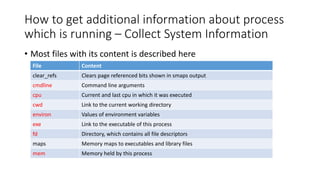
• Most files with its content is described here
File Content
clear_refs Clears page referenced bits shown in smaps output
cmdline Command line arguments
cpu Current and last cpu in which it was executed
cwd Link to the current working directory
environ Values of environment variables
exe Link to the executable of this process
fd Directory, which contains all file descriptors
maps Memory maps to executables and library files
mem Memory held by this process
39.
How to getadditional information about process
which is running – Collect System Information
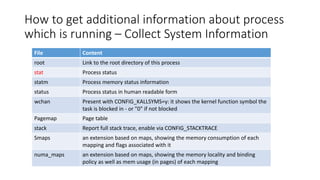
File Content
root Link to the root directory of this process
stat Process status
statm Process memory status information
status Process status in human readable form
wchan Present with CONFIG_KALLSYMS=y: it shows the kernel function symbol the
task is blocked in - or "0" if not blocked
Pagemap Page table
stack Report full stack trace, enable via CONFIG_STACKTRACE
Smaps an extension based on maps, showing the memory consumption of each
mapping and flags associated with it
numa_maps an extension based on maps, showing the memory locality and binding
policy as well as mem usage (in pages) of each mapping
40.
How to getadditional information about process
which is running – Collect System Information
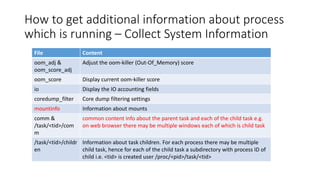
File Content
oom_adj &
oom_score_adj
Adjust the oom-killer (Out-Of_Memory) score
oom_score Display current oom-killer score
io Display the IO accounting fields
coredump_filter Core dump filtering settings
mountinfo Information about mounts
comm &
/task/<tid>/com
m
common content info about the parent task and each of the child task e.g.
on web browser there may be multiple windows each of which is child task
/task/<tid>/childr
en
Information about task children. For each process there may be multiple
child task, hence for each of the child task a subdirectory with process ID of
child i.e. <tid> is created user /proc/<pid>/task/<tid>
41.
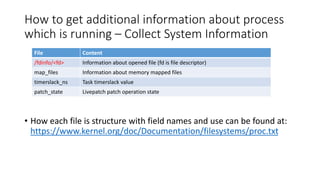
How to getadditional information about process
which is running – Collect System Information
• How each file is structure with field names and use can be found at:
https://www.kernel.org/doc/Documentation/filesystems/proc.txt
File Content
/fdinfo/<fd> Information about opened file (fd is file descriptor)
map_files Information about memory mapped files
timerslack_ns Task timerslack value
patch_state Livepatch patch operation state
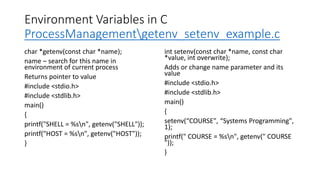
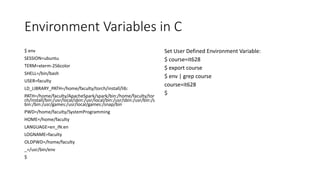
Environment Variables inC
ProcessManagementgetenv_setenv_example.c
char *getenv(const char *name);
name – search for this name in
environment of current process
Returns pointer to value
#include <stdio.h>
#include <stdlib.h>
main()
{
printf("SHELL = %sn", getenv("SHELL"));
printf("HOST = %sn", getenv("HOST"));
}
int setenv(const char *name, const char
*value, int overwrite);
Adds or change name parameter and its
value
#include <stdio.h>
#include <stdlib.h>
main()
{
setenv(“COURSE", “Systems Programming",
1);
printf(" COURSE = %sn", getenv(" COURSE
"));
}

![Zombie Process
ProcessManagementzambi_example.c
#include <stdio.h>
main()
{
int pid;
pid = fork(); /* Duplicate */
if ( pid!= 0 ) /* Branch based on return value from fork() */
{
while (1) /* Never terminate, and never execute a wait() */
sleep(1000);
}
else
{
exit(42); /* Exit with a silly number */
}
}
$ zombie & ---> execute the program in the background using &
[1] 13545
$ ps ---> obtain process status.
PID TT STAT TIME COMMAND
13535 p2 S 0:00 -ksh (ksh) ---> the shell.
13545 p2 S 0:00 zombie ---> the parent process.
13546 p2 Z 0:00 <defunct> ---> the zombile child.
13547 p2 R 0:00 ps
$ kill 13545 ---> kill the parent process.
[1] Terminated zombie
$ ps ---> notice that the zombie is gone now.
PID TT STAT TIME COMMAND
13535 p2 S 0:00 -ksh (ksh)
13547 p2 R 0:00 ps](https://image.slidesharecdn.com/02ait227computersystemsprogramming-process-260207100332-41232636/85/02A-IT227-Computer-Systems-Programming-Process-pdf-26-320.jpg)
![exec() family of System Calls
When fork() creates a child process with a copy of same code, data etc as parent process
but if you need to run another process as child process then →
A process may replace its current code, data, and stack with those of another executable
by using one of the “exec()” family of system calls
When a process executes an “exec()” system call, its PID and PPID numbers stay the same -
only the code that the process is executing changes.
System Call:
int execl( const char* path, const char* arg0, const char* arg1,…, const char* argn, NULL )
int execv( const char* path, const char* argv[] )
int execlp( const char* path, const char* arg0, const char* arg1, …, const char* argn, NULL)
int execvp( const char* path, const char* argv[] )
The “exec()” family of system calls replaces the calling process’ code, data, and stack with
those of the executable whose pathname is stored in path.](https://image.slidesharecdn.com/02ait227computersystemsprogramming-process-260207100332-41232636/85/02A-IT227-Computer-Systems-Programming-Process-pdf-29-320.jpg)
![Difference in exec() System Calls
• “execlp()” and “execvp()” use the $ PATH environment variable to find
path.
• If the executable is not found, the system call returns a value of -1; otherwise,
the calling process replaces its code, data, and stack with those of the
executable and starts to execute the new code.
• “execl()” and “execlp()” invoke the executable with the string
arguments pointed to by arg1 through argn.
• arg0 must be the name of the executable file itself, and the list of arguments
must be null terminated.
• “execv()” and “execvp()” invoke the executable with the string
arguments pointed to by argv[1] to argv[n], where argv[n+1] is NULL.
• argv[0] must be the name of the executable file itself.](https://image.slidesharecdn.com/02ait227computersystemsprogramming-process-260207100332-41232636/85/02A-IT227-Computer-Systems-Programming-Process-pdf-30-320.jpg)
![Background Process using fork() and exec() System
Calls ProcessManagementrun_exec_in_child.c
#include <stdio.h>
int main( int argc, char* argv[] )
{
if ( fork() == 0 ) /* Child */
{
execvp( argv[1], &argv[1] ); /*
Execute other program */
fprintf( stderr, “Could not execute %s
n”, argv[1] );
}
}
$ ./background ls -R -ltr /usr/ ---> run
the program.
Confirm that “ls” command is
showing up in ps listing
faculty@faculty-OptiPlex-3040:~$ ps
2579
PID TTY STAT TIME COMMAND
2579 pts/22 D 0:24 ls -R -ltr /usr/](https://image.slidesharecdn.com/02ait227computersystemsprogramming-process-260207100332-41232636/85/02A-IT227-Computer-Systems-Programming-Process-pdf-32-320.jpg)
![Master-Slave implementation
• Master accepts n values from
command line
• Set of 2 values to be passed to
each child process i.e. argv[1] and
argv[2] pass to child 1, argv[2] and
argv[3] pass tp child 2 and so on
• forks as many child processes as
required i.e. n/2
• Reads the value returned using
exit() call using WEXISTSTATUS
macro
• ProcessManagementprocess_pare
nt.c
• Child process accepts the 2
command line arguments as
argv[1] and argv[2]
• Perform the required processing
• Return the result back as exit status
using exit() system call
• ProcessManagementprocess_child
.c](https://image.slidesharecdn.com/02ait227computersystemsprogramming-process-260207100332-41232636/85/02A-IT227-Computer-Systems-Programming-Process-pdf-33-320.jpg)
![Environment Variables in C
ProcessManagementdisp_env_vars.c
#include <stdio.h>
int main(int argc, char*argv[],
char*env[])
{
char **ptr;
for(ptr=env; *ptr != 0; ptr++)
printf("%sn",*ptr);
}](https://image.slidesharecdn.com/02ait227computersystemsprogramming-process-260207100332-41232636/85/02A-IT227-Computer-Systems-Programming-Process-pdf-43-320.jpg)