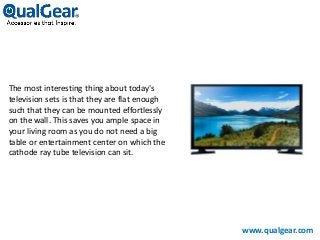
The most interesting thing about today's
television sets is that they are flat enough
such that they can be mounted effortlessly
on the wall. This saves you ample space in
your living room as you do not need a big
table or entertainment center on which the
cathode ray tube television can sit.
www.qualgear.com
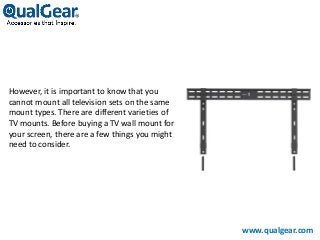
However, it is important to know that you
cannot mount all television sets on the same
mount types. There are different varieties of
TV mounts. Before buying a TV wall mount for
your screen, there are a few things you might
need to consider.
www.qualgear.com
Among Them Are As Follows:
Check your Television's or monitor's specifications
Choose the degree or swivel
www.qualgear.com
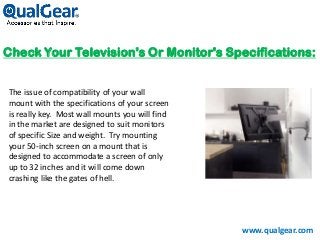
Check Your Television's Or Monitor's Specifications:
The issue of compatibility of your wall
mount with the specifications of your screen
is really key. Most wall mounts you will find
in the market are designed to suit monitors
of specific Size and weight. Try mounting
your 50-inch screen on a mount that is
designed to accommodate a screen of only
up to 32 inches and it will come down
crashing like the gates of hell.
www.qualgear.com
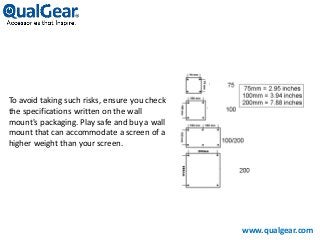
To avoid taking such risks, ensure you check
the specifications written on the wall
mount's packaging. Play safe and buy a wall
mount that can accommodate a screen of a
higher weight than your screen.
www.qualgear.com
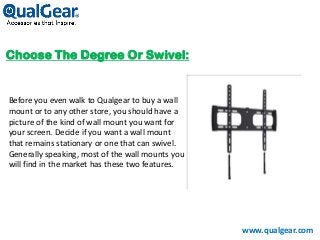
Choose The Degree Or Swivel:
Before you even walk to Qualgear to buy a wall
mount or to any other store, you should have a
picture of the kind of wall mount you want for
your screen. Decide if you want a wall mount
that remains stationary or one that can swivel.
Generally speaking, most of the wall mounts you
will find in the market has these two features.
www.qualgear.com
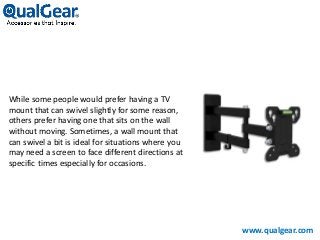
While some people would prefer having a TV
mount that can swivel slightly for some reason,
others prefer having one that sits on the wall
without moving. Sometimes, a wall mount that
can swivel a bit is ideal for situations where you
may need a screen to face different directions at
specific times especially for occasions.
www.qualgear.com
Do You Need A TV Mount With An Arm?
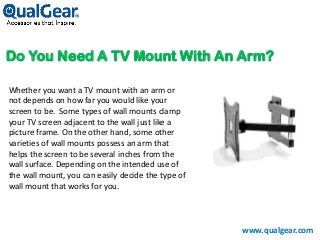
Whether you want a TV mount with an arm or
not depends on how far you would like your
screen to be. Some types of wall mounts clamp
your TV screen adjacent to the wall just like a
picture frame. On the other hand, some other
varieties of wall mounts possess an arm that
helps the screen to be several inches from the
wall surface. Depending on the intended use of
the wall mount, you can easily decide the type of
wall mount that works for you.
www.qualgear.com
Type Of Wall Mount That Works For You:
www.qualgear.com
Consider the cost
TV Wall mounting Tip
Consider The Cost:
www.qualgear.com
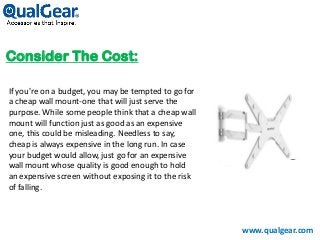
If you're on a budget, you may be tempted to go for
a cheap wall mount-one that will just serve the
purpose. While some people think that a cheap wall
mount will function just as good as an expensive
one, this could be misleading. Needless to say,
cheap is always expensive in the long run. In case
your budget would allow, just go for an expensive
wall mount whose quality is good enough to hold
an expensive screen without exposing it to the risk
of falling.
www.qualgear.com
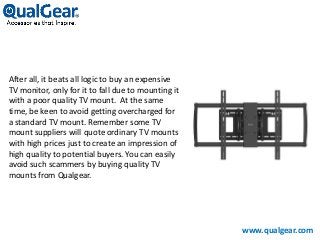
After all, it beats all logic to buy an expensive
TV monitor, only for it to fall due to mounting it
with a poor quality TV mount. At the same
time, be keen to avoid getting overcharged for
a standard TV mount. Remember some TV
mount suppliers will quote ordinary TV mounts
with high prices just to create an impression of
high quality to potential buyers. You can easily
avoid such scammers by buying quality TV
mounts from Qualgear.
TV Wall Mounting Tip:
www.qualgear.com
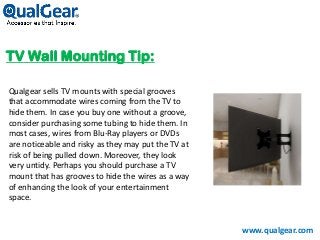
Qualgear sells TV mounts with special grooves
that accommodate wires coming from the TV to
hide them. In case you buy one without a groove,
consider purchasing some tubing to hide them. In
most cases, wires from Blu-Ray players or DVDs
are noticeable and risky as they may put the TV at
risk of being pulled down. Moreover, they look
very untidy. Perhaps you should purchase a TV
mount that has grooves to hide the wires as a way
of enhancing the look of your entertainment
space.
www.qualgear.com
Phone: +1-972-423-8960
Email: Support@qualgear.com
Websites: www.qualgear.com
A Guide When Buying TV Wall Mounts

A Guide When Buying TV Wall Mounts

  • 2.
    The most interestingthing about today's television sets is that they are flat enough such that they can be mounted effortlessly on the wall. This saves you ample space in your living room as you do not need a big table or entertainment center on which the cathode ray tube television can sit. www.qualgear.com
  • 3.
    However, it isimportant to know that you cannot mount all television sets on the same mount types. There are different varieties of TV mounts. Before buying a TV wall mount for your screen, there are a few things you might need to consider. www.qualgear.com
  • 4.
    Among Them AreAs Follows: Check your Television's or monitor's specifications Choose the degree or swivel www.qualgear.com
  • 5.
    Check Your Television'sOr Monitor's Specifications: The issue of compatibility of your wall mount with the specifications of your screen is really key. Most wall mounts you will find in the market are designed to suit monitors of specific Size and weight. Try mounting your 50-inch screen on a mount that is designed to accommodate a screen of only up to 32 inches and it will come down crashing like the gates of hell. www.qualgear.com
  • 6.
    To avoid takingsuch risks, ensure you check the specifications written on the wall mount's packaging. Play safe and buy a wall mount that can accommodate a screen of a higher weight than your screen. www.qualgear.com
  • 7.
    Choose The DegreeOr Swivel: Before you even walk to Qualgear to buy a wall mount or to any other store, you should have a picture of the kind of wall mount you want for your screen. Decide if you want a wall mount that remains stationary or one that can swivel. Generally speaking, most of the wall mounts you will find in the market has these two features. www.qualgear.com
  • 8.
    While some peoplewould prefer having a TV mount that can swivel slightly for some reason, others prefer having one that sits on the wall without moving. Sometimes, a wall mount that can swivel a bit is ideal for situations where you may need a screen to face different directions at specific times especially for occasions. www.qualgear.com
  • 9.
    Do You NeedA TV Mount With An Arm? Whether you want a TV mount with an arm or not depends on how far you would like your screen to be. Some types of wall mounts clamp your TV screen adjacent to the wall just like a picture frame. On the other hand, some other varieties of wall mounts possess an arm that helps the screen to be several inches from the wall surface. Depending on the intended use of the wall mount, you can easily decide the type of wall mount that works for you. www.qualgear.com
  • 10.
    Type Of WallMount That Works For You: www.qualgear.com Consider the cost TV Wall mounting Tip
  • 11.
    Consider The Cost: www.qualgear.com Ifyou're on a budget, you may be tempted to go for a cheap wall mount-one that will just serve the purpose. While some people think that a cheap wall mount will function just as good as an expensive one, this could be misleading. Needless to say, cheap is always expensive in the long run. In case your budget would allow, just go for an expensive wall mount whose quality is good enough to hold an expensive screen without exposing it to the risk of falling.
  • 12.
    www.qualgear.com After all, itbeats all logic to buy an expensive TV monitor, only for it to fall due to mounting it with a poor quality TV mount. At the same time, be keen to avoid getting overcharged for a standard TV mount. Remember some TV mount suppliers will quote ordinary TV mounts with high prices just to create an impression of high quality to potential buyers. You can easily avoid such scammers by buying quality TV mounts from Qualgear.
  • 13.
    TV Wall MountingTip: www.qualgear.com Qualgear sells TV mounts with special grooves that accommodate wires coming from the TV to hide them. In case you buy one without a groove, consider purchasing some tubing to hide them. In most cases, wires from Blu-Ray players or DVDs are noticeable and risky as they may put the TV at risk of being pulled down. Moreover, they look very untidy. Perhaps you should purchase a TV mount that has grooves to hide the wires as a way of enhancing the look of your entertainment space.
  • 14.