Jonathan Bossenger
Let’s Code
Learn.WordPress.org
Global Styles Variations in Block Themes
2
👋🏽
Welcome!
As you join, please get
your local WordPress
install ready:
Install and activate the following plugins:
• Create Block Theme plugin -
https://wordpress.org/plugins/create-block-theme/
• SQL Buddy plugin -
https://wordpress.org/plugins/sql-buddy/
Then, let everyone know in the chat where you’re joining
us from…
Hello!
○ My name is Jonathan Bossenger
○ From Cape Town, South Africa
○ Ex-developer turned code instructor
○ Sponsored contributor at Automattic
○ @jon_bossenger in Twitter
Learn.WordPress.org
Let's code!
Global Styles
Variations in
Block Themes
Jonathan Bossenger
Announcements
○ Welcome, and thank you to Kathryn for co-hosting today!
○ We’ll be presenting in focus mode.
○ You are welcome to ask questions.
○ You are welcome to unmute to ask questions, or post them in the chat.
Announcements
○ Please consider taking the Learn WordPress Learner Survey
• https://learn.wordpress.org/individual-learner-survey/
○ Make sure your local install is ready
• Create Block Theme plugin - https://wordpress.org/plugins/create-block-theme/
• SQL Buddy plugin - https://wordpress.org/plugins/sql-buddy/
○ If I am going too fast, please let me know!
○ We will be posting this session to https://wordpress.tv/ afterwards
○ For more WordPress focused content please visit https://learn.wordpress.org/
Learning Outcomes
○ What is a Global Styles variation
○ How Global Styles variations work
○ How to create a Global Styles variation using the Site Editor
○ How to export and create the style variation file
• Manually
• Using Create Block Theme
Objectives 1
1. Create a brand new blank theme
2. Create a simple style variation, and save it manually
a. Apply a different font
b. Apply some different colors
3. Create a slightly more complex style variation, and save it using Create Block Theme
a. Change the contentSize and wideSize
b. Add and apply an external font
c. Apply a bunch of different colors
7
What are Global Styles Variations?
○ Introduced in WordPress 6.0
○ https://make.wordpress.org/core/2022/05/03/global-styles-variations-in-wordpress-6-0/
○ Allows theme developers to create multiple different styles for their themes
○ Uses the same JSON format as theme.json
○ https://developer.wordpress.org/block-editor/how-to-guides/themes/theme-json/
○ https://developer.wordpress.org/themes/advanced-topics/theme-json/#global-styles-
variations
○ Most recently seen on the Twenty Twenty-Two theme
○ Extensively used for Twenty Twenty-Three.
9
Let’s code.
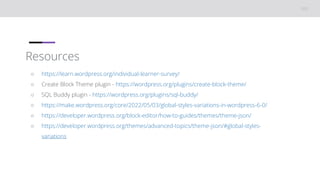
Resources
○ https://learn.wordpress.org/individual-learner-survey/
○ Create Block Theme plugin - https://wordpress.org/plugins/create-block-theme/
○ SQL Buddy plugin - https://wordpress.org/plugins/sql-buddy/
○ https://make.wordpress.org/core/2022/05/03/global-styles-variations-in-wordpress-6-0/
○ https://developer.wordpress.org/block-editor/how-to-guides/themes/theme-json/
○ https://developer.wordpress.org/themes/advanced-topics/theme-json/#global-styles-
variations

Global Styles Variations in Block Themes.pptx

  • 1.
  • 2.
    2 👋🏽 Welcome! As you join,please get your local WordPress install ready: Install and activate the following plugins: • Create Block Theme plugin - https://wordpress.org/plugins/create-block-theme/ • SQL Buddy plugin - https://wordpress.org/plugins/sql-buddy/ Then, let everyone know in the chat where you’re joining us from… Hello! ○ My name is Jonathan Bossenger ○ From Cape Town, South Africa ○ Ex-developer turned code instructor ○ Sponsored contributor at Automattic ○ @jon_bossenger in Twitter
  • 3.
  • 4.
    Announcements ○ Welcome, andthank you to Kathryn for co-hosting today! ○ We’ll be presenting in focus mode. ○ You are welcome to ask questions. ○ You are welcome to unmute to ask questions, or post them in the chat.
  • 5.
    Announcements ○ Please considertaking the Learn WordPress Learner Survey • https://learn.wordpress.org/individual-learner-survey/ ○ Make sure your local install is ready • Create Block Theme plugin - https://wordpress.org/plugins/create-block-theme/ • SQL Buddy plugin - https://wordpress.org/plugins/sql-buddy/ ○ If I am going too fast, please let me know! ○ We will be posting this session to https://wordpress.tv/ afterwards ○ For more WordPress focused content please visit https://learn.wordpress.org/
  • 6.
    Learning Outcomes ○ Whatis a Global Styles variation ○ How Global Styles variations work ○ How to create a Global Styles variation using the Site Editor ○ How to export and create the style variation file • Manually • Using Create Block Theme
  • 7.
    Objectives 1 1. Createa brand new blank theme 2. Create a simple style variation, and save it manually a. Apply a different font b. Apply some different colors 3. Create a slightly more complex style variation, and save it using Create Block Theme a. Change the contentSize and wideSize b. Add and apply an external font c. Apply a bunch of different colors 7
  • 8.
    What are GlobalStyles Variations? ○ Introduced in WordPress 6.0 ○ https://make.wordpress.org/core/2022/05/03/global-styles-variations-in-wordpress-6-0/ ○ Allows theme developers to create multiple different styles for their themes ○ Uses the same JSON format as theme.json ○ https://developer.wordpress.org/block-editor/how-to-guides/themes/theme-json/ ○ https://developer.wordpress.org/themes/advanced-topics/theme-json/#global-styles- variations ○ Most recently seen on the Twenty Twenty-Two theme ○ Extensively used for Twenty Twenty-Three.
  • 9.
  • 10.
    Resources ○ https://learn.wordpress.org/individual-learner-survey/ ○ CreateBlock Theme plugin - https://wordpress.org/plugins/create-block-theme/ ○ SQL Buddy plugin - https://wordpress.org/plugins/sql-buddy/ ○ https://make.wordpress.org/core/2022/05/03/global-styles-variations-in-wordpress-6-0/ ○ https://developer.wordpress.org/block-editor/how-to-guides/themes/theme-json/ ○ https://developer.wordpress.org/themes/advanced-topics/theme-json/#global-styles- variations

Editor's Notes

  • #2 TITLE SLIDE: Make a copy of this presentation to your Google Drive, and edit to replace with your details.