Collecting Network Performance Analytics from a
Swarm of Network Sensors
End-to-End Network Performance API
CEO, NetBeez
@StefanoGridelli
Stefano Gridelli
NetBeez
NetBeez is a SaaS company that has developed a real-time, distributed, performance
monitoring solution that detects network and application problems before users do.
The platform monitors LAN,WAN, and WiFi networks from the user perspective,
measuring and reporting KPI of service quality. 
Use cases:
• Proactive detection
• Network troubleshooting
• Performance monitoring
• End-user experience monitoring
NETWORK
ctrl_channel
TESTS
NetBeez
BeezKeeper
(Server)
TARGET
Beez
(Agent)
Beez
(Agent)
Beez
(Agent)
Architecture
Agents Supported
Raspberry Pi NetBeez WiFiOdroid C2
Linux OVA/KVM Docker AWS AMI
Cisco Cat9K
NetBeez Network Analytics
Test Primary Metric Test Interval
PING Round-TripTime, Packet Loss 5 seconds
DNS DNS LookupTime 30 seconds
HTTP HTTP GETTime 60 seconds
Traceroute Hop Count, RTT, MTU 120 seconds
Iperf TCP/UDP/MulticastThroughput Scheduled
VoIP Jitter, Packet Loss, MOS Scheduled
Speed Test Download/UploadThroughput Scheduled
WiFi 802.11 Signal Strength, Link Quality, Bit Rate, Channel
NetBeez API
• GET only
• POST coming up in the second half of 2019
• JSON data model
• How to start working with the NetBeez API
1. Create tests on NetBeez Dashboard
2. Generate an API Key
3. GET your data!
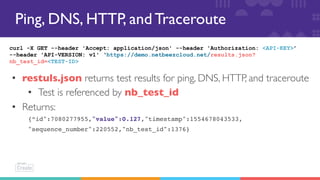
Ping, DNS, HTTP, and Traceroute
curl -X GET --header 'Accept: application/json' --header 'Authorization: <API-KEY>’
--header 'API-VERSION: v1' ‘https://demo.netbeezcloud.net/results.json?
nb_test_id=<TEST-ID>
• restuls.json returns test results for ping, DNS, HTTP, and traceroute
• Test is referenced by nb_test_id
• Returns:
{“id":7080277955,"value":0.127,"timestamp":1554678043533,
"sequence_number":220552,"nb_test_id":1376}
Iperf, Speed Test, andVoIP
curl -X GET --header 'Accept: application/json' --header 'Authorization: <API-KEY>’
—header 'API-VERSION: v1' ‘https://demo.netbeezcloud.net/
scheduled_nb_test_results.json?scheduled_nb_test_template_id=<TEST-ID>’
• scheduled_nb_test_results.json returns results of iperf, speed test,
andVoIP tests
• Test is referenced by scheduled_nb_test_template_id
• Returns:
{“ts":1554595200000,"scheduled_nb_test_template_id":68,"agent_id":
51,"nb_test_id":1227606,"result_values":[{"key":"bw","value":10.0},
{"key":"jitter","value":0.012000000104308128},{"key":"packet_loss","value":
0.0},{"key":"packets_lost","value":0.0},{"key":"packets_sent","value":8504.0}]
WiFi 802.11
curl -X GET --header 'Accept: application/json' --header 'Authorization: <API-KEY>’
—header 'API-VERSION: v1' ‘https://demo.netbeezcloud.net/access_point_metrics.json?
agent_id=<AGENT_ID>’
• access_point_metrics.json returns results of iperf, speed test,
andVoIP tests
• Agent is referenced by agent_id
• Returns:
{ "id": 89652553, "timestamp": 1554672753378, "access_point_id": 59,
"network_interface_id": 245, "signal_level": -49, "link_quality": 0.871429,
"bit_rate": 867, "channel": 149, "tx_rate": 10386, "rx_rate": 110749}
What’s Next?
• netbeez.net
• https://github.com/netbeez/public-
dashboard
• https://netbeez.net/blog/beezkeeper-
application-program-interface-api/
• Connect with me (stefano@netbeez.net )
and request access to a demo dashboard
Cisco DevNet CREATE 2019 - NetBeez Network Performance API

Cisco DevNet CREATE 2019 - NetBeez Network Performance API

  • 1.
    Collecting Network PerformanceAnalytics from a Swarm of Network Sensors End-to-End Network Performance API CEO, NetBeez @StefanoGridelli Stefano Gridelli
  • 2.
    NetBeez NetBeez is a SaaScompany that has developed a real-time, distributed, performance monitoring solution that detects network and application problems before users do. The platform monitors LAN,WAN, and WiFi networks from the user perspective, measuring and reporting KPI of service quality.  Use cases: • Proactive detection • Network troubleshooting • Performance monitoring • End-user experience monitoring
  • 3.
  • 4.
    Agents Supported Raspberry PiNetBeez WiFiOdroid C2 Linux OVA/KVM Docker AWS AMI Cisco Cat9K
  • 5.
    NetBeez Network Analytics TestPrimary Metric Test Interval PING Round-TripTime, Packet Loss 5 seconds DNS DNS LookupTime 30 seconds HTTP HTTP GETTime 60 seconds Traceroute Hop Count, RTT, MTU 120 seconds Iperf TCP/UDP/MulticastThroughput Scheduled VoIP Jitter, Packet Loss, MOS Scheduled Speed Test Download/UploadThroughput Scheduled WiFi 802.11 Signal Strength, Link Quality, Bit Rate, Channel
  • 6.
    NetBeez API • GETonly • POST coming up in the second half of 2019 • JSON data model • How to start working with the NetBeez API 1. Create tests on NetBeez Dashboard 2. Generate an API Key 3. GET your data!
  • 7.
    Ping, DNS, HTTP,and Traceroute curl -X GET --header 'Accept: application/json' --header 'Authorization: <API-KEY>’ --header 'API-VERSION: v1' ‘https://demo.netbeezcloud.net/results.json? nb_test_id=<TEST-ID> • restuls.json returns test results for ping, DNS, HTTP, and traceroute • Test is referenced by nb_test_id • Returns: {“id":7080277955,"value":0.127,"timestamp":1554678043533, "sequence_number":220552,"nb_test_id":1376}
  • 8.
    Iperf, Speed Test,andVoIP curl -X GET --header 'Accept: application/json' --header 'Authorization: <API-KEY>’ —header 'API-VERSION: v1' ‘https://demo.netbeezcloud.net/ scheduled_nb_test_results.json?scheduled_nb_test_template_id=<TEST-ID>’ • scheduled_nb_test_results.json returns results of iperf, speed test, andVoIP tests • Test is referenced by scheduled_nb_test_template_id • Returns: {“ts":1554595200000,"scheduled_nb_test_template_id":68,"agent_id": 51,"nb_test_id":1227606,"result_values":[{"key":"bw","value":10.0}, {"key":"jitter","value":0.012000000104308128},{"key":"packet_loss","value": 0.0},{"key":"packets_lost","value":0.0},{"key":"packets_sent","value":8504.0}]
  • 9.
    WiFi 802.11 curl -XGET --header 'Accept: application/json' --header 'Authorization: <API-KEY>’ —header 'API-VERSION: v1' ‘https://demo.netbeezcloud.net/access_point_metrics.json? agent_id=<AGENT_ID>’ • access_point_metrics.json returns results of iperf, speed test, andVoIP tests • Agent is referenced by agent_id • Returns: { "id": 89652553, "timestamp": 1554672753378, "access_point_id": 59, "network_interface_id": 245, "signal_level": -49, "link_quality": 0.871429, "bit_rate": 867, "channel": 149, "tx_rate": 10386, "rx_rate": 110749}
  • 10.
    What’s Next? • netbeez.net •https://github.com/netbeez/public- dashboard • https://netbeez.net/blog/beezkeeper- application-program-interface-api/ • Connect with me (stefano@netbeez.net ) and request access to a demo dashboard