Ærial
Executable Requirements Engine
Introduction
Presented by: Mykola Kolisnyk
What is Aerial?
How does it work?
How is it used?
Features
Further Directions
Major Topics
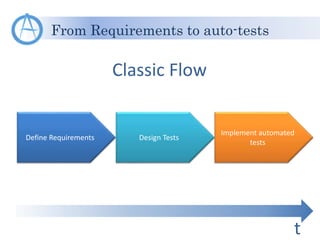
From Requirements to auto-tests
Define Requirements Design Tests
Implement automated
tests
Classic Flow
t
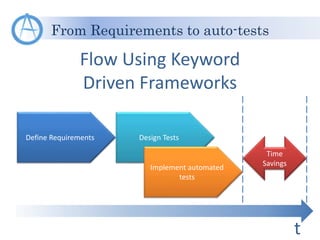
From Requirements to auto-tests
Define Requirements Design Tests
Flow Using Keyword
Driven Frameworks
t
Implement automated
tests
Time
Savings
From Requirements to auto-tests
Define Requirements
Design Tests
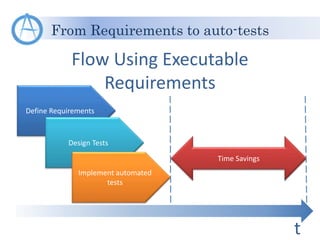
Flow Using Executable
Requirements
t
Implement automated
tests
Time Savings
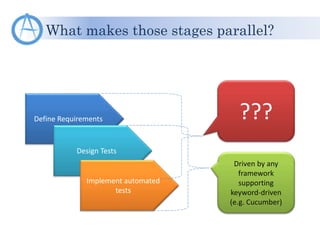
What makes those stages parallel?
Define Requirements
Design Tests
Implement automated
tests
Driven by any
framework
supporting
keyword-driven
(e.g. Cucumber)
???
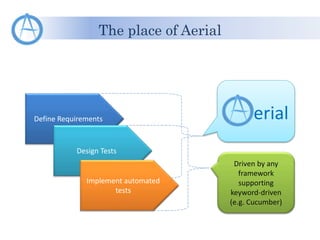
The place of Aerial
Define Requirements
Design Tests
Implement automated
tests
Driven by any
framework
supporting
keyword-driven
(e.g. Cucumber)
erial
What is Aerial?
erial is an engine
generating test cases based on
requirements description
Key principles in requirements design
Typical generation patterns
Tests generation flow
How does it work?
Typical functionality requires typical tests
Test data can be generated based on format knowledge
The tests flow can be represented in common form
Key principles in requirements design
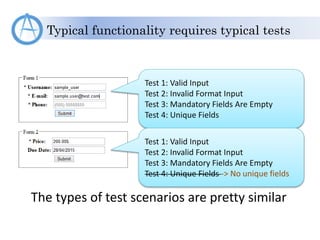
Typical functionality requires typical tests
Test 1: Valid Input
Test 2: Invalid Format Input
Test 3: Mandatory Fields Are Empty
Test 4: Unique Fields
The types of test scenarios are pretty similar
Test 1: Valid Input
Test 2: Invalid Format Input
Test 3: Mandatory Fields Are Empty
Test 4: Unique Fields -> No unique fields
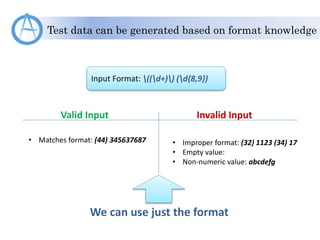
Test data can be generated based on format knowledge
Input Format: ((d+)) (d{8,9})
Valid Input Invalid Input
• Matches format: (44) 345637687 • Improper format: (32) 1123 (34) 17
• Empty value:
• Non-numeric value: abcdefg
We can use just the format
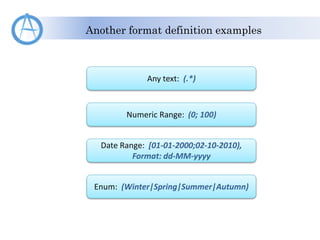
Another format definition examples
Any text: (.*)
Numeric Range: (0; 100)
Date Range: [01-01-2000;02-10-2010),
Format: dd-MM-yyyy
Enum: (Winter|Spring|Summer|Autumn)
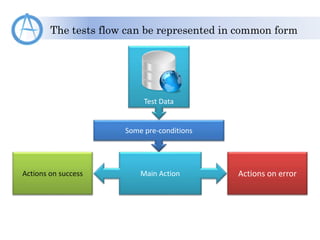
The tests flow can be represented in common form
Some pre-conditions
Main ActionActions on success Actions on error
Test Data
Major flow
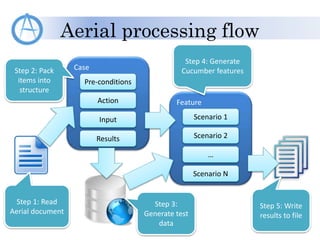
Aerial processing flow
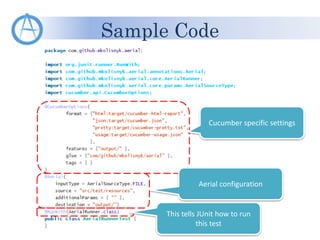
Sample code
How is it used?
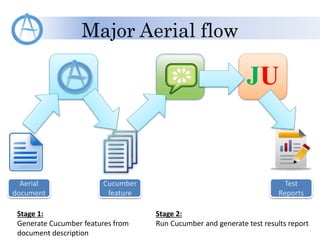
Major Aerial flow
JU
Aerial
document
Cucumber
feature
Test
Reports
Stage 1:
Generate Cucumber features from
document description
Stage 2:
Run Cucumber and generate test results report
Aerial processing flow
Step 1: Read
Aerial document
Case
Action
Input
Pre-conditions
Results
Step 2: Pack
items into
structure
Step 3:
Generate test
data
Feature
Scenario 2
…
Scenario 1
Scenario N
Step 4: Generate
Cucumber features
Step 5: Write
results to file
Sample Code
Cucumber specific settings
Aerial configuration
This tells JUnit how to run
this test
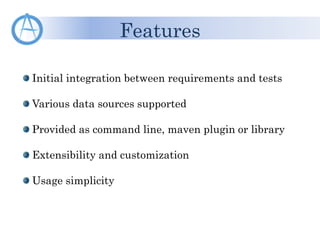
Initial integration between requirements and tests
Various data sources supported
Provided as command line, maven plugin or library
Extensibility and customization
Usage simplicity
Features
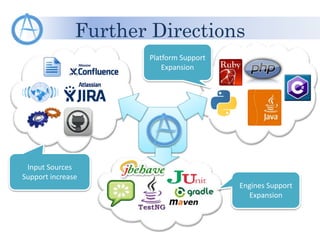
Further Directions
Platform Support
Expansion
Input Sources
Support increase
Engines Support
Expansion
Related Information
GitHub: https://github.com/mkolisnyk/aerial
Blog: Test Automation From Inside
http://mkolisnyk.blogspot.com/search/label/Aerial
LinkedIn: Mykola Kolisnyk
http://www.linkedin.com/pub/mykola-kolisnyk/14/533/903
E-mail: kolesnik.nickolay@gmail.com
Questions?
Thank You!
Presented by: Mykola Kolisnyk

Aerial - The Executable Requirements Engine - Introduction

  • 1.
  • 2.
    What is Aerial? Howdoes it work? How is it used? Features Further Directions Major Topics
  • 3.
    From Requirements toauto-tests Define Requirements Design Tests Implement automated tests Classic Flow t
  • 4.
    From Requirements toauto-tests Define Requirements Design Tests Flow Using Keyword Driven Frameworks t Implement automated tests Time Savings
  • 5.
    From Requirements toauto-tests Define Requirements Design Tests Flow Using Executable Requirements t Implement automated tests Time Savings
  • 6.
    What makes thosestages parallel? Define Requirements Design Tests Implement automated tests Driven by any framework supporting keyword-driven (e.g. Cucumber) ???
  • 7.
    The place ofAerial Define Requirements Design Tests Implement automated tests Driven by any framework supporting keyword-driven (e.g. Cucumber) erial
  • 8.
    What is Aerial? erialis an engine generating test cases based on requirements description
  • 9.
    Key principles inrequirements design Typical generation patterns Tests generation flow How does it work?
  • 10.
    Typical functionality requirestypical tests Test data can be generated based on format knowledge The tests flow can be represented in common form Key principles in requirements design
  • 11.
    Typical functionality requirestypical tests Test 1: Valid Input Test 2: Invalid Format Input Test 3: Mandatory Fields Are Empty Test 4: Unique Fields The types of test scenarios are pretty similar Test 1: Valid Input Test 2: Invalid Format Input Test 3: Mandatory Fields Are Empty Test 4: Unique Fields -> No unique fields
  • 12.
    Test data canbe generated based on format knowledge Input Format: ((d+)) (d{8,9}) Valid Input Invalid Input • Matches format: (44) 345637687 • Improper format: (32) 1123 (34) 17 • Empty value: • Non-numeric value: abcdefg We can use just the format
  • 13.
    Another format definitionexamples Any text: (.*) Numeric Range: (0; 100) Date Range: [01-01-2000;02-10-2010), Format: dd-MM-yyyy Enum: (Winter|Spring|Summer|Autumn)
  • 14.
    The tests flowcan be represented in common form Some pre-conditions Main ActionActions on success Actions on error Test Data
  • 15.
    Major flow Aerial processingflow Sample code How is it used?
  • 16.
    Major Aerial flow JU Aerial document Cucumber feature Test Reports Stage1: Generate Cucumber features from document description Stage 2: Run Cucumber and generate test results report
  • 17.
    Aerial processing flow Step1: Read Aerial document Case Action Input Pre-conditions Results Step 2: Pack items into structure Step 3: Generate test data Feature Scenario 2 … Scenario 1 Scenario N Step 4: Generate Cucumber features Step 5: Write results to file
  • 18.
    Sample Code Cucumber specificsettings Aerial configuration This tells JUnit how to run this test
  • 19.
    Initial integration betweenrequirements and tests Various data sources supported Provided as command line, maven plugin or library Extensibility and customization Usage simplicity Features
  • 20.
    Further Directions Platform Support Expansion InputSources Support increase Engines Support Expansion
  • 21.
    Related Information GitHub: https://github.com/mkolisnyk/aerial Blog:Test Automation From Inside http://mkolisnyk.blogspot.com/search/label/Aerial LinkedIn: Mykola Kolisnyk http://www.linkedin.com/pub/mykola-kolisnyk/14/533/903 E-mail: kolesnik.nickolay@gmail.com
  • 22.
  • 23.
    Thank You! Presented by:Mykola Kolisnyk

Editor's Notes

  • #2 This is initial presentation introducing Aerial the engine for automated test cases generation and execution based on requirements
  • #3 This presentation covers the following topics: What is the Aerial in general and what place it occupies Main principles and ideas explaining how it works Major ways Aerial is supposed to be used Features included into the engine The ways of further growth and directions of development
  • #4 During test automation development each feature goes through the following stages: Requirements definition – the stage when we collect, formalize and describe required behavior of the system under test Test Design – the stage when we define various scenarios to verify that each specific feature works the way it is defined in requirements Automated tests implementation – the actual coding to make test cases executed by some specific software In general case all those stages are sequential. Thus we cannot implement automated tests before we define test scenarios. And we don’t start test design before we define what is actually required. This is classic flow from requirements definition to automated tests implementation. As it’s seen it’s time consuming and if all of the stages are done in different streams (and usually it is so) there are some points of time when some stream just waits for input from previous stream. How can it be improved?
  • #5 A lot of modern test automation tools and frameworks implement keyword driven approach when some human readable text is associated with some portion of executable code. This approach is now supported both by vendor tools like QTP, Test Complete etc, as well as a lot of engines are designed to support this approach (e.g. Cucumber family, xSpec family etc). All of those solutions are targeted to combine test design stage with automated tests implementation. Thus we are getting some time savings due to some activities are done in parallel and each stream has less time when they are simply waiting for the input from the upstream. Also, keyword driven approach resolves the problem with synchronizing test cases with their automated implementation. Since automated tests (or executable chains) are generated based on tests designed we always know that our automated tests are in line with test cases. But again, we still have to wait for requirements to be defined before starting working on tests.
  • #6 What if our test cases are generated based on requirements or specifications we define? Thus we can make all our stages running in parallel. Thus the time advantage is bigger. So, the idea is that our requirements are the source for tests and automated implementation. Such approach is called “Executable Requirements”.
  • #7 So, what can make things driving this way? As it was mentioned before test design and automated tests implementation can be combined using keyword driven approach operated by the tools supporting it. But what about making requirements executable? A lot of tools are considered supporting executable requirements approach but mainly all they provide is an ability to define test scenarios somewhere within requirements with additional ability to run those tests. It’s not really executable requirements but rather another form of linking tests to requirements. What I’m interested in is an ability to generate tests based on requirements so that any requirement change will automatically affect changes in test cases as well as their automated implementation.
  • #8 This is what Aerial is designed for. It is targeted to collapse requirements definition and test design into one stage or at least make them running in parallel. And the output of Aerial then can be used by keyword driven engine as in this area existing solutions are handy enough nowadays.
  • #9 Thus we can explicitly define main purpose of Aerial engine. It generates test cases in controlled way based on requirements/specification descriptions.
  • #10 In order to have an idea how it works we should know the following items: Key principles we should keep for requirements design Typical patterns we use for data and test scenarios generation General flow the Aerial use for scenarios generation
  • #11 All scenarios generation is based on several main principles. They are: Typical functionality requires typical tests – a lot of components work based on similar principles/flows. Thus it can be defined in common way. In most cases we choose test data having knowledge of acceptable format, set of available records or any kind of data relationship. So, we can define just rules and engine generates the set of all input data Each test scenario goes through some specific stages. They can be represented in some common form, hence, that part can be automated Next slides will describe above principles in more details
  • #12 A lot of application under test functionality may be different by the data they operate and the way to reach the check-point but they may have similar approach for test design. In this example we have 2 different forms. One of them submits user information. Another one submits price and due date (if applicable). Both forms operate with different entities in different format. Nevertheless, both forms have similar test types: Valid input – all data fit the format and all fields are set -> the result should be success Some data has format violation -> we expect some failure Some fields are mandatory. So, if we leave them empty we should have some errors Some fields or their combinations are unique, so we cannot perform the same operation twice As you can see the above test scenarios can be applied to both forms. Major details are about operation flow to reach the form, actions to perform on form data and results verification. We can even abstract from web form and apply similar approach to something else, like command line utility, web-service, whatever. The form can be different but techniques are still the same
  • #13 Imagine we have some field which fits the format defined on slide. Here it is an example of the phone number format. The test data for any input like that is quite typical and can include groups like: Values matching the format – one or two values that fully satisfy the format. Mainly it is used for positive tests as valid input Malformed format. Normally it can be achieved by concatenating generated strings for valid input Empty value Value which doesn’t meet input data requirements. E.g. the format expects numbers, so we should enter alphabetic characters Main idea is that all those above groups can be generated using pre-defined algorithm for the specific input type. Thus, in our requirement document we can use only format description which is much more compact record than any set of potential input values
  • #14 Here are just some examples of input data format definitions. Mainly format can be based on some regular expression or on some construction in pre-defined format. Here are examples of: Any text string without restrictions (in real life usually there’s at least size restriction) Numeric range. Having data defined in this format we may use not just positive/negative techniques but also boundary value analysis Same range but for dates. Enum value when some parameter is about to be selected from the list of available values
  • #15 Most of test scenarios can be represented in the form: Action -> Result. In order to make distinction between positive and negative tests we can represent our tests as Action -> Result on Success and Action -> Results on Error. Every test case may have some pre-conditions. And all this structure may be driven by some set of input data. Since these items are pretty abstract here we can freely apply this to many test cases and find all those structure components in any of them. The Aerial uses this representation for test scenarios generation
  • #16 In order to explain how Aerial is used we need to explain in more details the following items: Major flow – the high-level flow which is used to transform requirement document descriptions into tests and their execution results Aerial processing flow – the flow showing how document is internally transformed into Cucumber features Sample code – simply shows an example how Aerial instructions a bound to test class
  • #17 Major Aerial flow involves 3 major components: Aerial itself Cucumber as engine running generated features JUnit as immediate test runner The flow itself goes in 2 stages: The initial requirements document is processed by Aerial and the output Cucumber features are written into some resource The Cucumber features are taken by Cucumber and being executed using JUnit. This is stage 2 As the result we have test reports produced containing generated test scenarios results
  • #18 Aerial itself processes documents in 5 major steps: Read document from the specified source Parse it and pack all data into some internal structure which is convenient for further scenarios generation Generate test data Generate text containing already processed and ready to use Cucumber features Write results into file or any other accessible output type
  • #19 Here is Aerial test class sample showing how it is included for real-life tests. There are 3 points where we should make additional settings: For any test class we want to use we should make sure that AerialRunner is used for Junit tests. For this purpose we use @RunWith(AerialRunner.class) annotation We should define Aerial configuration where we define where we take data from, the format of input/output data and the destination. This is done using @Aerial annotation Cucumber annotation. Since the Aerial simply prepares the input for the Cucumber we still should use Cucumber annotation to provide all information which Cucumber needs
  • #21 Of course Aerial isn’t something static. It should grow in many directions. There would be a lot of internal improvements related to scenarios generation or extensibility. But external growth is targeted to 3 major directions: Input sources support – the Aerial should be able to read not just from text files but also many different tracking and documentation management systems. It can be Jira, Confluence, GitHub, Wiki or some external web-services. In any case, we should integrate Aerial with many external systems where we can store initial requirements Currently Aerial is designed for Java. But in order to make it more universal solution it can be migrated to other development platforms and technologies. Mainly it’s about migration to different programming languages But since main development is done for Java we also should be able to support various Java engines. In particular, Aerial shouldn’t be strictly bound just to Cucumber, there should be an ability to configure it to JBehave. Also, it should be runnable not only just for JUnit but for TestNG as well as many people use TestNG. Currently, Aerial is provided as Maven dependency as well as plugin. Similar thing should be done for other tools performing dependency management or build
  • #22 All project relevant information can be found using the links on the slide: GitHub project Blogspot page with entries dedicated to Aerial My LinkedIn profile My direct e-mail
  • #23 Here is the time for questions
  • #24 Thank You!