“Analytics as a service”
Embedded Analytics for SaaS
2
Hello from Jaspersoft!
© Copyright 2000-2018 TIBCO Software Inc.
Shane Swiderek
Product Marketing Manager
San Francisco, CA
Scott Andersen
Sr. Solutions Consultant
Denver, CO
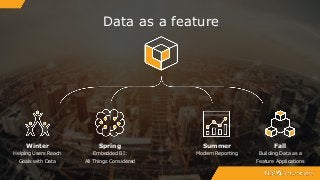
Data as a feature
Winter
Helping Users Reach
Goals with Data
Spring
Embedded BI:
All Things Considered
Summer
Modern Reporting
Fall
Building Data as a
Feature Applications
44
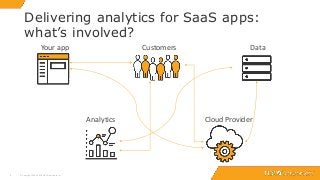
Delivering analytics for SaaS apps:
what’s involved?
© Copyright 2000-2018 TIBCO Software Inc.
Customers
Cloud Provider
DataYour app
Analytics
55
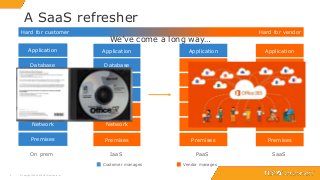
A SaaS refresher
© Copyright 2000-2018 TIBCO Software Inc.
Network
Hardware
Premises
App Server
Database
OS
Application
IaaS
Network
Hardware
Premises
App Server
Database
OS
Application
SaaS
Network
Hardware
Premises
App Server
Database
OS
Application
PaaSOn prem
Network
Hardware
Premises
App Server
Database
OS
Application
Customer manages Vendor manages
Hard for customer Hard for vendor
We’ve come a long way…
Are the apps developed by your company deployed as software
as a service (SaaS)?
© Copyright 2000-2017 TIBCO Software Inc. 6
Polling Question:
77
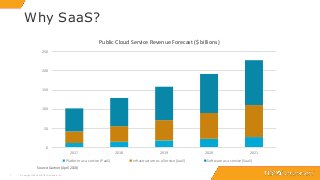
Why SaaS?
© Copyright 2000-2018 TIBCO Software Inc.
Source: Gartner (April 2018)
0
50
100
150
200
250
2017 2018 2019 2020 2021
Platform as a service (PaaS) Infrastructure as a Service (IaaS) Software as a service (SaaS)
Public Cloud Service Revenue Forecast ($ billions)
8
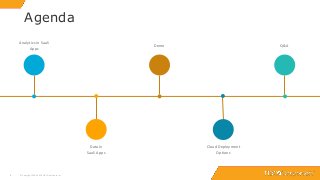
Analytics in SaaS
Apps
Data in
SaaS Apps
Demo
Cloud Deployment
Options
8
Agenda
© Copyright 2000-2018 TIBCO Software Inc.
Q&A
Analytics in SaaS Apps
1010
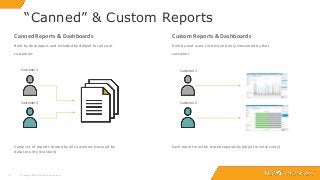
“Canned” & Custom Reports
© Copyright 2000-2018 TIBCO Software Inc.
Canned Reports & Dashboards
Built by developers and included by default for all your
customers
Same set of reports shared by all customers (secured by
data security structure)
Customer 2
Customer 1
Custom Reports & Dashboards
Built by end users (or dev) and only consumed by that
customer
Each report must be stored separately (object level security)
Customer 1
Customer 2
1111
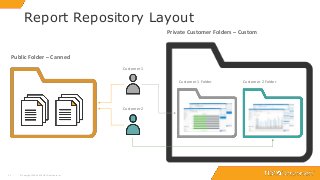
Report Repository Layout
© Copyright 2000-2018 TIBCO Software Inc.
Public Folder – Canned
Private Customer Folders – Custom
Customer 1 Folder Customer 2 Folder
Customer 1
Customer 2
1212
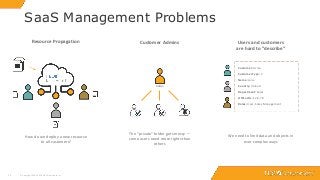
SaaS Management Problems
© Copyright 2000-2018 TIBCO Software Inc.
Customer Admins Users and customers
are hard to “describe”
Resource Propagation
How do we deploy a new resource
to all customers?
Admin
Customer: Acme
Customer Type: 2
Name: Jane
Country: Ireland
Department: Sales
Office IDs: 12,9,78
Roles: User, Sales Management
The “private” folder gets messy —
some users need more rights than
others
We need to limit data and objects in
ever complex ways
Data in SaaS Apps
Column- and Row-Level Security and 4 Types of Multi-tenancy
1414
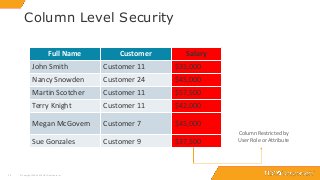
Column Level Security
© Copyright 2000-2018 TIBCO Software Inc.
Full Name Customer Salary
John Smith Customer 11 $35,000
Nancy Snowden Customer 24 $45,000
Martin Scotcher Customer 11 $57,500
Terry Knight Customer 11 $42,000
Megan McGovern Customer 7 $45,000
Sue Gonzales Customer 9 $37,500
Full Name Customer Salary
John Smith Customer 11 $35,000
Nancy Snowden Customer 24 $45,000
Martin Scotcher Customer 11 $57,500
Terry Knight Customer 11 $42,000
Megan McGovern Customer 7 $45,000
Sue Gonzales Customer 9 $37,500
Column Restricted by
User Role or Attribute
1515
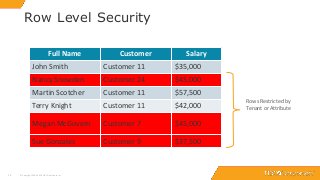
Row Level Security
© Copyright 2000-2018 TIBCO Software Inc.
Full Name Customer Salary
John Smith Customer 11 $35,000
Nancy Snowden Customer 24 $45,000
Martin Scotcher Customer 11 $57,500
Terry Knight Customer 11 $42,000
Megan McGovern Customer 7 $45,000
Sue Gonzales Customer 9 $37,500
Full Name Customer Salary
John Smith Customer 11 $35,000
Nancy Snowden Customer 24 $45,000
Martin Scotcher Customer 11 $57,500
Terry Knight Customer 11 $42,000
Megan McGovern Customer 7 $45,000
Sue Gonzales Customer 9 $37,500
Rows Restricted by
Tenant or Attribute
1616
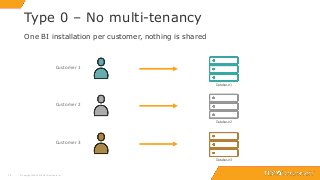
Type 0 – No multi-tenancy
© Copyright 2000-2018 TIBCO Software Inc.
One BI installation per customer, nothing is shared
Customer 1
Customer 2
Customer 3
Database 1
Database 2
Database 3
1717
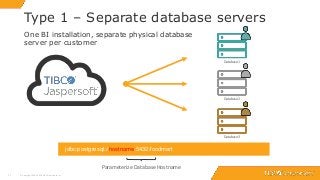
Type 1 – Separate database servers
© Copyright 2000-2018 TIBCO Software Inc.
One BI installation, separate physical database
server per customer
jdbc:postgresql://hostname:5432/foodmart
Parameterize Database Hostname
Database 1
Database 2
Database 3
1818
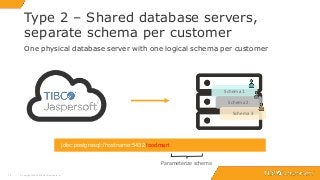
Type 2 – Shared database servers,
separate schema per customer
© Copyright 2000-2018 TIBCO Software Inc.
One physical database server with one logical schema per customer
jdbc:postgresql://hostname:5432/foodmart
Parameterize schema
Schema 1
Schema 2
Schema 3
1919
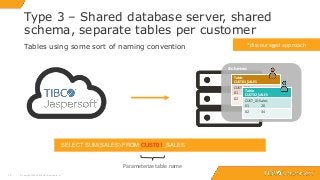
Type 3 – Shared database server, shared
schema, separate tables per customer
© Copyright 2000-2018 TIBCO Software Inc.
Tables using some sort of naming convention
SELECT SUM(SALES) FROM CUST01_SALES
Parameterize table name
*discouraged approach
Table:
CUST01_SALES
CUST_ID Sales
01 20
02 34
Table:
CUST02_SALES
CUST_ID Sales
01 20
02 34
Schema
2020
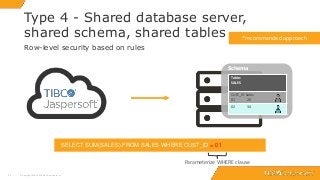
Type 4 - Shared database server,
shared schema, shared tables
© Copyright 2000-2018 TIBCO Software Inc.
Row-level security based on rules
SELECT SUM(SALES) FROM SALES WHERE CUST_ID = 01
Parameterize WHERE clause
*recommended approach
Schema
Table:
SALES
CUST_ID Sales
01 20
02 34
demo
Cloud deployment options
2323
Hybrid Approach
© Copyright 2000-2018 TIBCO Software Inc.
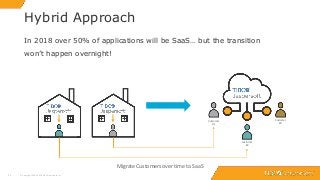
In 2018 over 50% of applications will be SaaS… but the transition
won’t happen overnight!
Migrate Customers over time to SaaS
Customer
#1
Customer
#2
Customer
#3
2424
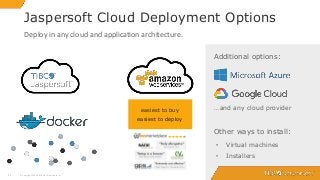
Jaspersoft Cloud Deployment Options
© Copyright 2000-2018 TIBCO Software Inc.
easiest to buy
easiest to deploy
• Virtual machines
• Installers
Additional options:
Deploy in any cloud and application architecture.
…and any cloud provider
Other ways to install:
Q & A
26
What next?
© Copyright 2000-2018 TIBCO Software Inc.
See How to Get Started
http://www.jaspersoft.com/getting-started
Try Jaspersoft Free for 60 Days
http://www.jaspersoft.com/download
O’Reilly Books
www.jaspersoft.com > Resources
Get your question(s) answered by an expert
Send questions to: na-jaspersoftdemo@tibco.com
Next webinar:
Modern Reporting at Scale
Key considerations
for embedding
Why embedding?

Embedded Analytics for SaaS: "Analytics as a Service"

  • 1.
    “Analytics as aservice” Embedded Analytics for SaaS
  • 2.
    2 Hello from Jaspersoft! ©Copyright 2000-2018 TIBCO Software Inc. Shane Swiderek Product Marketing Manager San Francisco, CA Scott Andersen Sr. Solutions Consultant Denver, CO
  • 3.
    Data as afeature Winter Helping Users Reach Goals with Data Spring Embedded BI: All Things Considered Summer Modern Reporting Fall Building Data as a Feature Applications
  • 4.
    44 Delivering analytics forSaaS apps: what’s involved? © Copyright 2000-2018 TIBCO Software Inc. Customers Cloud Provider DataYour app Analytics
  • 5.
    55 A SaaS refresher ©Copyright 2000-2018 TIBCO Software Inc. Network Hardware Premises App Server Database OS Application IaaS Network Hardware Premises App Server Database OS Application SaaS Network Hardware Premises App Server Database OS Application PaaSOn prem Network Hardware Premises App Server Database OS Application Customer manages Vendor manages Hard for customer Hard for vendor We’ve come a long way…
  • 6.
    Are the appsdeveloped by your company deployed as software as a service (SaaS)? © Copyright 2000-2017 TIBCO Software Inc. 6 Polling Question:
  • 7.
    77 Why SaaS? © Copyright2000-2018 TIBCO Software Inc. Source: Gartner (April 2018) 0 50 100 150 200 250 2017 2018 2019 2020 2021 Platform as a service (PaaS) Infrastructure as a Service (IaaS) Software as a service (SaaS) Public Cloud Service Revenue Forecast ($ billions)
  • 8.
    8 Analytics in SaaS Apps Datain SaaS Apps Demo Cloud Deployment Options 8 Agenda © Copyright 2000-2018 TIBCO Software Inc. Q&A
  • 9.
  • 10.
    1010 “Canned” & CustomReports © Copyright 2000-2018 TIBCO Software Inc. Canned Reports & Dashboards Built by developers and included by default for all your customers Same set of reports shared by all customers (secured by data security structure) Customer 2 Customer 1 Custom Reports & Dashboards Built by end users (or dev) and only consumed by that customer Each report must be stored separately (object level security) Customer 1 Customer 2
  • 11.
    1111 Report Repository Layout ©Copyright 2000-2018 TIBCO Software Inc. Public Folder – Canned Private Customer Folders – Custom Customer 1 Folder Customer 2 Folder Customer 1 Customer 2
  • 12.
    1212 SaaS Management Problems ©Copyright 2000-2018 TIBCO Software Inc. Customer Admins Users and customers are hard to “describe” Resource Propagation How do we deploy a new resource to all customers? Admin Customer: Acme Customer Type: 2 Name: Jane Country: Ireland Department: Sales Office IDs: 12,9,78 Roles: User, Sales Management The “private” folder gets messy — some users need more rights than others We need to limit data and objects in ever complex ways
  • 13.
    Data in SaaSApps Column- and Row-Level Security and 4 Types of Multi-tenancy
  • 14.
    1414 Column Level Security ©Copyright 2000-2018 TIBCO Software Inc. Full Name Customer Salary John Smith Customer 11 $35,000 Nancy Snowden Customer 24 $45,000 Martin Scotcher Customer 11 $57,500 Terry Knight Customer 11 $42,000 Megan McGovern Customer 7 $45,000 Sue Gonzales Customer 9 $37,500 Full Name Customer Salary John Smith Customer 11 $35,000 Nancy Snowden Customer 24 $45,000 Martin Scotcher Customer 11 $57,500 Terry Knight Customer 11 $42,000 Megan McGovern Customer 7 $45,000 Sue Gonzales Customer 9 $37,500 Column Restricted by User Role or Attribute
  • 15.
    1515 Row Level Security ©Copyright 2000-2018 TIBCO Software Inc. Full Name Customer Salary John Smith Customer 11 $35,000 Nancy Snowden Customer 24 $45,000 Martin Scotcher Customer 11 $57,500 Terry Knight Customer 11 $42,000 Megan McGovern Customer 7 $45,000 Sue Gonzales Customer 9 $37,500 Full Name Customer Salary John Smith Customer 11 $35,000 Nancy Snowden Customer 24 $45,000 Martin Scotcher Customer 11 $57,500 Terry Knight Customer 11 $42,000 Megan McGovern Customer 7 $45,000 Sue Gonzales Customer 9 $37,500 Rows Restricted by Tenant or Attribute
  • 16.
    1616 Type 0 –No multi-tenancy © Copyright 2000-2018 TIBCO Software Inc. One BI installation per customer, nothing is shared Customer 1 Customer 2 Customer 3 Database 1 Database 2 Database 3
  • 17.
    1717 Type 1 –Separate database servers © Copyright 2000-2018 TIBCO Software Inc. One BI installation, separate physical database server per customer jdbc:postgresql://hostname:5432/foodmart Parameterize Database Hostname Database 1 Database 2 Database 3
  • 18.
    1818 Type 2 –Shared database servers, separate schema per customer © Copyright 2000-2018 TIBCO Software Inc. One physical database server with one logical schema per customer jdbc:postgresql://hostname:5432/foodmart Parameterize schema Schema 1 Schema 2 Schema 3
  • 19.
    1919 Type 3 –Shared database server, shared schema, separate tables per customer © Copyright 2000-2018 TIBCO Software Inc. Tables using some sort of naming convention SELECT SUM(SALES) FROM CUST01_SALES Parameterize table name *discouraged approach Table: CUST01_SALES CUST_ID Sales 01 20 02 34 Table: CUST02_SALES CUST_ID Sales 01 20 02 34 Schema
  • 20.
    2020 Type 4 -Shared database server, shared schema, shared tables © Copyright 2000-2018 TIBCO Software Inc. Row-level security based on rules SELECT SUM(SALES) FROM SALES WHERE CUST_ID = 01 Parameterize WHERE clause *recommended approach Schema Table: SALES CUST_ID Sales 01 20 02 34
  • 21.
  • 22.
  • 23.
    2323 Hybrid Approach © Copyright2000-2018 TIBCO Software Inc. In 2018 over 50% of applications will be SaaS… but the transition won’t happen overnight! Migrate Customers over time to SaaS Customer #1 Customer #2 Customer #3
  • 24.
    2424 Jaspersoft Cloud DeploymentOptions © Copyright 2000-2018 TIBCO Software Inc. easiest to buy easiest to deploy • Virtual machines • Installers Additional options: Deploy in any cloud and application architecture. …and any cloud provider Other ways to install:
  • 25.
  • 26.
    26 What next? © Copyright2000-2018 TIBCO Software Inc. See How to Get Started http://www.jaspersoft.com/getting-started Try Jaspersoft Free for 60 Days http://www.jaspersoft.com/download O’Reilly Books www.jaspersoft.com > Resources Get your question(s) answered by an expert Send questions to: na-jaspersoftdemo@tibco.com Next webinar: Modern Reporting at Scale Key considerations for embedding Why embedding?

Editor's Notes

  • #2 W
  • #4 SHANE This webinar is part of the Spring theme, Embedded BI: All Things Considered. There is a lot to evaluate when looking to embed analytics into your applications. Throughout the course of this theme we are exploring all of the major considerations ranging from how to get started and choose the right type of analytics to how to embed them, to how to configure security and deploy analytics in multi-tenant SaaS applications. Each of the 4 themes throughout the year are actually sub-themes of a concept called Data as a feature. Data as a feature is about treating data as a core feature in your product or service and making data into a valuable asset to your users. This is a concept that we’ve collaborated on with O’Reilly Media and, if this sounds interesting to you, at the end of the webinar, I’ll point you to where you can learn about the concept further.
  • #5 You might have an existing cloud application or maybe you’re looking to move your apps to the cloud – there are at least five major pieces involved: your apps, customers, data, cloud provider analytics (Build slide) In this webinar we will try to demystify this process and try to educate you on some of the major considerations and options available. Along the way you’ll learn about how Jaspersoft has become the leader in embedded analytics for saas customers and an interactive demo.
  • #6 So before we kick things off, just a little reminder about why SaaS is so important from a vendor and customer point of view. From a vendor perspective, there are the business reasons for SaaS: recurring services revenue is considered to be the best way to monetize software but of course there is more work involved for you as a software vendor. You’ll now see the evolution of SaaS. (click) On Prem: This is the traditional way - think of the days when software was shipped on CDs (that wasn’t that long ago!!) –the customer had to get secure premises, set up a network, procure hardware, install an operating system, application server, databaeses and finally load your applications. Very expensive and manual process! (click) Infrastructure as a Service came about and really changed things – suddenly premises, network and hardware was managed by someone else (and put into a central data center – i.e. the cloud) (click) further down the line, Platform as a Service comes about – mainly used for developers but still a huge amount of time savings (click) and the easiest for customers (buy hardest for you as a vendor!) is SaaS – your customers just get a login, no CDs to install, nothing to manage just what they want!
  • #7 So lets take a poll to see where you are with your software products Choices: Yes, 100% of our apps are SaaS Most, more than 50% are SaaS Some, less than 50% are SaaS Nope, none of our apps are SaaS (we’ll relate to the results with the next slide)
  • #8 Technology Business Research published this estimation of the cloud market – as you see SaaS is bigger than IaaS + PaaS put together (now and the future estimates) (click once) The entire size of the software market (cloud and premises) as estimated by IDC – 135 Billion dollars – so in 2013 SaaS was only 25% (click again) By 2018 that number should be greater than 50% - so over half of software will be sold as SaaS cloud software! Relate that to the poll results…. *revenue expected to grow 22% to reach $78 billion in 2018
  • #11 So here are two patterns we see very often with SaaS vendors who include reporting and BI with their apps – canned and custom reports. There is some data that all your customers are interested in and some that are specific to that customer Canned ones are built by app developers and included by default Custom are Created by customer, only consumed by that customers Introduce that you’ll need repository to store this kind of layout – which is one of the challenges of SaaS BI
  • #12 So for canned reports we store them in a folder called Public which is shared between all your customers – the only thing that changes is the underlying data – something we cover off in the next section The Private folders are a little more tricky – each customer needs their own Private folders so that objects can be saved into them
  • #13 (Purpose of this slide to show folks that we “get” MT ) So we know all about SaaS and some of the management problems that arise #1 – You have your customers in motion – now you identify a new report they all want- we make that easy (new in 6.2 btw) #2 – Each customer could have thousands of users, the IT staff of your customers sometimes wants to be able to admin resources – so we have per organization admins. We even have situations with nested customers and can handle that #3 The problem here is that we have users who have these attributes about them and we need to limit what they can see – we have a very complex role and attribute system that spans servers, roles, customers and users – so you can describe them in any way you need to suit how your applications work
  • #22 Ways to deploy Jaspersoft in the cloud
  • #23 Ways to deploy Jaspersoft in the cloud
  • #24 We recognize that this stuff doesn’t happen overnight if you are a traditional software vendor moving to SaaS (refer back to survey results here). So we recognize this and give you ways to move tenants slowly from on premise to cloud with our easy import/export functionality new in Jaspersoft 6.2 as well
  • #25 We have a good few ways to deploy Jaspersoft on the cloud so that you can serve your SaaS customers. The most common being Amazon. You can buy directly from the AWS marketplace, deploy it using pre-built AMI images. You can also use our “BYOL” license to negotiate an OEM license with us and get support. Rackspace and Microsoft Azure are also supported: its easy to launch Jaspersoft on any cloud provider with our virtual machines and installers Late last year, we released Jaspersoft for Docker which offers support for deploying and running Jaspersoft in a docker container.
  • #26 Ways to deploy Jaspersoft in the cloud