Creating a link (Hyperlink)
What is a hyperlink?Definition: A highlighted word or phrase on a webpage or email that, when clicked on, will take a person to another webpage. Hyperlinks can be distinguished from the rest of the text by it’s pronounced style. Styles may include: underline, bold, or a bright color such as blue or red.
Creating a hyperlinkHighlight the text for your link.
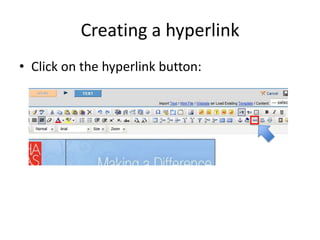
Creating a hyperlinkClick on the hyperlink button:
Creating a hyperlinkType or paste your URL into the Hyperlink field
Creating a hyperlinkClick “Submit” to create your link.
Creating a hyperlinkTo create a link to an email address add the prefix mailto: before the email in the Hyperlink field type: mailto:info@hadassah.orginstead of http://www.hadassah.org

Creating a hyperlink (Powerpoint)

  • 1.
    Creating a link(Hyperlink)
  • 2.
    What is ahyperlink?Definition: A highlighted word or phrase on a webpage or email that, when clicked on, will take a person to another webpage. Hyperlinks can be distinguished from the rest of the text by it’s pronounced style. Styles may include: underline, bold, or a bright color such as blue or red.
  • 3.
    Creating a hyperlinkHighlightthe text for your link.
  • 4.
    Creating a hyperlinkClickon the hyperlink button:
  • 5.
    Creating a hyperlinkTypeor paste your URL into the Hyperlink field
  • 6.
    Creating a hyperlinkClick“Submit” to create your link.
  • 7.
    Creating a hyperlinkTocreate a link to an email address add the prefix mailto: before the email in the Hyperlink field type: mailto:info@hadassah.orginstead of http://www.hadassah.org