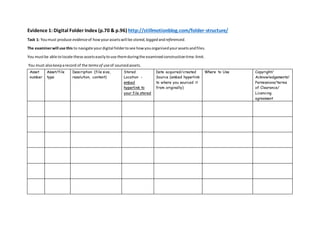
Evidence 1: Digital Folder Index (p.70 & p.96) http://stillmotionblog.com/folder-structure/
Task 1: Youmust produce evidenceof howyourassetswill be stored,logged andreferenced.
The examinerwill use this to navigate yourdigital foldertosee howyouorganisedyourassetsandfiles.
You mustbe able tolocate these assetseasilytouse themduringthe examinedconstructiontime-limit.
You must alsokeeparecord of the termsof useof sourcedassets.
Asset
number
Asset/file
type
Description (file size,
resolution, content)
Stored
Location -
embed
hyperlink to
your file stored
Date acquired/created
Source (embed hyperlink
to where you sourced it
from originally)
Where to Use Copyright/
Acknowledgements/
Permissions/terms
of Clearance/
Licencing
agreement
Evidence 2: Log (p.72, 83, 84 and 97)
Task 2: Keepalogon your weeblypage ‘Unit5:Digital Folder’ of all the hyperlinksof sourcedmaterialsand howyouusedthem toproduce yourassets.If
youcreatedyour assetsfromscratch provide evidence of screenshotsanddocumenthowyoudidthis.
Asset Date How you
manipulated/used it
How you created it
captured
Screenshots of
evidence
Consideration of how it meets the brief
requirements
Evidence 3:Evaluate your assets (p.73)
Explainhow the assetsmeetthe contentrequirementsof the brief.
Annotate eachcategory witheither‘S’ = strengthsand ‘W’ = weakness usingthe gridbelow.
Asset
number
Asset file type (is
it usable –
resolution
manageable?) Have
you have tested it,
does it play or
render as
required?)
Length/Size (will it fill
the required duration,
or the page layout)
Purpose (does it
communicate the
message, fit for this
audience)
Aesthetics
qualities (artistic
or visual appeal)
Composition Rule
of 3rds/image
quality, sound
quality, layout not
and colours ‘pop’,
font readable?)
Appropriateness use
of techniques and
conventions
(interactive emags
or video ads)
Quality (resolution,
consistency in
lighting, focus,
MES, acting/pose,
sound)
Evidence 4:Labelling and Storage (p.83)
Set up your file and folder directory on your Mac in S218 to store and organise your assets. Creates hyperlink shortcuts to the directory. Make
sure that everything is labelled and stored correctly – the examiner will test it to assess you.
Set up a cloud file online using the same format – you will need a back up in case it corrupts.
Screen grab both screens of your file directory once you have stored your assets so farand post to your Weebly ‘Unit 5 Digital Folder’ page
along with your Index and Log.
Hyperlink or file directory to access your digital folder:
Asset Filename File Type Resolution/Size Mac stored
on/Back up
Details of content

Digital folder index

  • 1.
    Evidence 1: DigitalFolder Index (p.70 & p.96) http://stillmotionblog.com/folder-structure/ Task 1: Youmust produce evidenceof howyourassetswill be stored,logged andreferenced. The examinerwill use this to navigate yourdigital foldertosee howyouorganisedyourassetsandfiles. You mustbe able tolocate these assetseasilytouse themduringthe examinedconstructiontime-limit. You must alsokeeparecord of the termsof useof sourcedassets. Asset number Asset/file type Description (file size, resolution, content) Stored Location - embed hyperlink to your file stored Date acquired/created Source (embed hyperlink to where you sourced it from originally) Where to Use Copyright/ Acknowledgements/ Permissions/terms of Clearance/ Licencing agreement
  • 2.
    Evidence 2: Log(p.72, 83, 84 and 97) Task 2: Keepalogon your weeblypage ‘Unit5:Digital Folder’ of all the hyperlinksof sourcedmaterialsand howyouusedthem toproduce yourassets.If youcreatedyour assetsfromscratch provide evidence of screenshotsanddocumenthowyoudidthis. Asset Date How you manipulated/used it How you created it captured Screenshots of evidence Consideration of how it meets the brief requirements Evidence 3:Evaluate your assets (p.73) Explainhow the assetsmeetthe contentrequirementsof the brief. Annotate eachcategory witheither‘S’ = strengthsand ‘W’ = weakness usingthe gridbelow.
  • 3.
    Asset number Asset file type(is it usable – resolution manageable?) Have you have tested it, does it play or render as required?) Length/Size (will it fill the required duration, or the page layout) Purpose (does it communicate the message, fit for this audience) Aesthetics qualities (artistic or visual appeal) Composition Rule of 3rds/image quality, sound quality, layout not and colours ‘pop’, font readable?) Appropriateness use of techniques and conventions (interactive emags or video ads) Quality (resolution, consistency in lighting, focus, MES, acting/pose, sound) Evidence 4:Labelling and Storage (p.83) Set up your file and folder directory on your Mac in S218 to store and organise your assets. Creates hyperlink shortcuts to the directory. Make sure that everything is labelled and stored correctly – the examiner will test it to assess you. Set up a cloud file online using the same format – you will need a back up in case it corrupts.
  • 4.
    Screen grab bothscreens of your file directory once you have stored your assets so farand post to your Weebly ‘Unit 5 Digital Folder’ page along with your Index and Log. Hyperlink or file directory to access your digital folder: Asset Filename File Type Resolution/Size Mac stored on/Back up Details of content