StockFusion for
Ninja Trader
Trading Advisor Expert System


Boris Zinchenko, Ph.D.
www.stockfusion.net
Ninja Data Synchronization
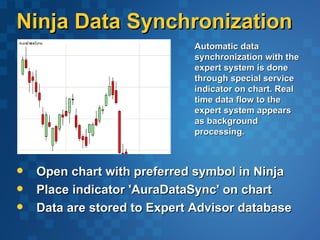
                             Automatic data
                             synchronization with the
                             expert system is done
                             through special service
                             indicator on chart. Real
                             time data flow to the
                             expert system appears
                             as background
                             processing.


   Open chart with preferred symbol in Ninja
   Place indicator 'AuraDataSync' on chart
   Data are stored to Expert Advisor database
StockFusion data link
   Enter 'Data Manager'
    panel of StockFusion


                                Home & Basics >
                                 Select Provider
                                Highlight Ninja and
    Double click to open        click [Next]
     chart for this symbol      Select symbol
                                 category
Expert System Inference
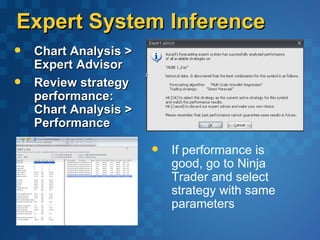
   Chart Analysis >
    Expert Advisor
   Review strategy
    performance:
    Chart Analysis >
    Performance

                          If performance is
                           good, go to Ninja
                           Trader and select
                           strategy with same
                           parameters
Ninja Trader Strategy
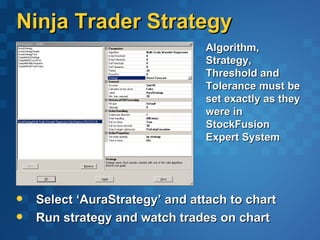
                                Algorithm,
                                Strategy,
                                Threshold and
                                Tolerance must be
                                set exactly as they
                                were in
                                StockFusion
                                Expert System


   Select ‘AuraStrategy’ and attach to chart
   Run strategy and watch trades on chart

StockFusion for Ninja Trader

  • 1.
    StockFusion for Ninja Trader TradingAdvisor Expert System Boris Zinchenko, Ph.D. www.stockfusion.net
  • 2.
    Ninja Data Synchronization Automatic data synchronization with the expert system is done through special service indicator on chart. Real time data flow to the expert system appears as background processing.  Open chart with preferred symbol in Ninja  Place indicator 'AuraDataSync' on chart  Data are stored to Expert Advisor database
  • 3.
    StockFusion data link  Enter 'Data Manager' panel of StockFusion  Home & Basics > Select Provider  Highlight Ninja and  Double click to open click [Next] chart for this symbol  Select symbol category
  • 4.
    Expert System Inference  Chart Analysis > Expert Advisor  Review strategy performance: Chart Analysis > Performance  If performance is good, go to Ninja Trader and select strategy with same parameters
  • 5.
    Ninja Trader Strategy Algorithm, Strategy, Threshold and Tolerance must be set exactly as they were in StockFusion Expert System  Select ‘AuraStrategy’ and attach to chart  Run strategy and watch trades on chart