Business Process
Automation with Office365
Copyright © 2015–2017 BizPortals Solutions
Agenda
1) Introductions
2) Business Process Automation on Office 365
3) Building Business Process Automation on Office
365
Copyright © 2015–2017 BizPortals Solutions
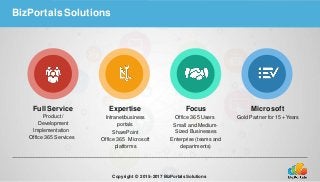
BizPortals Solutions
Full Service
Product /
Development
Implementation
Office 365 Services
Expertise
Intranet/business
portals
SharePoint
Office 365 Microsoft
platforms
Focus
Office 365 Users
Small and Medium-
Sized Businesses
Enterprise (teams and
departments)
Microsoft
Gold Partner for 15+ Years
Copyright © 2015–2017 BizPortals Solutions
Common Challenges Companies Face
 Paper Forms
 Manual Processes
 Lack of Accountability and Communication
 Lack of Proper Record Keeping and Compliance
 Disparate Systems
Copyright © 2015–2017 BizPortals Solutions
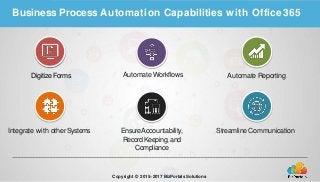
Business Process Automation Capabilities with Office365
DigitizeForms Automate Workflows
Integrate with otherSystems
Automate Reporting
Streamline CommunicationEnsureAccountability,
RecordKeeping, and
Compliance
Copyright © 2015–2017 BizPortals Solutions
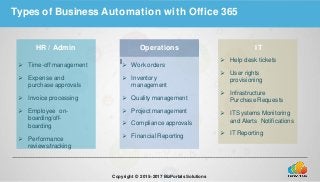
Types of Business Automation with Office 365
HR / Admin
 Time-off management
 Expense and
purchase approvals
 Invoice processing
 Employee on-
boarding/off-
boarding
 Performance
reviews/tracking
I
Operations
 Work orders
 Inventory
management
 Quality management
 Project management
 Compliance approvals
 Financial Reporting
IT
 Help desk tickets
 User rights
provisioning
 Infrastructure
Purchase Requests
 IT Systems Monitoring
and Alerts Notifications
 IT Reporting
Copyright © 2015–2017 BizPortals Solutions
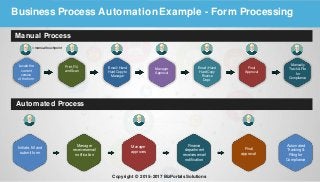
Business Process AutomationExample - Form Processing
Manual Process
Automated Process
Locatethe
current
version
of theform
Print,Fill,
andScan
Email / Hand
Hard Copyto
Manager
Manager
Approval
Email / Hand
Hard Copy
Finance
Dept.
Final
Approval
Manually
Track & File
for
Compliance
Initiate, fill and
submit form
Manager
receivesemail
notification
Finance
department
receivesemail
notification
Final
approval
Manager
approves
Automated
Tracking&
Filing for
Compliance
=manualtouchpoint
Copyright © 2015–2017 BizPortals Solutions
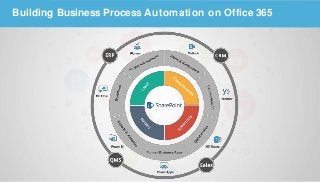
Building Business Process Automation on Office 365
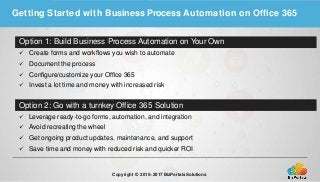
Getting Started with Business Process Automation on Office 365
Option 1: Build Business Process Automation on Your Own
 Create forms and workflows you wish to automate
 Document the process
 Configure/customize your Office 365
 Invest a lot time and money with increased risk
Copyright © 2015–2017 BizPortals Solutions
Option 2: Go with a turnkey Office 365 Solution
 Leverage ready-to-go forms, automation, and integration
 Avoid recreating the wheel
 Get ongoing product updates, maintenance, and support
 Save time and money with reduced risk and quicker ROI
12 Copyright © 2015–2017BizPortalsSolutions
Let us know how we can help
Contact info:
https://www.bizportals365.com
bizinfo@bizportals.com

Business process automation with office 365

  • 1.
    Business Process Automation withOffice365 Copyright © 2015–2017 BizPortals Solutions
  • 2.
    Agenda 1) Introductions 2) BusinessProcess Automation on Office 365 3) Building Business Process Automation on Office 365 Copyright © 2015–2017 BizPortals Solutions
  • 3.
    BizPortals Solutions Full Service Product/ Development Implementation Office 365 Services Expertise Intranet/business portals SharePoint Office 365 Microsoft platforms Focus Office 365 Users Small and Medium- Sized Businesses Enterprise (teams and departments) Microsoft Gold Partner for 15+ Years Copyright © 2015–2017 BizPortals Solutions
  • 4.
    Common Challenges CompaniesFace  Paper Forms  Manual Processes  Lack of Accountability and Communication  Lack of Proper Record Keeping and Compliance  Disparate Systems Copyright © 2015–2017 BizPortals Solutions
  • 5.
    Business Process AutomationCapabilities with Office365 DigitizeForms Automate Workflows Integrate with otherSystems Automate Reporting Streamline CommunicationEnsureAccountability, RecordKeeping, and Compliance Copyright © 2015–2017 BizPortals Solutions
  • 6.
    Types of BusinessAutomation with Office 365 HR / Admin  Time-off management  Expense and purchase approvals  Invoice processing  Employee on- boarding/off- boarding  Performance reviews/tracking I Operations  Work orders  Inventory management  Quality management  Project management  Compliance approvals  Financial Reporting IT  Help desk tickets  User rights provisioning  Infrastructure Purchase Requests  IT Systems Monitoring and Alerts Notifications  IT Reporting Copyright © 2015–2017 BizPortals Solutions
  • 7.
    Business Process AutomationExample- Form Processing Manual Process Automated Process Locatethe current version of theform Print,Fill, andScan Email / Hand Hard Copyto Manager Manager Approval Email / Hand Hard Copy Finance Dept. Final Approval Manually Track & File for Compliance Initiate, fill and submit form Manager receivesemail notification Finance department receivesemail notification Final approval Manager approves Automated Tracking& Filing for Compliance =manualtouchpoint Copyright © 2015–2017 BizPortals Solutions
  • 8.
    Building Business ProcessAutomation on Office 365
  • 9.
    Getting Started withBusiness Process Automation on Office 365 Option 1: Build Business Process Automation on Your Own  Create forms and workflows you wish to automate  Document the process  Configure/customize your Office 365  Invest a lot time and money with increased risk Copyright © 2015–2017 BizPortals Solutions Option 2: Go with a turnkey Office 365 Solution  Leverage ready-to-go forms, automation, and integration  Avoid recreating the wheel  Get ongoing product updates, maintenance, and support  Save time and money with reduced risk and quicker ROI
  • 10.
    12 Copyright ©2015–2017BizPortalsSolutions Let us know how we can help Contact info: https://www.bizportals365.com bizinfo@bizportals.com