3D Printing Basics
with Stacy Devino (09/02/15)
childofthehorn@gmail.com
Dallas / Ft. Worth
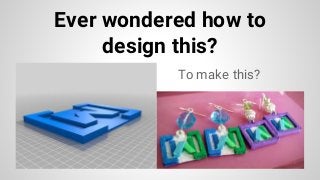
To make this?
Ever wondered how to
design this?
ThingHubs
(Stuff to download and print)
Thingiverse.com
Youmagine.com
3dvia.com
Domawe.net
Tf3dm.com
Shapeways.com
Ponoko.com
Cubify.com
Bld3r.com
Yeggi.com
Repables.com
Grabcad.com
DefCAD.com
123dapp.com
Myminifactory.com
DigitalStore.makerbot.com
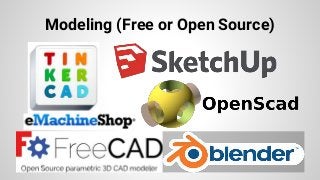
Modeling (Free or Open Source)
Beginners
TinkerCAD - Web Based tool that allows imported files and
direct connectability with Thingiverse
Sketchup - (Windows or MAC) Very good at making simple
things that might need some complex interlacing of simple
shapes or large areas
EMachineShop - Diagram based tool for doing 2D to 3D
models or tracing, very simple to start for people who draw
Advanced
Blender - (all platforms) Python based, Open Source full 3D
modeling suite, used in some professional animation
studios
FreeCAD - AutoCAD-like modeling suite for engineers, Open
Source
OpenSCAD - 3D for Programmers and Mathematicians
Materials (Plastics and otherwise)
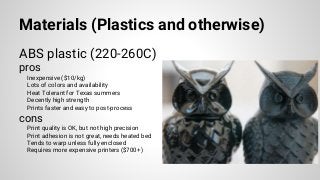
ABS plastic (220-260C)
pros
Inexpensive ($10/kg)
Lots of colors and availability
Heat Tolerant for Texas summers
Decently high strength
Prints faster and easy to post-process
cons
Print quality is OK, but not high precision
Print adhesion is not great, needs heated bed
Tends to warp unless fully enclosed
Requires more expensive printers ($700+)
Materials (Plastics and otherwise)
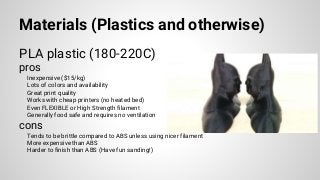
PLA plastic (180-220C)
pros
Inexpensive ($15/kg)
Lots of colors and availability
Great print quality
Works with cheap printers (no heated bed)
Even FLEXIBLE or High Strength filament
Generally food safe and requires no ventilation
cons
Tends to be brittle compared to ABS unless using nicer filament
More expensive than ABS
Harder to finish than ABS (Have fun sanding!)
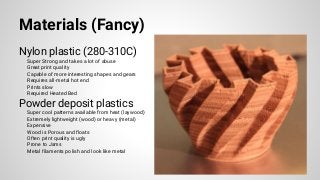
Materials (Fancy)
Nylon plastic (280-310C)
Super Strong and takes a lot of abuse
Great print quality
Capable of more interesting shapes and gears
Requires all-metal hot end
Prints slow
Required Heated Bed
Powder deposit plastics
Super cool patterns available from heat (laywood)
Extremely lightweight (wood) or heavy (metal)
Expensive
Wood is Porous and floats
Often print quality is ugly
Prone to Jams
Metal filaments polish and look like metal
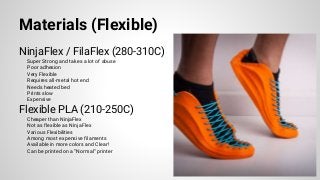
Materials (Flexible)
NinjaFlex / FilaFlex (280-310C)
Super Strong and takes a lot of abuse
Poor adhesion
Very Flexible
Requires all-metal hot end
Needs heated bed
Prints slow
Expensive
Flexible PLA (210-250C)
Cheaper than NinjaFlex
Not as flexible as NinjaFlex
Various Flexibilities
Among most expensive filaments
Available in more colors and Clear!
Can be printed on a “Normal” printer
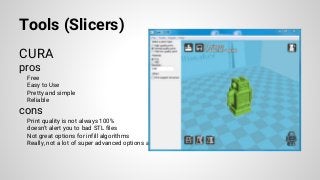
Tools (Slicers)
CURA
pros
Free
Easy to Use
Pretty and simple
Reliable
cons
Print quality is not always 100%
doesn’t alert you to bad STL files
Not great options for infill algorithms
Really, not a lot of super advanced options available
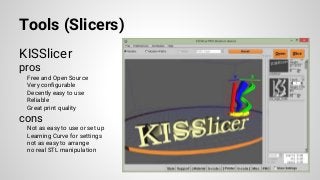
Tools (Slicers)
KISSlicer
pros
Free and Open Source
Very configurable
Decently easy to use
Reliable
Great print quality
cons
Not as easy to use or set up
Learning Curve for settings
not as easy to arrange
no real STL manipulation
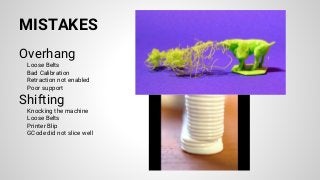
MISTAKES
Overhang
Loose Belts
Bad Calibration
Retraction not enabled
Poor support
Shifting
Knocking the machine
Loose Belts
Printer Blip
GCode did not slice well
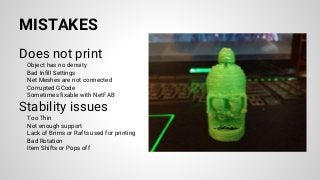
MISTAKES
Does not print
Object has no density
Bad Infill Settings
Net Meshes are not connected
Corrupted GCode
Sometimes fixable with NetFAB
Stability issues
Too Thin
Not enough support
Lack of Brims or Rafts used for printing
Bad Rotation
Item Shifts or Pops off
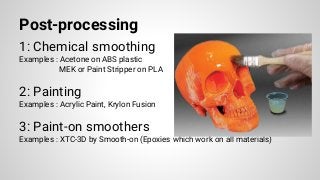
Post-processing
1: Chemical smoothing
Examples : Acetone on ABS plastic
MEK or Paint Stripper on PLA
2: Painting
Examples : Acrylic Paint, Krylon Fusion
3: Paint-on smoothers
Examples : XTC-3D by Smooth-on (Epoxies which work on all materials)
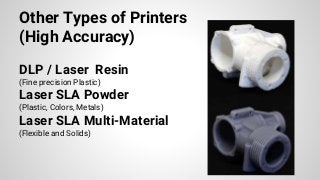
Other Types of Printers
(High Accuracy)
DLP / Laser Resin
(Fine precision Plastic)
Laser SLA Powder
(Plastic, Colors, Metals)
Laser SLA Multi-Material
(Flexible and Solids)
3D Printing Services
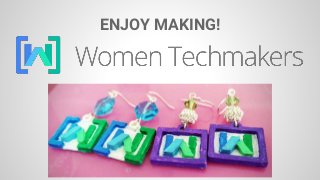
ENJOY MAKING!

3D printing basics for FDM printers

  • 1.
    3D Printing Basics withStacy Devino (09/02/15) childofthehorn@gmail.com Dallas / Ft. Worth
  • 2.
    To make this? Everwondered how to design this?
  • 3.
    ThingHubs (Stuff to downloadand print) Thingiverse.com Youmagine.com 3dvia.com Domawe.net Tf3dm.com Shapeways.com Ponoko.com Cubify.com Bld3r.com Yeggi.com Repables.com Grabcad.com DefCAD.com 123dapp.com Myminifactory.com DigitalStore.makerbot.com
  • 4.
    Modeling (Free orOpen Source)
  • 5.
    Beginners TinkerCAD - WebBased tool that allows imported files and direct connectability with Thingiverse Sketchup - (Windows or MAC) Very good at making simple things that might need some complex interlacing of simple shapes or large areas EMachineShop - Diagram based tool for doing 2D to 3D models or tracing, very simple to start for people who draw
  • 6.
    Advanced Blender - (allplatforms) Python based, Open Source full 3D modeling suite, used in some professional animation studios FreeCAD - AutoCAD-like modeling suite for engineers, Open Source OpenSCAD - 3D for Programmers and Mathematicians
  • 7.
    Materials (Plastics andotherwise) ABS plastic (220-260C) pros Inexpensive ($10/kg) Lots of colors and availability Heat Tolerant for Texas summers Decently high strength Prints faster and easy to post-process cons Print quality is OK, but not high precision Print adhesion is not great, needs heated bed Tends to warp unless fully enclosed Requires more expensive printers ($700+)
  • 8.
    Materials (Plastics andotherwise) PLA plastic (180-220C) pros Inexpensive ($15/kg) Lots of colors and availability Great print quality Works with cheap printers (no heated bed) Even FLEXIBLE or High Strength filament Generally food safe and requires no ventilation cons Tends to be brittle compared to ABS unless using nicer filament More expensive than ABS Harder to finish than ABS (Have fun sanding!)
  • 9.
    Materials (Fancy) Nylon plastic(280-310C) Super Strong and takes a lot of abuse Great print quality Capable of more interesting shapes and gears Requires all-metal hot end Prints slow Required Heated Bed Powder deposit plastics Super cool patterns available from heat (laywood) Extremely lightweight (wood) or heavy (metal) Expensive Wood is Porous and floats Often print quality is ugly Prone to Jams Metal filaments polish and look like metal
  • 10.
    Materials (Flexible) NinjaFlex /FilaFlex (280-310C) Super Strong and takes a lot of abuse Poor adhesion Very Flexible Requires all-metal hot end Needs heated bed Prints slow Expensive Flexible PLA (210-250C) Cheaper than NinjaFlex Not as flexible as NinjaFlex Various Flexibilities Among most expensive filaments Available in more colors and Clear! Can be printed on a “Normal” printer
  • 11.
    Tools (Slicers) CURA pros Free Easy toUse Pretty and simple Reliable cons Print quality is not always 100% doesn’t alert you to bad STL files Not great options for infill algorithms Really, not a lot of super advanced options available
  • 12.
    Tools (Slicers) KISSlicer pros Free andOpen Source Very configurable Decently easy to use Reliable Great print quality cons Not as easy to use or set up Learning Curve for settings not as easy to arrange no real STL manipulation
  • 13.
    MISTAKES Overhang Loose Belts Bad Calibration Retractionnot enabled Poor support Shifting Knocking the machine Loose Belts Printer Blip GCode did not slice well
  • 14.
    MISTAKES Does not print Objecthas no density Bad Infill Settings Net Meshes are not connected Corrupted GCode Sometimes fixable with NetFAB Stability issues Too Thin Not enough support Lack of Brims or Rafts used for printing Bad Rotation Item Shifts or Pops off
  • 15.
    Post-processing 1: Chemical smoothing Examples: Acetone on ABS plastic MEK or Paint Stripper on PLA 2: Painting Examples : Acrylic Paint, Krylon Fusion 3: Paint-on smoothers Examples : XTC-3D by Smooth-on (Epoxies which work on all materials)
  • 16.
    Other Types ofPrinters (High Accuracy) DLP / Laser Resin (Fine precision Plastic) Laser SLA Powder (Plastic, Colors, Metals) Laser SLA Multi-Material (Flexible and Solids)
  • 17.
  • 18.