





Copyright 2017 Severalnines AB
I'm Jean-Jérôme from the Severalnines Team and
I'm your host for today's webinar!
Feel free to ask any questions in the Questions
section of this application or via the Chat box.
You can also contact me directly via the chat box
or via email: jj@severalnines.com during or
after the webinar.
Your host & some logistics
Copyright 2017 Severalnines AB
About Severalnines and ClusterControl
Copyright 2017 Severalnines AB
What we do
Manage Scale
MonitorDeploy
Copyright 2017 Severalnines AB
Provisioning
•Deploy a cluster in minutes
•On-premises or in the cloud (AWS)
Monitoring
•Systems view
•1sec resolution
•DB / OS stats & performance advisors
•Configurable dashboards
•Query Analyzer
•Real-time / historical
ClusterControl Automation & Management
Management
•Multi cluster/data-center
•Automate repair/recovery
•Database upgrades
•Backups
•Configuration management
•Cloning
•One-click scaling
Copyright 2017 Severalnines AB
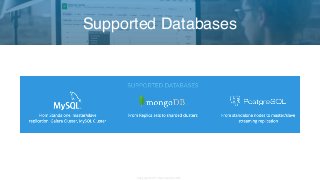
Supported Databases
Copyright 2017 Severalnines AB
Customers
Copyright 2017 Severalnines AB
Krzysztof Książek, Senior Support Engineer @Severalnines
krzysztof@severalnines.com
Presenter
MySQL Tutorial - Backup Tips for MySQL,
MariaDB & Galera Cluster
June, 13th 2017
Copyright 2017 Severalnines AB
Backup types
Tools
Good practices
Example setups
Demo of backup management in ClusterControl
Agenda
Copyright 2017 Severalnines AB
Logical backups
Copyright 2017 Severalnines AB
Generate a plain text file: SQL, CSV, tab-separated
Use SQL commands to load data
•INSERT INTO …
•LOAD DATA INFILE …
Gives possibility to recover even a single row
Must have for major version upgrades
•It changed in MySQL 5.7 - binary upgrade 5.6 -> 5.7 is possible. Hard to tell if it will
become a norm or just one-time change
Logical backups
Copyright 2017 Severalnines AB
Arguably the best known backup tool for MySQL
Ability to dump tables, schemas
Ability to recover even a single row (it’s easier with --extended-insert=0)
Locking - yes, but it’s not that big problem as you may think (for InnoDB tables)
May generate large SQL files, dump separate tables, not full schema
mysqldump
Copyright 2017 Severalnines AB
Can be used to build a slave (--master-data)
Long recovery time (need to parse all that SQL)
Single thread (you can run it in parallel on per-table basis, though - little bit of scripting
required)
Character set may be tricky if you don't pay attention
Did I mention long recovery time?
mysqldump
Copyright 2017 Severalnines AB
Available as a separate mode in mysqldump
Less performance overhead in restoring
More tricky to restore (do you remember all those ‘terminated by’, ‘separated by’ settings?)
Can be used to generate CSV files - for compatibility
SELECT INTO OUTFILE
Copyright 2017 Severalnines AB
Like mysqldump with some differences - allows parallelization, splits tables in chunks
Used to be very hard to install and use. Luckily, Percona started to maintain the code
Supports GTID
Supports dumping of schemas, routines, triggers, events
•Starting from 0.9.1
RPM’s are available, installation is now so much easier
mydumper/myloader
Copyright 2017 Severalnines AB
Pretty nice dump time (1T ~ 4-6h, YMMV of course)
Long loading time (but not as long as with mysqldump)
The fastest logical backup I know - you may need to get familiar if you require a logical
backup on a large dataset
mydumper/myloader
Copyright 2017 Severalnines AB
Physical backups
Copyright 2017 Severalnines AB
Generate an exact copy of the data
Tend to work on high level - restore all or nothing
Fast way of grabbing a copy of your data
Fast way of restoring your data
Limitation is usually the hardware (disk, network)
Great for building the infrastructure
Physical backups
Copyright 2017 Severalnines AB
_The_ backup solution
Online backup for InnoDB tables
“Virtually” non-locking
Works by copying the data files and logging transactions which happened in the meantime
If you have MyISAM, you’ll get locked. Don’t use MyISAM
xtrabackup
Copyright 2017 Severalnines AB
Supports local backups and streaming over the network
Supports incremental backups
Backup has to be prepared (transactions from the log have to be applied)
innobackupex --apply-log /path/to/BACKUP-DIR
Remember about --use-memory when applying logs. Memory speeds things up
xtrabackup
Copyright 2017 Severalnines AB
Supports partial backups
• Per schema
• Per table
This comes handy when restoring missing data, speeds it up
Can bundle replication information with the backup
Can bundle Galera’s sequence number with the backup
xtrabackup
Copyright 2017 Severalnines AB
LVM, EBS snapshot, SAN snapshot, you name it
Grabs the whole data at once
Usually it’s pretty fast
Great for building infrastructure, especially in the cloud
Not so great for recovering small pieces of data
Snapshots
Copyright 2017 Severalnines AB
Snapshots have to be consistent to be useful
innodb_flush_log_at_trx_commit=1 works for InnoDB but you’ll have to go through InnoDB
recovery
Running FTWRL may work for all engines but you’ll still have to go through the InnoDB
recovery process
Cold backup is the best but it’s also expensive (to shut down MySQL you need to have a
separate host)
Snapshots
Copyright 2017 Severalnines AB
Great tool to implement snapshots in EC2
Supports:
• Cold backup
• FLUSH TABLE WITH READ LOCK
• fsfreeze / xfs_freeze
• RAIDed volumes
ec2-consistent-snapshot
Copyright 2017 Severalnines AB
Point-in-time recovery
Copyright 2017 Severalnines AB
Backups are taken at a given time
• How to recover data modified between backups?
Binary logs store all modifications and can be used to replay changes. As long as binlogs
are enabled, that is.
Using mysqlbinlog you can easily convert binary logs into SQL format
• mysqlbinlog binary_log.00001 > data.sql
• add --base64-output=DECODE-ROWS --verbose for RBR
Point-in-time recovery
Copyright 2017 Severalnines AB
Whole process is fairly simple:
• Use a backup prior to data loss to recover the system
• Grab binary log position at the time when the backup was taken (SHOW MASTER
STATUS, xtrabackup_binlog_info)
• mysqlbinlog --start-position=xxx
• Find the point of the data loss, identify position before it
• mysqlbinlog --start-position=xxx —stop-position=yyy
• Identify position after the data loss event and use it next
• mysqlbinlog --start-position=zzz
Point-in-time recovery
Copyright 2017 Severalnines AB
Good practices
Copyright 2017 Severalnines AB
Ensure the backups are being made
Ensure that their size makes sense
Ensure logs are clear from the errors
Automate this process to make your life easier
Daily/weekly healthcheck
Copyright 2017 Severalnines AB
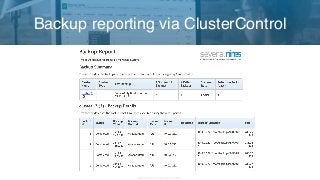
Backup reporting via ClusterControl
Copyright 2017 Severalnines AB
Each backup is a Schrödinger’s backup - it’s condition is unknown until a restore attempt
Perform it regularly, i.e. every other month, twice per year.
Perform it after you made any changes to the backup process
Should cover whole process of recovering:
• Decompress/decrypt the backup
• Build and start a new instance using this data
• Slave it off the master using the data from the backup
Restore test
Copyright 2017 Severalnines AB
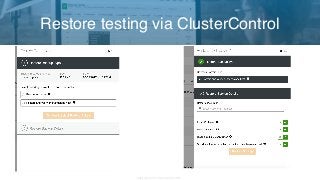
Restore testing via ClusterControl
Copyright 2017 Severalnines AB
Have one
Store your backups outside of the main datacenter
Assess time needed to transfer the data back and recover it
Prepare detailed runbooks - when in rush you either stick to the runbook or make mistakes
Disaster recovery plan
Copyright 2017 Severalnines AB
Example setups
Copyright 2017 Severalnines AB
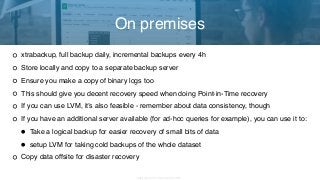
xtrabackup, full backup daily, incremental backups every 4h
Store locally and copy to a separate backup server
Ensure you make a copy of binary logs too
This should give you decent recovery speed when doing Point-in-Time recovery
If you can use LVM, it’s also feasible - remember about data consistency, though
If you have an additional server available (for ad-hoc queries for example), you can use it to:
• Take a logical backup for easier recovery of small bits of data
• setup LVM for taking cold backups of the whole dataset
Copy data offsite for disaster recovery
On premises
Copyright 2017 Severalnines AB
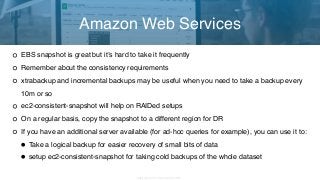
EBS snapshot is great but it’s hard to take it frequently
Remember about the consistency requirements
xtrabackup and incremental backups may be useful when you need to take a backup every
10m or so
ec2-consistent-snapshot will help on RAIDed setups
On a regular basis, copy the snapshot to a different region for DR
If you have an additional server available (for ad-hoc queries for example), you can use it to:
•Take a logical backup for easier recovery of small bits of data
•setup ec2-consistent-snapshot for taking cold backups of the whole dataset
Amazon Web Services
Copyright 2017 Severalnines AB
Demo
Copyright 2017 Severalnines AB
Whitepaper - DevOps Guide to Database Backups
Severalnines resources on backups:
• https://severalnines.com/blog/full-restore-mysql-galera-cluster-backup
• https://severalnines.com/blog/what-s-new-clustercontrol-14-backup-management
• https://severalnines.com/blog/how-perform-efficient-backup-mysql-and-mariadb
Install ClusterControl:
•https://severalnines.com/download-clustercontrol-database-management-system
Contact: jj@severalnines.com
Thank You!

Webinar slides: MySQL Tutorial - Backup Tips for MySQL, MariaDB & Galera Cluster

  • 1.
    Copyright 2017 SeveralninesAB I'm Jean-Jérôme from the Severalnines Team and I'm your host for today's webinar! Feel free to ask any questions in the Questions section of this application or via the Chat box. You can also contact me directly via the chat box or via email: jj@severalnines.com during or after the webinar. Your host & some logistics
  • 2.
    Copyright 2017 SeveralninesAB Copyright 2017 Severalnines AB About Severalnines and ClusterControl
  • 3.
    Copyright 2017 SeveralninesAB What we do Manage Scale MonitorDeploy
  • 4.
    Copyright 2017 SeveralninesAB Provisioning •Deploy a cluster in minutes •On-premises or in the cloud (AWS) Monitoring •Systems view •1sec resolution •DB / OS stats & performance advisors •Configurable dashboards •Query Analyzer •Real-time / historical ClusterControl Automation & Management Management •Multi cluster/data-center •Automate repair/recovery •Database upgrades •Backups •Configuration management •Cloning •One-click scaling
  • 5.
    Copyright 2017 SeveralninesAB Supported Databases
  • 6.
  • 7.
    Copyright 2017 SeveralninesAB Krzysztof Książek, Senior Support Engineer @Severalnines krzysztof@severalnines.com Presenter MySQL Tutorial - Backup Tips for MySQL, MariaDB & Galera Cluster June, 13th 2017
  • 8.
    Copyright 2017 SeveralninesAB Backup types Tools Good practices Example setups Demo of backup management in ClusterControl Agenda
  • 9.
    Copyright 2017 SeveralninesAB Copyright 2017 Severalnines AB Logical backups
  • 10.
    Copyright 2017 SeveralninesAB Generate a plain text file: SQL, CSV, tab-separated Use SQL commands to load data •INSERT INTO … •LOAD DATA INFILE … Gives possibility to recover even a single row Must have for major version upgrades •It changed in MySQL 5.7 - binary upgrade 5.6 -> 5.7 is possible. Hard to tell if it will become a norm or just one-time change Logical backups
  • 11.
    Copyright 2017 SeveralninesAB Arguably the best known backup tool for MySQL Ability to dump tables, schemas Ability to recover even a single row (it’s easier with --extended-insert=0) Locking - yes, but it’s not that big problem as you may think (for InnoDB tables) May generate large SQL files, dump separate tables, not full schema mysqldump
  • 12.
    Copyright 2017 SeveralninesAB Can be used to build a slave (--master-data) Long recovery time (need to parse all that SQL) Single thread (you can run it in parallel on per-table basis, though - little bit of scripting required) Character set may be tricky if you don't pay attention Did I mention long recovery time? mysqldump
  • 13.
    Copyright 2017 SeveralninesAB Available as a separate mode in mysqldump Less performance overhead in restoring More tricky to restore (do you remember all those ‘terminated by’, ‘separated by’ settings?) Can be used to generate CSV files - for compatibility SELECT INTO OUTFILE
  • 14.
    Copyright 2017 SeveralninesAB Like mysqldump with some differences - allows parallelization, splits tables in chunks Used to be very hard to install and use. Luckily, Percona started to maintain the code Supports GTID Supports dumping of schemas, routines, triggers, events •Starting from 0.9.1 RPM’s are available, installation is now so much easier mydumper/myloader
  • 15.
    Copyright 2017 SeveralninesAB Pretty nice dump time (1T ~ 4-6h, YMMV of course) Long loading time (but not as long as with mysqldump) The fastest logical backup I know - you may need to get familiar if you require a logical backup on a large dataset mydumper/myloader
  • 16.
    Copyright 2017 SeveralninesAB Copyright 2017 Severalnines AB Physical backups
  • 17.
    Copyright 2017 SeveralninesAB Generate an exact copy of the data Tend to work on high level - restore all or nothing Fast way of grabbing a copy of your data Fast way of restoring your data Limitation is usually the hardware (disk, network) Great for building the infrastructure Physical backups
  • 18.
    Copyright 2017 SeveralninesAB _The_ backup solution Online backup for InnoDB tables “Virtually” non-locking Works by copying the data files and logging transactions which happened in the meantime If you have MyISAM, you’ll get locked. Don’t use MyISAM xtrabackup
  • 19.
    Copyright 2017 SeveralninesAB Supports local backups and streaming over the network Supports incremental backups Backup has to be prepared (transactions from the log have to be applied) innobackupex --apply-log /path/to/BACKUP-DIR Remember about --use-memory when applying logs. Memory speeds things up xtrabackup
  • 20.
    Copyright 2017 SeveralninesAB Supports partial backups • Per schema • Per table This comes handy when restoring missing data, speeds it up Can bundle replication information with the backup Can bundle Galera’s sequence number with the backup xtrabackup
  • 21.
    Copyright 2017 SeveralninesAB LVM, EBS snapshot, SAN snapshot, you name it Grabs the whole data at once Usually it’s pretty fast Great for building infrastructure, especially in the cloud Not so great for recovering small pieces of data Snapshots
  • 22.
    Copyright 2017 SeveralninesAB Snapshots have to be consistent to be useful innodb_flush_log_at_trx_commit=1 works for InnoDB but you’ll have to go through InnoDB recovery Running FTWRL may work for all engines but you’ll still have to go through the InnoDB recovery process Cold backup is the best but it’s also expensive (to shut down MySQL you need to have a separate host) Snapshots
  • 23.
    Copyright 2017 SeveralninesAB Great tool to implement snapshots in EC2 Supports: • Cold backup • FLUSH TABLE WITH READ LOCK • fsfreeze / xfs_freeze • RAIDed volumes ec2-consistent-snapshot
  • 24.
    Copyright 2017 SeveralninesAB Copyright 2017 Severalnines AB Point-in-time recovery
  • 25.
    Copyright 2017 SeveralninesAB Backups are taken at a given time • How to recover data modified between backups? Binary logs store all modifications and can be used to replay changes. As long as binlogs are enabled, that is. Using mysqlbinlog you can easily convert binary logs into SQL format • mysqlbinlog binary_log.00001 > data.sql • add --base64-output=DECODE-ROWS --verbose for RBR Point-in-time recovery
  • 26.
    Copyright 2017 SeveralninesAB Whole process is fairly simple: • Use a backup prior to data loss to recover the system • Grab binary log position at the time when the backup was taken (SHOW MASTER STATUS, xtrabackup_binlog_info) • mysqlbinlog --start-position=xxx • Find the point of the data loss, identify position before it • mysqlbinlog --start-position=xxx —stop-position=yyy • Identify position after the data loss event and use it next • mysqlbinlog --start-position=zzz Point-in-time recovery
  • 27.
    Copyright 2017 SeveralninesAB Copyright 2017 Severalnines AB Good practices
  • 28.
    Copyright 2017 SeveralninesAB Ensure the backups are being made Ensure that their size makes sense Ensure logs are clear from the errors Automate this process to make your life easier Daily/weekly healthcheck
  • 29.
    Copyright 2017 SeveralninesAB Backup reporting via ClusterControl
  • 30.
    Copyright 2017 SeveralninesAB Each backup is a Schrödinger’s backup - it’s condition is unknown until a restore attempt Perform it regularly, i.e. every other month, twice per year. Perform it after you made any changes to the backup process Should cover whole process of recovering: • Decompress/decrypt the backup • Build and start a new instance using this data • Slave it off the master using the data from the backup Restore test
  • 31.
    Copyright 2017 SeveralninesAB Restore testing via ClusterControl
  • 32.
    Copyright 2017 SeveralninesAB Have one Store your backups outside of the main datacenter Assess time needed to transfer the data back and recover it Prepare detailed runbooks - when in rush you either stick to the runbook or make mistakes Disaster recovery plan
  • 33.
    Copyright 2017 SeveralninesAB Copyright 2017 Severalnines AB Example setups
  • 34.
    Copyright 2017 SeveralninesAB xtrabackup, full backup daily, incremental backups every 4h Store locally and copy to a separate backup server Ensure you make a copy of binary logs too This should give you decent recovery speed when doing Point-in-Time recovery If you can use LVM, it’s also feasible - remember about data consistency, though If you have an additional server available (for ad-hoc queries for example), you can use it to: • Take a logical backup for easier recovery of small bits of data • setup LVM for taking cold backups of the whole dataset Copy data offsite for disaster recovery On premises
  • 35.
    Copyright 2017 SeveralninesAB EBS snapshot is great but it’s hard to take it frequently Remember about the consistency requirements xtrabackup and incremental backups may be useful when you need to take a backup every 10m or so ec2-consistent-snapshot will help on RAIDed setups On a regular basis, copy the snapshot to a different region for DR If you have an additional server available (for ad-hoc queries for example), you can use it to: •Take a logical backup for easier recovery of small bits of data •setup ec2-consistent-snapshot for taking cold backups of the whole dataset Amazon Web Services
  • 36.
    Copyright 2017 SeveralninesAB Copyright 2017 Severalnines AB Demo
  • 37.
    Copyright 2017 SeveralninesAB Whitepaper - DevOps Guide to Database Backups Severalnines resources on backups: • https://severalnines.com/blog/full-restore-mysql-galera-cluster-backup • https://severalnines.com/blog/what-s-new-clustercontrol-14-backup-management • https://severalnines.com/blog/how-perform-efficient-backup-mysql-and-mariadb Install ClusterControl: •https://severalnines.com/download-clustercontrol-database-management-system Contact: jj@severalnines.com Thank You!