Using JIRA for Test
Case Management
RYAN YACKEL | QASYMPHONY
INSERT PHOTO ON TOP
About Me
Ryan Yackel
Director of Product Marketing
@ryanyackattack
With a deep interest in the emerging trends of
testing needs, Ryan is dedicated to being the
customer voice for all QASymphony products.
Before joining QASymphony, Ryan was a test
automation consultant for CGI and an enterprise
test analyst for Macy’s Systems & Technology.
INSERT PHOTO ON TOP
AGENDA
How JIRA is setup for testing
Option A: Pros and cons of customizing JIRA as a test case
management solution
Option B: Using add-ons with JIRA for test case management
Option B: Using external integrations with JIRA for test case
management
How to get the best of both worlds
The #1 software development tool used by
agile teams
Agile Adoption Rate
How Is JIRA Setup For
Testing
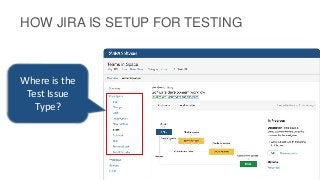
HOW JIRA IS SETUP FOR TESTING
Where is the
Test Issue
Type?
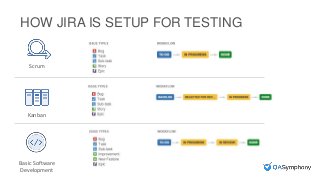
HOW JIRA IS SETUP FOR TESTING
Scrum
Kanban
Basic Software
Development
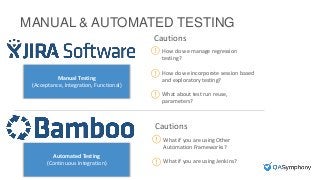
MANUAL & AUTOMATED TESTING
Cautions
What if you are using Other
Automation Frameworks?
What if you are using Jenkins?
Cautions
How do we manage regression
testing?
How do we incorporate session based
and exploratory testing?
What about test run reuse,
parameters?
Manual Testing
(Acceptance, Integration, Functional)
Automated Testing
(Continuous Integration)
Option A: Customize
JIRA Issues
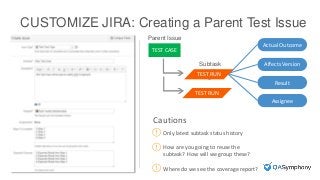
CUSTOMIZE JIRA: Creating a Parent Test Issue
TEST CASE
Parent Issue
Subtask
TEST RUN
TEST RUN
Actual Outcome
Affects Version
Result
Assignee
Cautions
Only latest subtask status history
How are you going to reuse the
subtask? How will we group these?
Where do we see the coverage report?
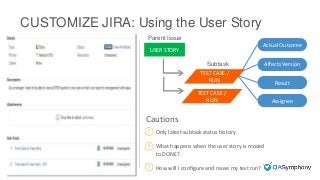
CUSTOMIZE JIRA: Using the User Story
USER STORY
Parent Issue
Subtask
TEST CASE /
RUN
Actual Outcome
Affects Version
Result
Assignee
Cautions
Only latest subtask status history
What happens when the user story is moved
to DONE?
How will I configure and reuse my test run?
TEST CASE /
RUN
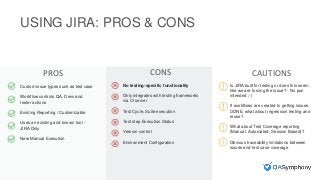
USING JIRA: PROS & CONS
PROS CONS CAUTIONS
Is JIRA built for testing or does this seem
like we are forcing the issue? - No pun
intended :-)
If workflows are created to getting issues
DONE, what about regression testing and
reuse?
What about Test Coverage reporting
(Manual, Automated, Session Based)?
Obvious traceability limitations between
issues and test case coverage
Custom issue types such as test case
Workflow controls QA, Devs and
tester actions
Existing Reporting / Customizable
Uses an existing and known tool -
JIRA Only
New Manual Execution
No testing-specific functionality
Only integrates with testing frameworks
via CI server
Test Cycle, Suite execution
Test step Execution Status
Version control
Environment Configuration
Option B: Integrations
with JIRA
INSERT PHOTO ON TOP
Option B: Add-Ons
INSERT PHOTO ON TOP
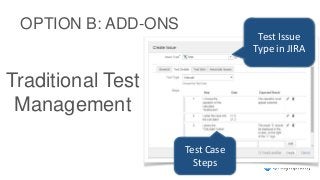
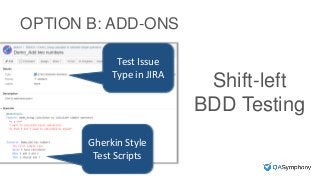
OPTION B: ADD-ONS
Test Issue
Type in JIRA
Test Case
Steps
Traditional Test
Management
INSERT PHOTO ON TOP
OPTION B: ADD-ONS
Gherkin Style
Test Scripts
Test Issue
Type in JIRA
Shift-left
BDD Testing
INSERT PHOTO ON TOP
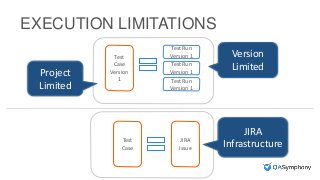
EXECUTION LIMITATIONS
Test
Case
Version
1
Test Run
Version 1
Test Run
Version 1
Test Run
Version 1
Test
Case
JIRA
Issue
Version
Limited
Project
Limited
JIRA
Infrastructure
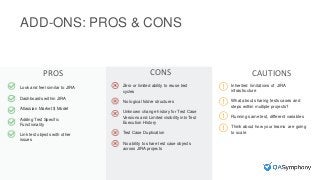
ADD-ONS: PROS & CONS
PROS CONS CAUTIONS
Look and feel similar to JIRA
Dashboards within JIRA
Atlassian Market $ Model
Adding Test Specific
Functionality
Link test objects with other
issues
Inherited limitations of JIRA
infrastructure
What about sharing tests cases and
steps within multiple projects?
Running same test, different variables
Think about how your teams are going
to scale
Zero or limited ability to reuse test
cycles
No logical folder structures
Unknown change history for Test Case
Versions and Limited visibility into Test
Execution History
Test Case Duplication
No ability to share test case objects
across JIRA projects
INSERT PHOTO ON TOP
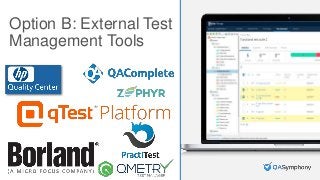
Option B: External Test
Management Tools
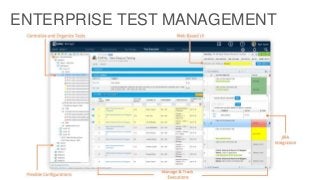
ENTERPRISE TEST MANAGEMENT
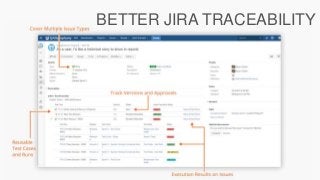
BETTER JIRA TRACEABILITY
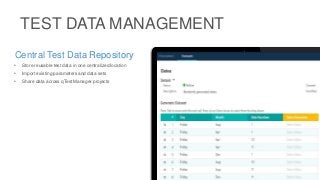
TEST DATA MANAGEMENT
Central Test Data Repository
• Store reusable test data in one centralized location
• Import existing parameters and data sets
• Share data across qTest Manager projects
INSERT PHOTO ON TOP
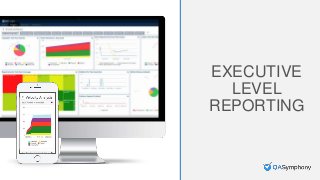
Executive Level
Reporting
EXECUTIVE
LEVEL
REPORTING
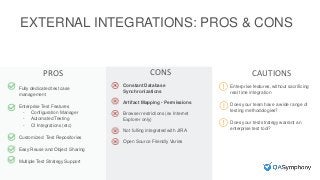
EXTERNAL INTEGRATIONS: PROS & CONS
PROS CONS CAUTIONS
Fully dedicated test case
management
Enterprise Test Features
- Configuration Manager
- Automated Testing
- CI Integrations (etc)
Customized Test Repositories
Easy Reuse and Object Sharing
Multiple Test Strategy Support
Enterprise features, without sacrificing
real time integration
Does your team have a wide range of
testing methodologies?
Does your test strategy warrant an
enterprise test tool?
Constant Database
Synchronizations
Artifact Mapping - Permissions
Browser restrictions (ex Internet
Explorer only)
Not fulling integrated with JIRA
Open Source Friendly Varies
qTest Platform: Best of
Both Worlds
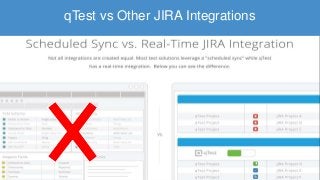
qTest vs Other JIRA Integrations
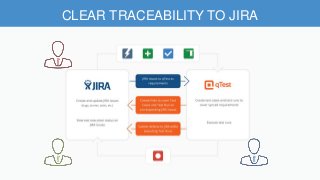
CLEAR TRACEABILITY TO JIRA
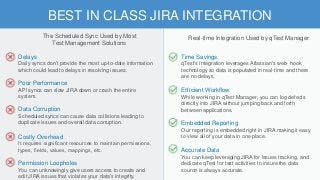
BEST IN CLASS JIRA INTEGRATION
Time Savings
qTest's integration leverages Atlassian's web- hook
technology so data is populated in real-time and there
are no delays.
Efficient Workflow
While working in qTest Manager, you can log defects
directly into JIRA without jumping back and forth
between applications.
Embedded Reporting
Our reporting is embedded right in JIRA making it easy
to view all of your data in one place.
Accurate Data
You can keep leveraging JIRA for issues tracking, and
dedicate qTest for test activities to insure the data
source is always accurate.
Delays
Daily syncs don't provide the most up-to-date information
which could lead to delays in resolving issues.
Poor Performance
API syncs can slow JIRA down or crash the entire
system.
Data Corruption
Scheduled syncs can cause data collisions leading to
duplicate issues and overall data corruption.
Costly Overhead
It requires significant resources to maintain permissions,
types, fields, values, mappings, etc.
Permission Loopholes
You can unknowingly give users access to create and
edit JIRA issues that violates your data's integrity.
The Scheduled Sync Used by Most
Test Management Solutions
Real-time Integration Used by qTest Manager
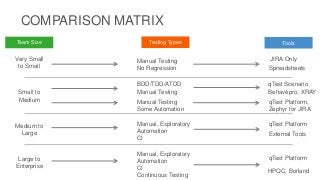
Very Small
to Small
Small to
Medium
Medium to
Large
Large to
Enterprise
Team Size
COMPARISON MATRIX
Testing Types Tools
Manual Testing
No Regression
BDD/TDD/ATDD
Manual Testing
Manual, Exploratory
Automation
CI
Manual Testing
Some Automation
Manual, Exploratory
Automation
CI
Continuous Testing
JIRA Only
qTest Platform,
Zephyr for JIRA
qTest Platform
qTest Platform
Spreadsheets
qTest Scenario
Behavepro, XRAY
External Tools
HPQC, Borland
For a Free Trial Visit QASymphony.com

Using JIRA for Test Case Management

  • 1.
    Using JIRA forTest Case Management RYAN YACKEL | QASYMPHONY
  • 2.
    INSERT PHOTO ONTOP About Me Ryan Yackel Director of Product Marketing @ryanyackattack With a deep interest in the emerging trends of testing needs, Ryan is dedicated to being the customer voice for all QASymphony products. Before joining QASymphony, Ryan was a test automation consultant for CGI and an enterprise test analyst for Macy’s Systems & Technology.
  • 3.
    INSERT PHOTO ONTOP AGENDA How JIRA is setup for testing Option A: Pros and cons of customizing JIRA as a test case management solution Option B: Using add-ons with JIRA for test case management Option B: Using external integrations with JIRA for test case management How to get the best of both worlds
  • 4.
    The #1 softwaredevelopment tool used by agile teams Agile Adoption Rate
  • 5.
    How Is JIRASetup For Testing
  • 6.
    HOW JIRA ISSETUP FOR TESTING Where is the Test Issue Type?
  • 7.
    HOW JIRA ISSETUP FOR TESTING Scrum Kanban Basic Software Development
  • 8.
    MANUAL & AUTOMATEDTESTING Cautions What if you are using Other Automation Frameworks? What if you are using Jenkins? Cautions How do we manage regression testing? How do we incorporate session based and exploratory testing? What about test run reuse, parameters? Manual Testing (Acceptance, Integration, Functional) Automated Testing (Continuous Integration)
  • 9.
  • 10.
    CUSTOMIZE JIRA: Creatinga Parent Test Issue TEST CASE Parent Issue Subtask TEST RUN TEST RUN Actual Outcome Affects Version Result Assignee Cautions Only latest subtask status history How are you going to reuse the subtask? How will we group these? Where do we see the coverage report?
  • 11.
    CUSTOMIZE JIRA: Usingthe User Story USER STORY Parent Issue Subtask TEST CASE / RUN Actual Outcome Affects Version Result Assignee Cautions Only latest subtask status history What happens when the user story is moved to DONE? How will I configure and reuse my test run? TEST CASE / RUN
  • 12.
    USING JIRA: PROS& CONS PROS CONS CAUTIONS Is JIRA built for testing or does this seem like we are forcing the issue? - No pun intended :-) If workflows are created to getting issues DONE, what about regression testing and reuse? What about Test Coverage reporting (Manual, Automated, Session Based)? Obvious traceability limitations between issues and test case coverage Custom issue types such as test case Workflow controls QA, Devs and tester actions Existing Reporting / Customizable Uses an existing and known tool - JIRA Only New Manual Execution No testing-specific functionality Only integrates with testing frameworks via CI server Test Cycle, Suite execution Test step Execution Status Version control Environment Configuration
  • 13.
  • 14.
    INSERT PHOTO ONTOP Option B: Add-Ons
  • 15.
    INSERT PHOTO ONTOP OPTION B: ADD-ONS Test Issue Type in JIRA Test Case Steps Traditional Test Management
  • 16.
    INSERT PHOTO ONTOP OPTION B: ADD-ONS Gherkin Style Test Scripts Test Issue Type in JIRA Shift-left BDD Testing
  • 17.
    INSERT PHOTO ONTOP EXECUTION LIMITATIONS Test Case Version 1 Test Run Version 1 Test Run Version 1 Test Run Version 1 Test Case JIRA Issue Version Limited Project Limited JIRA Infrastructure
  • 18.
    ADD-ONS: PROS &CONS PROS CONS CAUTIONS Look and feel similar to JIRA Dashboards within JIRA Atlassian Market $ Model Adding Test Specific Functionality Link test objects with other issues Inherited limitations of JIRA infrastructure What about sharing tests cases and steps within multiple projects? Running same test, different variables Think about how your teams are going to scale Zero or limited ability to reuse test cycles No logical folder structures Unknown change history for Test Case Versions and Limited visibility into Test Execution History Test Case Duplication No ability to share test case objects across JIRA projects
  • 19.
    INSERT PHOTO ONTOP Option B: External Test Management Tools
  • 20.
  • 21.
  • 22.
    TEST DATA MANAGEMENT CentralTest Data Repository • Store reusable test data in one centralized location • Import existing parameters and data sets • Share data across qTest Manager projects
  • 23.
    INSERT PHOTO ONTOP Executive Level Reporting EXECUTIVE LEVEL REPORTING
  • 24.
    EXTERNAL INTEGRATIONS: PROS& CONS PROS CONS CAUTIONS Fully dedicated test case management Enterprise Test Features - Configuration Manager - Automated Testing - CI Integrations (etc) Customized Test Repositories Easy Reuse and Object Sharing Multiple Test Strategy Support Enterprise features, without sacrificing real time integration Does your team have a wide range of testing methodologies? Does your test strategy warrant an enterprise test tool? Constant Database Synchronizations Artifact Mapping - Permissions Browser restrictions (ex Internet Explorer only) Not fulling integrated with JIRA Open Source Friendly Varies
  • 25.
    qTest Platform: Bestof Both Worlds
  • 26.
    qTest vs OtherJIRA Integrations
  • 27.
  • 28.
    BEST IN CLASSJIRA INTEGRATION Time Savings qTest's integration leverages Atlassian's web- hook technology so data is populated in real-time and there are no delays. Efficient Workflow While working in qTest Manager, you can log defects directly into JIRA without jumping back and forth between applications. Embedded Reporting Our reporting is embedded right in JIRA making it easy to view all of your data in one place. Accurate Data You can keep leveraging JIRA for issues tracking, and dedicate qTest for test activities to insure the data source is always accurate. Delays Daily syncs don't provide the most up-to-date information which could lead to delays in resolving issues. Poor Performance API syncs can slow JIRA down or crash the entire system. Data Corruption Scheduled syncs can cause data collisions leading to duplicate issues and overall data corruption. Costly Overhead It requires significant resources to maintain permissions, types, fields, values, mappings, etc. Permission Loopholes You can unknowingly give users access to create and edit JIRA issues that violates your data's integrity. The Scheduled Sync Used by Most Test Management Solutions Real-time Integration Used by qTest Manager
  • 29.
    Very Small to Small Smallto Medium Medium to Large Large to Enterprise Team Size COMPARISON MATRIX Testing Types Tools Manual Testing No Regression BDD/TDD/ATDD Manual Testing Manual, Exploratory Automation CI Manual Testing Some Automation Manual, Exploratory Automation CI Continuous Testing JIRA Only qTest Platform, Zephyr for JIRA qTest Platform qTest Platform Spreadsheets qTest Scenario Behavepro, XRAY External Tools HPQC, Borland
  • 30.
    For a FreeTrial Visit QASymphony.com