Drupal 9 Training
Topics
1. Create a custom form with Country and City Fields as select list and show data of cities when particular
country is selected using ajax change event.
Ajax Module Example
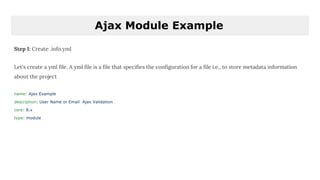
Step 1: Create .info.yml
Let's create a yml file. A yml file is a file that specifies the configuration for a file i.e., to store metadata information
about the project
name: Ajax Example
description: User Name or Email Ajax Validation
core: 8.x
type: module
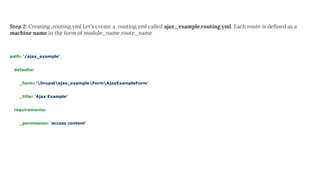
Step 2: Creating .routing.yml Let’s create a .routing.yml called ajax_example.routing.yml. Each route is defined as a
machine name in the form of module_name.route_name
path: '/ajax_example'
defaults:
_form: 'Drupalajax_exampleFormAjaxExampleForm'
_title: 'Ajax Example'
requirements:
_permission: 'access content'
Step 3: Create AjaxExampleForm.php
Create a new file called AjaxExampleForm.php inside of src/Form/{AjaxExampleForm.php}.
getFormId() function is used to create a unique id to the form.
buildForm() function is used to create the form and it has a textfield to validate the username using #ajax. Drupal
provides the property ‘#ajax’ to a form element in your form array, to trigger an Ajax response.
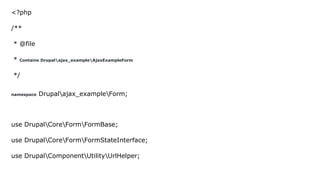
<?php
/**
* @file
* Contains Drupalajax_exampleAjaxExampleForm
*/
namespace Drupalajax_exampleForm;
use DrupalCoreFormFormBase;
use DrupalCoreFormFormStateInterface;
use DrupalComponentUtilityUrlHelper;
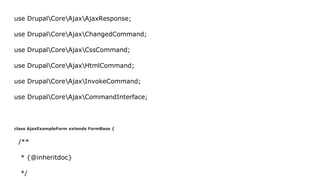
use DrupalCoreAjaxAjaxResponse;
use DrupalCoreAjaxChangedCommand;
use DrupalCoreAjaxCssCommand;
use DrupalCoreAjaxHtmlCommand;
use DrupalCoreAjaxInvokeCommand;
use DrupalCoreAjaxCommandInterface;
class AjaxExampleForm extends FormBase {
/**
* {@inheritdoc}
*/
public function getFormId() {
return 'resume_form';
}
/**
* {@inheritdoc}
*/
public function buildForm(array $form, FormStateInterface $form_state) {
$row[] = static::get_data();
$header = array('ID', 'Country', 'City');
if (!empty($row)) {
$form['table'] = [
'#type' => 'table',
'#header' => $header,
'#rows' => $row,
];
}
$country = array('none_country' => 'None', 'india' => 'India', 'pakistan' => 'Pakistan',
'srilanka' => 'Srilanka', 'bangladesh' => 'Bangladesh');
$default_state = array('Maharashtra', 'Gujrat');
$form['country'] = array(
'#type' => 'select',
'#title' => ('Country'),
'#options' => $country,
'#ajax' => array(
'callback' => '::dependent_state',
//'effect' => 'fade',
'event' => 'change',
'wrapper' => 'state',
),
);
$country = $form_state->getValues();
$selected_country = !empty($country['country']) ? $country['country'] : 'none_country';
//dsm($selected_country);
if ($selected_country == 'none_country') {
$options = array('none_state' => 'None');
}
else if ($selected_country == 'india') {
$options = array('maharashtra' => 'Maharashtra', 'gujrat' => 'Gujrat');
}
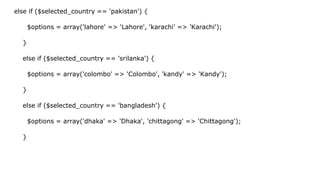
else if ($selected_country == 'pakistan') {
$options = array('lahore' => 'Lahore', 'karachi' => 'Karachi');
}
else if ($selected_country == 'srilanka') {
$options = array('colombo' => 'Colombo', 'kandy' => 'Kandy');
}
else if ($selected_country == 'bangladesh') {
$options = array('dhaka' => 'Dhaka', 'chittagong' => 'Chittagong');
}
$form['state'] = array(
'#type' => 'select',
'#title' => ('State'),
'#options' => $options,
'#prefix' => '<div id="state">',
'#suffix' => '</div>',
);
$form['submit'] = array(
'#type' => 'submit',
'#value' => t('Submit'),
);
return $form;
}
/**
* {@inheritdoc}
*/
public function submitForm(array &$form, FormStateInterface $form_state) {
// Display result.
$data = $form_state->getValues();
$country = $data['country'];
$state = $data['state'];
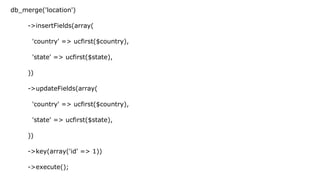
db_merge('location')
->insertFields(array(
'country' => ucfirst($country),
'state' => ucfirst($state),
))
->updateFields(array(
'country' => ucfirst($country),
'state' => ucfirst($state),
))
->key(array('id' => 1))
->execute();
}
public function dependent_state($form, $form_state) {
return $form['state'];
}
public function get_data() {
$db = Drupal::database();
$data = $db->select('location', 'l')
->fields('l')
->execute()
->fetchAssoc();
return $data;
}
}

Drupal 9 training ajax

  • 1.
  • 2.
    Topics 1. Create acustom form with Country and City Fields as select list and show data of cities when particular country is selected using ajax change event.
  • 3.
    Ajax Module Example Step1: Create .info.yml Let's create a yml file. A yml file is a file that specifies the configuration for a file i.e., to store metadata information about the project name: Ajax Example description: User Name or Email Ajax Validation core: 8.x type: module
  • 4.
    Step 2: Creating.routing.yml Let’s create a .routing.yml called ajax_example.routing.yml. Each route is defined as a machine name in the form of module_name.route_name path: '/ajax_example' defaults: _form: 'Drupalajax_exampleFormAjaxExampleForm' _title: 'Ajax Example' requirements: _permission: 'access content'
  • 5.
    Step 3: CreateAjaxExampleForm.php Create a new file called AjaxExampleForm.php inside of src/Form/{AjaxExampleForm.php}. getFormId() function is used to create a unique id to the form. buildForm() function is used to create the form and it has a textfield to validate the username using #ajax. Drupal provides the property ‘#ajax’ to a form element in your form array, to trigger an Ajax response.
  • 6.
    <?php /** * @file * ContainsDrupalajax_exampleAjaxExampleForm */ namespace Drupalajax_exampleForm; use DrupalCoreFormFormBase; use DrupalCoreFormFormStateInterface; use DrupalComponentUtilityUrlHelper;
  • 7.
    use DrupalCoreAjaxAjaxResponse; use DrupalCoreAjaxChangedCommand; useDrupalCoreAjaxCssCommand; use DrupalCoreAjaxHtmlCommand; use DrupalCoreAjaxInvokeCommand; use DrupalCoreAjaxCommandInterface; class AjaxExampleForm extends FormBase { /** * {@inheritdoc} */
  • 8.
    public function getFormId(){ return 'resume_form'; } /** * {@inheritdoc} */ public function buildForm(array $form, FormStateInterface $form_state) { $row[] = static::get_data();
  • 9.
    $header = array('ID','Country', 'City'); if (!empty($row)) { $form['table'] = [ '#type' => 'table', '#header' => $header, '#rows' => $row, ]; } $country = array('none_country' => 'None', 'india' => 'India', 'pakistan' => 'Pakistan', 'srilanka' => 'Srilanka', 'bangladesh' => 'Bangladesh'); $default_state = array('Maharashtra', 'Gujrat'); $form['country'] = array(
  • 10.
    '#type' => 'select', '#title'=> ('Country'), '#options' => $country, '#ajax' => array( 'callback' => '::dependent_state', //'effect' => 'fade', 'event' => 'change', 'wrapper' => 'state', ), );
  • 11.
    $country = $form_state->getValues(); $selected_country= !empty($country['country']) ? $country['country'] : 'none_country'; //dsm($selected_country); if ($selected_country == 'none_country') { $options = array('none_state' => 'None'); } else if ($selected_country == 'india') { $options = array('maharashtra' => 'Maharashtra', 'gujrat' => 'Gujrat'); }
  • 12.
    else if ($selected_country== 'pakistan') { $options = array('lahore' => 'Lahore', 'karachi' => 'Karachi'); } else if ($selected_country == 'srilanka') { $options = array('colombo' => 'Colombo', 'kandy' => 'Kandy'); } else if ($selected_country == 'bangladesh') { $options = array('dhaka' => 'Dhaka', 'chittagong' => 'Chittagong'); }
  • 13.
    $form['state'] = array( '#type'=> 'select', '#title' => ('State'), '#options' => $options, '#prefix' => '<div id="state">', '#suffix' => '</div>', ); $form['submit'] = array( '#type' => 'submit', '#value' => t('Submit'), );
  • 14.
    return $form; } /** * {@inheritdoc} */ publicfunction submitForm(array &$form, FormStateInterface $form_state) { // Display result. $data = $form_state->getValues(); $country = $data['country']; $state = $data['state'];
  • 15.
    db_merge('location') ->insertFields(array( 'country' => ucfirst($country), 'state'=> ucfirst($state), )) ->updateFields(array( 'country' => ucfirst($country), 'state' => ucfirst($state), )) ->key(array('id' => 1)) ->execute();
  • 16.
    } public function dependent_state($form,$form_state) { return $form['state']; } public function get_data() { $db = Drupal::database(); $data = $db->select('location', 'l') ->fields('l') ->execute() ->fetchAssoc(); return $data; } }