Redemption Process
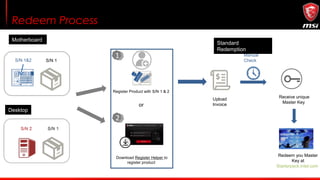
Redeem Process
Register Product with S/N 1 & 2
Manual
CheckS/N 1&2 S/N 1
Upload
Invoice
Motherboard
or
11
22
Download Register Helper to
register product
Standard
Redemption
Desktop
Receive unique
Master Key
Redeem you Master
Key at
Starterpack.intel.com
Standard
Redemption Process
Step 1 : Register/Login to MSI Member Center
1
2
1. Select your preferred language
2. Create account by fulfilling member form or register by Facebook/Google+ account
Step 2 : Go to product registration page
Scroll down the screen and find the “PRODUCT REGISTRATION”
Step 3 : Start to register a product
1. Select “MY PORDUCT”
2. Click button with “+Register Product”
1
2
Step 4 : Select a product line
Select the product line that your product belongs to.
Step 5 : Download register helper
Download register helper. The computer you run the Helper should be your purchased motherboard/Desktop.
*If your purchased motherboard is not installed, please click “Manually Register Product” beside Download button.
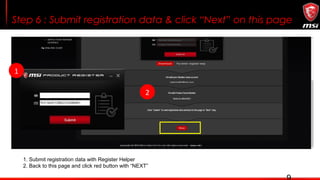
Step 6 : Submit registration data & click “Next” on this page
1. Submit registration data with Register Helper
2. Back to this page and click red button with “NEXT”
2
1
Step 7 : Select the promotion you want to redeem
1. Select “PROMOTIONS”
2. Click the promotion icon that you want to redeem
1
2
For Desktops For Motherboard
11
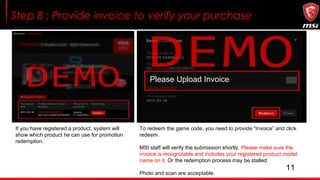
Step 8 : Provide invoice to verify your purchase
Please Upload Invoice
If you have registered a product, system will
show which product he can use for promotion
redemption.
To redeem the game code, you need to provide “Invoice” and click
redeem.
MSI staff will verify the submission shortly. Please make sure the
invoice is recognizable and includes your registered product model
name on it. Or the redemption process may be stalled.
Photo and scan are acceptable.
Example of Uploaded Invoice
Please make sure your uploaded invoice having circled information.
1.Shops/Vendors’ name
2.Invoice/Purchase date
3.Model name
1
3
ABC PC BUILD
2
Step 9 : Redeem you master Key
Redeem you Master Key at https://starterpack.intel.com/#/home
Step 10 : Complete the short survey and click Submit
Complete the short survey and click Submit
Step 11 : Complete the short survey and click Submit
Select any of the available software products shown.
Click install and follow the instruction to begin enjoy your new game!
Redemption process

Redemption process

  • 1.
  • 2.
    Redeem Process Register Productwith S/N 1 & 2 Manual CheckS/N 1&2 S/N 1 Upload Invoice Motherboard or 11 22 Download Register Helper to register product Standard Redemption Desktop Receive unique Master Key Redeem you Master Key at Starterpack.intel.com
  • 3.
  • 4.
    Step 1 :Register/Login to MSI Member Center 1 2 1. Select your preferred language 2. Create account by fulfilling member form or register by Facebook/Google+ account
  • 5.
    Step 2 :Go to product registration page Scroll down the screen and find the “PRODUCT REGISTRATION”
  • 6.
    Step 3 :Start to register a product 1. Select “MY PORDUCT” 2. Click button with “+Register Product” 1 2
  • 7.
    Step 4 :Select a product line Select the product line that your product belongs to.
  • 8.
    Step 5 :Download register helper Download register helper. The computer you run the Helper should be your purchased motherboard/Desktop. *If your purchased motherboard is not installed, please click “Manually Register Product” beside Download button.
  • 9.
    Step 6 :Submit registration data & click “Next” on this page 1. Submit registration data with Register Helper 2. Back to this page and click red button with “NEXT” 2 1
  • 10.
    Step 7 :Select the promotion you want to redeem 1. Select “PROMOTIONS” 2. Click the promotion icon that you want to redeem 1 2 For Desktops For Motherboard
  • 11.
    11 Step 8 :Provide invoice to verify your purchase Please Upload Invoice If you have registered a product, system will show which product he can use for promotion redemption. To redeem the game code, you need to provide “Invoice” and click redeem. MSI staff will verify the submission shortly. Please make sure the invoice is recognizable and includes your registered product model name on it. Or the redemption process may be stalled. Photo and scan are acceptable.
  • 12.
    Example of UploadedInvoice Please make sure your uploaded invoice having circled information. 1.Shops/Vendors’ name 2.Invoice/Purchase date 3.Model name 1 3 ABC PC BUILD 2
  • 13.
    Step 9 :Redeem you master Key Redeem you Master Key at https://starterpack.intel.com/#/home
  • 14.
    Step 10 :Complete the short survey and click Submit Complete the short survey and click Submit
  • 15.
    Step 11 :Complete the short survey and click Submit Select any of the available software products shown. Click install and follow the instruction to begin enjoy your new game!

Editor's Notes

  • #3 CMS instruction?