EOSC Provider Dashboard Tutorial
v1.00 – 30/09/2020
Dr. Jorge-A. Sanchez-P., Antonis Zervas, JNP, George Papastefanatos, NKUA
Introduction
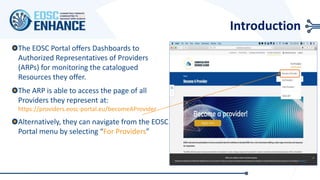
The EOSC Portal offers Dashboards to
Authorized Representatives of Providers
(ARPs) for monitoring the catalogued
Resources they offer.
The ARP is able to access the page of all
Providers they represent at:
https://providers.eosc-portal.eu/becomeAProvider
Alternatively, they can navigate from the EOSC
Portal menu by selecting “For Providers”
EOSC Provider Dashboard – Status of Resources
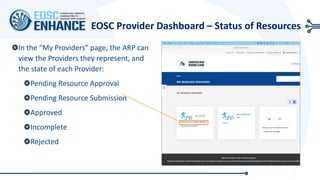
In the “My Providers” page, the ARP can
view the Providers they represent, and
the state of each Provider:
Pending Resource Approval
Pending Resource Submission
Approved
Incomplete
Rejected
Pending resource template submission
MY RESOURCE PROVIDERS
+ Resource Template
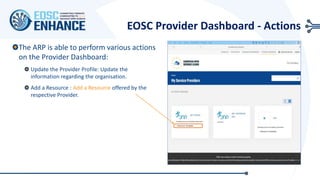
EOSC Provider Dashboard - Actions
The ARP is able to perform various actions
on the Provider Dashboard:
Update the Provider Profile: Update the
information regarding the organisation.
Add a Resource : Add a Resource offered by the
respective Provider.
Pending resource template submission
+ Resource Template
+ Resource Template
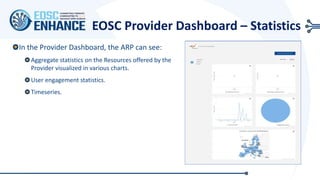
EOSC Provider Dashboard – Statistics
In the Provider Dashboard, the ARP can see:
Aggregate statistics on the Resources offered by the
Provider visualized in various charts.
User engagement statistics.
Timeseries.
ADD NEW RESOURCE
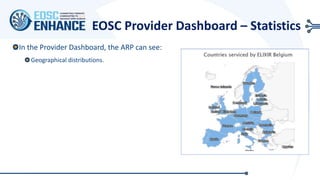
EOSC Provider Dashboard – Statistics
In the Provider Dashboard, the ARP can see:
Geographical distributions.
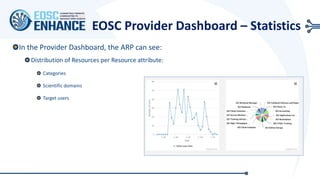
EOSC Provider Dashboard – Statistics
In the Provider Dashboard, the ARP can see:
Distribution of Resources per Resource attribute:
Categories
Scientific domains
Target users
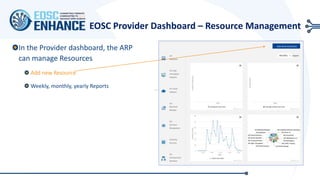
EOSC Provider Dashboard – Resource Management
In the Provider dashboard, the ARP
can manage Resources
Add new Resource
Weekly, monthly, yearly Reports
ADD NEW RESOURCE
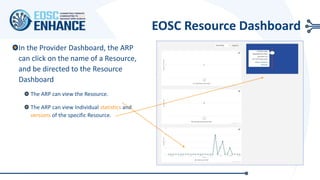
EOSC Resource Dashboard
In the Provider Dashboard, the ARP
can click on the name of a Resource,
and be directed to the Resource
Dashboard
The ARP can view the Resource.
The ARP can view Individual statistics and
versions of the specific Resource.
11/11/2020 10
Disclaimer
The information contained in this document is provided by the copyright holders "as is" and any express or
implied warranties, including, but not limited to, the implied warranties of merchantability and fitness for a
particular purpose are disclaimed. In no event shall the authors or the European Commission be liable for
any direct, indirect, incidental, special, exemplary, or consequential damages (including, but not limited to,
procurement of substitute goods or services; loss of use, data, or profits; or business interruption) however
caused and on any theory of liability, whether in contract, strict liability, or tort (including negligence or
otherwise) arising in any way out of the use of the information contained in this document, even if advised
of the possibility of such damage. The sole responsibility for the content of this publication lies with the
authors. It does not necessarily reflect the opinion of the European Commission. The European Commission
is not responsible for any use that may be made of the information contained therein.
Copyright
This work by JNP, NKUA and CYFRONET is licensed under a Creative Commons Attribution 4.0 International
License (http://creativecommons.org/licenses/by/4.0/).
https://www.eosc-portal.eu/
info@eosc-portal.eu
https://twitter.com/eoscportal
EOSC Provider Dashboard Tutorial

EOSC Provider Dashboard Tutorial

  • 1.
    EOSC Provider DashboardTutorial v1.00 – 30/09/2020 Dr. Jorge-A. Sanchez-P., Antonis Zervas, JNP, George Papastefanatos, NKUA
  • 2.
    Introduction The EOSC Portaloffers Dashboards to Authorized Representatives of Providers (ARPs) for monitoring the catalogued Resources they offer. The ARP is able to access the page of all Providers they represent at: https://providers.eosc-portal.eu/becomeAProvider Alternatively, they can navigate from the EOSC Portal menu by selecting “For Providers”
  • 3.
    EOSC Provider Dashboard– Status of Resources In the “My Providers” page, the ARP can view the Providers they represent, and the state of each Provider: Pending Resource Approval Pending Resource Submission Approved Incomplete Rejected Pending resource template submission Pending resource template submission MY RESOURCE PROVIDERS MY RESOURCE PROVIDERS + Resource Template
  • 4.
    EOSC Provider Dashboard- Actions The ARP is able to perform various actions on the Provider Dashboard: Update the Provider Profile: Update the information regarding the organisation. Add a Resource : Add a Resource offered by the respective Provider. Pending resource template submission Pending resource template submission + Resource Template + Resource Template
  • 5.
    EOSC Provider Dashboard– Statistics In the Provider Dashboard, the ARP can see: Aggregate statistics on the Resources offered by the Provider visualized in various charts. User engagement statistics. Timeseries. ADD NEW RESOURCE
  • 6.
    EOSC Provider Dashboard– Statistics In the Provider Dashboard, the ARP can see: Geographical distributions.
  • 7.
    EOSC Provider Dashboard– Statistics In the Provider Dashboard, the ARP can see: Distribution of Resources per Resource attribute: Categories Scientific domains Target users
  • 8.
    EOSC Provider Dashboard– Resource Management In the Provider dashboard, the ARP can manage Resources Add new Resource Weekly, monthly, yearly Reports ADD NEW RESOURCE
  • 9.
    EOSC Resource Dashboard Inthe Provider Dashboard, the ARP can click on the name of a Resource, and be directed to the Resource Dashboard The ARP can view the Resource. The ARP can view Individual statistics and versions of the specific Resource.
  • 10.
    11/11/2020 10 Disclaimer The informationcontained in this document is provided by the copyright holders "as is" and any express or implied warranties, including, but not limited to, the implied warranties of merchantability and fitness for a particular purpose are disclaimed. In no event shall the authors or the European Commission be liable for any direct, indirect, incidental, special, exemplary, or consequential damages (including, but not limited to, procurement of substitute goods or services; loss of use, data, or profits; or business interruption) however caused and on any theory of liability, whether in contract, strict liability, or tort (including negligence or otherwise) arising in any way out of the use of the information contained in this document, even if advised of the possibility of such damage. The sole responsibility for the content of this publication lies with the authors. It does not necessarily reflect the opinion of the European Commission. The European Commission is not responsible for any use that may be made of the information contained therein. Copyright This work by JNP, NKUA and CYFRONET is licensed under a Creative Commons Attribution 4.0 International License (http://creativecommons.org/licenses/by/4.0/).
  • 11.