POS Customer Credit
Payment Odoo App
Payment Management
Email: contact@browseinfo.in
Contact : 079-29700001
BrowseinfoSensing your needs
Introduction :
* By using this POS customer credit payment Odoo App you can easily
add/update credit of your customer.
* This credit can be used as Payment on time of POS payment which
special POS credit journal.
* Customer credit can easily shown on each customer on POS screen ,
So don't need to go back and check each customer's credit, When any
order made that customer's credit will shown in front of cashier.
* So easily choose whether wants to pay from Credit (partially or fully)
or pay from card/cash (normal payment method of odoo).
Introduction :
* This odoo credit payment app allow assigned customer credit facility
in Odoo Point Of Sale.
* This customer credit payment management Odoo module is complete
features of customer credit management system for POS which
manages the credit balance, pay orders and bill using credit amount,
buy credit.
* Accounting entries managed properly Whenever credit amount use for
payment or buy credit balance as well as when first time balance
allocated as credit.
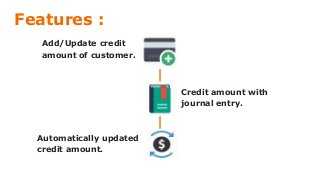
Features :
Add/Update credit
amount of customer.
Credit amount with
journal entry.
Automatically updated
credit amount.
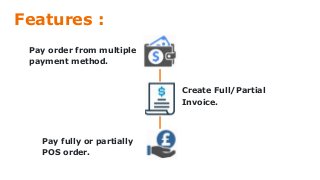
Features :
Pay order from multiple
payment method.
Create Full/Partial
Invoice.
Pay fully or partially
POS order.
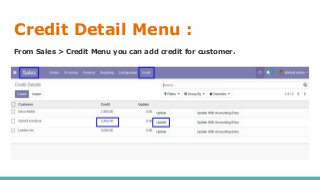
Credit Detail Menu :
From Sales > Credit Menu you can add credit for customer.
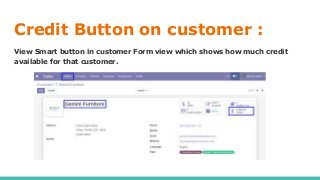
Credit Button on customer :
View Smart button in customer Form view which shows how much credit
available for that customer.
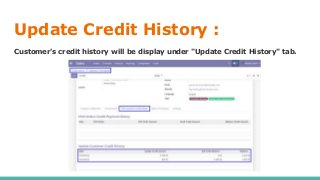
Update Credit History :
Customer's credit history will be display under "Update Credit History" tab.
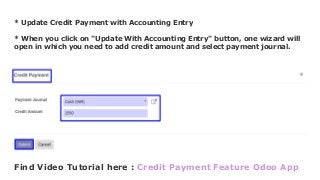
* Update Credit Payment with Accounting Entry
* When you click on "Update With Accounting Entry" button, one wizard will
open in which you need to add credit amount and select payment journal.
Find Video Tutorial here : Credit Payment Feature Odoo App
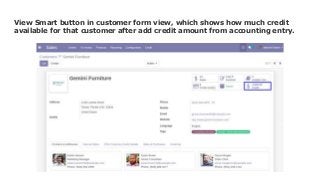
View Smart button in customer form view, which shows how much credit
available for that customer after add credit amount from accounting entry.
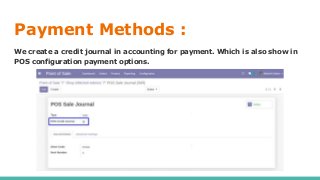
Payment Methods :
We create a credit journal in accounting for payment. Which is also show in
POS configuration payment options.
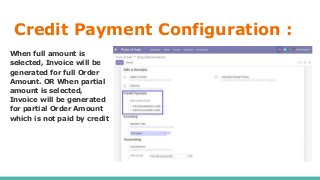
Credit Payment Configuration :
When full amount is
selected, Invoice will be
generated for full Order
Amount. OR When partial
amount is selected,
Invoice will be generated
for partial Order Amount
which is not paid by credit
Errors :
* No Customer Error: We can not use credit payment option if there is no
customer selected. It will be raise Error popup.
* Credit Availability : Customer should not pay more than its credit
availability and not more than order amount.
* No Product Error : if product is not selected then It will be raise Error
popup in POS.
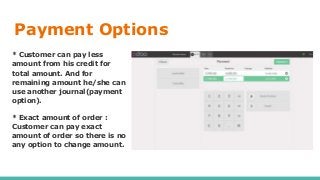
Payment Options
* Customer can pay less
amount from his credit for
total amount. And for
remaining amount he/she can
use another journal(payment
option).
* Exact amount of order :
Customer can pay exact
amount of order so there is no
any option to change amount.
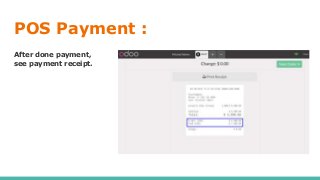
POS Payment :
After done payment,
see payment receipt.
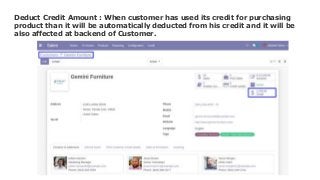
Deduct Credit Amount : When customer has used its credit for purchasing
product than it will be automatically deducted from his credit and it will be
also affected at backend of Customer.
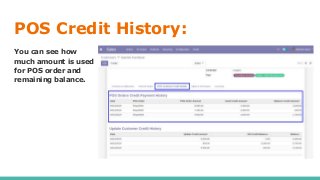
POS Credit History:
You can see how
much amount is used
for POS order and
remaining balance.
Conclusion :
* If you are using a POS and want to assigned Credit to
your customer then POS payment management odoo app
will be the good module for use.
* Spanish translation of this module is available.
* This Odoo POS credit payment module is Simple and
flexible in use.
* App Version : V8, V9, V10, V11, V12, V13
Other Similar Apps May You Like
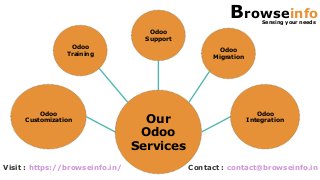
Our
Odoo
Services
Odoo
Customization
Odoo
Training
Odoo
Support
Odoo
Migration
Odoo
Integration
Visit : https://browseinfo.in/ Contact : contact@browseinfo.in
BrowseinfoSensing your needs
A-310, Siddhivinayak Tower,
Makarba,Ahmedabad, 380051,
Gujarat, India
079-29700001
contact@browseinfo.in
https://browseinfo.in/

Pos customer credit payment odoo app

  • 1.
    POS Customer Credit PaymentOdoo App Payment Management Email: contact@browseinfo.in Contact : 079-29700001 BrowseinfoSensing your needs
  • 2.
    Introduction : * Byusing this POS customer credit payment Odoo App you can easily add/update credit of your customer. * This credit can be used as Payment on time of POS payment which special POS credit journal. * Customer credit can easily shown on each customer on POS screen , So don't need to go back and check each customer's credit, When any order made that customer's credit will shown in front of cashier. * So easily choose whether wants to pay from Credit (partially or fully) or pay from card/cash (normal payment method of odoo).
  • 3.
    Introduction : * Thisodoo credit payment app allow assigned customer credit facility in Odoo Point Of Sale. * This customer credit payment management Odoo module is complete features of customer credit management system for POS which manages the credit balance, pay orders and bill using credit amount, buy credit. * Accounting entries managed properly Whenever credit amount use for payment or buy credit balance as well as when first time balance allocated as credit.
  • 4.
    Features : Add/Update credit amountof customer. Credit amount with journal entry. Automatically updated credit amount.
  • 5.
    Features : Pay orderfrom multiple payment method. Create Full/Partial Invoice. Pay fully or partially POS order.
  • 6.
    Credit Detail Menu: From Sales > Credit Menu you can add credit for customer.
  • 7.
    Credit Button oncustomer : View Smart button in customer Form view which shows how much credit available for that customer.
  • 8.
    Update Credit History: Customer's credit history will be display under "Update Credit History" tab.
  • 9.
    * Update CreditPayment with Accounting Entry * When you click on "Update With Accounting Entry" button, one wizard will open in which you need to add credit amount and select payment journal. Find Video Tutorial here : Credit Payment Feature Odoo App
  • 10.
    View Smart buttonin customer form view, which shows how much credit available for that customer after add credit amount from accounting entry.
  • 11.
    Payment Methods : Wecreate a credit journal in accounting for payment. Which is also show in POS configuration payment options.
  • 12.
    Credit Payment Configuration: When full amount is selected, Invoice will be generated for full Order Amount. OR When partial amount is selected, Invoice will be generated for partial Order Amount which is not paid by credit
  • 13.
    Errors : * NoCustomer Error: We can not use credit payment option if there is no customer selected. It will be raise Error popup. * Credit Availability : Customer should not pay more than its credit availability and not more than order amount. * No Product Error : if product is not selected then It will be raise Error popup in POS.
  • 14.
    Payment Options * Customercan pay less amount from his credit for total amount. And for remaining amount he/she can use another journal(payment option). * Exact amount of order : Customer can pay exact amount of order so there is no any option to change amount.
  • 15.
    POS Payment : Afterdone payment, see payment receipt.
  • 16.
    Deduct Credit Amount: When customer has used its credit for purchasing product than it will be automatically deducted from his credit and it will be also affected at backend of Customer.
  • 17.
    POS Credit History: Youcan see how much amount is used for POS order and remaining balance.
  • 18.
    Conclusion : * Ifyou are using a POS and want to assigned Credit to your customer then POS payment management odoo app will be the good module for use. * Spanish translation of this module is available. * This Odoo POS credit payment module is Simple and flexible in use. * App Version : V8, V9, V10, V11, V12, V13
  • 19.
    Other Similar AppsMay You Like
  • 20.
  • 21.
    BrowseinfoSensing your needs A-310,Siddhivinayak Tower, Makarba,Ahmedabad, 380051, Gujarat, India 079-29700001 contact@browseinfo.in https://browseinfo.in/