Global Dynamic Export
Excel Reports For All
Application In Odoo
BrowseinfoSensing your needs
Email : contact@browseinfo.in
Contact : 079-29700001
Address : A-310, Siddhivinayak Tower,
Makarba, Ahmedabad, 380051,
Gujarat, India.
Description :
If you are using any ERP system, In end of day
you will require reports of different sort, in order
to keep track of things.
We have specially for odoo this dynamic export
excel report in Odoo apps which can print
report in excel data in for all applications in
Odoo like sales, CRM, HR, Accounting.
you have to select object and field you want to
export you will get it in Odoo,e reports of
different sort, in order to keep track of things.
Features :
Dynamic Object report generation : We can use this
Global dynamic reports in Odoo module on any object of
odoo to print the data with selected field. We can also
configure the template of the Report.
Custom styles in reports : For a well formatted data you
have to give attractive style to the data so from this all in
one export excel dynamic report Odoo app you can pick
any style and color for your company details, header of
reports and the total field details.
Group By Selected Field : If you want to Group By some
data with specific fields, Now it's possible in excel reports.
You can Group By selected fields.
Features :
You can select submodel to print it's report : Print
Submodel with model means you can also able to print
one2many records inside the model, as you on image you
can select submodel on the configuration. i.e you can
able to print order line from sales and purchase. invoice
lines from invoice.
View well formatted large data : The core functionality
of this Global report in odoo module is to produce excel
report for any object of odoo. You can select the fields
you want to display on the excel report and get the data in
well formatted excel sheets.
Features :
Total of integer and float fields in footer of report : If
you want to display the total of integer and float fields
you can do it by configuring the template and can have
the total of fields with specific style.
Company and header details in report : If you want to
display the company details with specific style and color
you can show it by specifying the style for the header
and company details in the template.
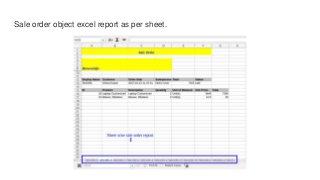
Record Per Sheet : If you want to display report as per
sheet wise, So you can also print report as per sheet.
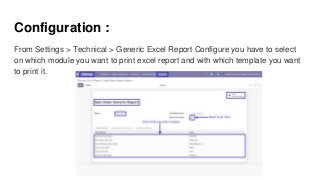
Configuration :
From Settings > Technical > Generic Excel Report Configure you have to select
on which module you want to print excel report and with which template you want
to print it.
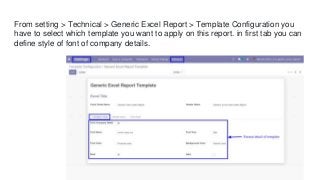
From setting > Technical > Generic Excel Report > Template Configuration you
have to select which template you want to apply on this report. in first tab you can
define style of font of company details.
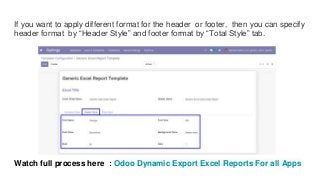
If you want to apply different format for the header or footer, then you can specify
header format by “Header Style” and footer format by “Total Style” tab.
Watch full process here : Odoo Dynamic Export Excel Reports For all Apps
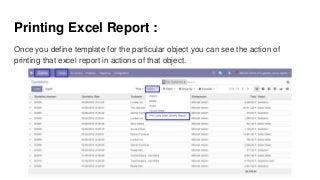
Printing Excel Report :
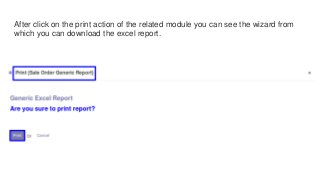
Once you define template for the particular object you can see the action of
printing that excel report in actions of that object.
After click on the print action of the related module you can see the wizard from
which you can download the excel report.
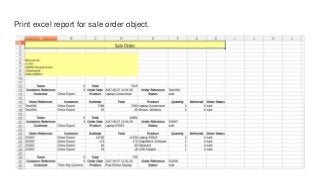
Print excel report for sale order object.
Sale order object excel report as per sheet.
Conclusion :
By using this Print dynamic report in
Odoo app you can print report of any
selected object and this features make the
module super useful.
If you can export report in customize
manner what else you need, This export
excel report in Odoo module turn out to
very resourceful.
This Module has many updates versions
like V8, V9, V10, V11, V12, V13.
Our
Odoo
Module
Contact on : contact@browseinfo.in
BrowseinfoSensing your needs
Odoo
Implementation
Odoo
Development
Odoo
Consultancy
Hire Odoo
Developer
OUR FEATURED SERVICES
Thanks For
Your Attention
Browseinfo
Sensing your needs
Email : contact@browseinfo.in
Contact : 079-29700001
Website : https://browseinfo.in/

Global dynamic export excel reports for all application in odoo

  • 1.
    Global Dynamic Export ExcelReports For All Application In Odoo BrowseinfoSensing your needs Email : contact@browseinfo.in Contact : 079-29700001 Address : A-310, Siddhivinayak Tower, Makarba, Ahmedabad, 380051, Gujarat, India.
  • 2.
    Description : If youare using any ERP system, In end of day you will require reports of different sort, in order to keep track of things. We have specially for odoo this dynamic export excel report in Odoo apps which can print report in excel data in for all applications in Odoo like sales, CRM, HR, Accounting. you have to select object and field you want to export you will get it in Odoo,e reports of different sort, in order to keep track of things.

  • 3.
    Features : Dynamic Objectreport generation : We can use this Global dynamic reports in Odoo module on any object of odoo to print the data with selected field. We can also configure the template of the Report. Custom styles in reports : For a well formatted data you have to give attractive style to the data so from this all in one export excel dynamic report Odoo app you can pick any style and color for your company details, header of reports and the total field details. Group By Selected Field : If you want to Group By some data with specific fields, Now it's possible in excel reports. You can Group By selected fields.
  • 4.
    Features : You canselect submodel to print it's report : Print Submodel with model means you can also able to print one2many records inside the model, as you on image you can select submodel on the configuration. i.e you can able to print order line from sales and purchase. invoice lines from invoice. View well formatted large data : The core functionality of this Global report in odoo module is to produce excel report for any object of odoo. You can select the fields you want to display on the excel report and get the data in well formatted excel sheets.
  • 5.
    Features : Total ofinteger and float fields in footer of report : If you want to display the total of integer and float fields you can do it by configuring the template and can have the total of fields with specific style. Company and header details in report : If you want to display the company details with specific style and color you can show it by specifying the style for the header and company details in the template. Record Per Sheet : If you want to display report as per sheet wise, So you can also print report as per sheet.
  • 6.
    Configuration : From Settings> Technical > Generic Excel Report Configure you have to select on which module you want to print excel report and with which template you want to print it.
  • 7.
    From setting >Technical > Generic Excel Report > Template Configuration you have to select which template you want to apply on this report. in first tab you can define style of font of company details.
  • 8.
    If you wantto apply different format for the header or footer, then you can specify header format by “Header Style” and footer format by “Total Style” tab. Watch full process here : Odoo Dynamic Export Excel Reports For all Apps
  • 9.
    Printing Excel Report: Once you define template for the particular object you can see the action of printing that excel report in actions of that object.
  • 10.
    After click onthe print action of the related module you can see the wizard from which you can download the excel report.
  • 11.
    Print excel reportfor sale order object.
  • 12.
    Sale order objectexcel report as per sheet.
  • 13.
    Conclusion : By usingthis Print dynamic report in Odoo app you can print report of any selected object and this features make the module super useful. If you can export report in customize manner what else you need, This export excel report in Odoo module turn out to very resourceful. This Module has many updates versions like V8, V9, V10, V11, V12, V13.
  • 14.
    Our Odoo Module Contact on :contact@browseinfo.in BrowseinfoSensing your needs
  • 15.
  • 16.
    Thanks For Your Attention Browseinfo Sensingyour needs Email : contact@browseinfo.in Contact : 079-29700001 Website : https://browseinfo.in/