socket.io
an unconventional tutorial
PART 1
Hello!
I am Andrea Tarquini
I am a full stack developer (mainly
working with MEAN stack) and an IT
(security) geek and fan.
Follow me at:
@h4t0n
h4t0n
Andrea Tarquini
blog.h4t0n.com
socket.io an unconventional tutorial -- PART 1
We’ll see a socket.io simple introduction:
1. how it works (hacker style)
○ taking a look at what happens within the browser
2. get started with socket.io
○ some references to good starting points for
beginners (but not followed by this tutorial)
3. how it works (engineer style)
○ writing some application examples from the official
documentation
Before starting… What is Socket.io ?
■ Essentially a fast real time engine
■ It enables real-time bidirectional event-
based communication
■ It works on every platform, browser, device.
■ Mainly used for
○ Instant messaging and chat
○ Document collaboration
○ Binary streaming (image/video/audio… )
from version 1.0
1.
How it works (hacker style)
Let’s start taking a look at what
happens within the browser
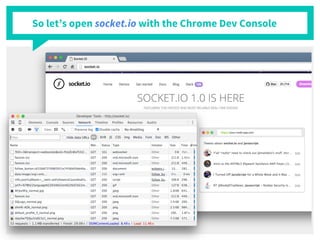
So let’s open socket.io with the Chrome Dev Console
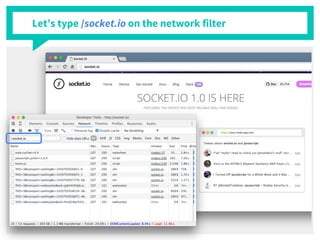
Let’s type /socket.io on the network filter
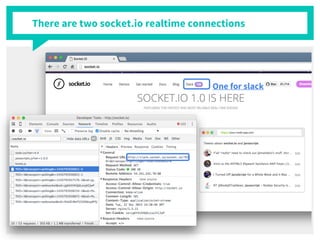
There are two socket.io realtime connections
One for slack
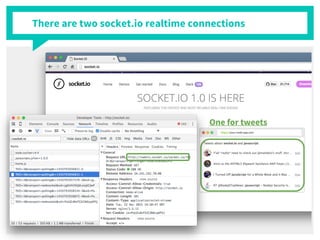
There are two socket.io realtime connections
One for tweets
There are some strange requests….
Both the socket.io connections
■ start with xhr-polling (long polling)
■ then switch to websocket transport (if supported)
[more info here]
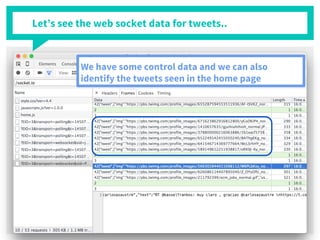
Let’s see the web socket data for tweets..
We have some control data and we can also
identify the tweets seen in the home page
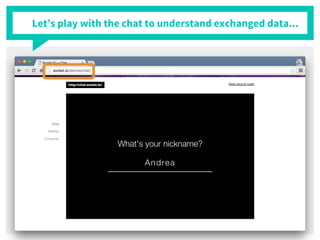
Let’s play with the chat to understand exchanged data...
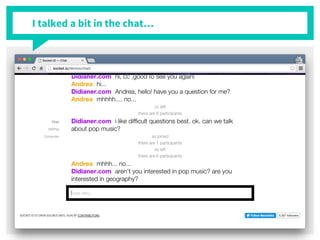
I talked a bit in the chat…
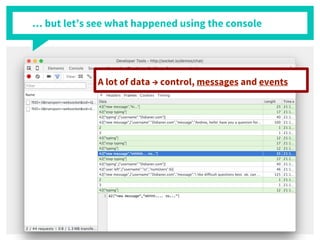
… but let’s see what happened using the console
A lot of data → control, messages and events
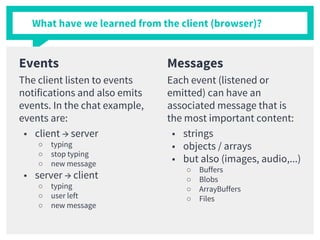
What have we learned from the client (browser)?
Events
The client listen to events
notifications and also emits
events. In the chat example,
events are:
■ client → server
○ typing
○ stop typing
○ new message
■ server → client
○ typing
○ user left
○ new message
Messages
Each event (listened or
emitted) can have an
associated message that is
the most important content:
■ strings
■ objects / arrays
■ but also (images, audio,...)
○ Buffers
○ Blobs
○ ArrayBuffers
○ Files
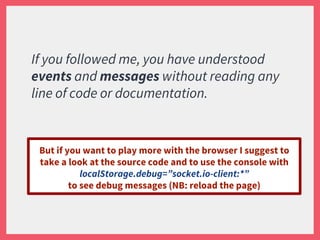
If you followed me, you have understood
events and messages without reading any
line of code or documentation.
But if you want to play more with the browser I suggest to
take a look at the source code and to use the console with
localStorage.debug=”socket.io-client:*”
to see debug messages (NB: reload the page)
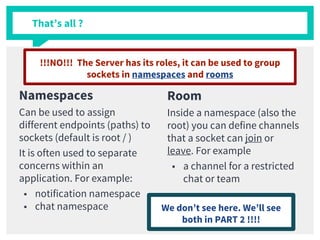
That’s all ?
Namespaces
Can be used to assign
different endpoints (paths) to
sockets (default is root / )
It is often used to separate
concerns within an
application. For example:
■ notification namespace
■ chat namespace
Room
Inside a namespace (also the
root) you can define channels
that a socket can join or
leave. For example
■ a channel for a restricted
chat or team
!!!NO!!! The Server has its roles, it can be used to group
sockets in namespaces and rooms
We don’t see here. We’ll see
both in PART 2 !!!!
2.
Get Started with socket.io
Let’s start with the chat application
at socket.io/get-started/chat/
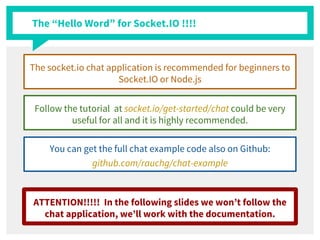
The “Hello Word” for Socket.IO !!!!
The socket.io chat application is recommended for beginners to
Socket.IO or Node.js
Follow the tutorial at socket.io/get-started/chat could be very
useful for all and it is highly recommended.
You can get the full chat example code also on Github:
github.com/rauchg/chat-example
ATTENTION!!!!! In the following slides we won’t follow the
chat application, we’ll work with the documentation.
3.
How it works (engineer style)
Let’s follow the official socket.io
documentation at socket.io/docs/
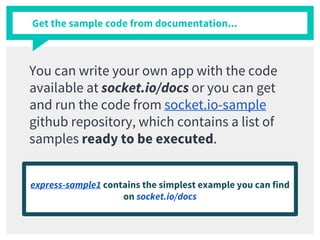
Get the sample code from documentation...
You can write your own app with the code
available at socket.io/docs or you can get
and run the code from socket.io-sample
github repository, which contains a list of
samples ready to be executed.
express-sample1 contains the simplest example you can find
on socket.io/docs
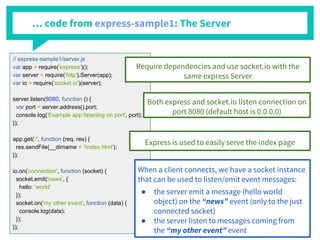
… code from express-sample1: The Server
// express-sample1/server.js
var app = require('express')();
var server = require('http').Server(app);
var io = require('socket.io')(server);
server.listen(8080, function () {
var port = server.address().port;
console.log('Example app listening on port', port);
});
app.get('/', function (req, res) {
res.sendFile(__dirname + '/index.html');
});
io.on('connection', function (socket) {
socket.emit('news', {
hello: 'world'
});
socket.on('my other event', function (data) {
console.log(data);
});
});
Require dependencies and use socket.io with the
same express Server
Both express and socket.io listen connection on
port 8080 (default host is 0.0.0.0)
Express is used to easily serve the index page
When a client connects, we have a socket instance
that can be used to listen/emit event messages:
● the server emit a message (hello world
object) on the “news” event (only to the just
connected socket)
● the server listen to messages coming from
the “my other event” event
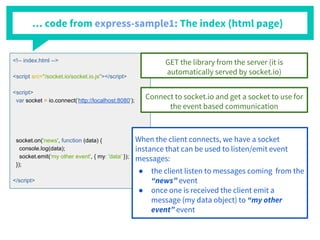
… code from express-sample1: The index (html page)
<!-- index.html -->
<script src="/socket.io/socket.io.js"></script>
<script>
var socket = io.connect('http://localhost:8080');
socket.on('news', function (data) {
console.log(data);
socket.emit('my other event', { my: 'data' });
});
</script>
GET the library from the server (it is
automatically served by socket.io)
Connect to socket.io and get a socket to use for
the event based communication
When the client connects, we have a socket
instance that can be used to listen/emit event
messages:
● the client listen to messages coming from the
“news” event
● once one is received the client emit a
message (my data object) to “my other
event” event
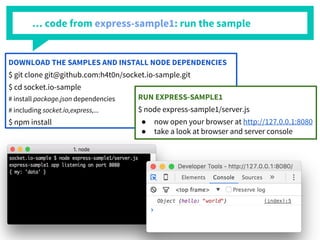
… code from express-sample1: run the sample
DOWNLOAD THE SAMPLES AND INSTALL NODE DEPENDENCIES
$ git clone git@github.com:h4t0n/socket.io-sample.git
$ cd socket.io-sample
# install package.json dependencies
# including socket.io,express,...
$ npm install
RUN EXPRESS-SAMPLE1
$ node express-sample1/server.js
● now open your browser at http://127.0.0.1:8080
● take a look at browser and server console
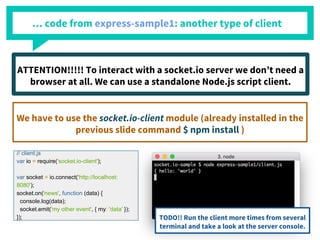
… code from express-sample1: another type of client
// client.js
var io = require('socket.io-client');
var socket = io.connect('http://localhost:
8080');
socket.on('news', function (data) {
console.log(data);
socket.emit('my other event', { my: 'data' });
});
ATTENTION!!!!! To interact with a socket.io server we don’t need a
browser at all. We can use a standalone Node.js script client.
We have to use the socket.io-client module (already installed in the
previous slide command $ npm install )
TODO!! Run the client more times from several
terminal and take a look at the server console.
From the example we have seen how to:
■ create a socket.io server
■ connect to the server by using a browser or a
standalone node app (script)
■ listen and emit event messages
○ from a single client to the server and vice versa
SO… VERY SIMPLE AND BASIC CONCEPTS...
.. .BUT THERE IS MUCH MORE !!!!!!!
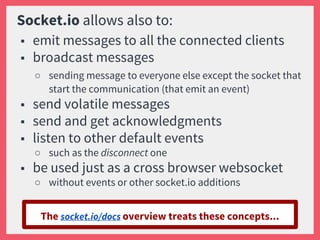
Socket.io allows also to:
■ emit messages to all the connected clients
■ broadcast messages
○ sending message to everyone else except the socket that
start the communication (that emit an event)
■ send volatile messages
■ send and get acknowledgments
■ listen to other default events
○ such as the disconnect one
■ be used just as a cross browser websocket
○ without events or other socket.io additions
The socket.io/docs overview treats these concepts...
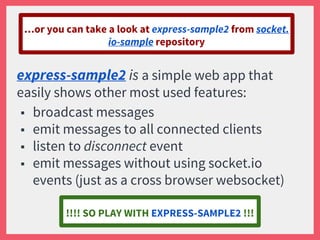
express-sample2 is a simple web app that
easily shows other most used features:
■ broadcast messages
■ emit messages to all connected clients
■ listen to disconnect event
■ emit messages without using socket.io
events (just as a cross browser websocket)
…or you can take a look at express-sample2 from socket.
io-sample repository
!!!! SO PLAY WITH EXPRESS-SAMPLE2 !!!
■ namespaces
■ rooms
■ middlewares
■ etcetera…
WE’LL SEE MORE FEATURES AND EXAMPLES IN THE
TUTORIAL PART 2
Thanks!
Any questions?
You can find me at:
@h4t0n
h4t0n
Andrea Tarquini
blog.h4t0n.com

Socket.io (part 1)

  • 1.
  • 2.
    Hello! I am AndreaTarquini I am a full stack developer (mainly working with MEAN stack) and an IT (security) geek and fan. Follow me at: @h4t0n h4t0n Andrea Tarquini blog.h4t0n.com
  • 3.
    socket.io an unconventionaltutorial -- PART 1 We’ll see a socket.io simple introduction: 1. how it works (hacker style) ○ taking a look at what happens within the browser 2. get started with socket.io ○ some references to good starting points for beginners (but not followed by this tutorial) 3. how it works (engineer style) ○ writing some application examples from the official documentation
  • 4.
    Before starting… Whatis Socket.io ? ■ Essentially a fast real time engine ■ It enables real-time bidirectional event- based communication ■ It works on every platform, browser, device. ■ Mainly used for ○ Instant messaging and chat ○ Document collaboration ○ Binary streaming (image/video/audio… ) from version 1.0
  • 5.
    1. How it works(hacker style) Let’s start taking a look at what happens within the browser
  • 6.
    So let’s opensocket.io with the Chrome Dev Console
  • 7.
    Let’s type /socket.ioon the network filter
  • 8.
    There are twosocket.io realtime connections One for slack
  • 9.
    There are twosocket.io realtime connections One for tweets
  • 10.
    There are somestrange requests…. Both the socket.io connections ■ start with xhr-polling (long polling) ■ then switch to websocket transport (if supported) [more info here]
  • 11.
    Let’s see theweb socket data for tweets.. We have some control data and we can also identify the tweets seen in the home page
  • 12.
    Let’s play withthe chat to understand exchanged data...
  • 13.
    I talked abit in the chat…
  • 14.
    … but let’ssee what happened using the console A lot of data → control, messages and events
  • 15.
    What have welearned from the client (browser)? Events The client listen to events notifications and also emits events. In the chat example, events are: ■ client → server ○ typing ○ stop typing ○ new message ■ server → client ○ typing ○ user left ○ new message Messages Each event (listened or emitted) can have an associated message that is the most important content: ■ strings ■ objects / arrays ■ but also (images, audio,...) ○ Buffers ○ Blobs ○ ArrayBuffers ○ Files
  • 16.
    If you followedme, you have understood events and messages without reading any line of code or documentation. But if you want to play more with the browser I suggest to take a look at the source code and to use the console with localStorage.debug=”socket.io-client:*” to see debug messages (NB: reload the page)
  • 17.
    That’s all ? Namespaces Canbe used to assign different endpoints (paths) to sockets (default is root / ) It is often used to separate concerns within an application. For example: ■ notification namespace ■ chat namespace Room Inside a namespace (also the root) you can define channels that a socket can join or leave. For example ■ a channel for a restricted chat or team !!!NO!!! The Server has its roles, it can be used to group sockets in namespaces and rooms We don’t see here. We’ll see both in PART 2 !!!!
  • 18.
    2. Get Started withsocket.io Let’s start with the chat application at socket.io/get-started/chat/
  • 19.
    The “Hello Word”for Socket.IO !!!! The socket.io chat application is recommended for beginners to Socket.IO or Node.js Follow the tutorial at socket.io/get-started/chat could be very useful for all and it is highly recommended. You can get the full chat example code also on Github: github.com/rauchg/chat-example ATTENTION!!!!! In the following slides we won’t follow the chat application, we’ll work with the documentation.
  • 20.
    3. How it works(engineer style) Let’s follow the official socket.io documentation at socket.io/docs/
  • 21.
    Get the samplecode from documentation... You can write your own app with the code available at socket.io/docs or you can get and run the code from socket.io-sample github repository, which contains a list of samples ready to be executed. express-sample1 contains the simplest example you can find on socket.io/docs
  • 22.
    … code fromexpress-sample1: The Server // express-sample1/server.js var app = require('express')(); var server = require('http').Server(app); var io = require('socket.io')(server); server.listen(8080, function () { var port = server.address().port; console.log('Example app listening on port', port); }); app.get('/', function (req, res) { res.sendFile(__dirname + '/index.html'); }); io.on('connection', function (socket) { socket.emit('news', { hello: 'world' }); socket.on('my other event', function (data) { console.log(data); }); }); Require dependencies and use socket.io with the same express Server Both express and socket.io listen connection on port 8080 (default host is 0.0.0.0) Express is used to easily serve the index page When a client connects, we have a socket instance that can be used to listen/emit event messages: ● the server emit a message (hello world object) on the “news” event (only to the just connected socket) ● the server listen to messages coming from the “my other event” event
  • 23.
    … code fromexpress-sample1: The index (html page) <!-- index.html --> <script src="/socket.io/socket.io.js"></script> <script> var socket = io.connect('http://localhost:8080'); socket.on('news', function (data) { console.log(data); socket.emit('my other event', { my: 'data' }); }); </script> GET the library from the server (it is automatically served by socket.io) Connect to socket.io and get a socket to use for the event based communication When the client connects, we have a socket instance that can be used to listen/emit event messages: ● the client listen to messages coming from the “news” event ● once one is received the client emit a message (my data object) to “my other event” event
  • 24.
    … code fromexpress-sample1: run the sample DOWNLOAD THE SAMPLES AND INSTALL NODE DEPENDENCIES $ git clone git@github.com:h4t0n/socket.io-sample.git $ cd socket.io-sample # install package.json dependencies # including socket.io,express,... $ npm install RUN EXPRESS-SAMPLE1 $ node express-sample1/server.js ● now open your browser at http://127.0.0.1:8080 ● take a look at browser and server console
  • 25.
    … code fromexpress-sample1: another type of client // client.js var io = require('socket.io-client'); var socket = io.connect('http://localhost: 8080'); socket.on('news', function (data) { console.log(data); socket.emit('my other event', { my: 'data' }); }); ATTENTION!!!!! To interact with a socket.io server we don’t need a browser at all. We can use a standalone Node.js script client. We have to use the socket.io-client module (already installed in the previous slide command $ npm install ) TODO!! Run the client more times from several terminal and take a look at the server console.
  • 26.
    From the examplewe have seen how to: ■ create a socket.io server ■ connect to the server by using a browser or a standalone node app (script) ■ listen and emit event messages ○ from a single client to the server and vice versa SO… VERY SIMPLE AND BASIC CONCEPTS... .. .BUT THERE IS MUCH MORE !!!!!!!
  • 27.
    Socket.io allows alsoto: ■ emit messages to all the connected clients ■ broadcast messages ○ sending message to everyone else except the socket that start the communication (that emit an event) ■ send volatile messages ■ send and get acknowledgments ■ listen to other default events ○ such as the disconnect one ■ be used just as a cross browser websocket ○ without events or other socket.io additions The socket.io/docs overview treats these concepts...
  • 28.
    express-sample2 is asimple web app that easily shows other most used features: ■ broadcast messages ■ emit messages to all connected clients ■ listen to disconnect event ■ emit messages without using socket.io events (just as a cross browser websocket) …or you can take a look at express-sample2 from socket. io-sample repository !!!! SO PLAY WITH EXPRESS-SAMPLE2 !!!
  • 29.
    ■ namespaces ■ rooms ■middlewares ■ etcetera… WE’LL SEE MORE FEATURES AND EXAMPLES IN THE TUTORIAL PART 2
  • 30.
    Thanks! Any questions? You canfind me at: @h4t0n h4t0n Andrea Tarquini blog.h4t0n.com