How to unlockan iPhone with iphone unlock card and software
First, if you wan't to unlock your iphone, and you don't have the iphone unlock card & software. Your can order form iPhone 4S Unlock
SIM Card with Unlock Software & Activation Code. The package includes an iphone 4s unlock card, a unlock software activation code,
and you can download the activation software form here.
This unlock card software compatible and interchangeable with both GSM and CDMA iPhone 4S. Support most network carriers in many
countries, include but not limit to AT&T, Verizon, Sprint, SoftBank, KDDI(AU), and more. Compatible with iOS 6.1.3 6.1 6.0 5.x
with/without jailbreak (No jailbreak required).
How to unlock your iPhone with the unlocking software:
software:
Insert the sim card from your new carrier with the iphone unlock card into your iphone.
Download the free iphone unlock software patch.
Unzip the file. Run iPhone unlock patch, use the data cable to connect your iPhone with your PC, make sure you've installed iTunes on
your PC.
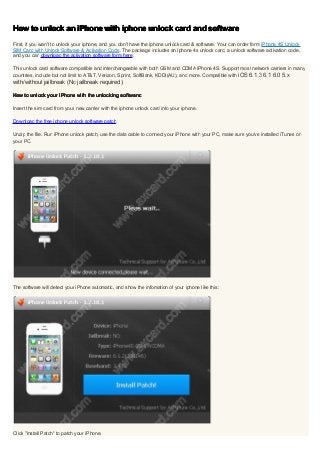
The software will detect your iPhone automatic, and show the infomation of your iphone like this:
Click "Install Patch" to patch your iPhone.
2.
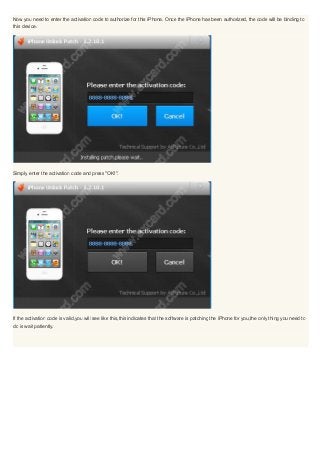
Now you needto enter the activation code to authorize for this iPhone. Once the iPhone has been authorized, the code will be binding to
this device.
Simply enter the activation code and press "OK!".
If the activation code is valid,you will see like this,this indicates that the software is patching the iPhone for you,the only thing you need to
do is wait patiently.
3.
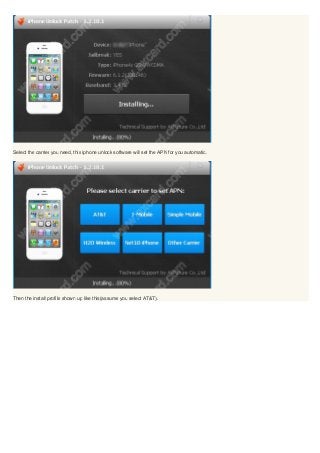
Select the carrieryou need, this iphone unlock software will set the APN for you automatic.
Then the install profile shown up like this(assume you select AT&T).
4.
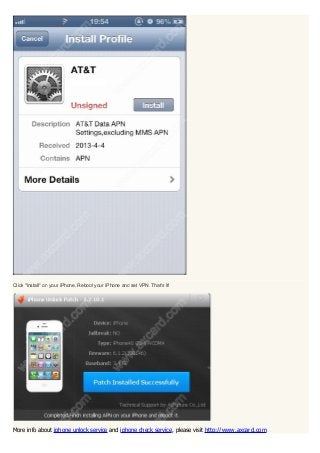
Click "Install" onyour iPhone. Reboot your iPhone and set VPN. That's it!
More info about iphone unlock service and iphone check service, please visit http://www.axcard.com


![Vibe Coding vs. Spec-Driven Development [Free Meetup]](https://cdn.slidesharecdn.com/ss_thumbnails/vibecodingvsspecdrivendevelopment-251209105622-43f455e7-thumbnail.jpg?width=640&height=640&fit=bounds)


