Platform Overview and Architecture 101
Salim Adamon, CRM Consultant & Solution Architect, MVP
Salim Adamon
▪ Independent CRM Consultant & Solution Architect
▪ 10+ CRM Deployments
▪ CRM Blogger @ http://salimadamoncrm.com
▪ Microsoft User Group regular speaker (Ottawa, Montreal, Online)
▪ Microsoft Dynamics CRM MVP
Presentation Plan
▪ Platform Overview
▪ What is CRM? What is XRM?
▪ Demonstration: System views, Configuration
▪ CRM Solution Architecture
▪ The Architect’s role
▪ The Architect’s tools
▪ Design Considerations
▪ Q & A
Platform Overview
What is CRM?
▪ Customer Relationship Management
▪ Microsoft Dynamics CRM
▪ Account & Contact Management in a context
▪ Default Modules:
▪ Service (case, incident management)
▪ Sales (lead, opportunity, products, invoices)
▪ Marketing (activities, emails, campaigns)
▪ COTS product
▪ Cloud (Office 365 or Private)
▪ On Premise (local installation)
What is xRM?
▪ Represents extending an application on the CRM platform
▪ ‘x’ is a variable that means ‘any’
▪ Example: Citizen RM, Student RM, Dealers RM, etc.
▪ Also referred to as “Extended CRM”
▪ Not a COTS product
▪ “One Platform: Many Applications”
What’s new in CRM 2015 ?
▪ Hierarchy visualization
▪ Search across multiple record types
▪ Business Process improvements
▪ Create custom help for users
▪ Sales Product Taxonomy
▪ CRM Online Administration experience
▪ Lots of additional new features for developers
The CRM Solution Architect
What is the CRM Architect’s role?
▪ Subject Matter Expertise
▪ Deep knowledge of ALL ASPECTS of the platform
▪ Provide guidance and best solution design
▪ Troubleshoot unexpected issues
▪ Provide long term vision and strategy for solution
▪ Speak both “business” and “technical” languages
What is the CRM Architect’s role?
▪ Delivery Methodology
▪ Project implementation methodology (Agile, Waterfalls...)
▪ Delivery Modules Management
▪ CRM Solution evolution framework
▪ Configuration, Dev, QA, Prod environments
▪ Deployment model
▪ Tool Box
▪ Configuration tools
▪ Development tools
▪ Debugging tools
▪ Accelerators
What is the CRM Architect’s role?
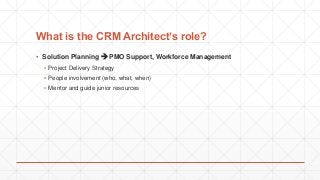
▪ Solution Planning  PMO Support, Workforce Management
▪ Project Delivery Strategy
▪ People involvement (who, what, when)
▪ Mentor and guide junior resources
The Architect’s Tools
CRM Architect Tools
▪ Knowledge is POWER
▪ Learning resources
▪ Online Resources
▪ Microsoft Community Blogs
▪ Training, User Groups Conferences
▪ Practice – Use trial organizations
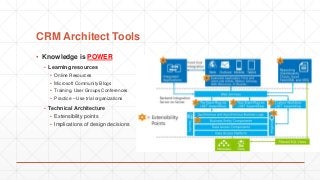
▪ Technical Architecture
▪ Extensibility points
▪ Implications of design decisions
CRM Architect Tools
▪ Knowledge is POWER
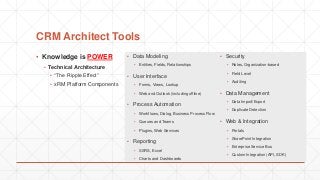
▪ Technical Architecture
▪ “The Ripple Effect”
▪ xRM Platform Components
▪ Data Modeling
▪ Entities, Fields, Relationships
▪ User Interface
▪ Forms, Views, Lookup
▪ Web and Outlook (including offline)
▪ Process Automation
▪ Workflows, Dialog, Business Process Flow
▪ Queues and Teams
▪ Plugins, Web Services
▪ Reporting
▪ SSRS, Excel
▪ Charts and Dashboards
▪ Security
▪ Roles, Organization-based
▪ Field Level
▪ Auditing
▪ Data Management
▪ Data Import/Export
▪ Duplicate Detection
▪ Web & Integration
▪ Portals
▪ SharePoint Integration
▪ Enterprise Service Bus
▪ Custom Integration (API, SDK)
Typical Design Considerations
▪ Using the appropriate functionality
1. System Configuration
2. System Customization
Typical Design Considerations
▪ Automation Design – Client Side
▪ Form Scripting & Business Rules
▪ Ribbon customizations
▪ Sitemap customizations
▪ Business process flow
▪ Custom UI development
▪ Automation Design – Server Side
▪ Workflows, Custom Workflow Activities
▪ Plugins
▪ CRM Web Services (REST, ODATA)
▪ SQL Server
▪ SSRS Reports
Typical Design Considerations
▪ CRM Online vs CRM On Premise
▪ Different integration consideration
▪ Different security considerations
▪ Scalability control
▪ CRM Solution Components
▪ Consider ease of deployment
▪ Build automated deployment tools
▪ Limit the number of external elements in your solution
Typical Design Considerations
▪ Data Integration & Migration
▪ Dynamics CRM provide SQL views to READ CRM Data
▪ Create, Update, Delete must be done through Web Service
▪ Understand CRM Web Service limitations
▪ Retrieve Multiple Record Limit
▪ Using Third Party Software for Data Integration and Migration Jobs
▪ SSIS + CRM Add On (Kingsway Soft, others)
▪ Scribe Soft, Instance Adapter etc.
▪ Decision making for data integration and migration (technology, performance, immediacy
etc.)
Typical Design Considerations
▪ Buy vs Build?
▪ Lots of CRM Solution Add-Ons :
▪ Portals (ADX Studio, Parature)
▪ Mobility
▪ Project Management, PSA, Field Services Management
▪ Can you build it internally?
▪ Should you build it or buy an existing add-on?
Typical Design Considerations
▪ Infrastructure Design
▪ CRM Access points
▪ HTTP vs HTTPS
▪ Active Directory, Claim Based Auth, Internet Facing Deployment (IFD)
▪ Portal(s)
▪ Solution Sizing
▪ Single vs Multiple Server Infrastructure
▪ SQL Server features
▪ SQL Indexes
Salim Adamon
salim.adamon@outlook.com
http://salimadamoncrm.com
Q&A

Dynamics CRM - Solution Architecture

  • 1.
    Platform Overview andArchitecture 101 Salim Adamon, CRM Consultant & Solution Architect, MVP
  • 2.
    Salim Adamon ▪ IndependentCRM Consultant & Solution Architect ▪ 10+ CRM Deployments ▪ CRM Blogger @ http://salimadamoncrm.com ▪ Microsoft User Group regular speaker (Ottawa, Montreal, Online) ▪ Microsoft Dynamics CRM MVP
  • 3.
    Presentation Plan ▪ PlatformOverview ▪ What is CRM? What is XRM? ▪ Demonstration: System views, Configuration ▪ CRM Solution Architecture ▪ The Architect’s role ▪ The Architect’s tools ▪ Design Considerations ▪ Q & A
  • 4.
  • 5.
    What is CRM? ▪Customer Relationship Management ▪ Microsoft Dynamics CRM ▪ Account & Contact Management in a context ▪ Default Modules: ▪ Service (case, incident management) ▪ Sales (lead, opportunity, products, invoices) ▪ Marketing (activities, emails, campaigns) ▪ COTS product ▪ Cloud (Office 365 or Private) ▪ On Premise (local installation)
  • 6.
    What is xRM? ▪Represents extending an application on the CRM platform ▪ ‘x’ is a variable that means ‘any’ ▪ Example: Citizen RM, Student RM, Dealers RM, etc. ▪ Also referred to as “Extended CRM” ▪ Not a COTS product ▪ “One Platform: Many Applications”
  • 7.
    What’s new inCRM 2015 ? ▪ Hierarchy visualization ▪ Search across multiple record types ▪ Business Process improvements ▪ Create custom help for users ▪ Sales Product Taxonomy ▪ CRM Online Administration experience ▪ Lots of additional new features for developers
  • 8.
  • 9.
    What is theCRM Architect’s role? ▪ Subject Matter Expertise ▪ Deep knowledge of ALL ASPECTS of the platform ▪ Provide guidance and best solution design ▪ Troubleshoot unexpected issues ▪ Provide long term vision and strategy for solution ▪ Speak both “business” and “technical” languages
  • 10.
    What is theCRM Architect’s role? ▪ Delivery Methodology ▪ Project implementation methodology (Agile, Waterfalls...) ▪ Delivery Modules Management ▪ CRM Solution evolution framework ▪ Configuration, Dev, QA, Prod environments ▪ Deployment model ▪ Tool Box ▪ Configuration tools ▪ Development tools ▪ Debugging tools ▪ Accelerators
  • 11.
    What is theCRM Architect’s role? ▪ Solution Planning  PMO Support, Workforce Management ▪ Project Delivery Strategy ▪ People involvement (who, what, when) ▪ Mentor and guide junior resources
  • 12.
  • 13.
    CRM Architect Tools ▪Knowledge is POWER ▪ Learning resources ▪ Online Resources ▪ Microsoft Community Blogs ▪ Training, User Groups Conferences ▪ Practice – Use trial organizations ▪ Technical Architecture ▪ Extensibility points ▪ Implications of design decisions
  • 14.
    CRM Architect Tools ▪Knowledge is POWER ▪ Technical Architecture ▪ “The Ripple Effect” ▪ xRM Platform Components ▪ Data Modeling ▪ Entities, Fields, Relationships ▪ User Interface ▪ Forms, Views, Lookup ▪ Web and Outlook (including offline) ▪ Process Automation ▪ Workflows, Dialog, Business Process Flow ▪ Queues and Teams ▪ Plugins, Web Services ▪ Reporting ▪ SSRS, Excel ▪ Charts and Dashboards ▪ Security ▪ Roles, Organization-based ▪ Field Level ▪ Auditing ▪ Data Management ▪ Data Import/Export ▪ Duplicate Detection ▪ Web & Integration ▪ Portals ▪ SharePoint Integration ▪ Enterprise Service Bus ▪ Custom Integration (API, SDK)
  • 15.
  • 16.
    Typical Design Considerations ▪Using the appropriate functionality 1. System Configuration 2. System Customization
  • 17.
    Typical Design Considerations ▪Automation Design – Client Side ▪ Form Scripting & Business Rules ▪ Ribbon customizations ▪ Sitemap customizations ▪ Business process flow ▪ Custom UI development ▪ Automation Design – Server Side ▪ Workflows, Custom Workflow Activities ▪ Plugins ▪ CRM Web Services (REST, ODATA) ▪ SQL Server ▪ SSRS Reports
  • 18.
    Typical Design Considerations ▪CRM Online vs CRM On Premise ▪ Different integration consideration ▪ Different security considerations ▪ Scalability control ▪ CRM Solution Components ▪ Consider ease of deployment ▪ Build automated deployment tools ▪ Limit the number of external elements in your solution
  • 19.
    Typical Design Considerations ▪Data Integration & Migration ▪ Dynamics CRM provide SQL views to READ CRM Data ▪ Create, Update, Delete must be done through Web Service ▪ Understand CRM Web Service limitations ▪ Retrieve Multiple Record Limit ▪ Using Third Party Software for Data Integration and Migration Jobs ▪ SSIS + CRM Add On (Kingsway Soft, others) ▪ Scribe Soft, Instance Adapter etc. ▪ Decision making for data integration and migration (technology, performance, immediacy etc.)
  • 20.
    Typical Design Considerations ▪Buy vs Build? ▪ Lots of CRM Solution Add-Ons : ▪ Portals (ADX Studio, Parature) ▪ Mobility ▪ Project Management, PSA, Field Services Management ▪ Can you build it internally? ▪ Should you build it or buy an existing add-on?
  • 21.
    Typical Design Considerations ▪Infrastructure Design ▪ CRM Access points ▪ HTTP vs HTTPS ▪ Active Directory, Claim Based Auth, Internet Facing Deployment (IFD) ▪ Portal(s) ▪ Solution Sizing ▪ Single vs Multiple Server Infrastructure ▪ SQL Server features ▪ SQL Indexes
  • 22.