
WCM Server Model (web content management)
•
3 likes•581 views

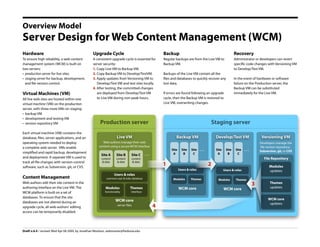
A model to show how web content management can be made reliable and flexible, using two servers. This generic model can be applied to many open source WCM tools, like Drupal, WordPress, Joomla, ExpressionEngine, etc.
Recommended

Recommended
More Related Content
What's hot
What's hot (20)
Similar to WCM Server Model (web content management)
Similar to WCM Server Model (web content management) (20)
Recently uploaded
Recently uploaded (20)
WCM Server Model (web content management)
- 1. Overview Model Server Design for Web Content Management (WCM) Hardware Upgrade Cycle Backup Recovery To ensure high reliability, a web content A consistent upgrade cycle is essential for Regular backups are from the Live VM to Administrator or developers can revert management system (WCM) is built on server security: Backup VM. specific code changes with Versioning VM two servers: 1. Copy Live VM to Backup VM. to Develop/Test VM. • production server for live sites 2. Copy Backup VM to Develop/TestVM. Backups of the Live VM contain all the • staging server for backup, development, 3. Apply updates from Versioning VM to files and databases to quickly recover any In the event of hardware or software and file version control. Develop/Test VM and test sites locally. lost data. failure on the Production server, the 4. After testing, the committed changes Backup VM can be substituted Virtual Machines (VM) are deployed from Develop/Test VM If errors are found following an upgrade immediately for the Live VM. to Live VM during non-peak hours. cycle, then the Backup VM is restored to All live web sites are hosted within one Live VM, overwriting changes. virtual machine (VM) on the production server, with three more VMs on staging: • backup VM • development and testing VM Production server Staging server • version repository VM Each virtual machine (VM) contains the Live VM Backup VM Develop/Test VM Versioning VM database, files, server applications, and an Web authors manage their web operating system needed to deploy Developers manage the content using a secure WCM interface file version repository: a complete web server. VMs enable Site . . . ... Site Site Site Site Site Subversion, git, or CVS simplified and rapid backup, development A B C A B C ... Site A Site B Site C and deployment. A separate VM is used to File Repository content content content track all file changes with version-control & data & data & data 1 2 Modules software, such as Subversion, git, or CVS. Users & roles Users & roles updates Users & roles Content Management common user & roles database Modules Themes Modules Themes Web authors edit their site content in the Themes 3 updates authoring interface on the Live VM. The Modules Themes WCM core WCM core functionality interface WCM platform is built on a set of databases. To ensure that the site WCM core WCM core databases are not altered during an updates 4 server files upgrade cycle, all web authors' editing access can be temporarily disabled. Draft v.4.4 / revised: Wed Apr 08 2009, by Jonathan Woolson, webmaster@fredonia.edu