TextFix
Text Editor and Processor
Copy text into TextFix → Modify the text →
Export to the internet and printers
Overview
•   Your Workspace
    -  Quickly and easily copy text into and
       out of TextFix
    -  Finger-tip access to undo and redo
    -  Easily change font size

•   Export your text
    -  Easily export your text to the internet
       and printers

•   Extract information from your text such as
    email, phone numbers, links, addresses,
    date/times and transit information

•   Use more than 90 build-in cleaning and
    processing options
Your Workspace
     •   Quickly and easily copy text into and out of
         TextFix


     •   Finger-tip access to undo and redo


     •   Easily change font size


     •   Save menu items as favourites
Quickly and easily copy text
                       into and out of TextFix
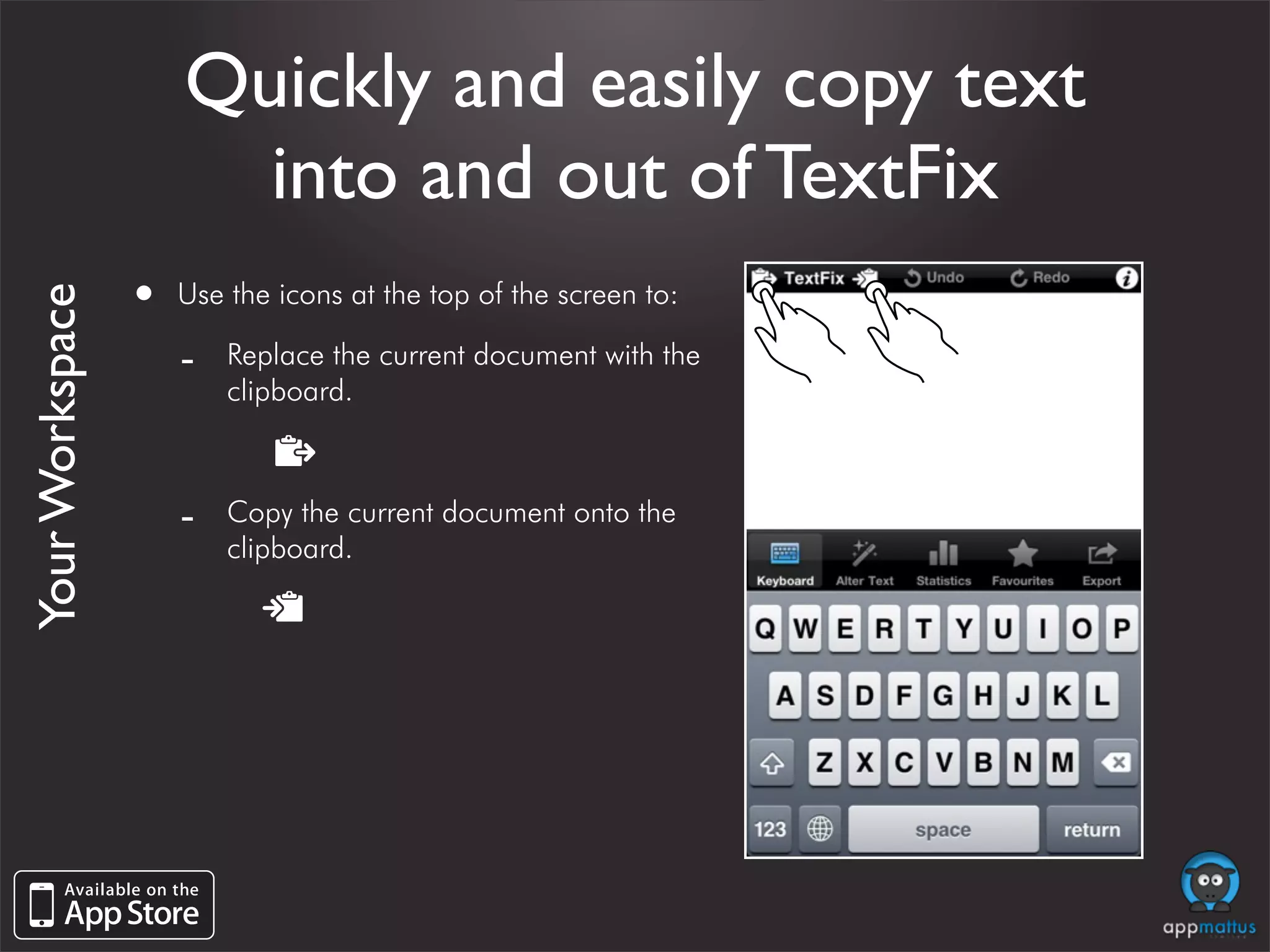
                 •   Use the icons at the top of the screen to:
Your Workspace


                     -   Replace the current document with the
                         clipboard.


                     -   Copy the current document onto the
                         clipboard.
Finger-tip access to
                                   undo and redo
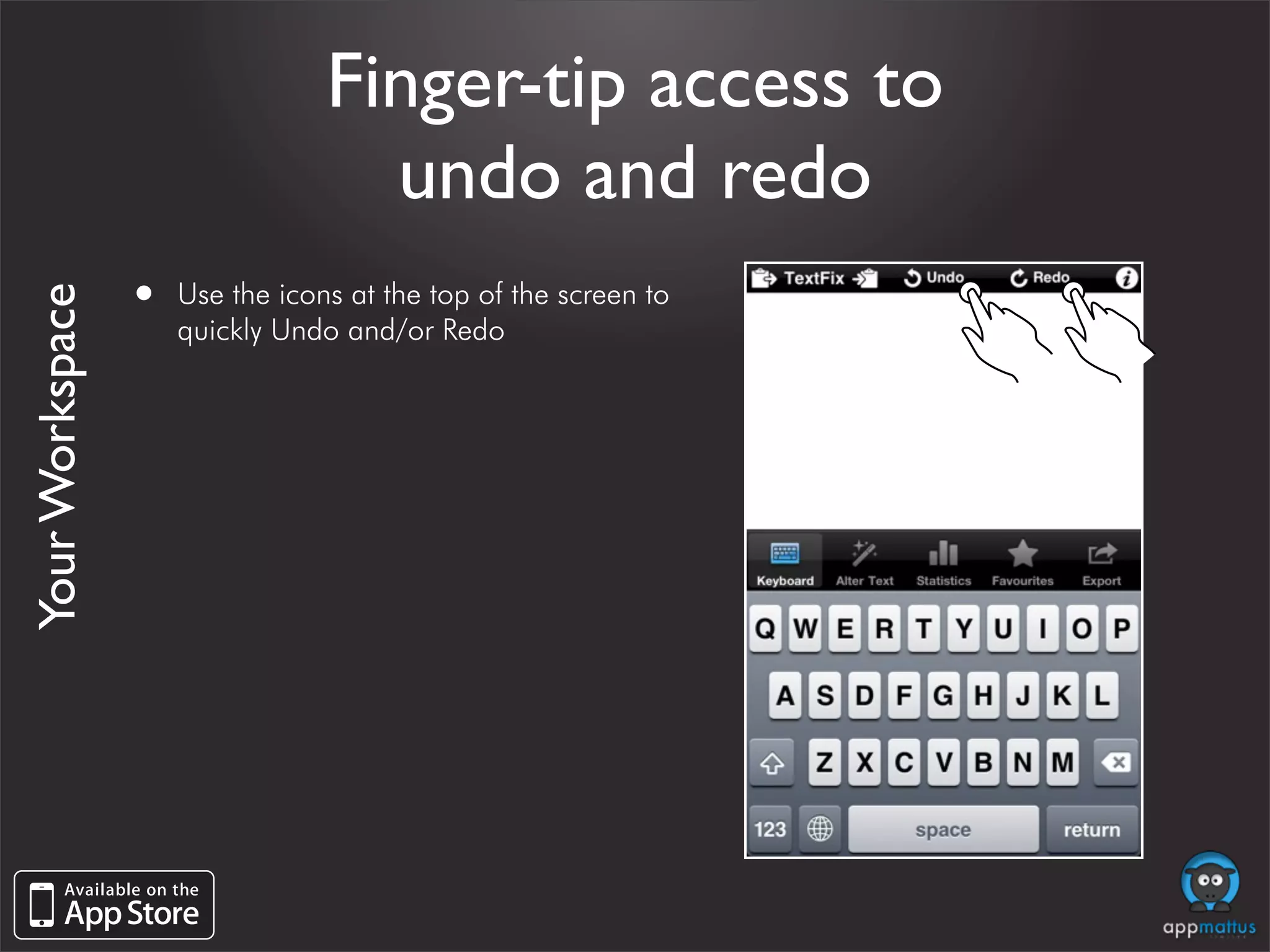
                 •   Use the icons at the top of the screen to
Your Workspace


                     quickly Undo and/or Redo
Finger-tip access to
                                  undo and redo
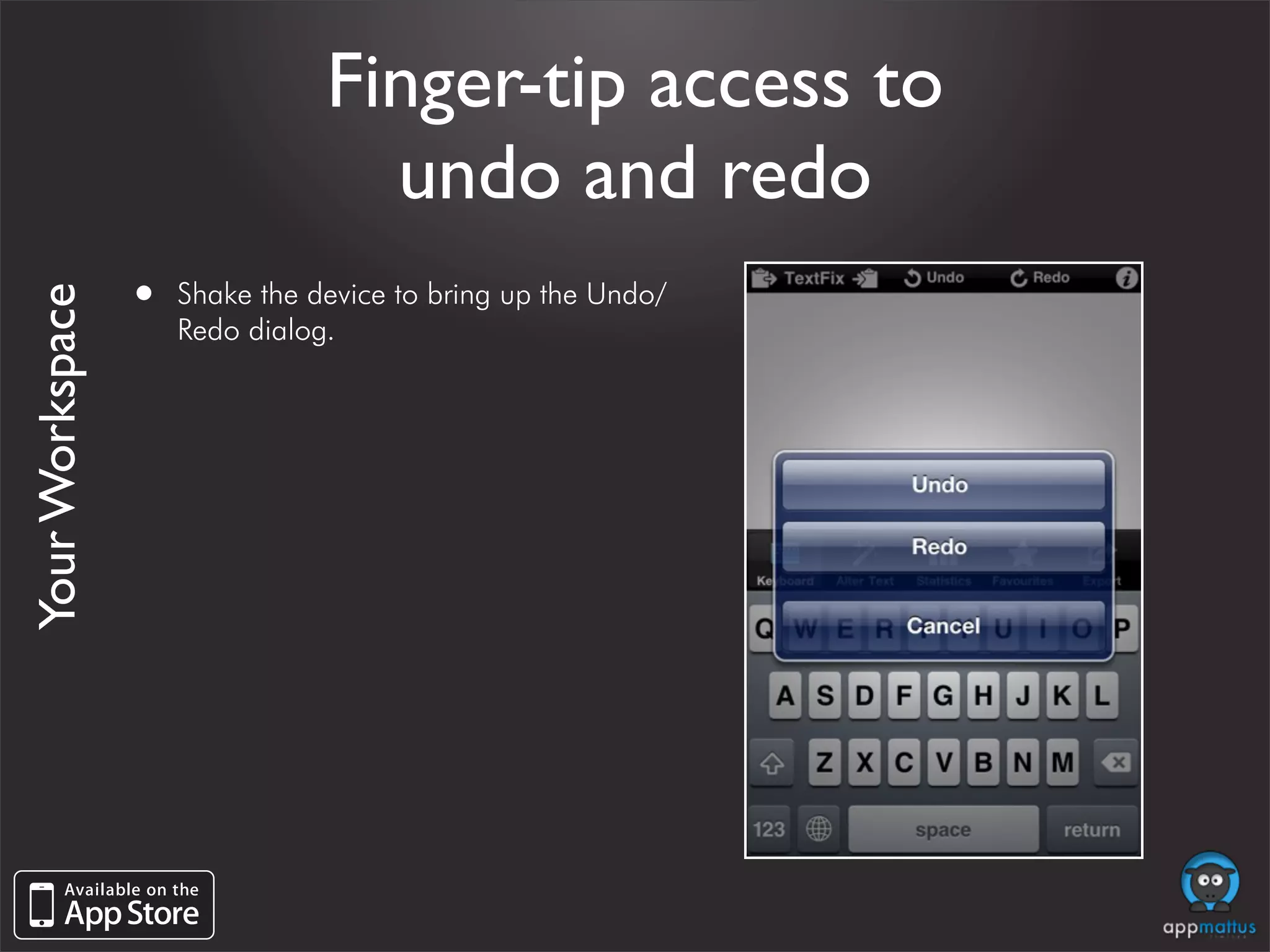
                 •   Shake the device to bring up the Undo/
Your Workspace


                     Redo dialog.
Easily change font size

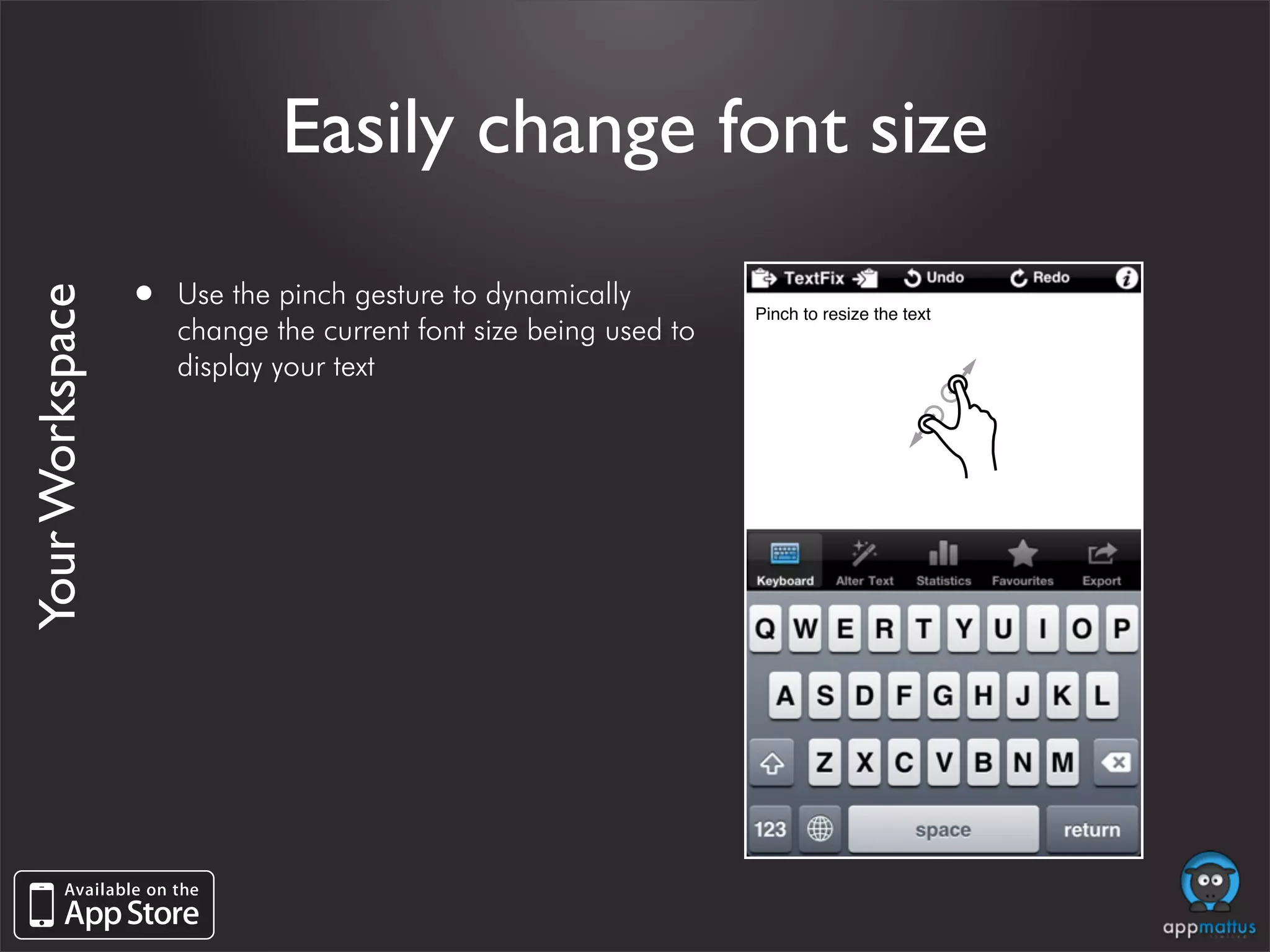
                 •   Use the pinch gesture to dynamically
Your Workspace


                                                                  Pinch to resize the text
                     change the current font size being used to
                     display your text
Save menu items as favourites

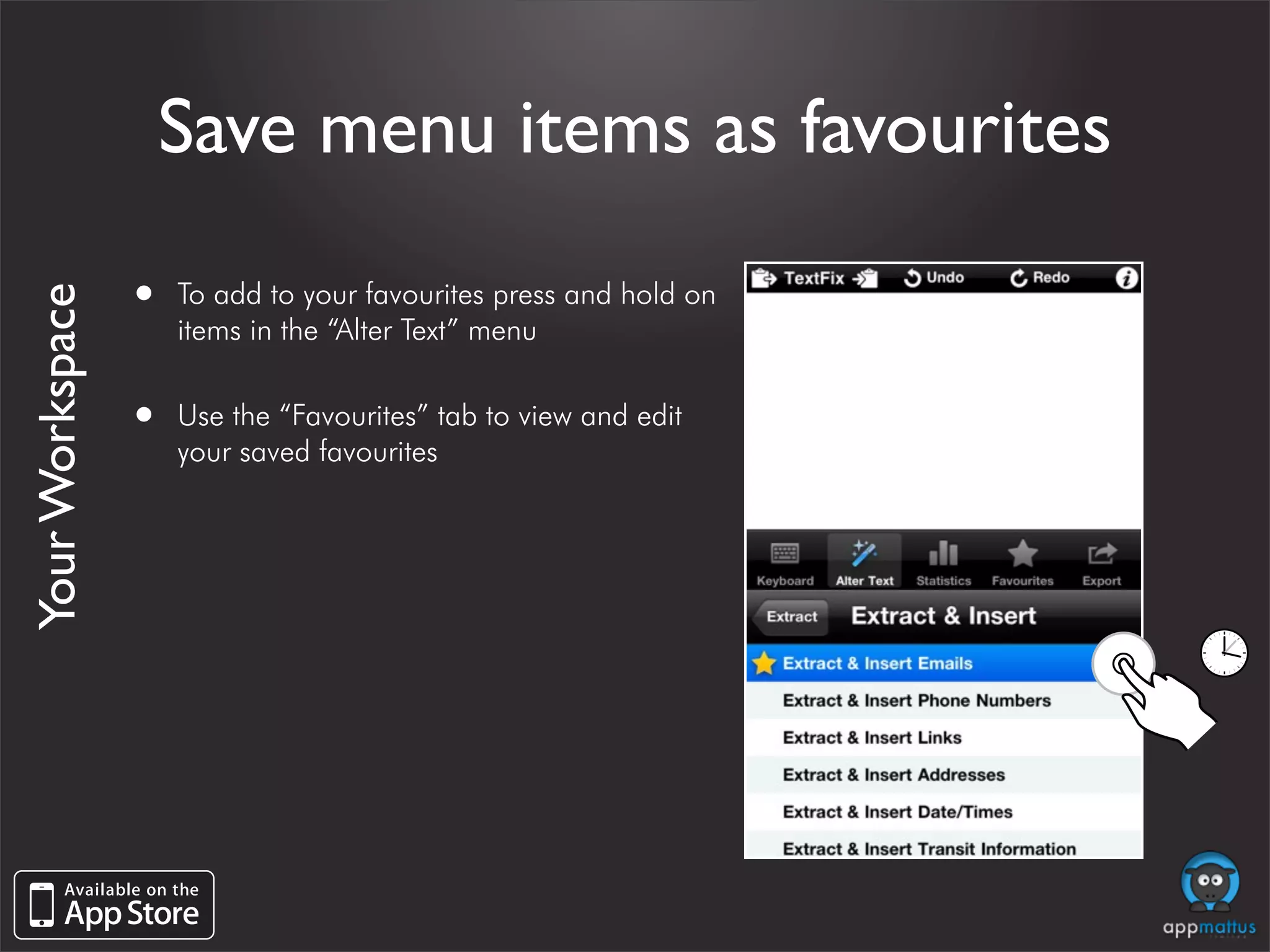
                 •   To add to your favourites press and hold on
Your Workspace


                     items in the “Alter Text” menu


                 •   Use the “Favourites” tab to view and edit
                     your saved favourites
Modify your text
      •   Easily access the cleaning and processing
          options


      •   Encryption & Hash Functions
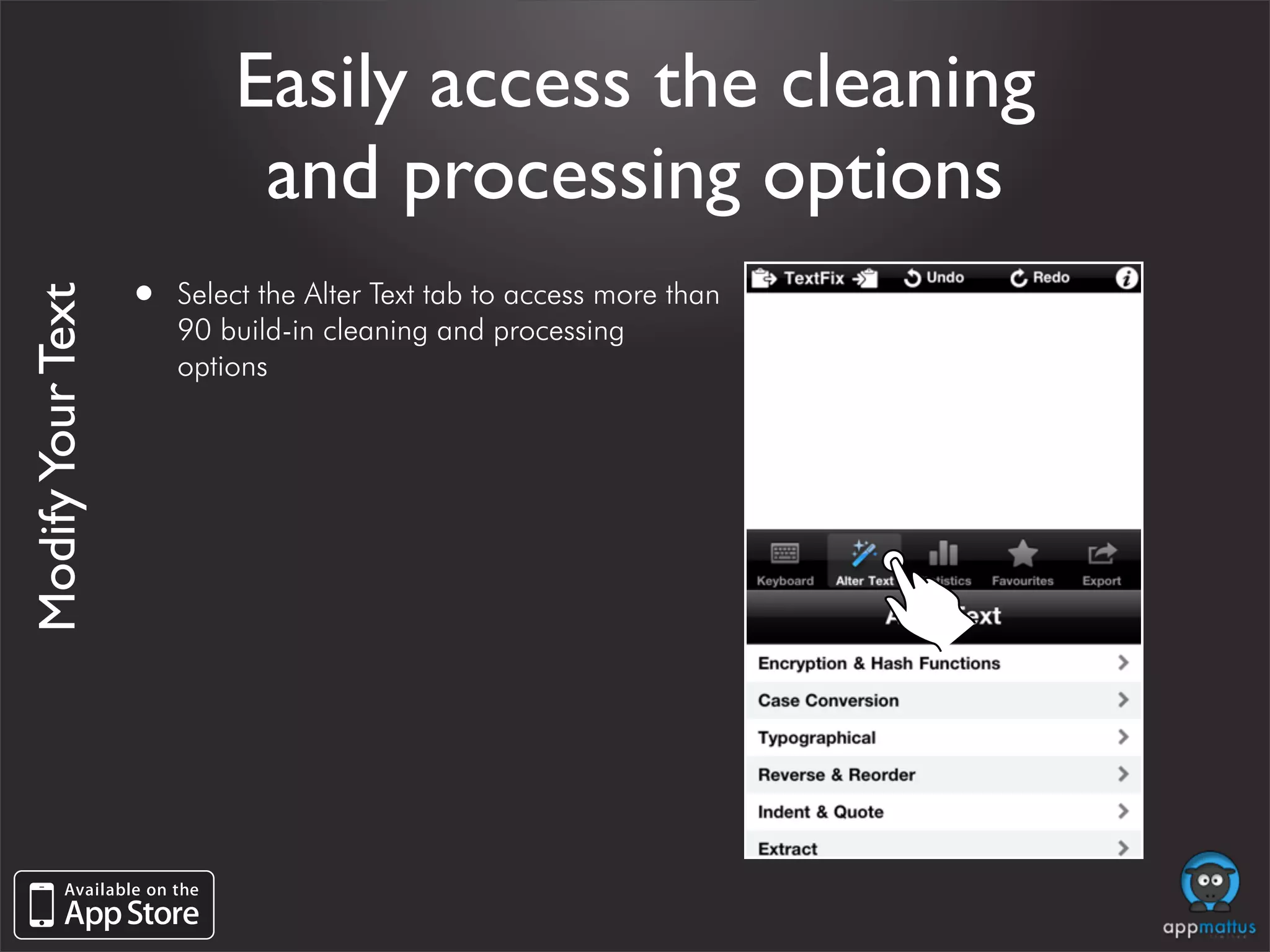
Easily access the cleaning
                            and processing options
                   •   Select the Alter Text tab to access more than
Modify Your Text


                       90 build-in cleaning and processing
                       options
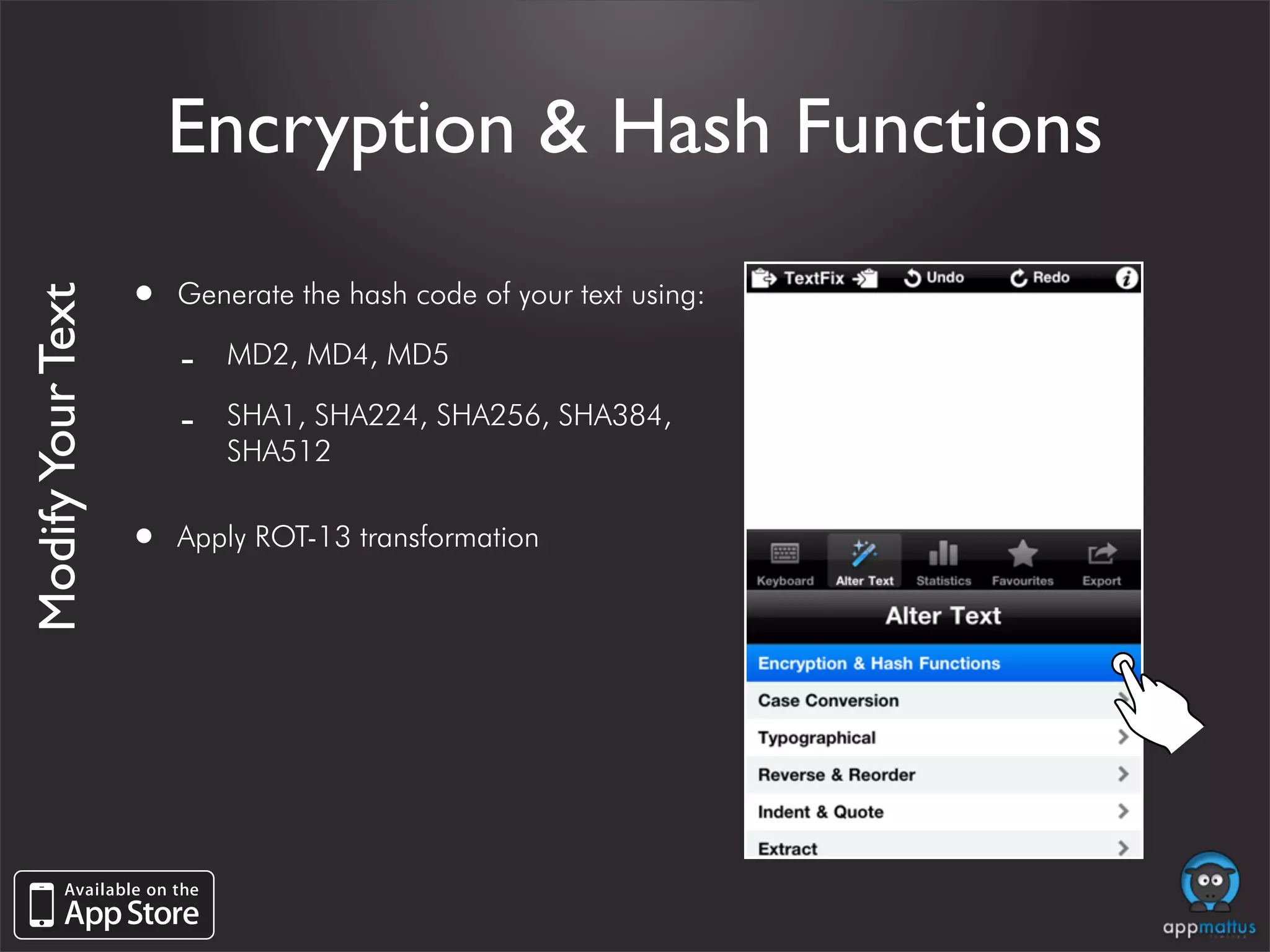
Encryption & Hash Functions

                   •   Generate the hash code of your text using:
Modify Your Text


                       -   MD2, MD4, MD5

                       -   SHA1, SHA224, SHA256, SHA384,
                           SHA512


                   •   Apply ROT-13 transformation
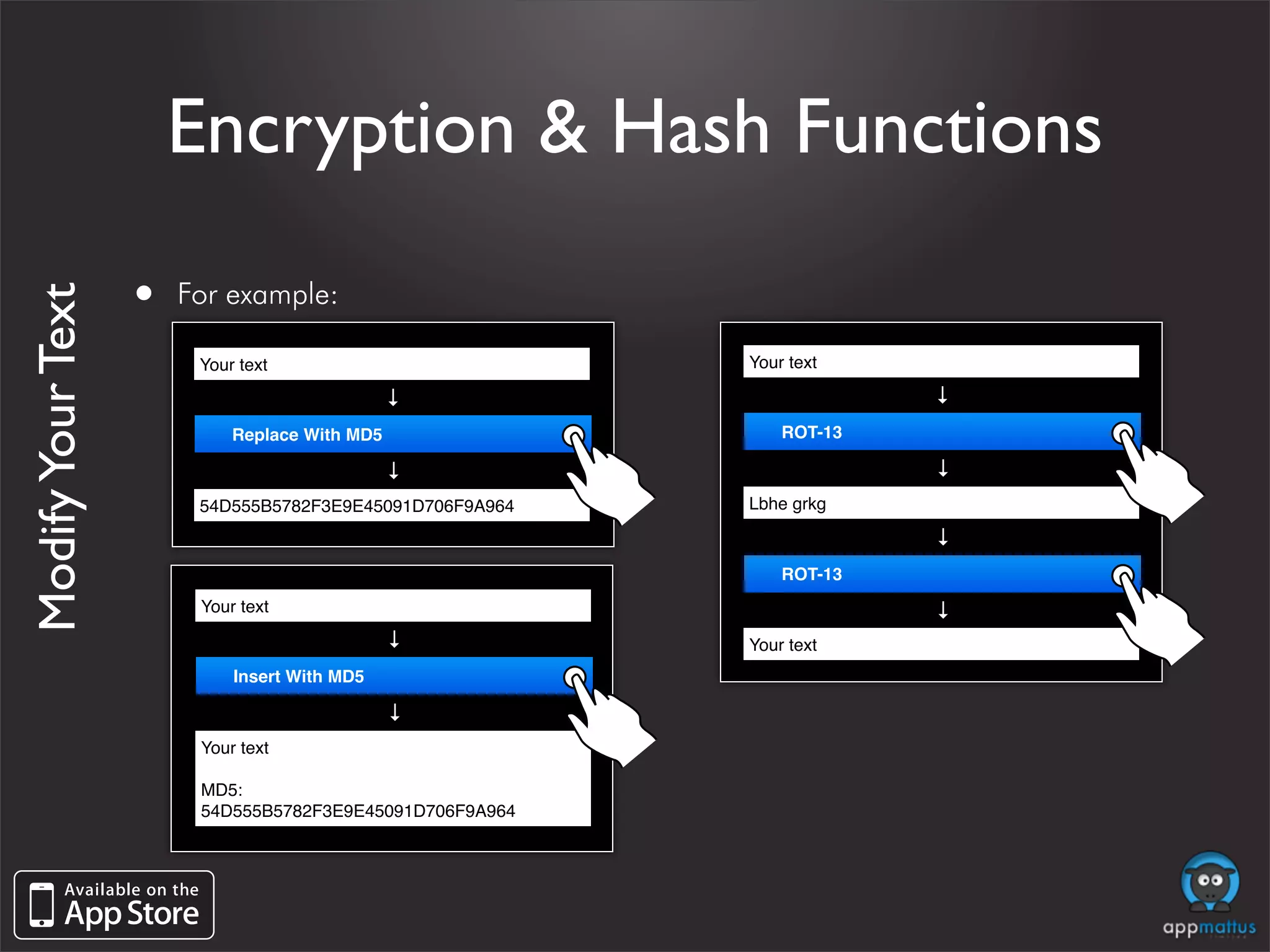
Encryption & Hash Functions

                   •   For example:
Modify Your Text


                        Your text                         Your text


                                                                       →
                                              →

                            Replace With MD5                  ROT-13


                                                                       →
                                              →


                        54D555B5782F3E9E45091D706F9A964   Lbhe grkg


                                                                       →
                                                              ROT-13


                                                                       →
                        Your text
                                              →


                                                          Your text
                            Insert With MD5
                                              →


                        Your text

                        MD5:
                        54D555B5782F3E9E45091D706F9A964
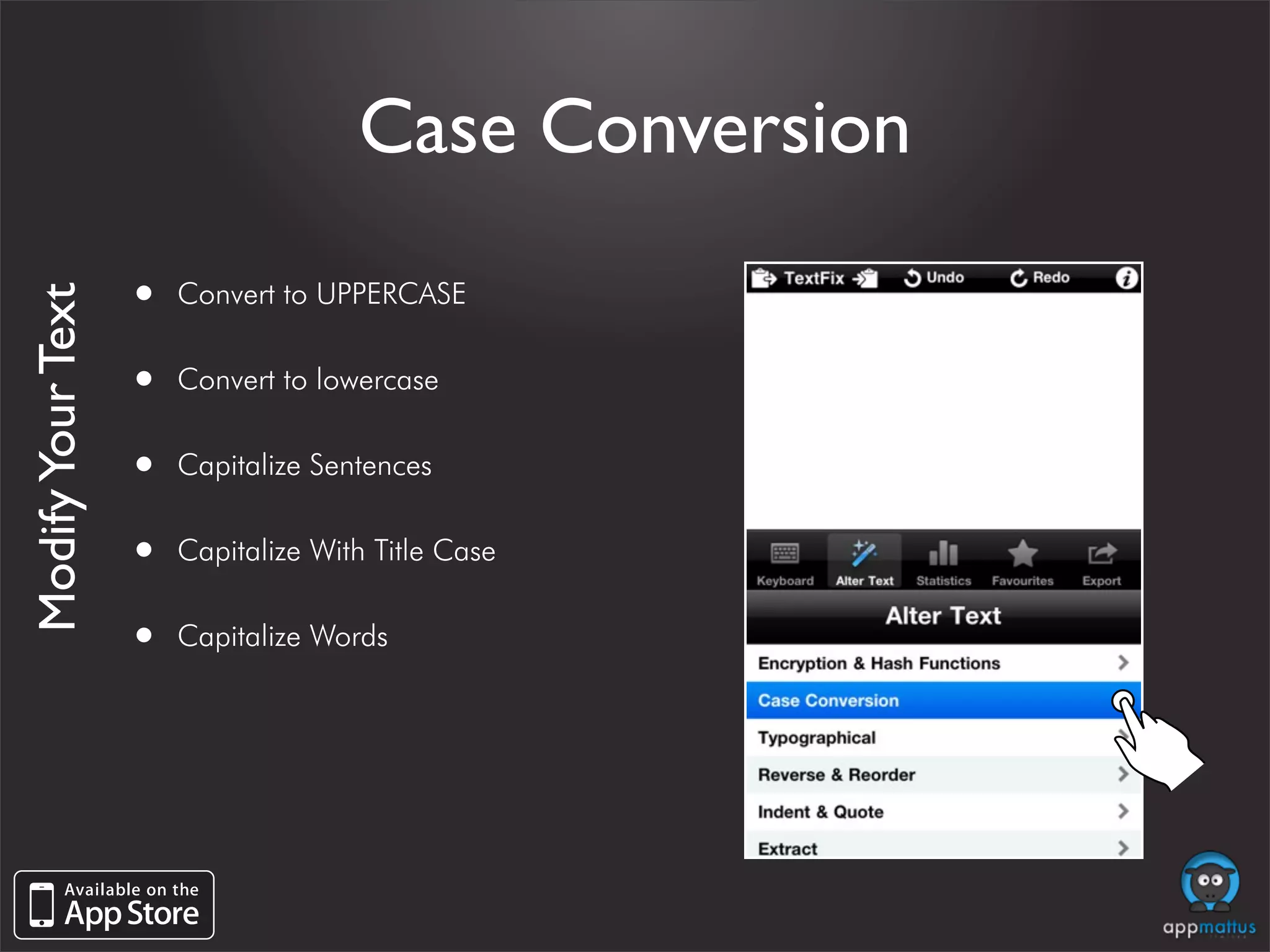
Case Conversion

                   •   Convert to UPPERCASE
Modify Your Text


                   •   Convert to lowercase


                   •   Capitalize Sentences


                   •   Capitalize With Title Case


                   •   Capitalize Words
Case Conversion

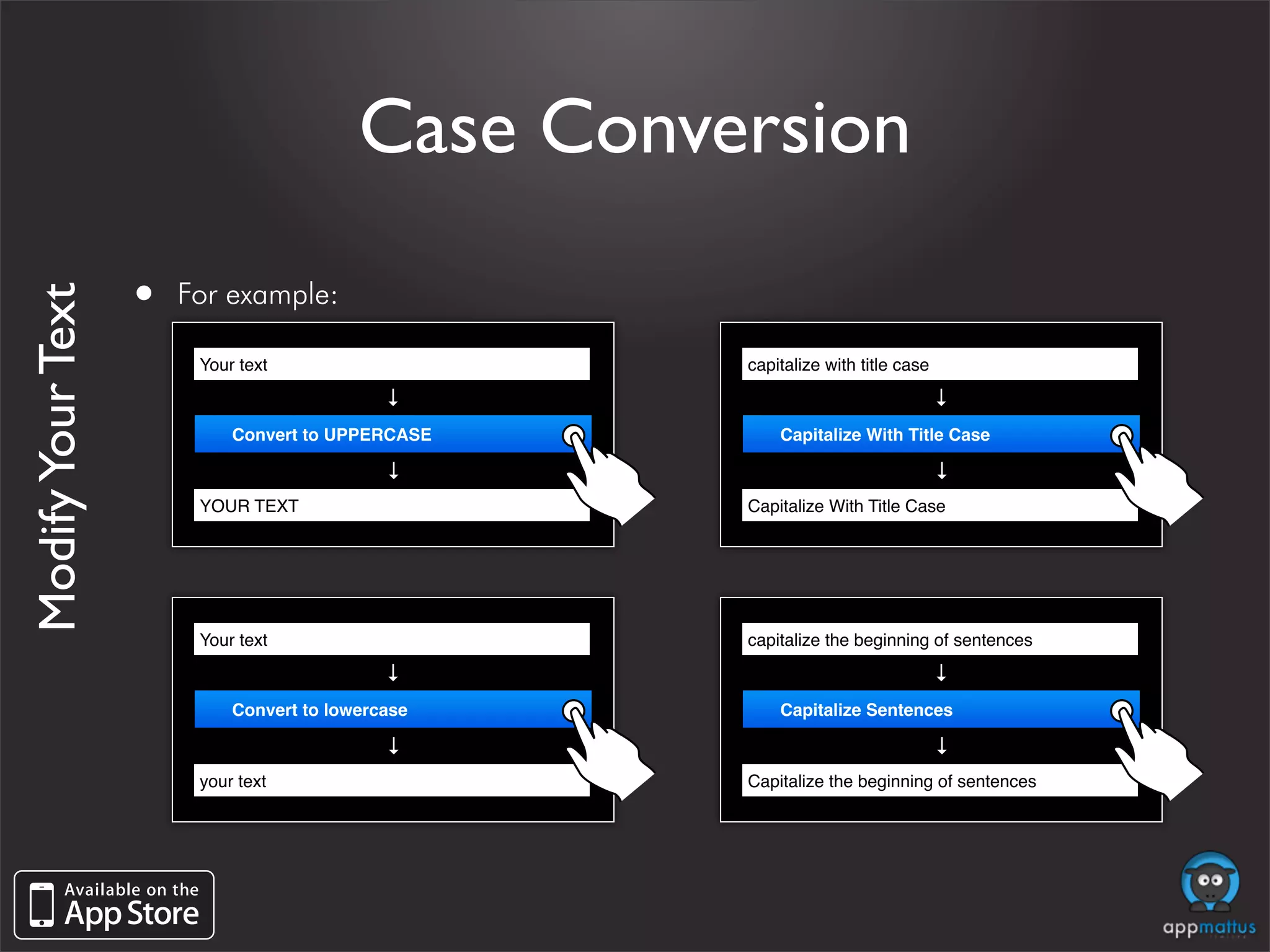
                   •   For example:
Modify Your Text


                        Your text                   capitalize with title case
                                            →


                                                                             →
                            Convert to UPPERCASE        Capitalize With Title Case
                                            →


                                                                             →
                        YOUR TEXT                   Capitalize With Title Case


                        Your text                   capitalize the beginning of sentences
                                            →


                                                                             →
                            Convert to lowercase        Capitalize Sentences
                                            →


                                                                             →
                        your text                   Capitalize the beginning of sentences
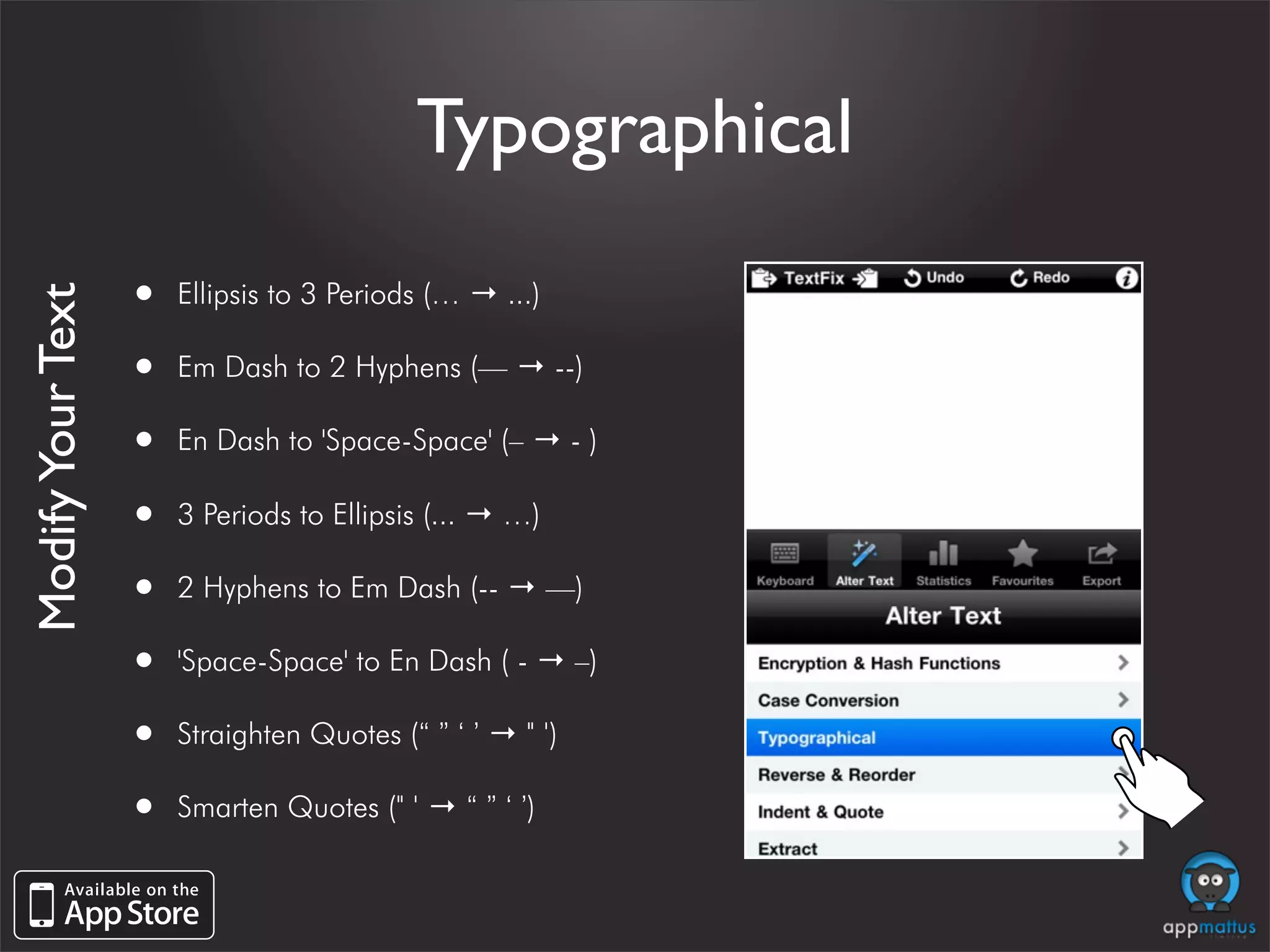
Typographical

                   •   Ellipsis to 3 Periods (… → ...)
Modify Your Text


                   •   Em Dash to 2 Hyphens (— → --)

                   •   En Dash to 'Space-Space' (– → - )

                   •   3 Periods to Ellipsis (... → …)

                   •   2 Hyphens to Em Dash (-- → —)

                   •   'Space-Space' to En Dash ( - → –)

                   •   Straighten Quotes (“ ” ‘ ’ → " ')

                   •   Smarten Quotes (" ' → “ ” ‘ ’)
Typographical

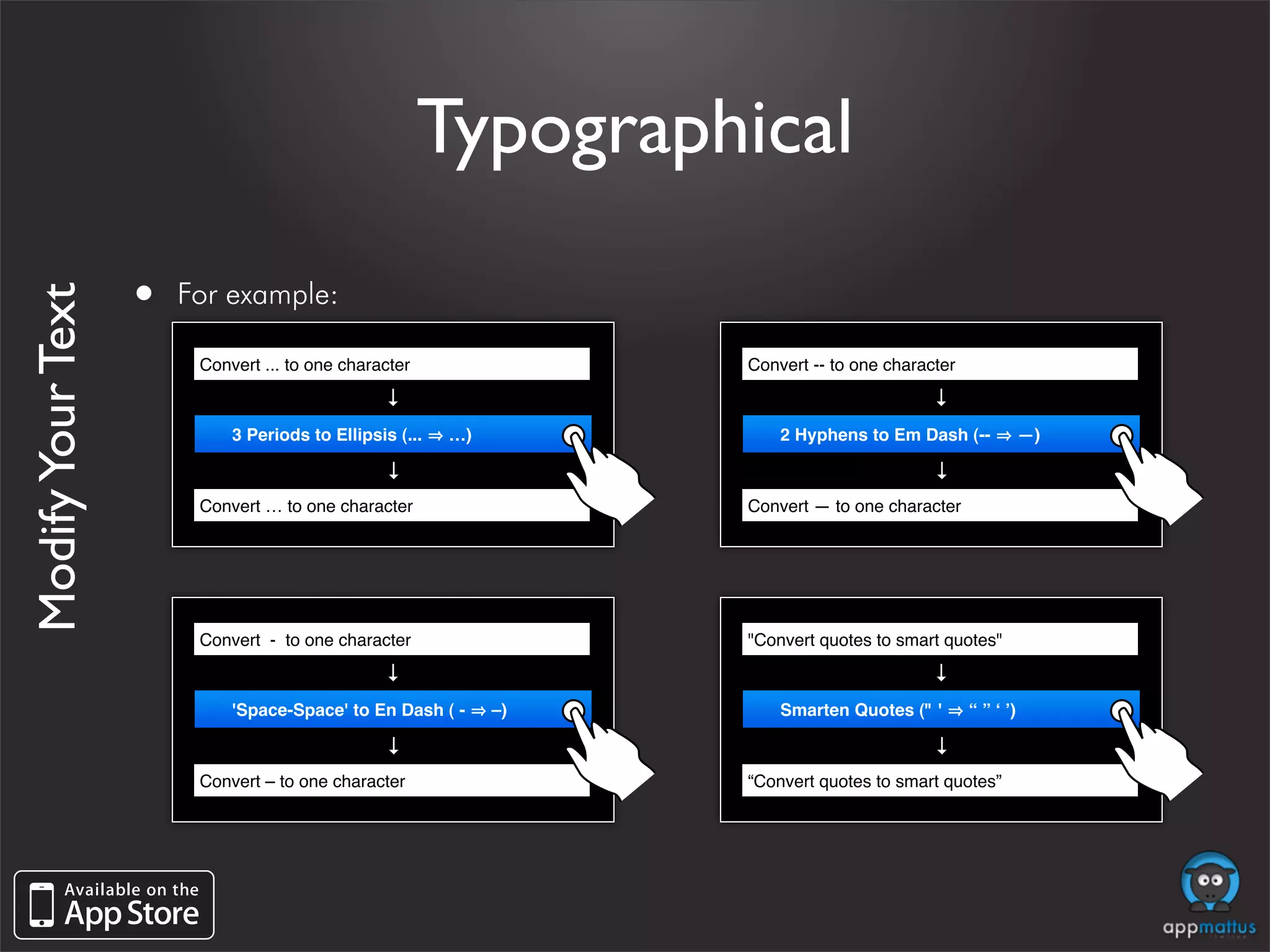
                   •   For example:
Modify Your Text


                        Convert ... to one character               Convert -- to one character
                                                →


                                                                                          →
                            3 Periods to Ellipsis (...   …)            2 Hyphens to Em Dash (--             —)
                                                →


                                                                                          →
                        Convert … to one character                 Convert — to one character


                        Convert - to one character                 "Convert quotes to smart quotes"
                                                →


                                                                                          →
                            'Space-Space' to En Dash ( -      –)       Smarten Quotes (" '       “ ” ʻ ʼ)
                                                →


                                                                                          →
                        Convert – to one character                 “Convert quotes to smart quotes”
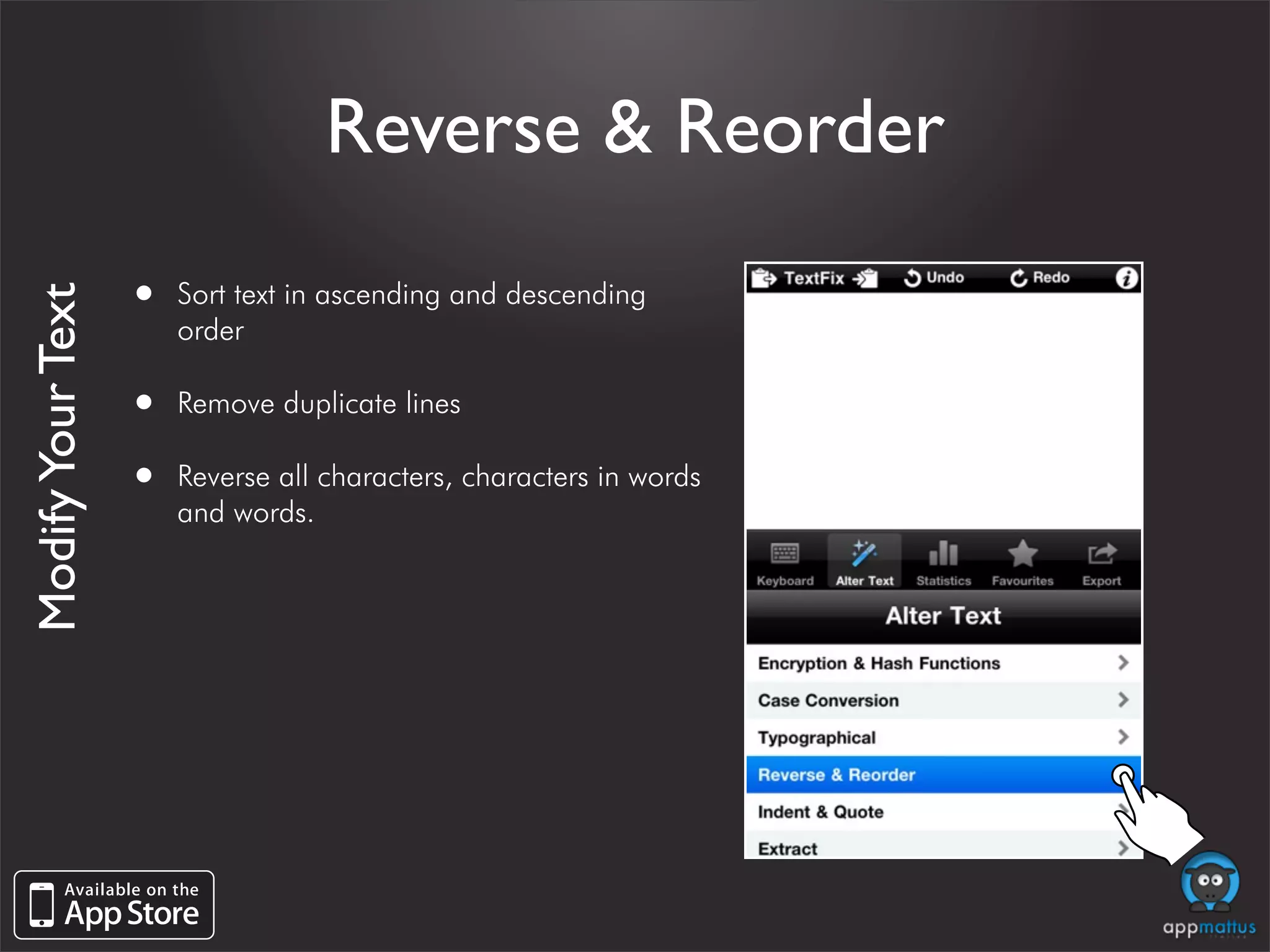
Reverse & Reorder

                   •   Sort text in ascending and descending
Modify Your Text


                       order

                   •   Remove duplicate lines

                   •   Reverse all characters, characters in words
                       and words.
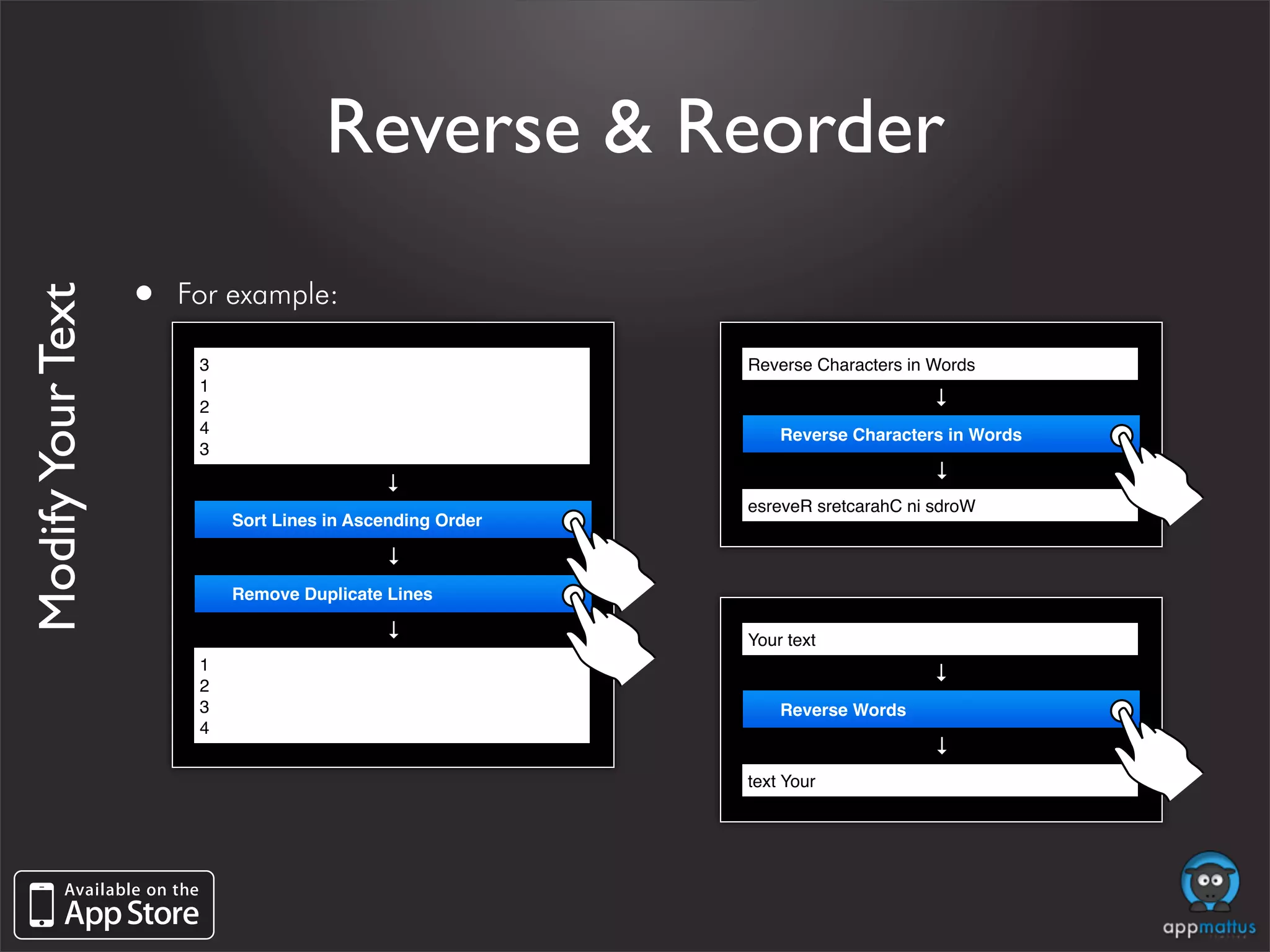
Reverse & Reorder

                   •   For example:
Modify Your Text


                        3                                   Reverse Characters in Words
                        1


                                                                                 →
                        2
                        4                                       Reverse Characters in Words
                        3


                                                                                 →
                                             →


                                                            esreveR sretcarahC ni sdroW
                            Sort Lines in Ascending Order
                                             →


                            Remove Duplicate Lines
                                             →


                                                            Your text
                        1


                                                                                 →
                        2
                        3                                       Reverse Words
                        4


                                                                                 →
                                                            text Your
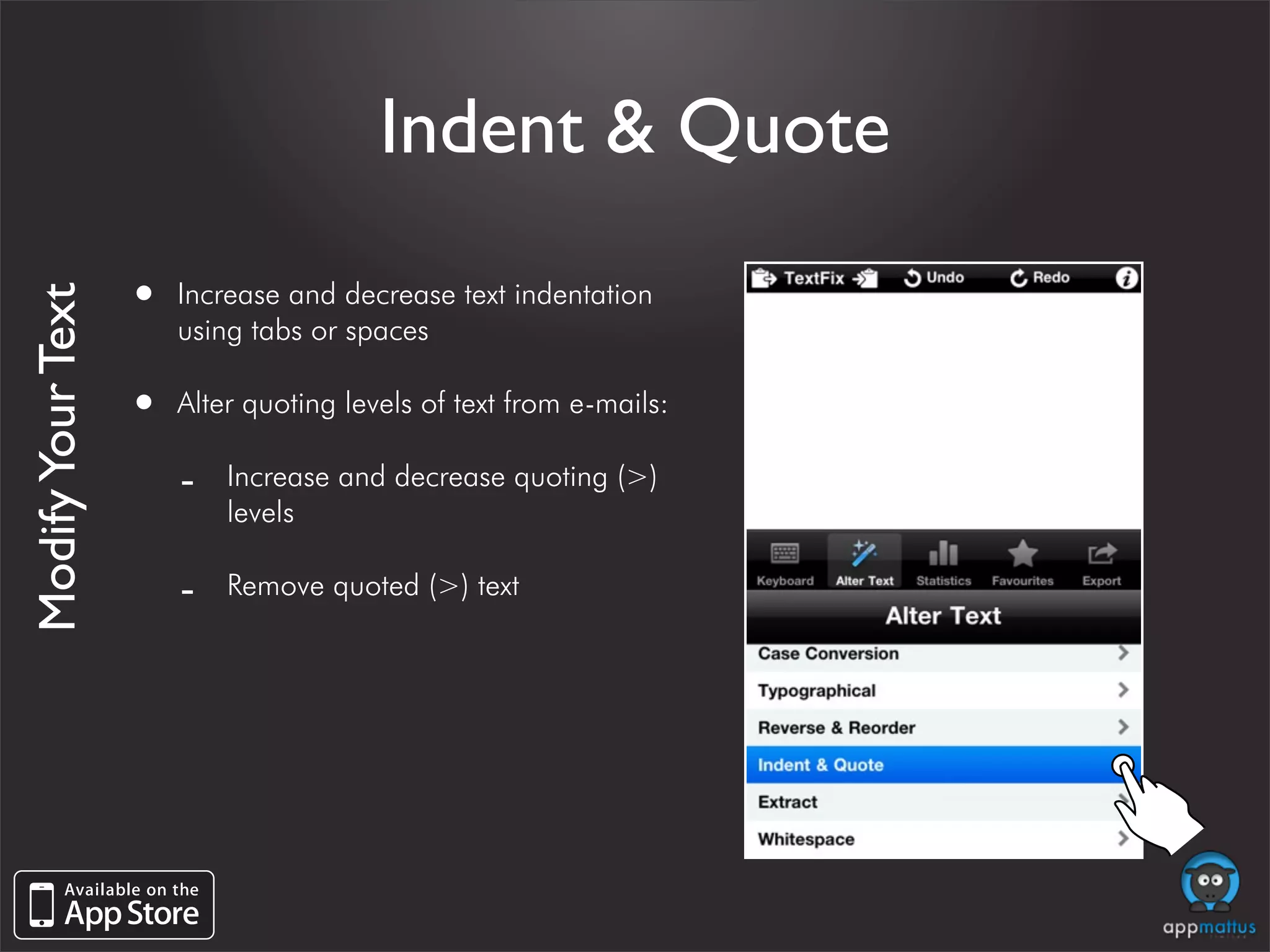
Indent & Quote

                   •   Increase and decrease text indentation
Modify Your Text


                       using tabs or spaces

                   •   Alter quoting levels of text from e-mails:

                       -   Increase and decrease quoting (>)
                           levels

                       -   Remove quoted (>) text
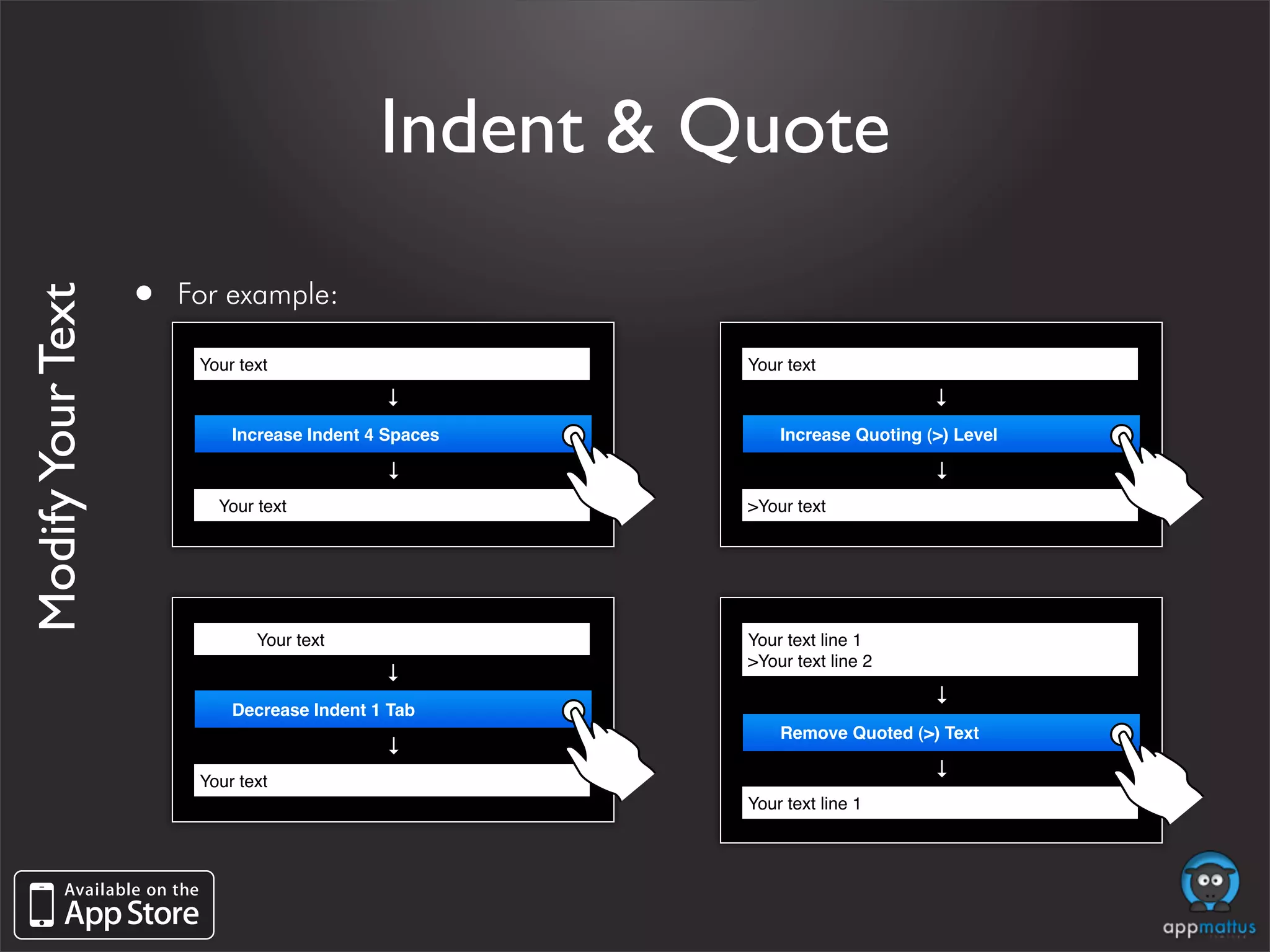
Indent & Quote

                   •   For example:
Modify Your Text


                        Your text                       Your text
                                              →


                                                                             →
                             Increase Indent 4 Spaces       Increase Quoting (>) Level
                                              →


                                                                             →
                            Your text                   >Your text


                        !        Your text              Your text line 1
                                                        >Your text line 2
                                              →


                                                                             →
                             Decrease Indent 1 Tab
                                                            Remove Quoted (>) Text
                                              →


                                                                             →
                        Your text
                                                        Your text line 1
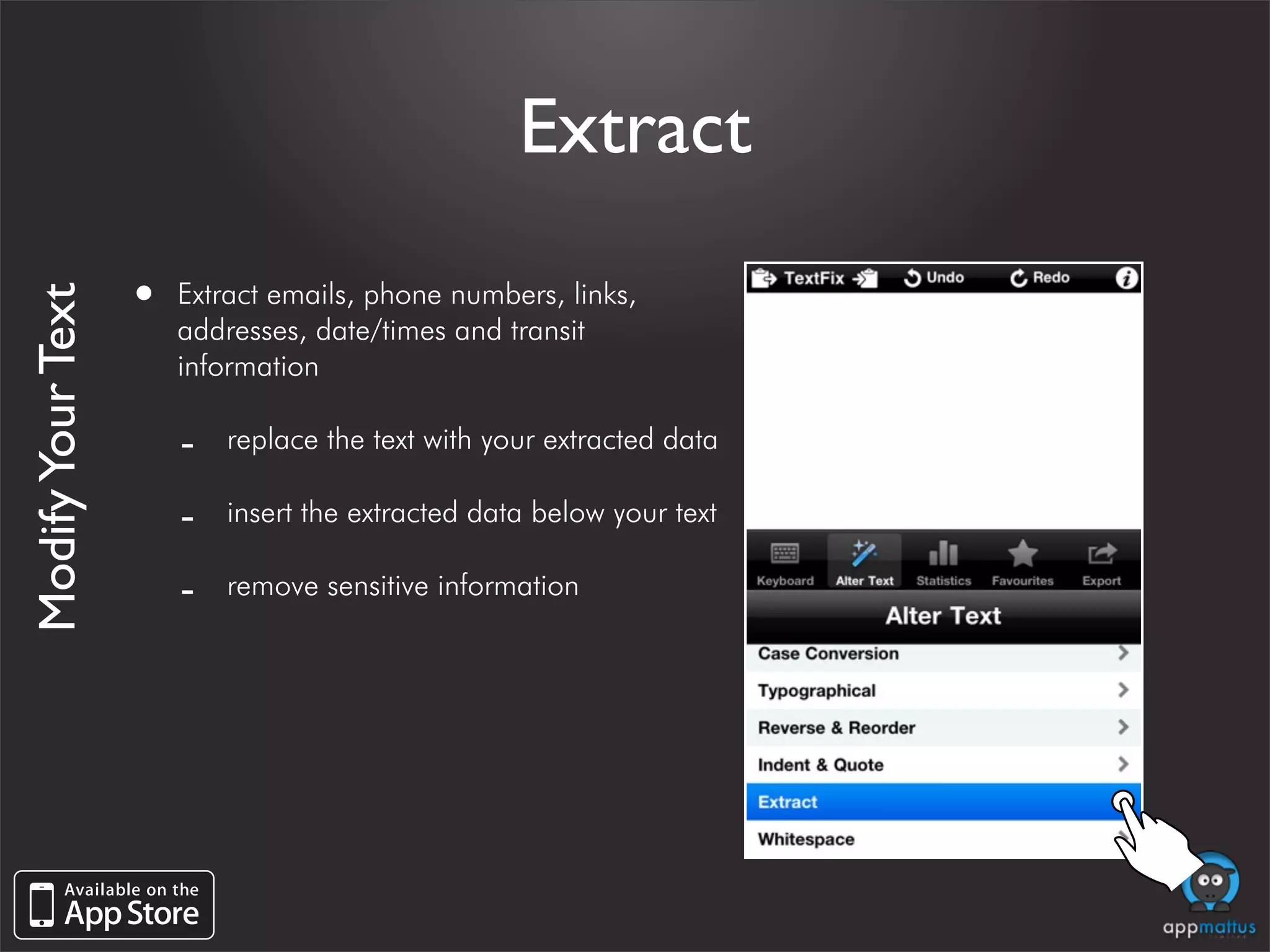
Extract

                   •   Extract emails, phone numbers, links,
Modify Your Text


                       addresses, date/times and transit
                       information

                       -   replace the text with your extracted data

                       -   insert the extracted data below your text

                       -   remove sensitive information
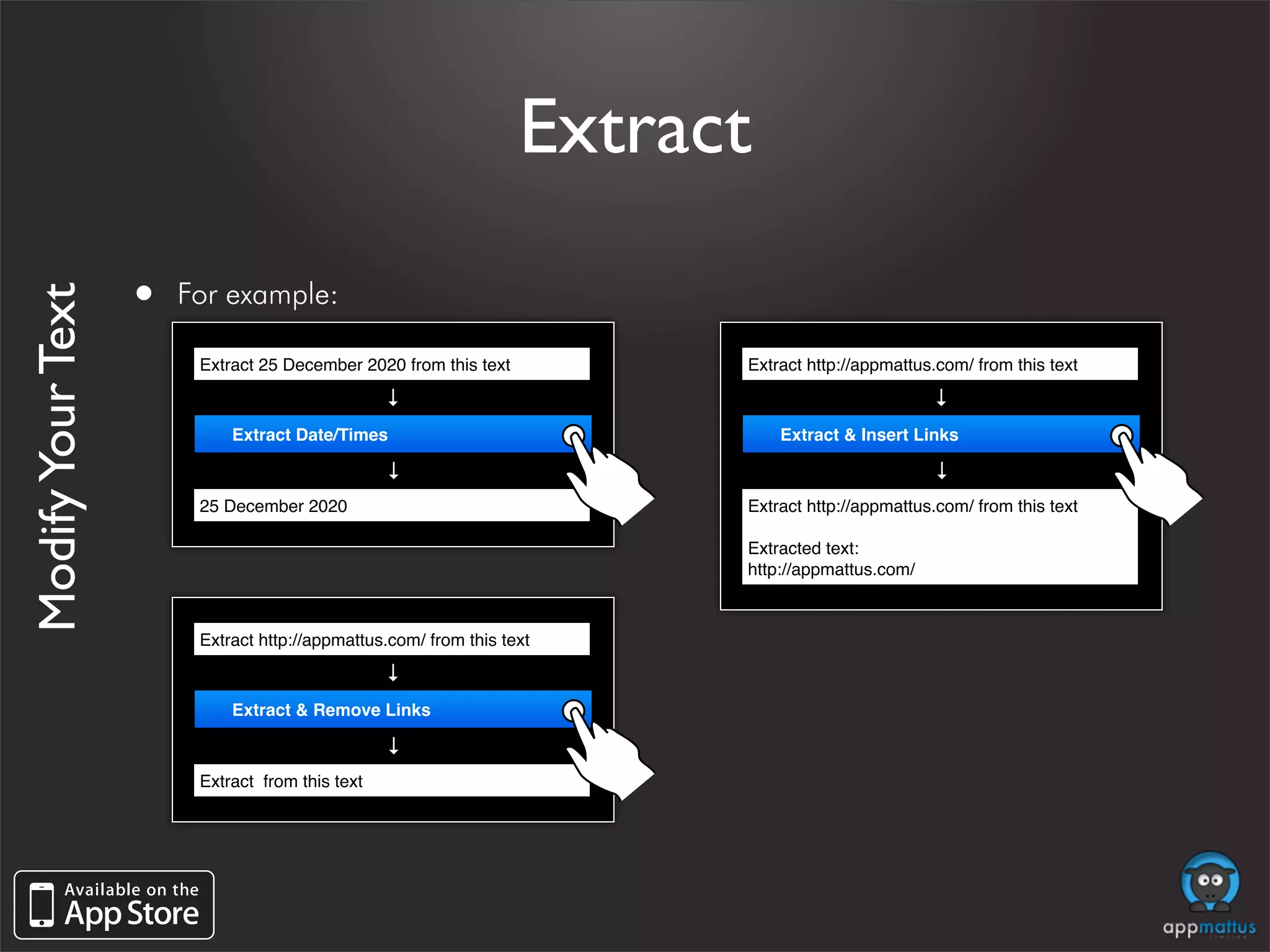
Extract

                   •   For example:
Modify Your Text


                        Extract 25 December 2020 from this text         Extract http://appmattus.com/ from this text
                                                 →


                                                                                                →
                            Extract Date/Times                              Extract & Insert Links
                                                 →


                                                                                                →
                        25 December 2020                                Extract http://appmattus.com/ from this text

                                                                        Extracted text:
                                                                        http://appmattus.com/


                        Extract http://appmattus.com/ from this text
                                                 →


                            Extract & Remove Links
                                                 →


                        Extract from this text
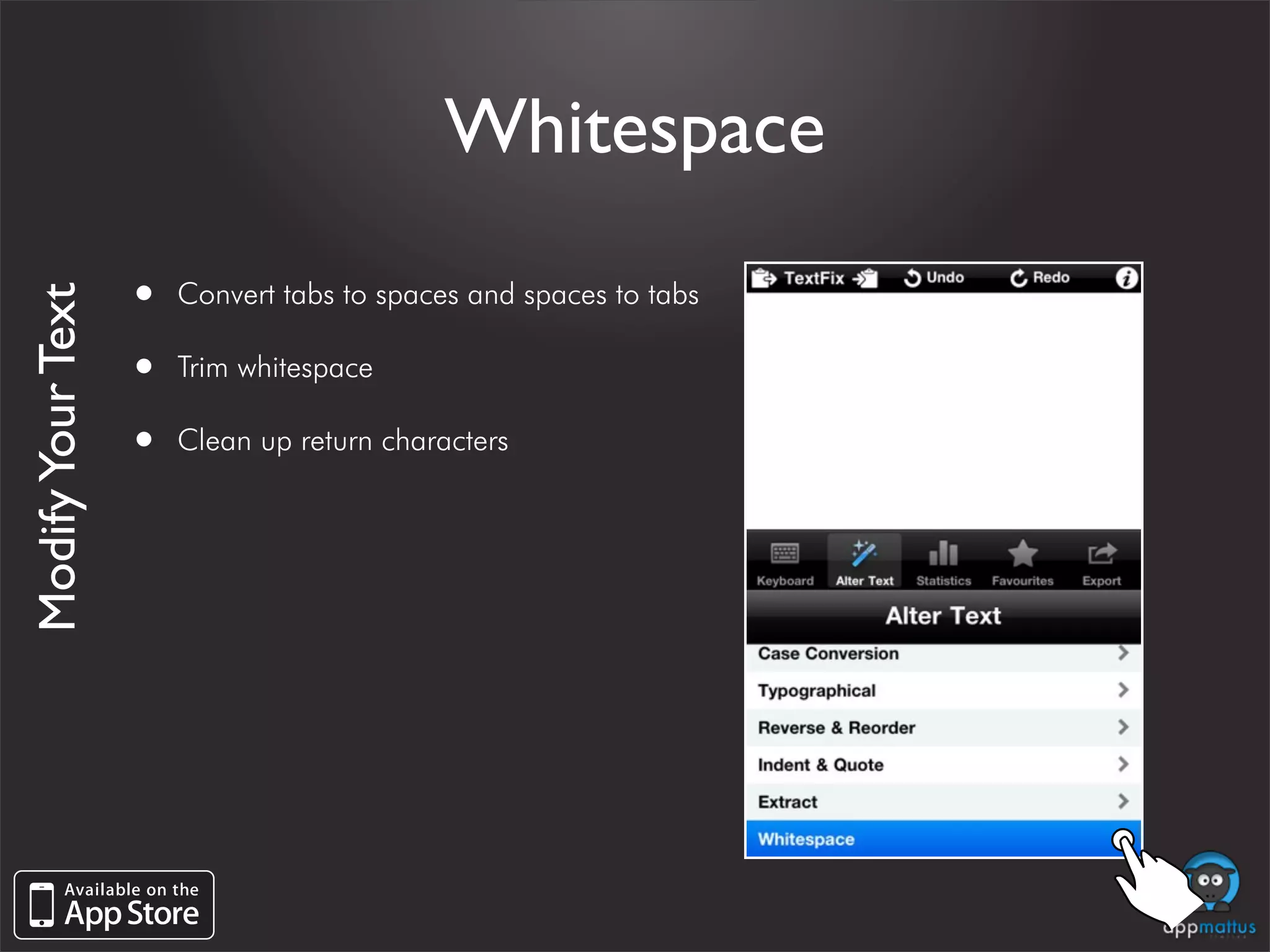
Whitespace

                   •   Convert tabs to spaces and spaces to tabs
Modify Your Text


                   •   Trim whitespace

                   •   Clean up return characters
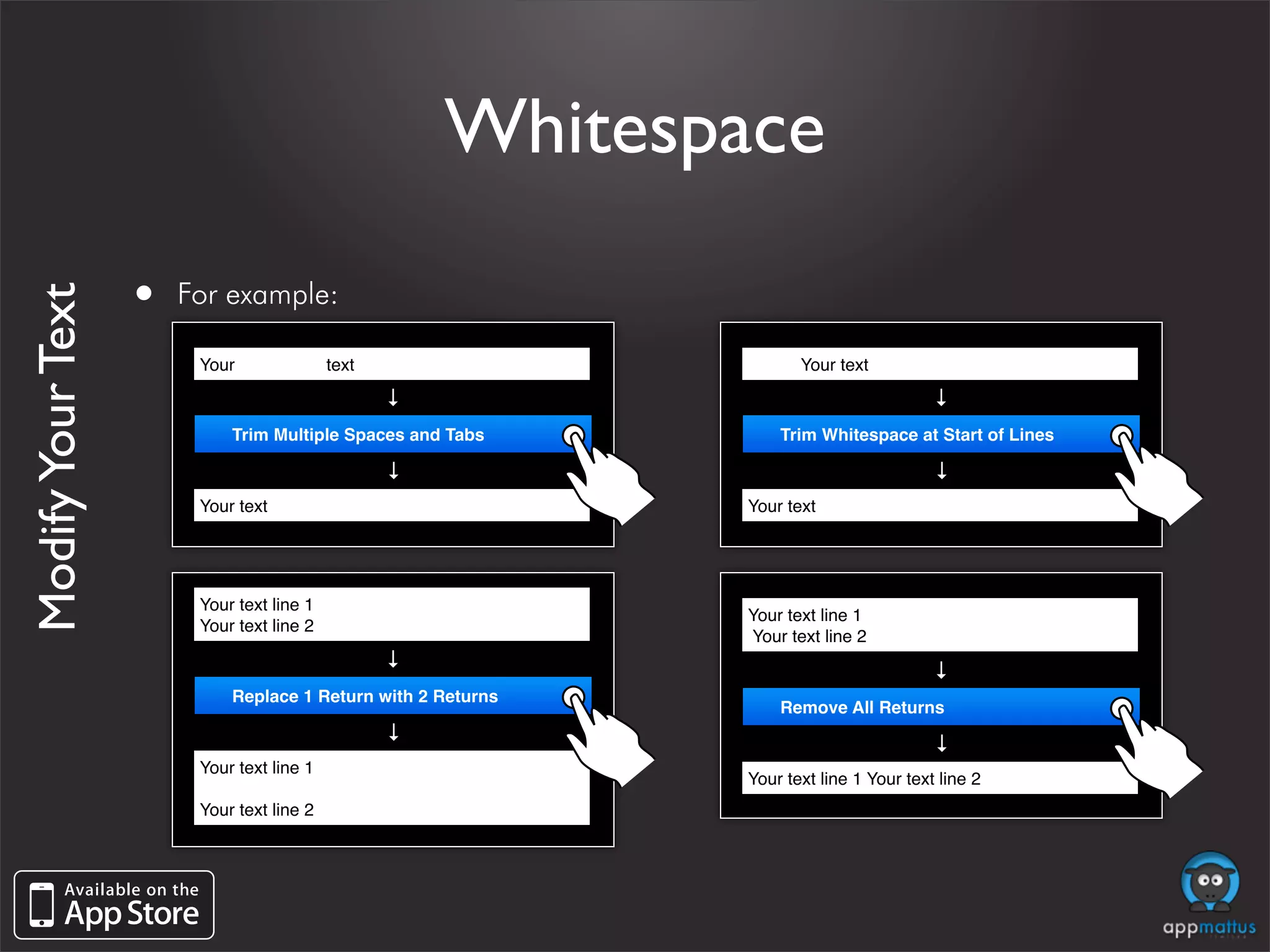
Whitespace

                   •   For example:
Modify Your Text


                        Your               text                      Your text
                                                  →


                                                                                       →
                            Trim Multiple Spaces and Tabs         Trim Whitespace at Start of Lines
                                                  →


                                                                                       →
                        Your text                             Your text


                        Your text line 1
                                                              Your text line 1
                        Your text line 2
                                                              Your text line 2
                                                  →


                                                                                       →
                            Replace 1 Return with 2 Returns
                                                                  Remove All Returns
                                                  →


                                                                                       →
                        Your text line 1
                                                              Your text line 1 Your text line 2
                        Your text line 2
Statistics about
   your text
     •   View statistics about your text
View statistics about your text

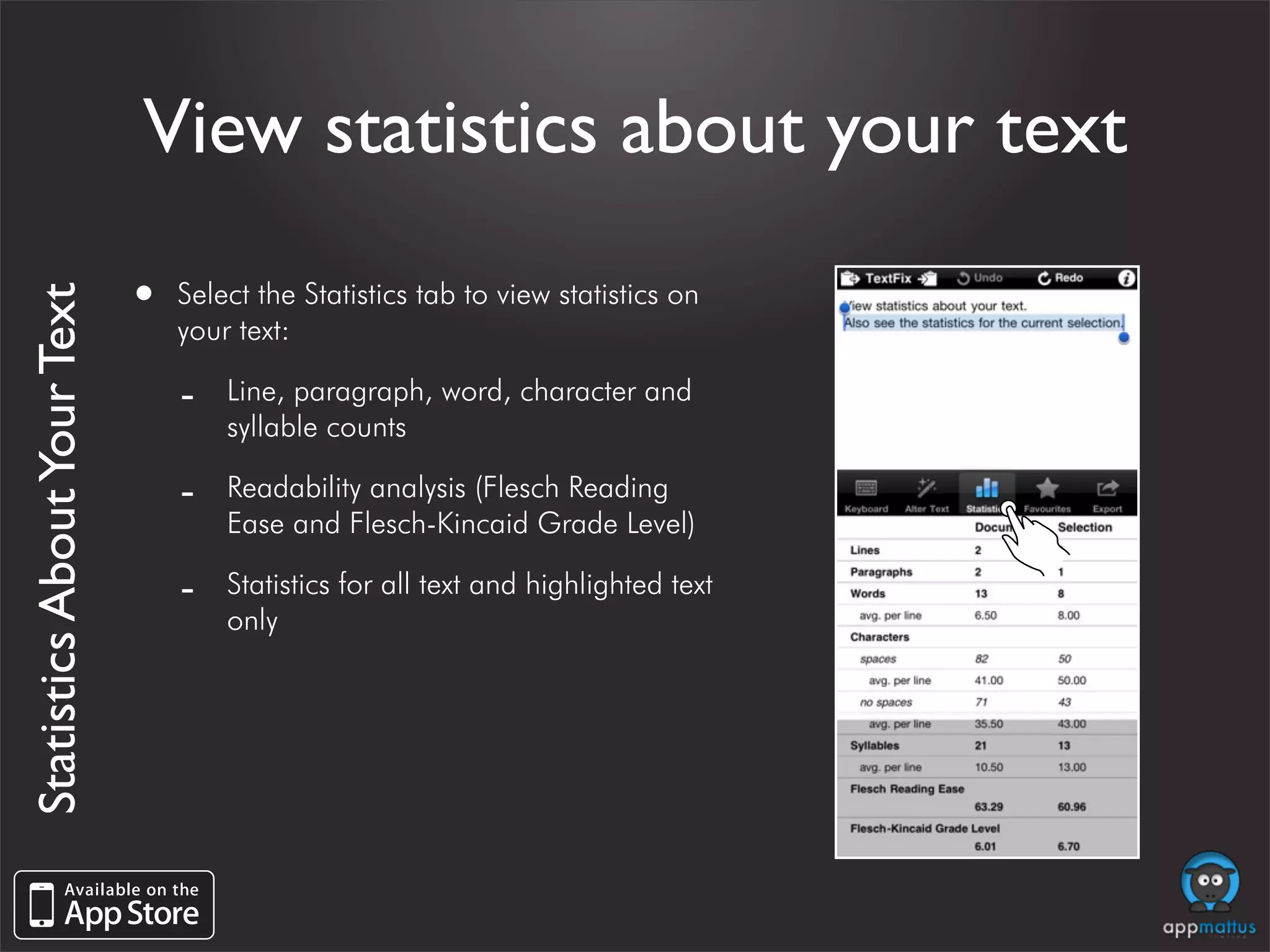
                             •   Select the Statistics tab to view statistics on
Statistics About Your Text


                                 your text:

                                 -   Line, paragraph, word, character and
                                     syllable counts

                                 -   Readability analysis (Flesch Reading
                                     Ease and Flesch-Kincaid Grade Level)

                                 -   Statistics for all text and highlighted text
                                     only
Export your text
      •   Easily export your text to the internet and
          printers
Easily export your text to
                           the internet and printers
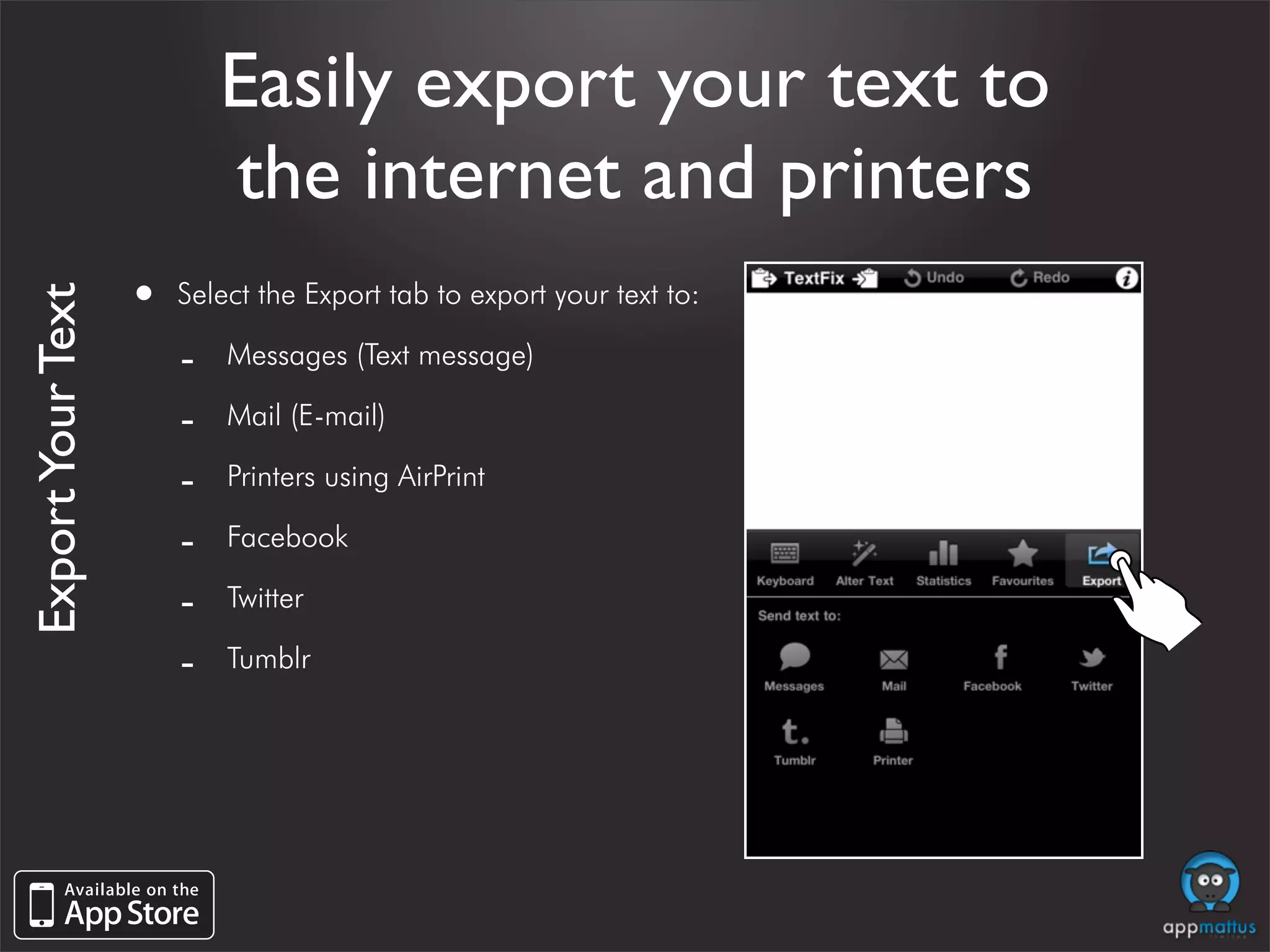
                   •   Select the Export tab to export your text to:
Export Your Text


                       -   Messages (Text message)

                       -   Mail (E-mail)

                       -   Printers using AirPrint

                       -   Facebook

                       -   Twitter

                       -   Tumblr
Copyright © 2011 Appmattus Limited. All rights reserved. Registered in England and Wales: 7469543.
           Registered Office: 126a Harpeden Road, St Albans, Hertfordshire AL3 6BZ.

TextFix: Text Editor and Processor

  • 1.
    TextFix Text Editor andProcessor Copy text into TextFix → Modify the text → Export to the internet and printers
  • 2.
    Overview • Your Workspace - Quickly and easily copy text into and out of TextFix - Finger-tip access to undo and redo - Easily change font size • Export your text - Easily export your text to the internet and printers • Extract information from your text such as email, phone numbers, links, addresses, date/times and transit information • Use more than 90 build-in cleaning and processing options
  • 3.
    Your Workspace • Quickly and easily copy text into and out of TextFix • Finger-tip access to undo and redo • Easily change font size • Save menu items as favourites
  • 4.
    Quickly and easilycopy text into and out of TextFix • Use the icons at the top of the screen to: Your Workspace - Replace the current document with the clipboard. - Copy the current document onto the clipboard.
  • 5.
    Finger-tip access to undo and redo • Use the icons at the top of the screen to Your Workspace quickly Undo and/or Redo
  • 6.
    Finger-tip access to undo and redo • Shake the device to bring up the Undo/ Your Workspace Redo dialog.
  • 7.
    Easily change fontsize • Use the pinch gesture to dynamically Your Workspace Pinch to resize the text change the current font size being used to display your text
  • 8.
    Save menu itemsas favourites • To add to your favourites press and hold on Your Workspace items in the “Alter Text” menu • Use the “Favourites” tab to view and edit your saved favourites
  • 9.
    Modify your text • Easily access the cleaning and processing options • Encryption & Hash Functions
  • 10.
    Easily access thecleaning and processing options • Select the Alter Text tab to access more than Modify Your Text 90 build-in cleaning and processing options
  • 11.
    Encryption & HashFunctions • Generate the hash code of your text using: Modify Your Text - MD2, MD4, MD5 - SHA1, SHA224, SHA256, SHA384, SHA512 • Apply ROT-13 transformation
  • 12.
    Encryption & HashFunctions • For example: Modify Your Text Your text Your text → → Replace With MD5 ROT-13 → → 54D555B5782F3E9E45091D706F9A964 Lbhe grkg → ROT-13 → Your text → Your text Insert With MD5 → Your text MD5: 54D555B5782F3E9E45091D706F9A964
  • 13.
    Case Conversion • Convert to UPPERCASE Modify Your Text • Convert to lowercase • Capitalize Sentences • Capitalize With Title Case • Capitalize Words
  • 14.
    Case Conversion • For example: Modify Your Text Your text capitalize with title case → → Convert to UPPERCASE Capitalize With Title Case → → YOUR TEXT Capitalize With Title Case Your text capitalize the beginning of sentences → → Convert to lowercase Capitalize Sentences → → your text Capitalize the beginning of sentences
  • 15.
    Typographical • Ellipsis to 3 Periods (… → ...) Modify Your Text • Em Dash to 2 Hyphens (— → --) • En Dash to 'Space-Space' (– → - ) • 3 Periods to Ellipsis (... → …) • 2 Hyphens to Em Dash (-- → —) • 'Space-Space' to En Dash ( - → –) • Straighten Quotes (“ ” ‘ ’ → " ') • Smarten Quotes (" ' → “ ” ‘ ’)
  • 16.
    Typographical • For example: Modify Your Text Convert ... to one character Convert -- to one character → → 3 Periods to Ellipsis (... …) 2 Hyphens to Em Dash (-- —) → → Convert … to one character Convert — to one character Convert - to one character "Convert quotes to smart quotes" → → 'Space-Space' to En Dash ( - –) Smarten Quotes (" ' “ ” ʻ ʼ) → → Convert – to one character “Convert quotes to smart quotes”
  • 17.
    Reverse & Reorder • Sort text in ascending and descending Modify Your Text order • Remove duplicate lines • Reverse all characters, characters in words and words.
  • 18.
    Reverse & Reorder • For example: Modify Your Text 3 Reverse Characters in Words 1 → 2 4 Reverse Characters in Words 3 → → esreveR sretcarahC ni sdroW Sort Lines in Ascending Order → Remove Duplicate Lines → Your text 1 → 2 3 Reverse Words 4 → text Your
  • 19.
    Indent & Quote • Increase and decrease text indentation Modify Your Text using tabs or spaces • Alter quoting levels of text from e-mails: - Increase and decrease quoting (>) levels - Remove quoted (>) text
  • 20.
    Indent & Quote • For example: Modify Your Text Your text Your text → → Increase Indent 4 Spaces Increase Quoting (>) Level → → Your text >Your text ! Your text Your text line 1 >Your text line 2 → → Decrease Indent 1 Tab Remove Quoted (>) Text → → Your text Your text line 1
  • 21.
    Extract • Extract emails, phone numbers, links, Modify Your Text addresses, date/times and transit information - replace the text with your extracted data - insert the extracted data below your text - remove sensitive information
  • 22.
    Extract • For example: Modify Your Text Extract 25 December 2020 from this text Extract http://appmattus.com/ from this text → → Extract Date/Times Extract & Insert Links → → 25 December 2020 Extract http://appmattus.com/ from this text Extracted text: http://appmattus.com/ Extract http://appmattus.com/ from this text → Extract & Remove Links → Extract from this text
  • 23.
    Whitespace • Convert tabs to spaces and spaces to tabs Modify Your Text • Trim whitespace • Clean up return characters
  • 24.
    Whitespace • For example: Modify Your Text Your text Your text → → Trim Multiple Spaces and Tabs Trim Whitespace at Start of Lines → → Your text Your text Your text line 1 Your text line 1 Your text line 2 Your text line 2 → → Replace 1 Return with 2 Returns Remove All Returns → → Your text line 1 Your text line 1 Your text line 2 Your text line 2
  • 25.
    Statistics about your text • View statistics about your text
  • 26.
    View statistics aboutyour text • Select the Statistics tab to view statistics on Statistics About Your Text your text: - Line, paragraph, word, character and syllable counts - Readability analysis (Flesch Reading Ease and Flesch-Kincaid Grade Level) - Statistics for all text and highlighted text only
  • 27.
    Export your text • Easily export your text to the internet and printers
  • 28.
    Easily export yourtext to the internet and printers • Select the Export tab to export your text to: Export Your Text - Messages (Text message) - Mail (E-mail) - Printers using AirPrint - Facebook - Twitter - Tumblr
  • 29.
    Copyright © 2011Appmattus Limited. All rights reserved. Registered in England and Wales: 7469543. Registered Office: 126a Harpeden Road, St Albans, Hertfordshire AL3 6BZ.