GPA and CGPA Software
By
Umar Yusuf
Tel: +2348039508010
www.UmarYusuf.com
Email: umaryusuf49@gmail.com
GPA and CGPA Guide
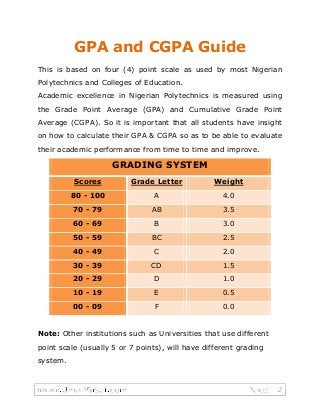
This is based on four (4) point scale as used by most Nigerian
Polytechnics and Colleges of Education.
Academic excellence in Nigerian Polytechnics is measured using
the Grade Point Average (GPA) and Cumulative Grade Point
Average (CGPA). So it is important that all students have insight
on how to calculate their GPA & CGPA so as to be able to evaluate
their academic performance from time to time and improve.
GRADING SYSTEM
Scores Grade Letter Weight
80 - 100 A 4.0
70 - 79 AB 3.5
60 - 69 B 3.0
50 - 59 BC 2.5
40 - 49 C 2.0
30 - 39 CD 1.5
20 - 29 D 1.0
10 - 19 E 0.5
00 - 09 F 0.0
Note: Other institutions such as Universities that use different
point scale (usually 5 or 7 points), will have different grading
system.
Class of Degree
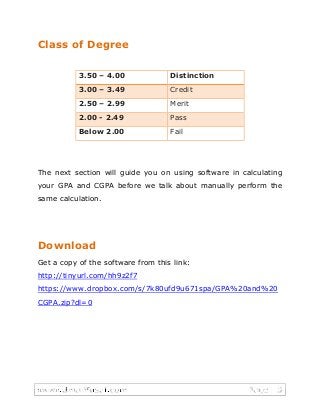
3.50 – 4.00 Distinction
3.00 – 3.49 Credit
2.50 – 2.99 Merit
2.00 - 2.49 Pass
Below 2.00 Fail
The next section will guide you on using software in calculating
your GPA and CGPA before we talk about manually perform the
same calculation.
Download
Get a copy of the software from this link:
http://tinyurl.com/hh9z2f7
https://www.dropbox.com/s/7k80ufd9u671spa/GPA%20and%20
CGPA.zip?dl=0
Login Screen
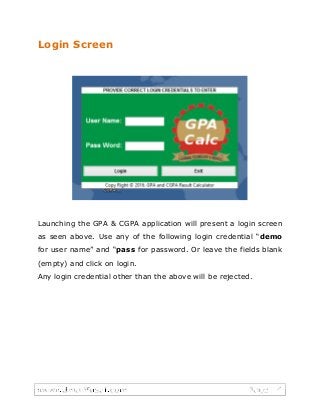
Launching the GPA & CGPA application will present a login screen
as seen above. Use any of the following login credential “demo
for user name” and “pass for password. Or leave the fields blank
(empty) and click on login.
Any login credential other than the above will be rejected.
Main Screen
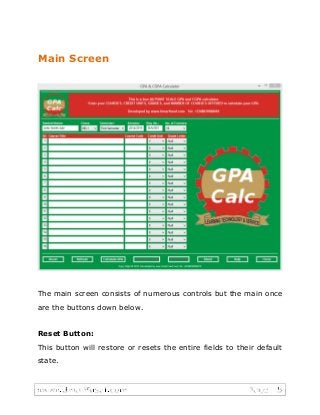
The main screen consists of numerous controls but the main once
are the buttons down below.
Reset Button:
This button will restore or resets the entire fields to their default
state.
Refresh Button:
This button will restore or resets only the “Credit Unit” and
“Grade Letter” fields to their default state respectively.
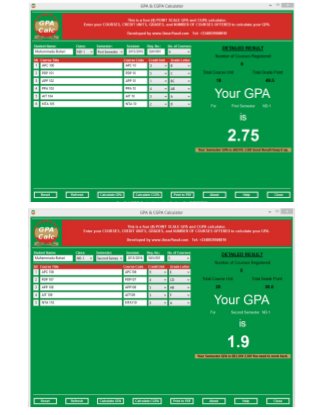
Calculate GPA Button:
After filling the required information for: Student name, Session,
Registration number, Number of Courses, Course Title, Course
Code, Credit Unit, Grade Letter then clicking on the “Calculate
GPA” button will display the resulting GPA to the right hand side
on the screen.
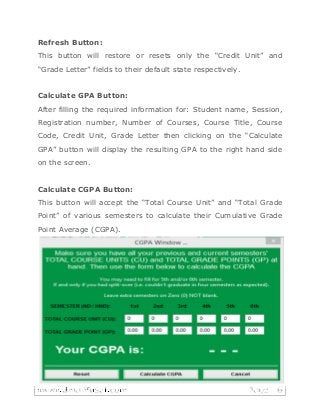
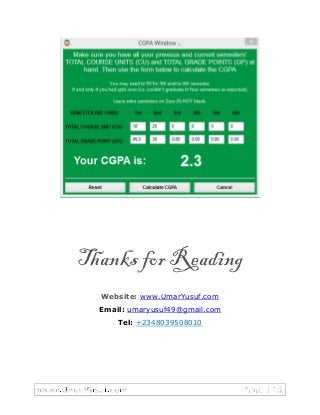
Calculate CGPA Button:
This button will accept the “Total Course Unit” and “Total Grade
Point” of various semesters to calculate their Cumulative Grade
Point Average (CGPA).
Print to PDF Button:
Just as the name implies, your calculated GPA result is printed
into a Portable Document Format (PDF) file and subsequently into
hardcopy (paper) printout. The pdf file is by default saved at this
location: “...srcprocessed_results” on your computer device.
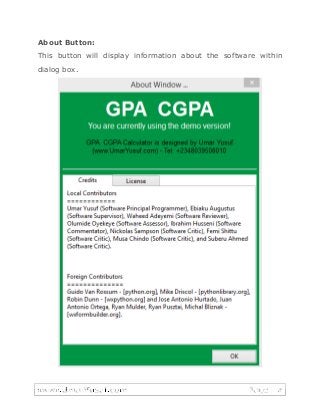
About Button:
This button will display information about the software within
dialog box.
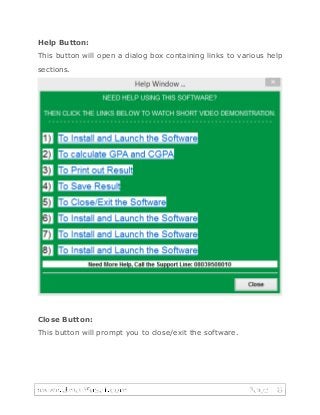
Help Button:
This button will open a dialog box containing links to various help
sections.
Close Button:
This button will prompt you to close/exit the software.
Customizing the Software
To customize the software to meet your school requirement,
there are two options to choose from;-
Option-1: Do it yourself – Contact the developer to Download
the source code from here: www.umaryusuf.com
Option-2: Do it for you – Contact the developer with your
specific requirements.
Manual GPA & CGPA Calculation
Here is how the software is doing the calculation for you. A
manual approach to calculate “GPA and CGPA” for a Nigerian
higher institution (Polytechnic and/or College of Education).
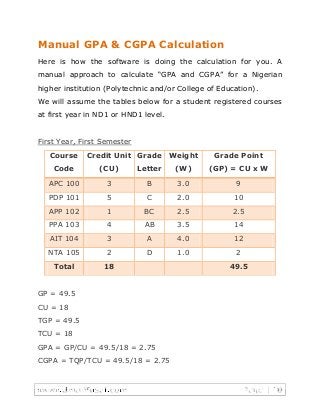
We will assume the tables below for a student registered courses
at first year in ND1 or HND1 level.
First Year, First Semester
Course
Code
Credit Unit
(CU)
Grade
Letter
Weight
(W)
Grade Point
(GP) = CU x W
APC 100 3 B 3.0 9
PDP 101 5 C 2.0 10
APP 102 1 BC 2.5 2.5
PPA 103 4 AB 3.5 14
AIT 104 3 A 4.0 12
NTA 105 2 D 1.0 2
Total 18 49.5
GP = 49.5
CU = 18
TGP = 49.5
TCU = 18
GPA = GP/CU = 49.5/18 = 2.75
CGPA = TQP/TCU = 49.5/18 = 2.75
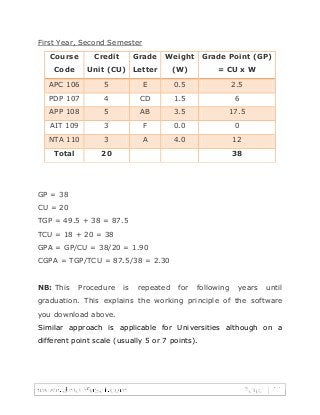
First Year, Second Semester
Course
Code
Credit
Unit (CU)
Grade
Letter
Weight
(W)
Grade Point (GP)
= CU x W
APC 106 5 E 0.5 2.5
PDP 107 4 CD 1.5 6
APP 108 5 AB 3.5 17.5
AIT 109 3 F 0.0 0
NTA 110 3 A 4.0 12
Total 20 38
GP = 38
CU = 20
TGP = 49.5 + 38 = 87.5
TCU = 18 + 20 = 38
GPA = GP/CU = 38/20 = 1.90
CGPA = TGP/TCU = 87.5/38 = 2.30
NB: This Procedure is repeated for following years until
graduation. This explains the working principle of the software
you download above.
Similar approach is applicable for Universities although on a
different point scale (usually 5 or 7 points).
Thanks for Reading
Website: www.UmarYusuf.com
Email: umaryusuf49@gmail.com
Tel: +2348039508010

GPA and CGPA Software - How to calculate GPA and CGPA

  • 1.
    GPA and CGPASoftware By Umar Yusuf Tel: +2348039508010 www.UmarYusuf.com Email: umaryusuf49@gmail.com
  • 2.
    GPA and CGPAGuide This is based on four (4) point scale as used by most Nigerian Polytechnics and Colleges of Education. Academic excellence in Nigerian Polytechnics is measured using the Grade Point Average (GPA) and Cumulative Grade Point Average (CGPA). So it is important that all students have insight on how to calculate their GPA & CGPA so as to be able to evaluate their academic performance from time to time and improve. GRADING SYSTEM Scores Grade Letter Weight 80 - 100 A 4.0 70 - 79 AB 3.5 60 - 69 B 3.0 50 - 59 BC 2.5 40 - 49 C 2.0 30 - 39 CD 1.5 20 - 29 D 1.0 10 - 19 E 0.5 00 - 09 F 0.0 Note: Other institutions such as Universities that use different point scale (usually 5 or 7 points), will have different grading system.
  • 3.
    Class of Degree 3.50– 4.00 Distinction 3.00 – 3.49 Credit 2.50 – 2.99 Merit 2.00 - 2.49 Pass Below 2.00 Fail The next section will guide you on using software in calculating your GPA and CGPA before we talk about manually perform the same calculation. Download Get a copy of the software from this link: http://tinyurl.com/hh9z2f7 https://www.dropbox.com/s/7k80ufd9u671spa/GPA%20and%20 CGPA.zip?dl=0
  • 4.
    Login Screen Launching theGPA & CGPA application will present a login screen as seen above. Use any of the following login credential “demo for user name” and “pass for password. Or leave the fields blank (empty) and click on login. Any login credential other than the above will be rejected.
  • 5.
    Main Screen The mainscreen consists of numerous controls but the main once are the buttons down below. Reset Button: This button will restore or resets the entire fields to their default state.
  • 6.
    Refresh Button: This buttonwill restore or resets only the “Credit Unit” and “Grade Letter” fields to their default state respectively. Calculate GPA Button: After filling the required information for: Student name, Session, Registration number, Number of Courses, Course Title, Course Code, Credit Unit, Grade Letter then clicking on the “Calculate GPA” button will display the resulting GPA to the right hand side on the screen. Calculate CGPA Button: This button will accept the “Total Course Unit” and “Total Grade Point” of various semesters to calculate their Cumulative Grade Point Average (CGPA). Print to PDF Button: Just as the name implies, your calculated GPA result is printed into a Portable Document Format (PDF) file and subsequently into hardcopy (paper) printout. The pdf file is by default saved at this location: “...srcprocessed_results” on your computer device.
  • 7.
    About Button: This buttonwill display information about the software within dialog box.
  • 8.
    Help Button: This buttonwill open a dialog box containing links to various help sections. Close Button: This button will prompt you to close/exit the software.
  • 9.
    Customizing the Software Tocustomize the software to meet your school requirement, there are two options to choose from;- Option-1: Do it yourself – Contact the developer to Download the source code from here: www.umaryusuf.com Option-2: Do it for you – Contact the developer with your specific requirements.
  • 10.
    Manual GPA &CGPA Calculation Here is how the software is doing the calculation for you. A manual approach to calculate “GPA and CGPA” for a Nigerian higher institution (Polytechnic and/or College of Education). We will assume the tables below for a student registered courses at first year in ND1 or HND1 level. First Year, First Semester Course Code Credit Unit (CU) Grade Letter Weight (W) Grade Point (GP) = CU x W APC 100 3 B 3.0 9 PDP 101 5 C 2.0 10 APP 102 1 BC 2.5 2.5 PPA 103 4 AB 3.5 14 AIT 104 3 A 4.0 12 NTA 105 2 D 1.0 2 Total 18 49.5 GP = 49.5 CU = 18 TGP = 49.5 TCU = 18 GPA = GP/CU = 49.5/18 = 2.75 CGPA = TQP/TCU = 49.5/18 = 2.75
  • 11.
    First Year, SecondSemester Course Code Credit Unit (CU) Grade Letter Weight (W) Grade Point (GP) = CU x W APC 106 5 E 0.5 2.5 PDP 107 4 CD 1.5 6 APP 108 5 AB 3.5 17.5 AIT 109 3 F 0.0 0 NTA 110 3 A 4.0 12 Total 20 38 GP = 38 CU = 20 TGP = 49.5 + 38 = 87.5 TCU = 18 + 20 = 38 GPA = GP/CU = 38/20 = 1.90 CGPA = TGP/TCU = 87.5/38 = 2.30 NB: This Procedure is repeated for following years until graduation. This explains the working principle of the software you download above. Similar approach is applicable for Universities although on a different point scale (usually 5 or 7 points).
  • 13.
    Thanks for Reading Website:www.UmarYusuf.com Email: umaryusuf49@gmail.com Tel: +2348039508010