mentormate.com
App Store Optimization Guide:
For The App Store & Google Play
mentormate.com
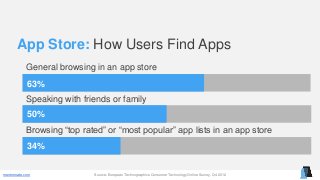
App Store: How Users Find Apps
63%
50%
General browsing in an app store
Speaking with friends or family
34%
Browsing “top rated” or “most popular” app lists in an app store
Source: European Technographics Consumer Technology Online Survey, Q4 2012
mentormate.com
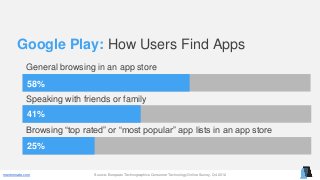
Google Play: How Users Find Apps
58%
41%
General browsing in an app store
Speaking with friends or family
25%
Browsing “top rated” or “most popular” app lists in an app store
Source: European Technographics Consumer Technology Online Survey, Q4 2012
mentormate.com
App Store:
Specific Tips
mentormate.com
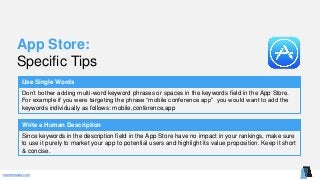
App Store:
Specific Tips
Use Single Words
Don’t bother adding multi-word keyword phrases or spaces in the keywords field in the App Store.
For example if you were targeting the phrase “mobile conference app” you would want to add the
keywords individually as follows: mobile,conference,app
Write a Human Description
Since keywords in the description field in the App Store have no impact in your rankings, make sure
to use it purely to market your app to potential users and highlight its value proposition. Keep it short
& concise.
mentormate.com
Google Play:
Specific Tips
mentormate.com
Google Play:
Specific Tips
Link To Your Google Play App Listing
Google Play app rankings are influenced by links pointing to your Google Play app listing web page.
The more authoritative links pointing to your Google Play app listing, the easier it will be for your app
to rank more highly in the Google Play search results.
Write a Hybrid Human & Robot Description
Google Play doesn’t offer a keywords field like the App Store does. This means that it’s important to
design your app description to be a hybrid accommodating both robots & humans by placing your
targeted keywords in the description in a human-friendly fashion.
mentormate.com
Google Play:
Specific Tips
Leverage Google+
Put some effort into getting as many +1’s as you can on Google+. Post about your app in relevant
Google+ Communities and get your co-workers and friends to help promote it on their Google+
profiles.
mentormate.com
App Store Optimization:
General Tips
mentormate.com
App Store Optimization:
General Tips
Plan What To Show Above The Fold
When writing your app descriptions, think about what should go above-the-fold versus below-the-
fold (where you need to click to reveal).
Consider Using Keywords in the Title
If you are willing to use your keyword(s) in the title of your app, on average this will result in a 10.3%
increase in app store search rankings.
(Source: MOBILEDEVHQ)
mentormate.com
App Store Optimization:
General Tips
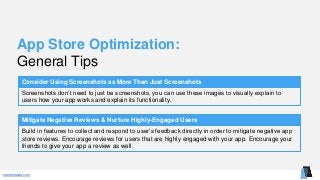
Consider Using Screenshots as More Than Just Screenshots
Screenshots don’t need to just be screenshots, you can use these images to visually explain to
users how your app works and explain its functionality.
Mitigate Negative Reviews & Nurture Highly-Engaged Users
Build in features to collect and respond to user’s feedback directly in order to mitigate negative app
store reviews. Encourage reviews for users that are highly engaged with your app. Encourage your
friends to give your app a review as well.
mentormate.com
App Store Optimization:
Keyword Research Tools
mentormate.com
Keyword Research Tools:
App Store & Google Suggested Search
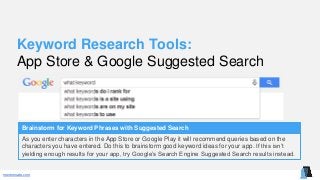
Brainstorm for Keyword Phrases with Suggested Search
As you enter characters in the App Store or Google Play it will recommend queries based on the
characters you have entered. Do this to brainstorm good keyword ideas for your app. If this isn’t
yielding enough results for your app, try Google’s Search Engine Suggested Search results instead.
mentormate.com
Keyword Research Tools:
Google Trends
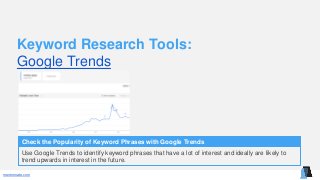
Check the Popularity of Keyword Phrases with Google Trends
Use Google Trends to identify keyword phrases that have a lot of interest and ideally are likely to
trend upwards in interest in the future.
mentormate.com
Keyword Research Tools:
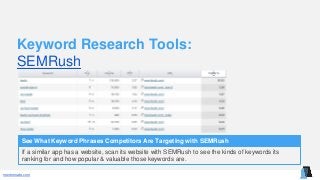
SEMRush
See What Keyword Phrases Competitors Are Targeting with SEMRush
If a similar app has a website, scan its website with SEMRush to see the kinds of keywords its
ranking for and how popular & valuable those keywords are.
mentormate.com
App Store Optimization:
Keyword Placement
mentormate.com
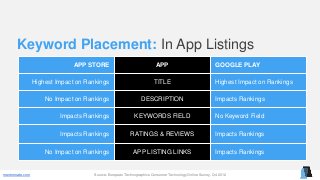
Keyword Placement: In App Listings
Source: European Technographics Consumer Technology Online Survey, Q4 2012
APP STORE APP GOOGLE PLAY
Highest Impact on Rankings TITLE Highest Impact on Rankings
No Impact on Rankings DESCRIPTION Impacts Rankings
Impacts Rankings KEYWORDS FIELD No Keyword Field
Impacts Rankings RATINGS & REVIEWS Impacts Rankings
No Impact on Rankings APP LISTING LINKS Impacts Rankings
mentormate.com
About MentorMate:
MentorMate is a Minneapolis-based mobile app development company that imagines,
designs & delivers custom software for its clients. Our rapidly growing list of satisfied
clients spans companies from start-up to Fortune 500. MentorMate is a pioneer and
has led the way in mobile app development since 2001.
Visit mentormate.com

App Store Optimization Guide

  • 1.
    mentormate.com App Store OptimizationGuide: For The App Store & Google Play
  • 2.
    mentormate.com App Store: HowUsers Find Apps 63% 50% General browsing in an app store Speaking with friends or family 34% Browsing “top rated” or “most popular” app lists in an app store Source: European Technographics Consumer Technology Online Survey, Q4 2012
  • 3.
    mentormate.com Google Play: HowUsers Find Apps 58% 41% General browsing in an app store Speaking with friends or family 25% Browsing “top rated” or “most popular” app lists in an app store Source: European Technographics Consumer Technology Online Survey, Q4 2012
  • 4.
  • 5.
    mentormate.com App Store: Specific Tips UseSingle Words Don’t bother adding multi-word keyword phrases or spaces in the keywords field in the App Store. For example if you were targeting the phrase “mobile conference app” you would want to add the keywords individually as follows: mobile,conference,app Write a Human Description Since keywords in the description field in the App Store have no impact in your rankings, make sure to use it purely to market your app to potential users and highlight its value proposition. Keep it short & concise.
  • 6.
  • 7.
    mentormate.com Google Play: Specific Tips LinkTo Your Google Play App Listing Google Play app rankings are influenced by links pointing to your Google Play app listing web page. The more authoritative links pointing to your Google Play app listing, the easier it will be for your app to rank more highly in the Google Play search results. Write a Hybrid Human & Robot Description Google Play doesn’t offer a keywords field like the App Store does. This means that it’s important to design your app description to be a hybrid accommodating both robots & humans by placing your targeted keywords in the description in a human-friendly fashion.
  • 8.
    mentormate.com Google Play: Specific Tips LeverageGoogle+ Put some effort into getting as many +1’s as you can on Google+. Post about your app in relevant Google+ Communities and get your co-workers and friends to help promote it on their Google+ profiles.
  • 9.
  • 10.
    mentormate.com App Store Optimization: GeneralTips Plan What To Show Above The Fold When writing your app descriptions, think about what should go above-the-fold versus below-the- fold (where you need to click to reveal). Consider Using Keywords in the Title If you are willing to use your keyword(s) in the title of your app, on average this will result in a 10.3% increase in app store search rankings. (Source: MOBILEDEVHQ)
  • 11.
    mentormate.com App Store Optimization: GeneralTips Consider Using Screenshots as More Than Just Screenshots Screenshots don’t need to just be screenshots, you can use these images to visually explain to users how your app works and explain its functionality. Mitigate Negative Reviews & Nurture Highly-Engaged Users Build in features to collect and respond to user’s feedback directly in order to mitigate negative app store reviews. Encourage reviews for users that are highly engaged with your app. Encourage your friends to give your app a review as well.
  • 12.
  • 13.
    mentormate.com Keyword Research Tools: AppStore & Google Suggested Search Brainstorm for Keyword Phrases with Suggested Search As you enter characters in the App Store or Google Play it will recommend queries based on the characters you have entered. Do this to brainstorm good keyword ideas for your app. If this isn’t yielding enough results for your app, try Google’s Search Engine Suggested Search results instead.
  • 14.
    mentormate.com Keyword Research Tools: GoogleTrends Check the Popularity of Keyword Phrases with Google Trends Use Google Trends to identify keyword phrases that have a lot of interest and ideally are likely to trend upwards in interest in the future.
  • 15.
    mentormate.com Keyword Research Tools: SEMRush SeeWhat Keyword Phrases Competitors Are Targeting with SEMRush If a similar app has a website, scan its website with SEMRush to see the kinds of keywords its ranking for and how popular & valuable those keywords are.
  • 16.
  • 17.
    mentormate.com Keyword Placement: InApp Listings Source: European Technographics Consumer Technology Online Survey, Q4 2012 APP STORE APP GOOGLE PLAY Highest Impact on Rankings TITLE Highest Impact on Rankings No Impact on Rankings DESCRIPTION Impacts Rankings Impacts Rankings KEYWORDS FIELD No Keyword Field Impacts Rankings RATINGS & REVIEWS Impacts Rankings No Impact on Rankings APP LISTING LINKS Impacts Rankings
  • 18.
    mentormate.com About MentorMate: MentorMate isa Minneapolis-based mobile app development company that imagines, designs & delivers custom software for its clients. Our rapidly growing list of satisfied clients spans companies from start-up to Fortune 500. MentorMate is a pioneer and has led the way in mobile app development since 2001. Visit mentormate.com